> For the complete documentation index, see [llms.txt](https://help.impact.com/llms.txt). Markdown versions of documentation pages are available by appending `.md` to page URLs; this page is available as [Markdown](https://help.impact.com/partner/it/di-cosa-vorresti-saperne-di-piu/campaigns/creator-campaigns/social-property-campaign-linking/add-links-to-your-tiktok-videos.md).
# Aggiungi link ai tuoi video TikTok
Se hai [collegato e verificato il tuo account TikTok](/partner/it/di-cosa-vorresti-saperne-di-piu/account-management/account-settings/connect-media-properties/connect-a-social-media-profile.md) su impact.com, potresti essere idoneo a partecipare al test di una nuova funzione di TikTok: aggiungere link ai prodotti di impact.com ai tuoi video organici su TikTok.
## Requisiti
* Hai un [collegate e verificate](/partner/it/di-cosa-vorresti-saperne-di-piu/account-management/account-settings/connect-media-properties/connect-a-social-media-profile.md) account TikTok personale (non aziendale) su impact.com.
* Il tuo account TikTok deve essere aggiunto e verificato su impact.com entro il 17 novembre 2024.
* Il paese indicato sotto *Indirizzo aziendale* e quello del tuo account TikTok *Località* devono essere entrambi `Stati Uniti`.
* Sei stato autorizzato a partecipare.
* Essere nella allowlist significa che impact.com ha inviato il tuo account TikTok collegato a TikTok e hanno attivato la funzione per te.
Se soddisfi i requisiti sopra indicati, [contatta l'assistenza](https://app.impact.com/support/portal.ihtml?createTicket=true) per richiedere l'accesso.
## Aggiungi link ai prodotti ai tuoi video TikTok
{% hint style="success" %}
Questa funzionalità è accessibile solo per specifiche edizioni o componenti aggiuntivi di impact.com. [Contattaci](https://app.impact.com/support/portal.ihtml?createTicket=true) per aggiornare il tuo account e ottenere l'accesso!
{% endhint %}
{% hint style="warning" %}
**Importante:** Questo test della funzione beta termina il 14 dicembre 2024. I link ai prodotti esistenti continueranno a funzionare dopo questa data, ma non potrai aggiungere nuovi link a TikTok.
{% endhint %}
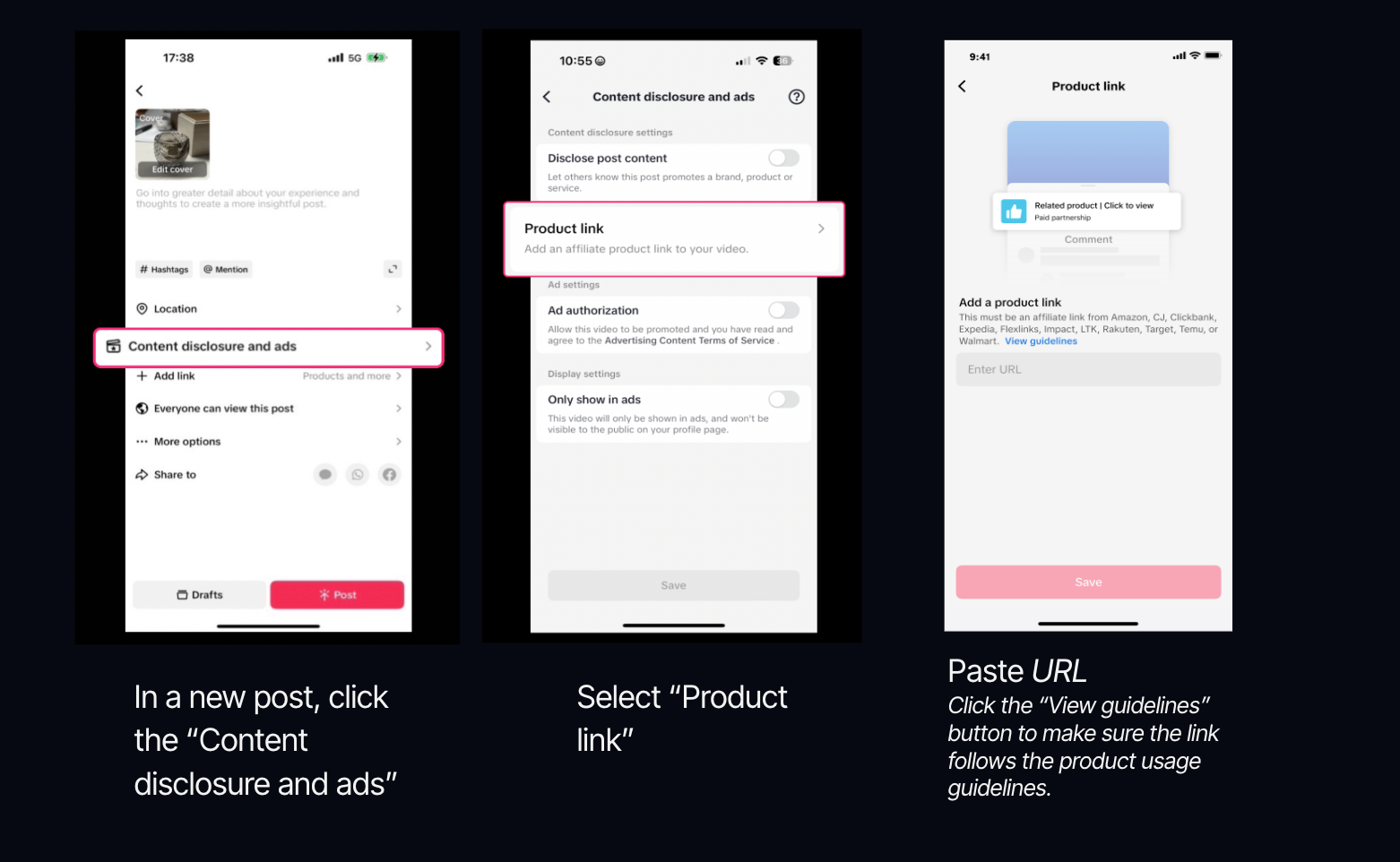
1. Apri i *pubblica un video* modulo in TikTok.
2. Seleziona **Divulgazione dei contenuti e annunci**.
3. Seleziona **Link al prodotto**.
4. **Copia e incolla** il tuo link al prodotto di impact.com nel *URL* campo.
* Scopri come [ottieni link ai prodotti](/partner/it/di-cosa-vorresti-saperne-di-piu/platform-features/tracking/tracking-links/create-and-manage-links/create-tracking-links.md#get-a-tracking-link-for-a-specific-product-0-2) su impact.com.
Criteri di idoneità dei link
* Solo **pagina di dettaglio di un singolo prodotto** sono supportati i link. Non sono consentite pagine prodotto aggregate o raccolte di link. **Ti consigliamo vivamente di selezionare il link Visualizza linee guida e di capire quali link saranno accettati.**
* I prodotti che promuovi devono [essere conformi alle normative di TikTok](https://ads.tiktok.com/help/article/tiktok-advertising-policies) .
5. Seleziona **Invia** → **Salva**.
6. **Pubblica** il tuo video.
* Puoi inviare fino a 7 link al giorno.
* I link saranno in revisione per 12 ore dopo l'invio.
* Se uno dei tuoi link viene segnalato, verrà rimosso dal tuo post, ma il post rimarrà online.
* Puoi aggiungere link solo ai video in cui *Contenuto brandizzato* sia  **\[Attivato]**.
* I prodotti verranno fissati in cima alla sezione commenti del tuo video.
---
# Agent Instructions
This documentation is published with GitBook. GitBook is the documentation platform designed so that both humans and AI agents can read, navigate, and reason over technical content effectively. Learn more at gitbook.com.
## Querying This Documentation
If you need additional information that is not directly available in this page, you can query the documentation by asking a question.
Perform an HTTP GET request on the following URL with the `ask` and `goal` query parameters:
```
GET https://help.impact.com/partner/it/di-cosa-vorresti-saperne-di-piu/campaigns/creator-campaigns/social-property-campaign-linking/add-links-to-your-tiktok-videos.md?ask=&goal=
```
`ask` is the immediate question: it should be specific, self-contained, and written in natural language.
`goal` is what the user is ultimately trying to achieve, the reason they need the answer. Sharing it helps GitBook give you a better, more relevant answer. A goal is most helpful when it describes the outcome the user wants rather than restating the question. For example, with `ask=how do I create an API token`, a goal like `automate deployments from our CI pipeline` lets GitBook tailor the answer to that use case.
The response will contain a direct answer to the question and relevant excerpts and sources from the documentation.
Use this mechanism when the answer is not explicitly present in the current page, you need clarification or additional context, or you want to retrieve related documentation sections.