> For the complete documentation index, see [llms.txt](https://help.impact.com/llms.txt). Markdown versions of documentation pages are available by appending `.md` to page URLs; this page is available as [Markdown](https://help.impact.com/partner/de/was-mochten-sie-lernen/platform-features/working-with-brands/contracts/get-a-sku-list-for-boosted-payouts.md).
# Eine SKU-Liste für Boosted-Auszahlungen erhalten
Wenn Ihre Partner-Marke eine Product-Boost-Kampagne mit [erhöhten Auszahlungen](/partner/de/was-mochten-sie-lernen/platform-features/working-with-brands/contracts/boosted-product-payouts-explained.md) für bestimmte Produkt-SKUs erstellt hat, können Sie die folgenden Schritte befolgen, um diese Artikel aufzulisten und zu ermitteln, welche Produkte Sie in Ihren Werbeaktionen priorisieren sollten.
## Schritt 1: Rufen Sie die Kampagnenbedingungen des Vertrags ab
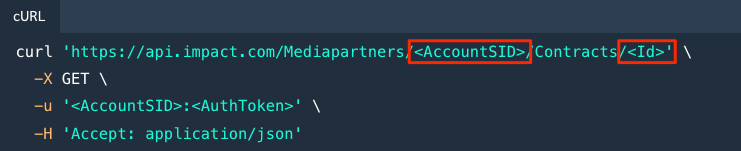
Verwenden Sie die [Contracts-API](https://integrations.impact.com/partner-api-reference/reference/contracts) um Ihren Vertrag mit der Marke abzurufen, die die Product-Boost-Kampagne erstellt hat.
* Folgen Sie der Beispielanfrage in der [Einen Vertrag abrufen](https://integrations.impact.com/partner-api-reference/reference/contracts/contracts) Referenz.
* Stellen Sie sicher, dass Sie die richtigen Anmeldedaten und den relevanten Vertrags `ID`.
## Schritt 2: Suchen Sie nach SKU-Ausnahmelisten
Suchen Sie in Ihrer API-Antwort nach SKU-Ausnahmelisten.
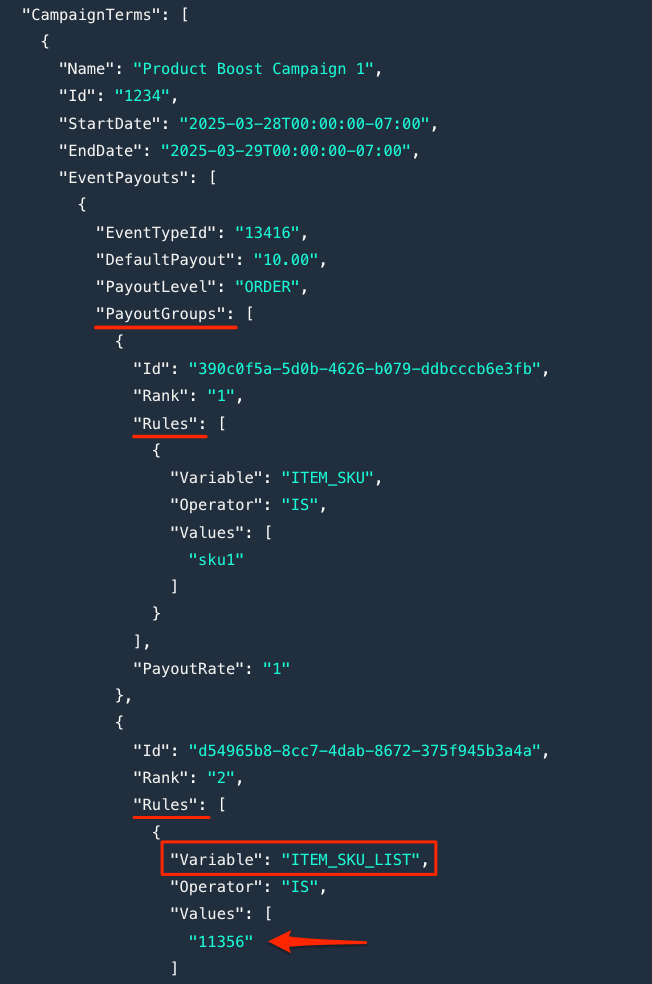
1. Navigieren Sie in Ihrer API-Antwort zum `CampaignTerms` Attribut, um dessen `PayoutGroups`.
2. Identifizieren Sie jede Auszahlungsgruppe `Regeln` mit dem `Variable` Wert `„ITEM_SKU_LIST“`.
3. Notieren Sie sich die Kennung der SKU-Liste, da Sie sie im nächsten Schritt verwenden werden.
* Z. B. wenn `ITEM_SKU_LIST` `IST` `11356` → „**11356**” ist die Kennung.
## Schritt 3: Listen Sie die Elemente in der Ausnahmeliste auf
Verwenden Sie die [API für Ausnahmelisten](https://integrations.impact.com/partner-api-reference/reference/exception-lists) um bestimmte Produkte mit erhöhten Auszahlungen aufzulisten.
1. Folgen Sie der Beispielanfrage in der [Listen Sie alle Elemente einer Ausnahmeliste auf](https://integrations.impact.com/partner-api-reference/reference/exception-lists/exception-lists) Referenz.
* Stellen Sie sicher, dass Sie die richtigen Anmeldedaten und die relevanten `ExceptionListId` (verwenden Sie die zuvor erwähnte Kennung der SKU-Liste).
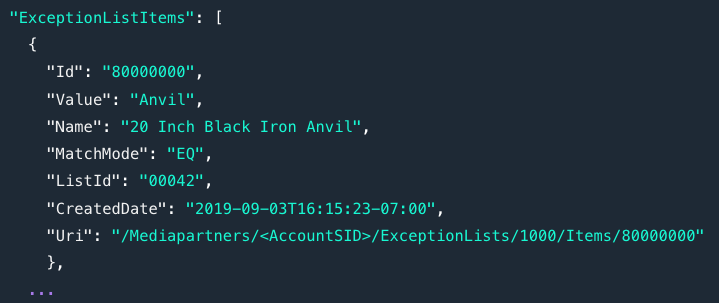
2. Ihre API-Antwort gibt für jedes Element in der SKU-Ausnahmeliste die folgenden Details zurück:
{% hint style="info" %}
**Tipp:** Erwägen Sie, Ihr technisches Team zu bitten, diesen Prozess zu automatisieren, z. B. eine Logik einzurichten, die automatisch erkennt, wenn ein Product-Boost-Kampagnenbegriff enthält `ITEM_SKU_LIST`.
{% endhint %}
---
# Agent Instructions
This documentation is published with GitBook. GitBook is the documentation platform designed so that both humans and AI agents can read, navigate, and reason over technical content effectively. Learn more at gitbook.com.
## Querying This Documentation
If you need additional information that is not directly available in this page, you can query the documentation by asking a question.
Perform an HTTP GET request on the following URL with the `ask` and `goal` query parameters:
```
GET https://help.impact.com/partner/de/was-mochten-sie-lernen/platform-features/working-with-brands/contracts/get-a-sku-list-for-boosted-payouts.md?ask=&goal=
```
`ask` is the immediate question: it should be specific, self-contained, and written in natural language.
`goal` is what the user is ultimately trying to achieve, the reason they need the answer. Sharing it helps GitBook give you a better, more relevant answer. A goal is most helpful when it describes the outcome the user wants rather than restating the question. For example, with `ask=how do I create an API token`, a goal like `automate deployments from our CI pipeline` lets GitBook tailor the answer to that use case.
The response will contain a direct answer to the question and relevant excerpts and sources from the documentation.
Use this mechanism when the answer is not explicitly present in the current page, you need clarification or additional context, or you want to retrieve related documentation sections.