> For the complete documentation index, see [llms.txt](https://help.impact.com/llms.txt). Markdown versions of documentation pages are available by appending `.md` to page URLs; this page is available as [Markdown](https://help.impact.com/partner/de/was-mochten-sie-lernen/platform-features/finance/payments-withdrawals-and-balance/payout-setup/canadian-routing-numbers-explained-for-partners.md).
# Kanadische Routing-Nummern für Partner erklärt
Als Partner, der das kanadische Bankensystem nutzt, ist es wichtig, die Routingnummern zu kennen, damit Sie [Ihr Guthaben per EFT abheben können](https://help.impact.com/partner/de/was-mochten-sie-lernen/platform-features/finance/payments-withdrawals-and-balance/payout-setup/withdraw-funds-to-your-bank-account.md#set-up-your-payment-method-0-1) über die impact.com-Plattform.
## Was ist eine Routingnummer?
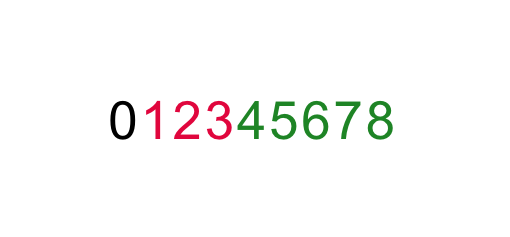
Banken in Kanada verwenden *Routingnummern* bei der Abwicklung von Transaktionen, um die Bank und die Filiale zu ermitteln, die einem Konto zugeordnet sind. Je nach Art der Transaktion kann diese Nummer in zwei verschiedenen Formaten angegeben werden. Bei EFT-Transaktionen hat Ihre Routingnummer immer das folgende Format:
* Die Nummer ist 9-stellig
* **0** ist eine standardmäßige Ziffer, die den anderen 8 Ziffern immer vorangestellt wird
* **123** steht für die *Bank* Ihres Kontos
* **45678** steht für die *Bankfiliale* Ihres Kontos
{% hint style="success" %}
**Hinweis:** Achten Sie darauf, das obige Format zu verwenden, wenn Sie das Feld *Routing Number* in Ihren impact.com- *Bankkontoeinstellungen* ausfüllen. Weitere Informationen zum Einrichten oder Ändern Ihrer Zahlungsmethode finden Sie unter [Bankkontoeinstellungen als Partner vervollständigen](https://help.impact.com/partner/de/was-mochten-sie-lernen/platform-features/finance/payments-withdrawals-and-balance/payout-setup/withdraw-funds-to-your-bank-account.md#set-up-your-payment-method-0-1) .
{% endhint %}
## Routingnummer finden
Wenn Sie die Routingnummer Ihres Kontos nicht kennen, können Sie sie mithilfe zahlreicher Online-Ressourcen ermitteln. Die folgenden Schritte zeigen, wie Sie die Routingnummer über eine solche Website finden.
1. Rufen Sie eine beliebige Website auf, die Ihnen hilft, Ihre Routingnummer zu finden. Für dieses Anwendungsbeispiel verwenden wir die [Webseite](https://wise.com/ca/bank-codes/transit-number/routing-number#routing-banks) von wise.com (impact.com ist in keiner Weise mit wise.com verbunden).
2. Wählen Sie **Routingnummer finden**.
3. Wählen Sie die Bank aus, bei der Sie Ihr Konto eröffnet haben.
4. Wählen Sie **Transitnummer (Ihrer Bank) finden**.
* Sie erhalten eine *Institutsnummer* und eine *Transitnummer* (auch bekannt als *Banknummer* und *Filialnummer*).
5. Setzen Sie die Nummern entsprechend dem oben gezeigten 9-stelligen Format zusammen. Denken Sie daran, zuerst die führende Null hinzuzufügen.
* Im gezeigten Screenshot lautet die Routingnummer: **0****010****30800**
{% hint style="success" %}
**Hinweis:** Wenn Sie die obigen Schritte nicht ausführen können, um Ihre Routingnummer zu finden, versuchen Sie es mit einer anderen Online-Ressource oder wenden Sie sich direkt an Ihre Bank.
{% endhint %}
---
# Agent Instructions
This documentation is published with GitBook. GitBook is the documentation platform designed so that both humans and AI agents can read, navigate, and reason over technical content effectively. Learn more at gitbook.com.
## Querying This Documentation
If you need additional information that is not directly available in this page, you can query the documentation by asking a question.
Perform an HTTP GET request on the following URL with the `ask` and `goal` query parameters:
```
GET https://help.impact.com/partner/de/was-mochten-sie-lernen/platform-features/finance/payments-withdrawals-and-balance/payout-setup/canadian-routing-numbers-explained-for-partners.md?ask=&goal=
```
`ask` is the immediate question: it should be specific, self-contained, and written in natural language.
`goal` is what the user is ultimately trying to achieve, the reason they need the answer. Sharing it helps GitBook give you a better, more relevant answer. A goal is most helpful when it describes the outcome the user wants rather than restating the question. For example, with `ask=how do I create an API token`, a goal like `automate deployments from our CI pipeline` lets GitBook tailor the answer to that use case.
The response will contain a direct answer to the question and relevant excerpts and sources from the documentation.
Use this mechanism when the answer is not explicitly present in the current page, you need clarification or additional context, or you want to retrieve related documentation sections.