> For the complete documentation index, see [llms.txt](https://help.impact.com/llms.txt). Markdown versions of documentation pages are available by appending `.md` to page URLs; this page is available as [Markdown](https://help.impact.com/partner/de/was-mochten-sie-lernen/impactcom-mobile-app/mobile-app-creator-campaigns/generate-campaign-tracking-links-on-the-mobile-app.md).

# Tracking-Links für Kampagnen in der Mobile App erstellen

Wenn du an einer Creator-Kampagne teilnimmst, kannst du Tracking-Links für Assets zu bestimmten Aufgaben abrufen.

1. Wählen Sie in der Navigationsleiste unten auf Ihrem Bildschirm ![](https://238227448-files.gitbook.io/~/files/v0/b/gitbook-x-prod.appspot.com/o/spaces%2Fb2rE79d9UhOKZQLgzSqx%2Fuploads%2Fgit-blob-5919cdeed52adbd4de9dfcbadcfe62d445d91025%2Faa71615bda928a0e5fa66f195170478ab70842ab08c0f4c6732acb34f16604de.svg?alt=media) **\[Aufgaben]**.
2. Auf dem *Kampagnenaufgaben* Auf dem Bildschirm, finde und wähle die Aufgabe aus, für die du einen Tracking-Link generieren möchtest.
   * Wählen Sie ![](https://238227448-files.gitbook.io/~/files/v0/b/gitbook-x-prod.appspot.com/o/spaces%2Fb2rE79d9UhOKZQLgzSqx%2Fuploads%2Fgit-blob-7cfd25b971c29a0610f2e298c20fbd9fd30ae9e6%2Fb9fc56922a355ba3112ddf49588fbe3cb2030c765ff244dd14a06eda4c9bf555.svg?alt=media) **\[Filter]** in der oberen rechten Ecke, um Aufgaben nach bestimmten Kategorien zu filtern. Siehe die *Filter-Referenz* unten für weitere Informationen an.
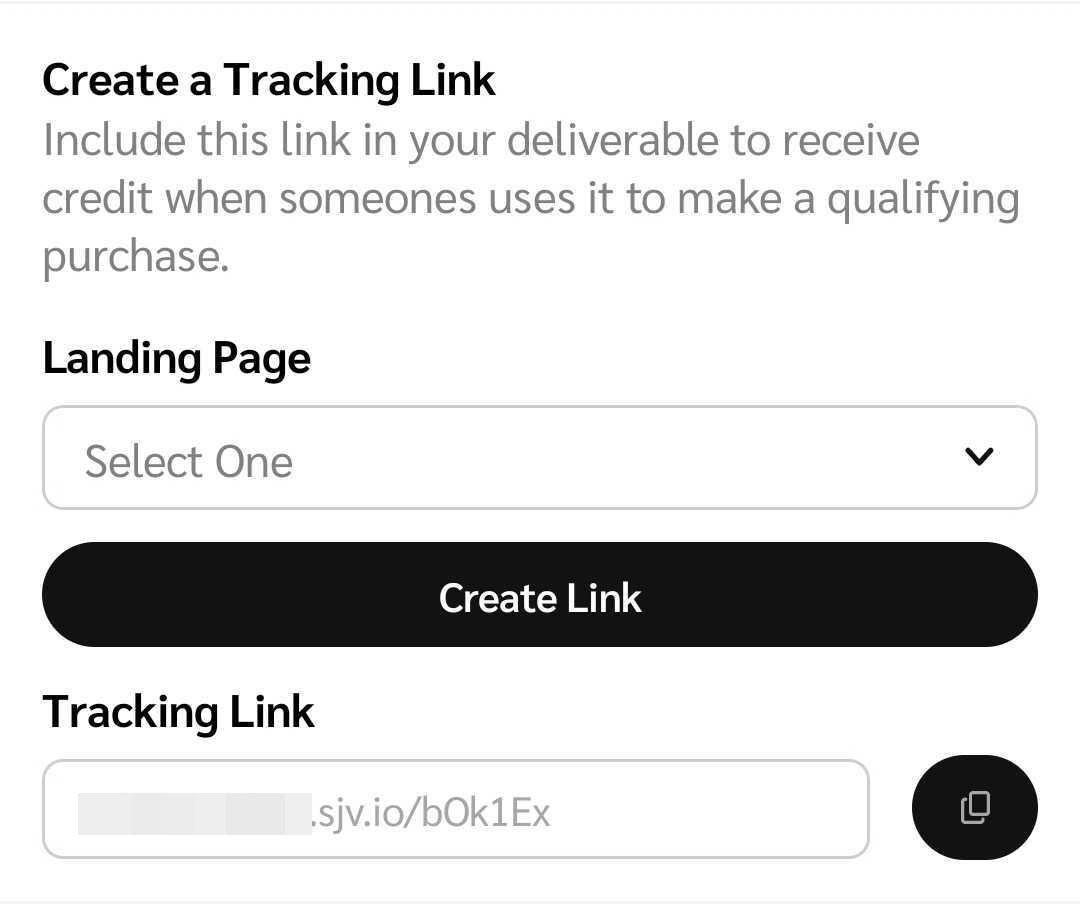
3. Je nach der Tracking-Link-Einstellung, die die Marke beim Einrichten der Kampagne gewählt hat, variiert dein Tracking-Link je nach einer von 3 Einstellungen:
   * **Du leitest Traffic auf Landingpages, die du auswählst:** Gib manuell eine Landingpage ein.
   * **Du leitest Traffic auf bestimmte Landingpages, die die Marke auswählt:** Wähle im Dropdown-Menü eine von dir gespeicherte Landingpage aus.
   * **Du leitest Traffic auf die standardmäßige Landingpage des Programms der Marke:** Deine Standard-Landingpage wird automatisch eingefügt und der Tracking-Link wird automatisch generiert.
4. Wähle basierend auf der Tracking-Link-Konfiguration **Link erstellen** und ![](https://238227448-files.gitbook.io/~/files/v0/b/gitbook-x-prod.appspot.com/o/spaces%2Fb2rE79d9UhOKZQLgzSqx%2Fuploads%2Fgit-blob-0fc6ec6fbddab318cb49020a8543ff19d958a44a%2Fef97680e348683b1af7ae2204cba73a1d66fd308d84258ad6b692e0e80c8c7e4.svg?alt=media) **\[Kopieren]** den Link aus und teile ihn mit deinem Publikum.

   <div data-with-frame="true"><figure><img src="https://238227448-files.gitbook.io/~/files/v0/b/gitbook-x-prod.appspot.com/o/spaces%2Fb2rE79d9UhOKZQLgzSqx%2Fuploads%2Fgit-blob-9d19bce48f29eff7c739f5176e588d23654f9768%2F51e4976f199cfcd3320762e54b128fd689f562cdaf6a63de13ee29b56821ad56.jpg?alt=media" alt="" width="375"><figcaption></figcaption></figure></div>

<details>

<summary>Filter-Referenz</summary>

| Filter         | Beschreibung                                                                                                                                                                                                                                                                                                                                                                                                                                                                |
| -------------- | --------------------------------------------------------------------------------------------------------------------------------------------------------------------------------------------------------------------------------------------------------------------------------------------------------------------------------------------------------------------------------------------------------------------------------------------------------------------------- |
| Sortieren nach | Aufgaben sortieren in *Aufsteigender* oder *Absteigender* Reihenfolge des Datums, an dem sie gestartet wurden.                                                                                                                                                                                                                                                                                                                                                              |
| Status         | <p>Filtern Sie nach Aufgaben in 1 der folgenden Fortschrittsstatus:</p><p>• <em>Abgeschlossen</em> — Vom Brand genehmigte Deliverables.</p><p>• <em>In Bearbeitung</em> — Entwürfe oder Deliverables, die auf die Überprüfung durch die Marke warten.</p><p>• <em>Wartet auf Einreichung des Deliverables</em> — Aufgaben, bei denen Ihre Einreichung eines Deliverables aussteht.</p><p>• <em>Nicht begonnen</em> — Aufgaben, mit denen Sie noch nicht begonnen haben.</p> |
| Marken         | Filtern Sie nach Aufgaben, die mit bestimmten Marken verknüpft sind, indem Sie nach Marken suchen und die relevanten ![](https://238227448-files.gitbook.io/~/files/v0/b/gitbook-x-prod.appspot.com/o/spaces%2Fb2rE79d9UhOKZQLgzSqx%2Fuploads%2FeDgsKbnQZ5dH2jD0aNKz%2Fsquare-regular.svg?alt=media\&token=8efeae58-5a9b-4e79-8fe4-1226db977aba) **\[Kontrollkästchen]**.                                                                                                   |
| Kampagnen      | Filtern Sie nach Aufgaben, die mit bestimmten Creator-Kampagnen verknüpft sind, indem Sie nach Kampagnen suchen und die relevanten ![](https://238227448-files.gitbook.io/~/files/v0/b/gitbook-x-prod.appspot.com/o/spaces%2Fb2rE79d9UhOKZQLgzSqx%2Fuploads%2FeDgsKbnQZ5dH2jD0aNKz%2Fsquare-regular.svg?alt=media\&token=8efeae58-5a9b-4e79-8fe4-1226db977aba) **\[Kontrollkästchen]**.                                                                                     |
| Aufgabentyp    | Filtern Sie nach bestimmten Arten von Aufgabenbeiträgen, indem Sie das relevante ![](https://238227448-files.gitbook.io/~/files/v0/b/gitbook-x-prod.appspot.com/o/spaces%2Fb2rE79d9UhOKZQLgzSqx%2Fuploads%2FeDgsKbnQZ5dH2jD0aNKz%2Fsquare-regular.svg?alt=media\&token=8efeae58-5a9b-4e79-8fe4-1226db977aba) **\[Kontrollkästchen]**.                                                                                                                                       |

</details>


---

# Agent Instructions
This documentation is published with GitBook. GitBook is the documentation platform designed so that both humans and AI agents can read, navigate, and reason over technical content effectively. Learn more at gitbook.com.

## Querying This Documentation
If you need additional information that is not directly available in this page, you can query the documentation by asking a question.

Perform an HTTP GET request on the following URL with the `ask` and `goal` query parameters:

```
GET https://help.impact.com/partner/de/was-mochten-sie-lernen/impactcom-mobile-app/mobile-app-creator-campaigns/generate-campaign-tracking-links-on-the-mobile-app.md?ask=<question>&goal=<user_goal>
```

`ask` is the immediate question: it should be specific, self-contained, and written in natural language.
`goal` is what the user is ultimately trying to achieve, the reason they need the answer. Sharing it helps GitBook give you a better, more relevant answer. A goal is most helpful when it describes the outcome the user wants rather than restating the question. For example, with `ask=how do I create an API token`, a goal like `automate deployments from our CI pipeline` lets GitBook tailor the answer to that use case.

The response will contain a direct answer to the question and relevant excerpts and sources from the documentation.

Use this mechanism when the answer is not explicitly present in the current page, you need clarification or additional context, or you want to retrieve related documentation sections.
