> For the complete documentation index, see [llms.txt](https://help.impact.com/llms.txt). Markdown versions of documentation pages are available by appending `.md` to page URLs; this page is available as [Markdown](https://help.impact.com/partner/de/was-mochten-sie-lernen/campaigns/creator-campaigns/social-property-campaign-linking/add-links-to-your-tiktok-videos.md).
# Links zu deinen TikTok-Videos hinzufügen
Wenn Sie [Ihr TikTok-Konto verbunden und verifiziert haben](/partner/de/was-mochten-sie-lernen/account-management/account-settings/connect-media-properties/connect-a-social-media-profile.md) auf impact.com sind, sind Sie möglicherweise berechtigt, an Tests für eine neue TikTok-Funktion teilzunehmen: dem Hinzufügen von impact.com-Produktlinks zu Ihren organischen TikTok-Videos.
## Anforderungen
* Sie haben ein [verbunden und verifiziert](/partner/de/was-mochten-sie-lernen/account-management/account-settings/connect-media-properties/connect-a-social-media-profile.md) persönliches TikTok-Konto (kein Geschäftskonto) auf impact.com.
* Ihr TikTok-Konto muss bis zum 17. November 2024 auf impact.com hinzugefügt und verifiziert sein.
* Das unter Ihrem impact.com-Creator-Konto angegebene Land *Firmenadresse* und das Ihres TikTok-Kontos *Standort* müssen beide `US`.
* Sie wurden für die Teilnahme freigeschaltet.
* Auf der Zulassungsliste zu stehen bedeutet, dass impact.com Ihr verbundenes TikTok-Konto an TikTok gesendet hat und TikTok die Funktion für Sie aktiviert hat.
Wenn Sie die oben genannten Anforderungen erfüllen, [den Support kontaktieren](https://app.impact.com/support/portal.ihtml?createTicket=true) um Zugriff anzufordern.
## Produktlinks zu Ihren TikTok-Videos hinzufügen
{% hint style="success" %}
Diese Funktion ist nur für bestimmte impact.com-Editionen oder Add-ons verfügbar. [Kontaktieren Sie uns](https://app.impact.com/support/portal.ihtml?createTicket=true) um Ihr Konto zu upgraden und Zugriff zu erhalten!
{% endhint %}
{% hint style="warning" %}
**Wichtig:** Dieser Beta-Test der Funktion endet am 14. Dezember 2024. Vorhandene Produktlinks funktionieren nach diesem Datum weiterhin, aber Sie können keine neuen Links zu TikTok hinzufügen.
{% endhint %}
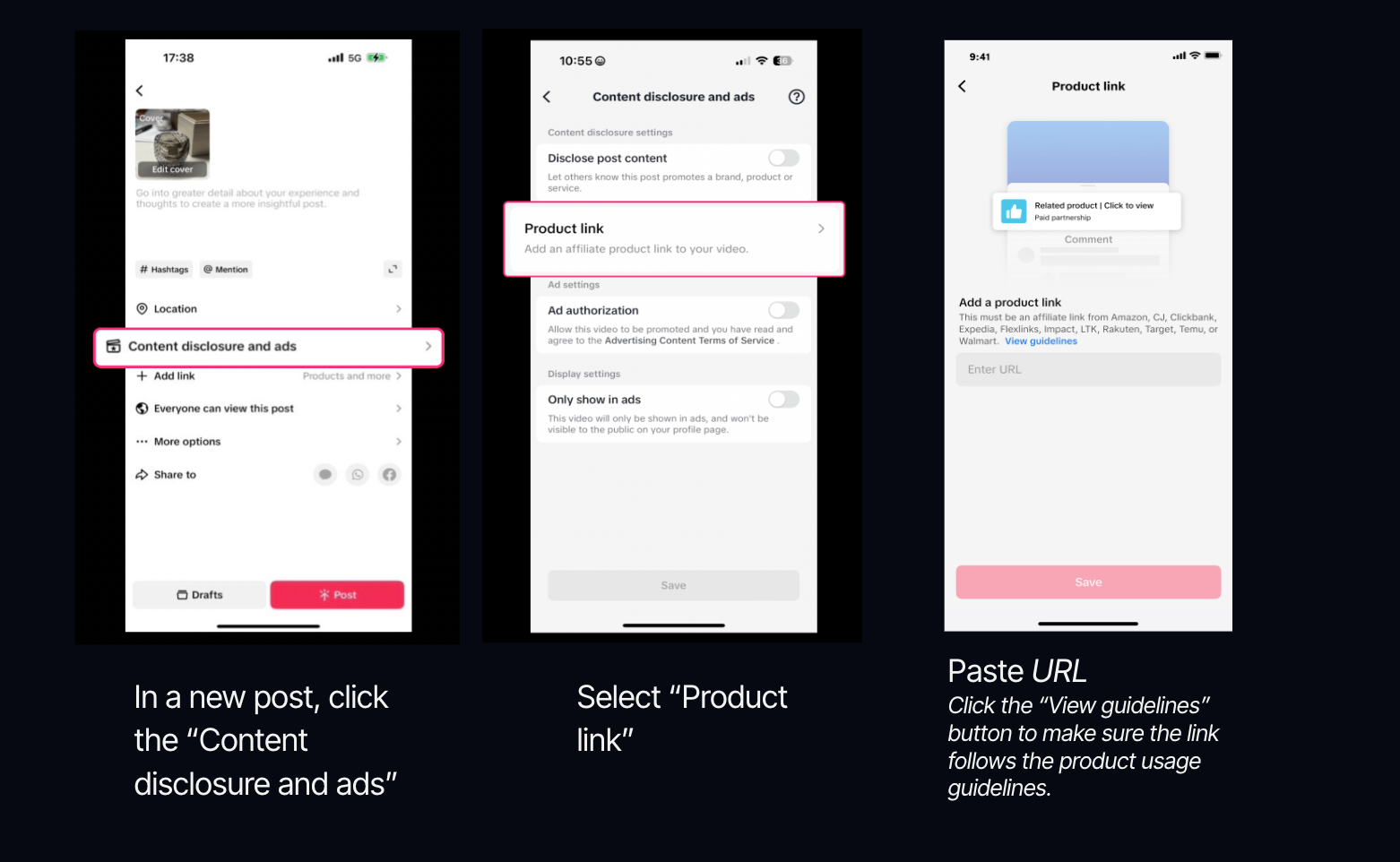
1. Öffnen Sie die *ein Video posten* Modul in TikTok.
2. Wählen Sie **Inhaltskennzeichnung und Anzeigen**.
3. Wählen Sie **Produktlink**.
4. **Kopieren und einfügen** Ihren impact.com-Produktlink in das *URL* Feld ein.
* Erfahren Sie, wie Sie [Produktlinks abrufen](/partner/de/was-mochten-sie-lernen/platform-features/tracking/tracking-links/create-and-manage-links/create-tracking-links.md#get-a-tracking-link-for-a-specific-product-0-2) auf impact.com.
Kriterien für die Link-Berechtigung
* Nur **eine einzelne Produktdetailseite** Links werden unterstützt. Aggregierte Produktseiten oder Linktrees sind nicht zulässig. **Wir empfehlen Ihnen dringend, den Link „Richtlinien anzeigen“ auszuwählen und zu verstehen, welche Links akzeptiert werden.**
* Die Produkte, die Sie bewerben, müssen [den TikTok-Richtlinien entsprechen](https://ads.tiktok.com/help/article/tiktok-advertising-policies) .
5. Wählen Sie **Absenden** → **Speichern**.
6. **Veröffentlichen** dein Video.
* Sie können bis zu 7 Links pro Tag einreichen.
* Links werden nach der Einreichung 12 Stunden lang geprüft.
* Wenn einer Ihrer Links markiert wird, wird er aus Ihrem Beitrag entfernt, Ihr Beitrag bleibt jedoch online.
* Sie können Links nur zu Videos hinzufügen, bei denen *Markeninhalt* ist  **\[Aktiviert]**.
* Produkte werden oben im Kommentarbereich Ihres Videos angeheftet.
---
# Agent Instructions
This documentation is published with GitBook. GitBook is the documentation platform designed so that both humans and AI agents can read, navigate, and reason over technical content effectively. Learn more at gitbook.com.
## Querying This Documentation
If you need additional information that is not directly available in this page, you can query the documentation by asking a question.
Perform an HTTP GET request on the following URL with the `ask` and `goal` query parameters:
```
GET https://help.impact.com/partner/de/was-mochten-sie-lernen/campaigns/creator-campaigns/social-property-campaign-linking/add-links-to-your-tiktok-videos.md?ask=&goal=
```
`ask` is the immediate question: it should be specific, self-contained, and written in natural language.
`goal` is what the user is ultimately trying to achieve, the reason they need the answer. Sharing it helps GitBook give you a better, more relevant answer. A goal is most helpful when it describes the outcome the user wants rather than restating the question. For example, with `ask=how do I create an API token`, a goal like `automate deployments from our CI pipeline` lets GitBook tailor the answer to that use case.
The response will contain a direct answer to the question and relevant excerpts and sources from the documentation.
Use this mechanism when the answer is not explicitly present in the current page, you need clarification or additional context, or you want to retrieve related documentation sections.