> For the complete documentation index, see [llms.txt](https://help.impact.com/llms.txt). Markdown versions of documentation pages are available by appending `.md` to page URLs; this page is available as [Markdown](https://help.impact.com/brand/zh/what-would-you-like-to-learn-about/platform-features/tracking/tracking-explained/tracking-links-explained-for-brands.md).
# 面向品牌的跟踪链接说明
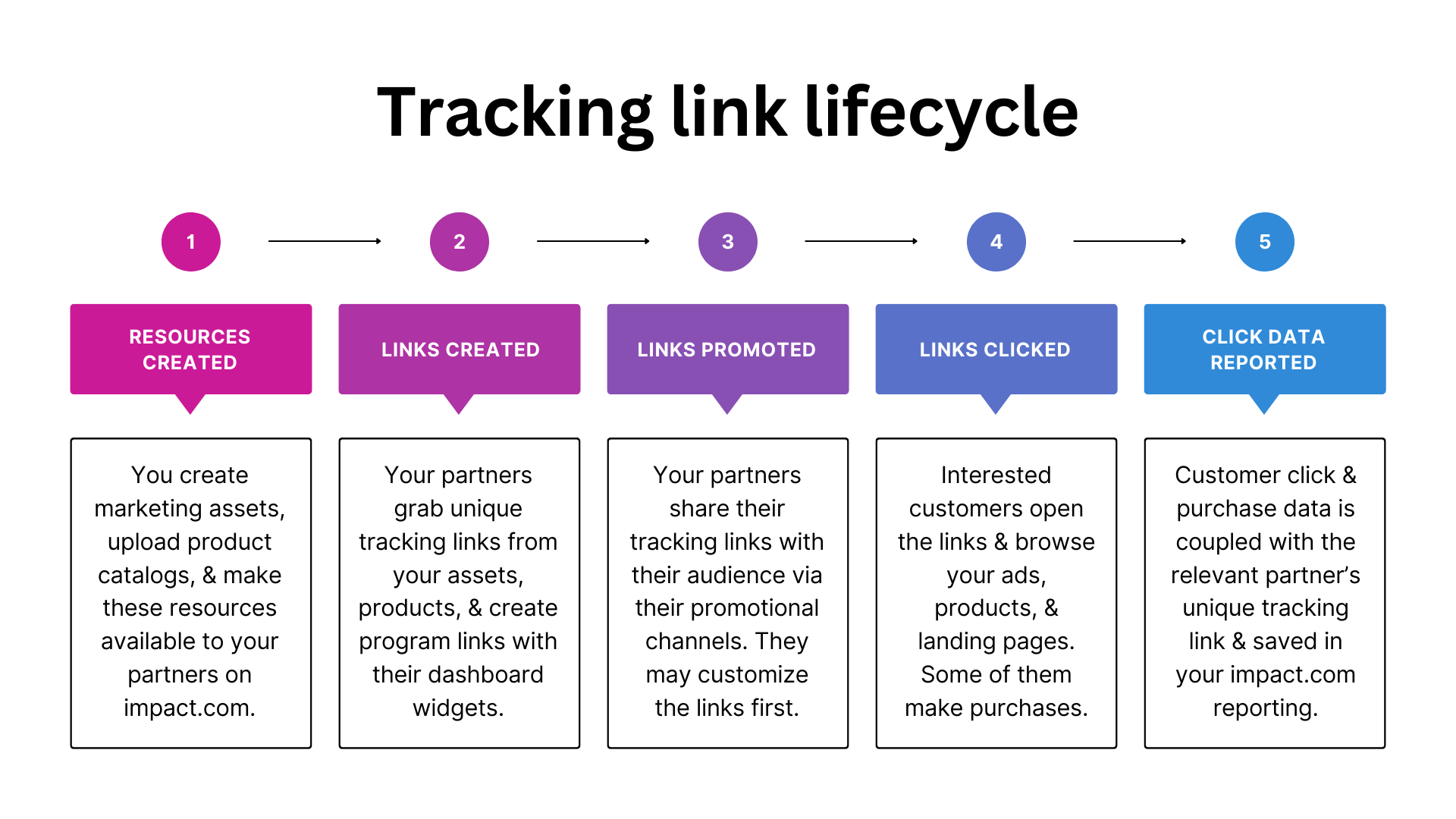
impact.com 让你的合作伙伴能够根据你提供的推广素材或产品创建独特链接。当他们向受众推广你的素材或产品时,任何链接点击或客户购买都可以被追踪并归因给相关合作伙伴。这样可确保合作伙伴驱动的转化(即销售、应用安装或期望的客户行为)获得公平结算,并帮助你优化结算策略以获得最佳效果。
#### 步骤 1:你提供推广资源
在完成 impact.com 项目设置后,你将通过以下操作开始产生效果:
{% tabs %}
{% tab title="创建素材" %}
作为品牌方,你可能拥有图片广告、电子邮件或视频等营销素材。你可以 [上传这些素材](/brand/zh/what-would-you-like-to-learn-about/platform-features/ads/create-ads/introduction-to-asset-types.md) 到 impact.com,并将其提供给合作伙伴,使他们能够向受众推广这些素材。合作伙伴也可以 [请求](/brand/zh/what-would-you-like-to-learn-about/platform-features/ads/manage-ads/process-partner-requests.md) 某个具体素材,如果他们在自己的社交渠道上看到了它的推广潜力。
{% endtab %}
{% tab title="上传产品目录" %}
您可以 [添加可自动更新的数据文件](/brand/zh/what-would-you-like-to-learn-about/platform-features/product-catalogs/add-product-catalogs-as-a-brand.md) 到 impact.com,用于提供你所销售产品的详细信息。许多品牌会通过电子商务解决方案创建产品目录,例如 [Shopify](https://integrations.impact.com/integration-guides/for-brands/plugin-integrations/e-commerce/integrate-with-shopify) 或 [Magento](https://integrations.impact.com/integration-guides/for-brands/plugin-integrations/e-commerce/integrate-with-adobe-commerce-magento),然后再与 impact.com 共享。
{% endtab %}
{% tab title="创建活动" %}
如果你运行的是创作者项目,你将 [创建活动](/brand/zh/what-would-you-like-to-learn-about/creator-program/creator-campaigns-for-brands/configure-a-creator-campaign.md) 并招募能够为你制作广告素材的创作者。每个活动都将包含你的已加入创作者同意完成的任务和交付成果。
{% endtab %}
{% endtabs %}
#### 步骤 2:合作伙伴获取跟踪链接
合作伙伴可以通过多种方式从你的资源中获取跟踪链接:
{% tabs %}
{% tab title="素材页面" %}
在推广你的营销素材时,合作伙伴会访问他们的 [素材页面](/partner/zh/ni-xiang-liao-jie-shen-me/platform-features/marketing-content/brand-assets/manage-assets-as-a-partner.md),筛选你的品牌项目,并复制与该素材相关联的唯一跟踪链接。
{% endtab %}
{% tab title="产品市场" %}
在推广你的产品时,合作伙伴会访问 [产品市场](/partner/zh/ni-xiang-liao-jie-shen-me/platform-features/marketing-content/product-promotions/promote-a-product-from-the-product-marketplace.md),浏览他们感兴趣的产品类别,并复制与该产品相关联的唯一跟踪链接。
{% endtab %}
{% tab title="仪表板小组件" %}
合作伙伴还可以通过生成一个指向你网站落地页的唯一跟踪链接来推广你的整体品牌项目。这可以通过合作伙伴仪表板中的 [创建链接小组件](/partner/zh/ni-xiang-liao-jie-shen-me/platform-features/tracking/tracking-links/create-and-manage-links/create-tracking-links.md) 来实现。
此外,创作者还可以使用该小组件为 [特定活动任务](/partner/zh/ni-xiang-liao-jie-shen-me/campaigns/creator-campaigns/campaign-management/generate-tracking-links-for-campaign-tasks-as-a-creator.md)生成跟踪链接。这使 impact.com 能够追踪与创作者活动及任务相关的点击和转化。
{% endtab %}
{% tab title="我的品牌页面" %}
合作伙伴还可以访问你在 [我的品牌](https://app.impact.com/secure/mediapartner/marketplace/new-campaign-marketplace-flow.ihtml) 页面上的个人资料,获取一个唯一的跟踪链接来推广你的整体品牌项目,或访问你的素材范围。
{% endtab %}
{% tab title="有效合同页面" %}
合作伙伴还可以在 [有效合同](https://app.impact.com/secure/mediapartner/campaigns/mp-manage-active-ios-flow.ihtml) 界面中进行设置。
{% endtab %}
{% endtabs %}
{% hint style="info" %}
**注意:** 页面上获取你整体项目的通用跟踪链接。合作伙伴有时会自定义跟踪链接,以便在报表中显示有关转化的更多数据。要进一步了解链接自定义,以及你是否可以查看/控制合作伙伴添加的参数,请参阅 [跟踪链接参数说明](/brand/zh/what-would-you-like-to-learn-about/platform-features/tracking/tracking-explained/tracking-link-parameters-explained.md).
{% endhint %}
#### 步骤 3:合作伙伴与其受众分享链接
接下来,合作伙伴会通过其推广渠道分享该跟踪链接。这些渠道包括社交媒体平台、博客、网站、新闻通讯,甚至是接触受众的线下方式。合作伙伴通常会将其推广渠道作为 [媒体属性](/partner/zh/ni-xiang-liao-jie-shen-me/account-management/account-settings/connect-media-properties/connect-and-manage-media-properties.md).
一旦跟踪链接被分享,它就会将你的品牌展示给合作伙伴的受众,建立对你产品的信任,并鼓励客户访问你的网站。跟踪链接包含所涉及的特定素材 ID(如适用)、你的项目 ID 以及合作伙伴的账户 ID。
#### 步骤 4:客户打开链接
当客户打开合作伙伴分享的链接时,会被引导到你网站上的一个页面。你可以确定链接的默认目标位置——参见 [步骤 2](#step-2-partner-grabs-tracking-links) ——或者 [允许合作伙伴进行深度链接](/brand/zh/what-would-you-like-to-learn-about/account-administration/program-settings/tracking-settings/set-up-permitted-domains-for-deep-linking.md) 到你网站上的任意页面。之后,客户可能完成购买、应用安装,或完成你项目旨在推广的任何类型转化。impact.com 会记录来自该跟踪链接的任何点击流量和转化数据,并将归因记给分享该链接的合作伙伴。
#### 步骤 5:你查看报告数据
一旦与某次转化相关的数据保存到 impact.com,你就可以在报表中查看它。你可以利用报表洞察来识别哪些合作伙伴和营销渠道为你的项目带来最大价值,并做出战略决策以最大化收入。
**访问你的报表**
1. 在左侧导航栏中,选择  **\[Engage] → 报告 → 更多报告**.
2. 在搜索栏中输入你想查看的报表名称。
* 要将报表固定到左侧导航栏以便快速访问,将鼠标悬停在报表行上并选择 **固定**.
**相关报表**
* [合作伙伴表现报表](/brand/zh/what-would-you-like-to-learn-about/platform-features/multi-program-reports/performance-reports-for-brands/performance-by-partner-report.md) — 按合作伙伴分组查看一般点击数据,以及动作、收入和动作成本等其他指标。
* [热门路径报表](/brand/zh/what-would-you-like-to-learn-about/platform-features/cross-channel-performance-insights/optimize-reports/top-paths-report.md) — 查看最受欢迎的客户转化路径,或客户在购买前互动的最常见接触点序列。
* [应付点击数据报表](/brand/zh/what-would-you-like-to-learn-about/platform-features/multi-program-reports/listing-reports/payable-click-data-report.md) — 查看被判定为应付的客户点击详情,例如促成点击的合作伙伴、相关广告以及点击成本。如果你使用 [CPC 事件类型](/brand/zh/what-would-you-like-to-learn-about/platform-features/event-types/event-types-explained.md) 向合作伙伴按点击进行结算,此报表很有用。
* [过期广告点击报表](/brand/zh/what-would-you-like-to-learn-about/platform-features/multi-program-reports/operations-reports/clicks-from-expired-ads-report.md) — 查看哪些已过期素材仍在产生点击,以便你通知相关合作伙伴相应更新他们的素材/帖子。
* [合作伙伴风险报表](/brand/zh/what-would-you-like-to-learn-about/platform-features/protect-and-monitor-your-performance-program/event-risk/risk-by-partner-report.md) — 识别与高风险或可能存在欺诈的点击相关联的合作伙伴。
{% hint style="info" %}
**注意:** 当客户点击合作伙伴通过仪表板小组件生成的跟踪链接时,点击数据会在你的报表中显示为与 *在线跟踪链接* 素材类型相关的点击。
{% endhint %}
---
# Agent Instructions
This documentation is published with GitBook. GitBook is the documentation platform designed so that both humans and AI agents can read, navigate, and reason over technical content effectively. Learn more at gitbook.com.
## Querying This Documentation
If you need additional information that is not directly available in this page, you can query the documentation by asking a question.
Perform an HTTP GET request on the following URL with the `ask` and `goal` query parameters:
```
GET https://help.impact.com/brand/zh/what-would-you-like-to-learn-about/platform-features/tracking/tracking-explained/tracking-links-explained-for-brands.md?ask=&goal=
```
`ask` is the immediate question: it should be specific, self-contained, and written in natural language.
`goal` is what the user is ultimately trying to achieve, the reason they need the answer. Sharing it helps GitBook give you a better, more relevant answer. A goal is most helpful when it describes the outcome the user wants rather than restating the question. For example, with `ask=how do I create an API token`, a goal like `automate deployments from our CI pipeline` lets GitBook tailor the answer to that use case.
The response will contain a direct answer to the question and relevant excerpts and sources from the documentation.
Use this mechanism when the answer is not explicitly present in the current page, you need clarification or additional context, or you want to retrieve related documentation sections.


.png?alt=media&token=ad740050-8f01-4e28-8fdf-ad0c7005f9a5)
