> For the complete documentation index, see [llms.txt](https://help.impact.com/llms.txt). Markdown versions of documentation pages are available by appending `.md` to page URLs; this page is available as [Markdown](https://help.impact.com/brand/zh/what-would-you-like-to-learn-about/platform-features/tracking/credit-policies/first-click-credit-policy-explained.md).
# 首次点击归因政策说明
如果“最后点击”将全部归因和支付都给到转化路径中促成最终一次点击的合作伙伴,那么“首次点击”则将其给到路径中促成首次点击的合作伙伴。合作伙伴通常不太青睐这种方式,一般不建议使用。
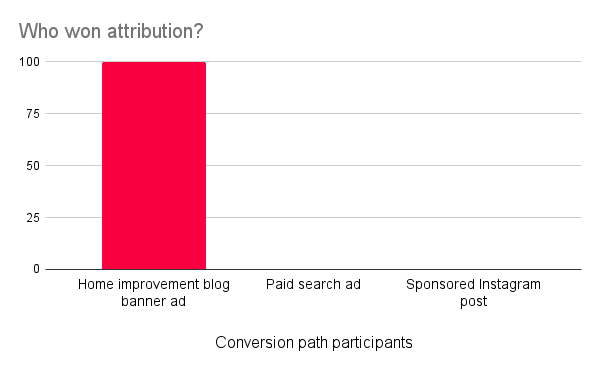
在“首次点击”归因策略下,在转化路径中促成首次点击的合作伙伴将获得 100% 的归因,通常也会获得该转化的全部支付。不过,获得全部归因可能取决于你的 [参与奖励](/brand/zh/what-would-you-like-to-learn-about/platform-features/contracts-and-template-terms/template-terms/payout-adjustments/participation-bonuses-explained.md) 设置。
{% hint style="info" %}
**兼容性说明:** 不同于 [最后加购](/brand/zh/what-would-you-like-to-learn-about/platform-features/tracking/credit-policies/last-to-cart-credit-policy-explained.md),首次点击不需要手动 [通用跟踪标签(UTT)](/brand/zh/what-would-you-like-to-learn-about/platform-features/tracking/javascript-tag-tracking/tracking-with-universal-tracking-tag-utt.md) `trackCart` 实施。如果你使用应用或插件集成,包括 Shopify、WooCommerce 或 BigCommerce,请使用不需要 `trackCart`.
{% endhint %}
首次点击策略与其他策略之间的一个主要区别是需要设置回溯窗口。该窗口决定了 impact.com 应向前追溯多长时间来查找转化路径中的首次点击。由于转化路径会在 [行为锁定窗口](/brand/zh/what-would-you-like-to-learn-about/platform-features/actions-and-payouts/understand-the-action-life-cycle-and-finance.md) 开始(即跟踪到一次转化,例如一次销售时),回溯窗口就决定了 impact.com 应向前追溯多远以找到引荐合作伙伴。
例如,回溯窗口设置为 90 天,则只会回溯到转化发生前 90 天。即使真实的转化路径耗时超过 90 天,在该窗口内最早促成点击的合作伙伴也将赢得该次转化的归因。
示例场景
例如,我们来看 Duff Inc. 的业务。他们基于若干不同原因决定升级到专业版,并且特别希望将归因逻辑切换为首次点击归因策略。
Duff Inc. 选择了 45 天的回溯窗口,因为当他们使用最后点击时,所有转化路径都需要这么长时间才能转化。他们还决定将首次点击策略优先于最后点击。最后,所有合作伙伴都将按照首次点击归因策略进行归因。
不过,不知为何,他们的转化路径看起来与使用最后点击时完全一样。客户总是先通过商品博客的横幅广告加购眼镜,再点击赞助搜索结果后添加品牌元素,最后在点击赞助 Instagram 帖子后完成购买。然而,自从切换之后,由于商品博客带来了转化路径中的第一次点击,它赢得了所有转化。
#### 我该如何申请此归因策略?
联系你的 CSM(或 [联系支持团队](https://app.impact.com/support/portal.ihtml?createTicket=true))讨论启用首次点击归因策略。你需要说明为什么想使用此策略、你的所有合作伙伴是否都将采用首次点击(如果不是,当同一旅程中存在多个策略时,应优先采用哪种策略),以及你是否已经考虑好回溯窗口。
---
# Agent Instructions
This documentation is published with GitBook. GitBook is the documentation platform designed so that both humans and AI agents can read, navigate, and reason over technical content effectively. Learn more at gitbook.com.
## Querying This Documentation
If you need additional information that is not directly available in this page, you can query the documentation by asking a question.
Perform an HTTP GET request on the following URL with the `ask` and `goal` query parameters:
```
GET https://help.impact.com/brand/zh/what-would-you-like-to-learn-about/platform-features/tracking/credit-policies/first-click-credit-policy-explained.md?ask=&goal=
```
`ask` is the immediate question: it should be specific, self-contained, and written in natural language.
`goal` is what the user is ultimately trying to achieve, the reason they need the answer. Sharing it helps GitBook give you a better, more relevant answer. A goal is most helpful when it describes the outcome the user wants rather than restating the question. For example, with `ask=how do I create an API token`, a goal like `automate deployments from our CI pipeline` lets GitBook tailor the answer to that use case.
The response will contain a direct answer to the question and relevant excerpts and sources from the documentation.
Use this mechanism when the answer is not explicitly present in the current page, you need clarification or additional context, or you want to retrieve related documentation sections.