> For the complete documentation index, see [llms.txt](https://help.impact.com/llms.txt). Markdown versions of documentation pages are available by appending `.md` to page URLs; this page is available as [Markdown](https://help.impact.com/brand/zh/what-would-you-like-to-learn-about/platform-features/reach-out-to-partners/segments/best-practices-for-configuring-segment-conditions.md).
# 配置细分条件的最佳实践
探讨分组的正确与错误做法 *条件* 在你的合作伙伴 [细分](/brand/zh/what-would-you-like-to-learn-about/platform-features/reach-out-to-partners/segments/create-a-partner-segment.md) 将帮助你有效利用这些细分。下面将展示有效和无效的条件分组示例。遵循这些指南后,你将学会如何创建动态细分,使你的合作伙伴列表保持相关且有序。
{% hint style="info" %}
**注意:** 下面的示例将展示如何正确使用每个条件,以避免在创建合作伙伴细分时出错。
{% endhint %}
#### 绩效条件最佳实践
以……为例 **正确做法** 和 **错误做法** 来识别哪些 *绩效* 条件可以组合在一起,帮助你避免在创建合作伙伴细分时出错。
绩效条件
| 可以 | 不要 |
| ------------------------------------------------------------------------------------------------------------------------------------------------------------------------------------------------------------------------------------------------------------------------------------------------------------------------------------------------------------ | ------------------------------------------------------------------------------------------------------------------------------------------------------------------------------------------------------------------------------------------------------------------------------------------------------------------------------------------------------------------------ |
| 使用 *绩效* 筛选条件与 **关系阶段** 筛选条件设置为 **已加入** 以仅评估已建立关系并产生 *绩效* 指标的合作伙伴。没有 **已加入** 关系,合作伙伴将没有任何绩效数据可供分析。 | 避免使用相同筛选条件和相同运算符两次。例如, *行动* `大于` 1 + *行动* `大于` 1. |
| 使用 绩效日期范围 筛选规则应遵循与 最后转换日期.
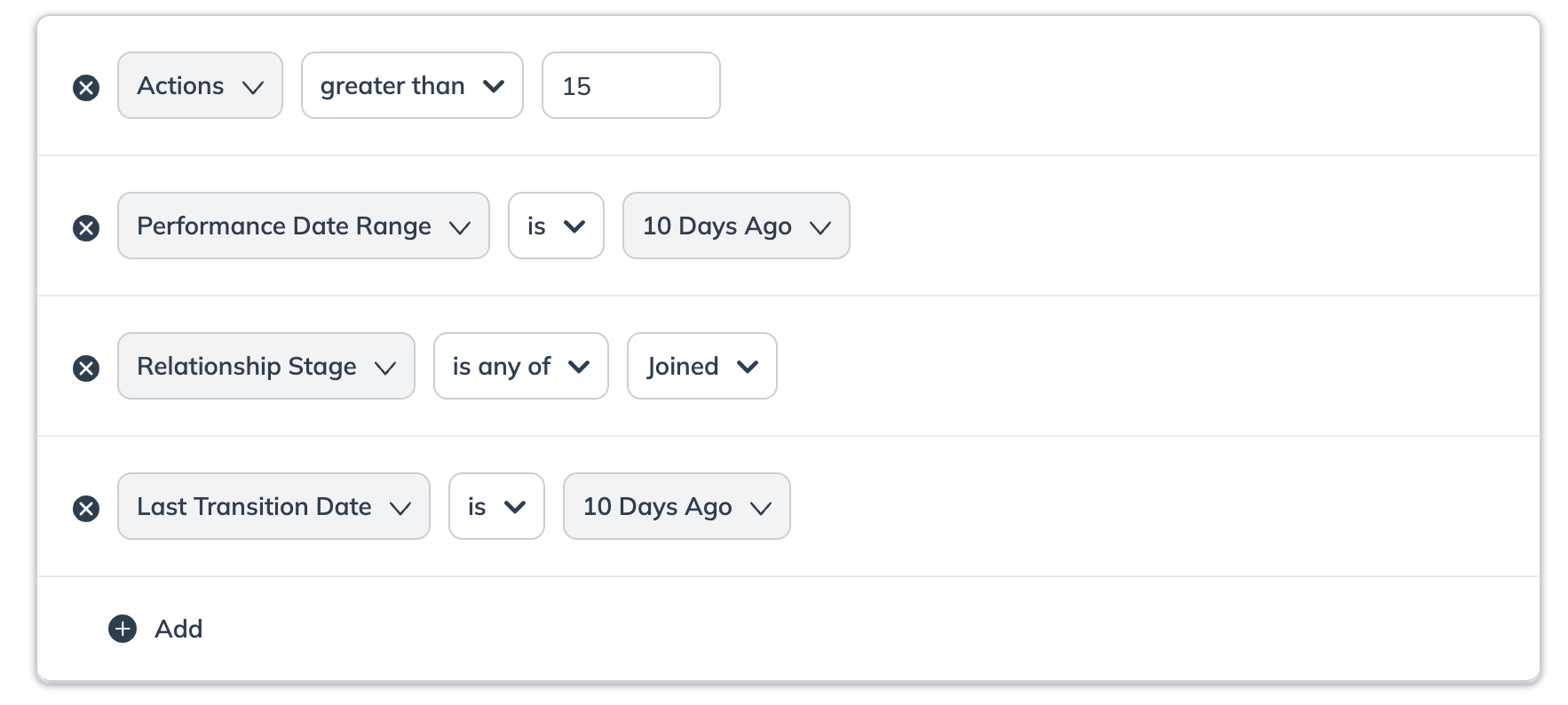
| 避免在同一细分中两次使用相同的筛选条件,即使与 绩效日期范围组合使用也是如此,因为这属于冗余,且可能导致意外结果。
例如, 行动 小于 5 + 行动 小于 3 + 绩效日期范围 为 昨天。
|
| | 不要使用 **绩效** 条件筛选器而不指定绩效指标 *点击*, *佣金*, *收入* 和 *绩效日期范围*. |
| 使用 *佣金* 筛选器来筛选出不活跃的合作伙伴。例如, `为` 0 或 `小于` 1. | |
| | 该 绩效 筛选条件不应与 合同阶段 筛选器。
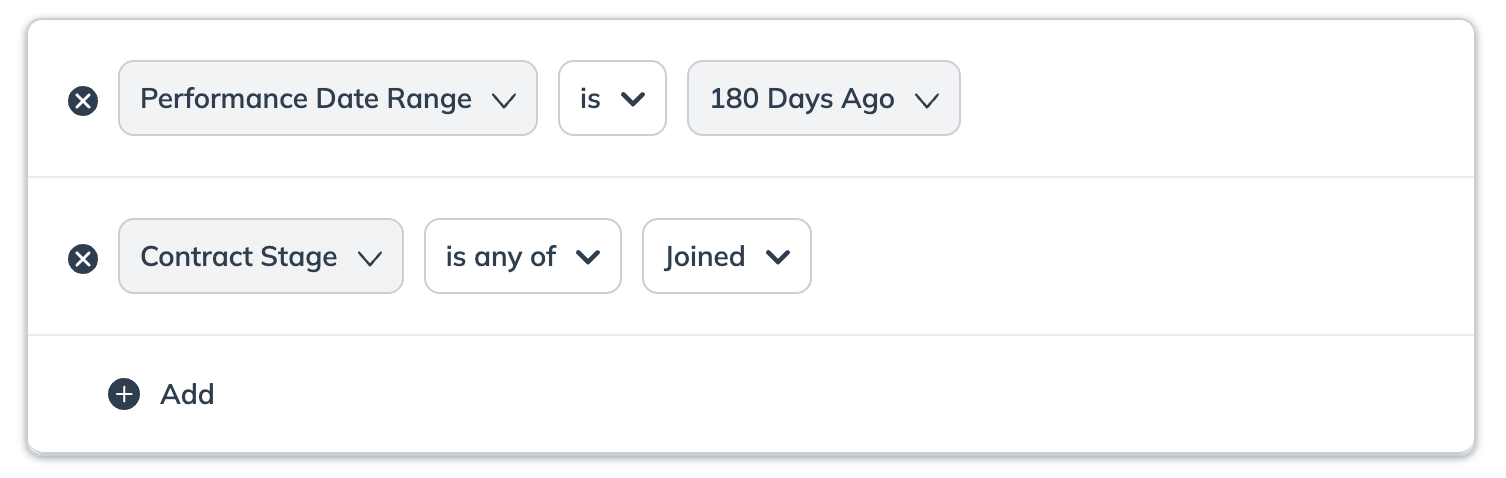
|
| | 该 绩效 筛选条件不应与 关系阶段 筛选器。
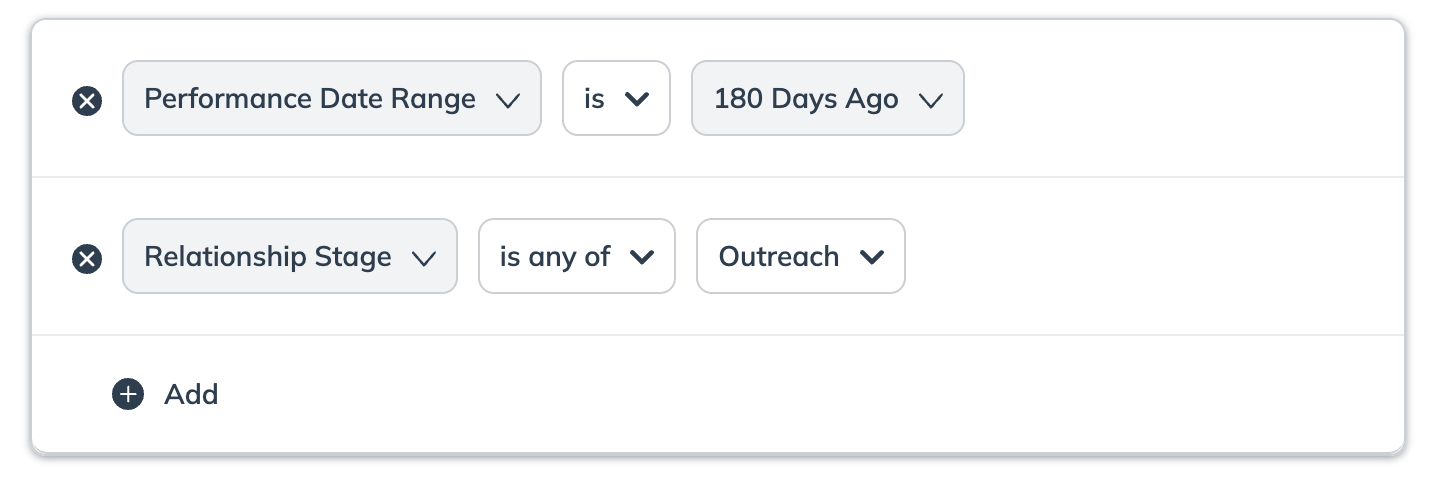
|
#### 合作伙伴条件最佳实践
以……为例 **正确做法** 和 **错误做法** 来识别哪些 *合作伙伴* 条件可以组合在一起,帮助你避免在创建合作伙伴细分时出错。
关系阶段
| 可以 | 不要 |
| ------------------------------------------------- | ----------------------------------------------------------------------------------------------------------------------------------------------------------------------------------------------------------------------------------------------------------------------------------------------------------------------------------------------------------------------- |
| 请确保为你要创建的细分类型选择并搭配正确的 **关系阶段** 。例如, *新建* + *已加入*. | 不要将这些 关系阶段 在如下所示的双行设置中配对,因为这可能导致结果不准确。
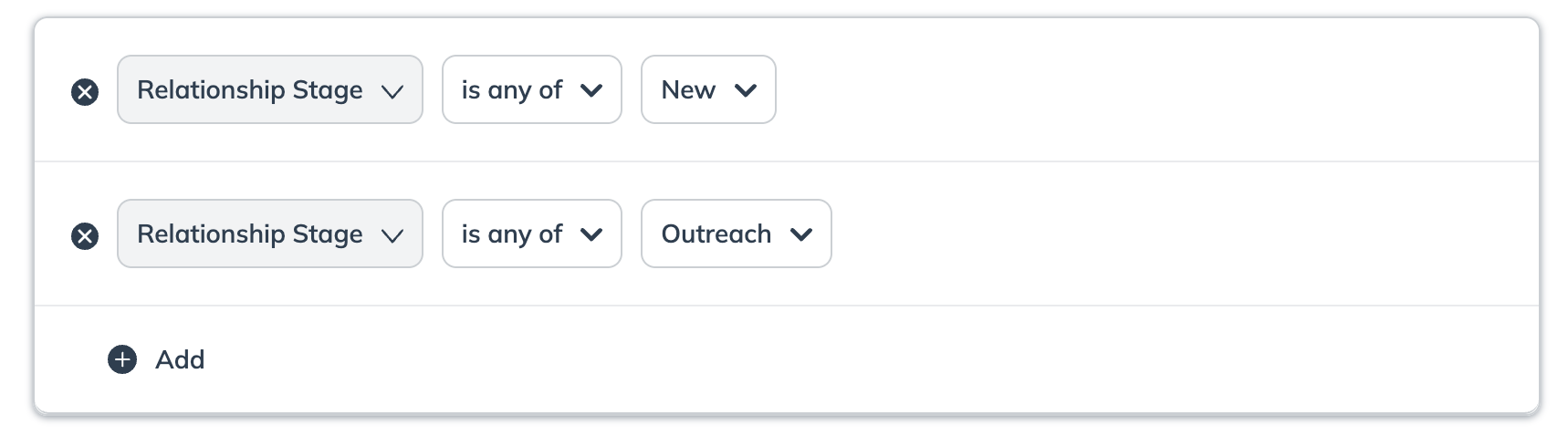
|
| | 该 **关系阶段** 和 **合同阶段** 筛选条件不应一起包含。 |
| | 该 **关系阶段** 和 **绩效日期范围** 筛选条件不应一起包含。 |
原始加入日期
| 可以 | 不要 |
| ---------------------------------------------------------------------------------------------------------------------------------------------------------------------------------- | ------------------------------------------------- |
| 按相同的 原始加入日期 和 最后转换日期 字段进行筛选可提供更精确、更准确的搜索结果。
例如,合作伙伴的 最后转换日期 为 今天 和 原始加入日期 为 今天.
| 避免使用 **原始加入日期** 与 **关系阶段** 为 *已到期*配对。否则可能导致结果不准确。 |
最后转换日期
| 可以 | 不要 |
| --------------------------------------------------------------------------------------------------------------------------------------------------------------------------------------------------------------------------------- | -------------------------------------------- |
| 将 最后转换日期 和 关系阶段 字段组合使用可提供更精确、更准确的搜索结果。例如,如果你想查找最近转换到 外联阶段的合作伙伴,请同时使用 外联阶段 和最近的 最后转换日期 范围筛选器。
• 同时筛选这两个字段可确保你选择的是在特定时间范围内转换到指定阶段的合作伙伴,避免仅使用任一字段时可能出现的差异。
| 不要使用 **最后转换日期** 字段在同一细分中使用两次属于冗余,且可能导致结果不准确。 |
| 使用 最后转换日期 用于筛选在今天转换到当前状态的合作伙伴。例如,日期范围将为 2024-01-01 00:00:00 进行 2024-01-01 23:59:59 UTC。
• 请记住,这并不指最近 24 小时。
| |
| 使用此筛选器可选择在以下日期之间转换到当前状态的合作伙伴。例如, 2024年9月15日,以及 2024年9月25日.
• 这将排除在 9 月 25 日转换的合作伙伴。
| |
| 使用此筛选器可选择在恰好指定天数前转换到当前状态的合作伙伴。
例如, 最后转换日期 区间介于 距今 20 至 45 天前。
| |
合作伙伴组
| 可以 | 不要 |
| ----------------------------------------------------------------------------------------------------------------------------------------------------------------------------------------------- | ------------------------------------------------------------------------------------------- |
| 若要包含来自多个组的合作伙伴,请使用带有 属于任意一个 运算符的单个筛选器。
示例: 合作伙伴组属于任意一个 影响者, 忠诚.
结果: 这可以正确找出属于 影响者 组或 忠诚 组的合作伙伴。
| 如果你打算查找来自两个不同组的合作伙伴,请不要使用此筛选器。合作伙伴必须同时属于这两个组才会被纳入结果;否则将被排除。 |
| 若要排除特定组中的合作伙伴,请使用 不属于 运算符的单个筛选器。
示例: 合作伙伴组不属于 竞争对手.
结果: 这会将你细分中的任何合作伙伴从 竞争对手 组中移除。
| 不要向单个 `不属于` 筛选器中添加多个组。此运算符一次只能排除一个组。如果你需要排除多个组(例如, *竞争对手* 和 *内部员工*),你必须为每个组使用单独的 `不属于` 筛选器。 |
合作伙伴模板条款
| 可以 | 不要 |
| --------------------------------------------------------- | ----------------------------------------------------------------------------------------------------------------------------------------------------------------------------------------------------------------------------------------------------------------------------------------------------------------------------------------------------------------------- |
| 使用此筛选器可包含签约于特定 **合作伙伴模板条款**下的合作伙伴。例如,公共条款。 | 不要将这些 模板条款 在如下所示的双行设置中配对,因为这可能导致结果不准确。
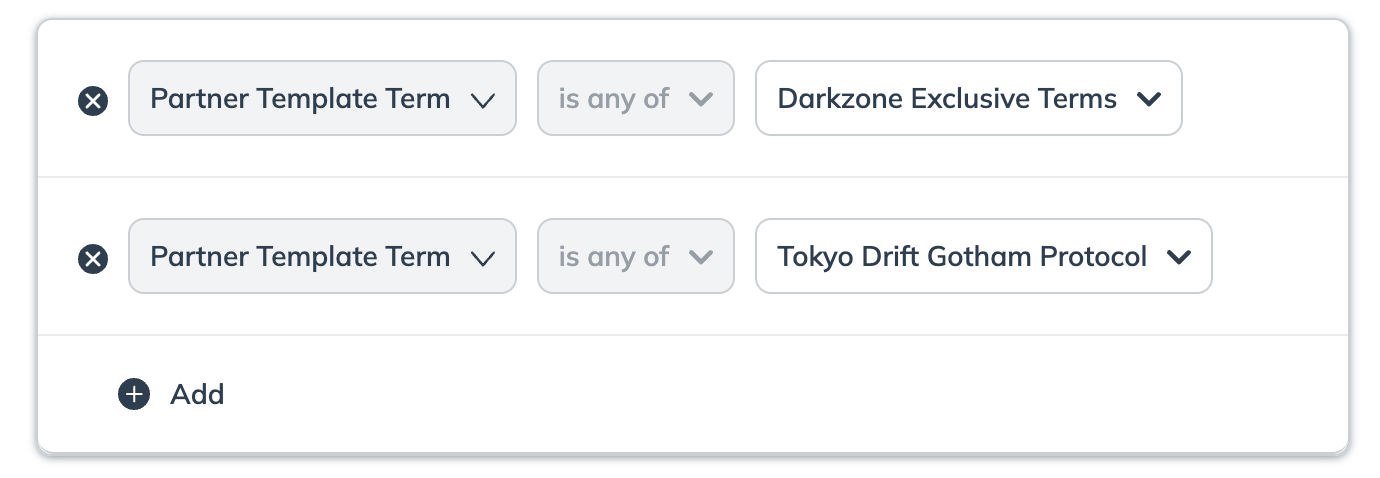
|
| 使用此筛选器可包含属于不同 **合作伙伴模板条款**的合作伙伴。例如,公共条款 **和** Acme G3 条款。 | |
合同阶段
| 可以 | 不要 |
| ------------------------------------------------------------------------------------------------------------------------------------------------------------------------------------------------------------------------------------------------------------------------------------------------------------------------------------------------------------------------------ | ----------------------------------------------------------------------------------------------------------------------------- |
| 使用此筛选器可应用多个 **合同阶段**。例如, *已加入* + *等待合同开始*. | 不要尝试筛选处于 等待发布者批准 和 发布者拒绝 合同阶段.
• 这些合同阶段彼此互斥,不会有任何合作伙伴符合此类条件。
|
| 若要按 不属于 筛选多个 合同阶段 ,请将它们添加到不同的行中。
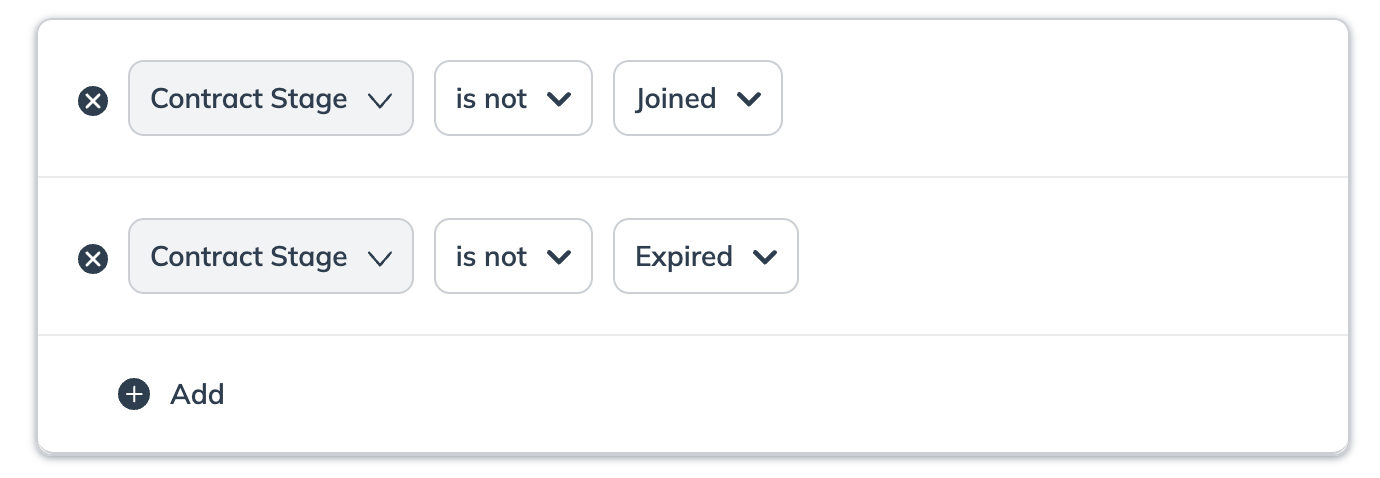
| |
| | 该 **合同阶段** 和 **绩效日期范围** 筛选条件不应一起包含。 |
| | 该 **合同阶段** 和 **关系** 筛选条件不应一起包含。 |
合作伙伴名称
| 可以 | 不要 |
| --------------------------------------------------- | -------------------------------------- |
| 使用此筛选器可选择多个 **合作伙伴名称**。例如,Justin Case + Hazel Nutt。 | 不要重复选择相同的合作伙伴名称。 |
合作伙伴 ID
| 可以 | 不要 |
| --------------------------------------- | ------------------------------------------------------------------------------------------ |
| 仅当你知道要筛选的合作伙伴的确切 **合作伙伴 ID** 时才使用此筛选器。 | 不要使用 合作伙伴 ID 与 合作伙伴名称 不一致的
,否则筛选器可能会产生意外结果。
|
{% hint style="warning" %}
**警告:** 如果你打算将细分用于新闻通讯,细分大小必须与你计划包含的广告代码数量相匹配,以避免发送失败。参见 [为合作伙伴创建并发送新闻通讯](/brand/zh/what-would-you-like-to-learn-about/platform-features/reach-out-to-partners/newsletters/create-and-send-newsletters-to-partners.md) ,了解基于广告代码数量的具体大小限制。
{% endhint %}
---
# Agent Instructions
This documentation is published with GitBook. GitBook is the documentation platform designed so that both humans and AI agents can read, navigate, and reason over technical content effectively. Learn more at gitbook.com.
## Querying This Documentation
If you need additional information that is not directly available in this page, you can query the documentation by asking a question.
Perform an HTTP GET request on the following URL with the `ask` and `goal` query parameters:
```
GET https://help.impact.com/brand/zh/what-would-you-like-to-learn-about/platform-features/reach-out-to-partners/segments/best-practices-for-configuring-segment-conditions.md?ask=&goal=
```
`ask` is the immediate question: it should be specific, self-contained, and written in natural language.
`goal` is what the user is ultimately trying to achieve, the reason they need the answer. Sharing it helps GitBook give you a better, more relevant answer. A goal is most helpful when it describes the outcome the user wants rather than restating the question. For example, with `ask=how do I create an API token`, a goal like `automate deployments from our CI pipeline` lets GitBook tailor the answer to that use case.
The response will contain a direct answer to the question and relevant excerpts and sources from the documentation.
Use this mechanism when the answer is not explicitly present in the current page, you need clarification or additional context, or you want to retrieve related documentation sections.