> For the complete documentation index, see [llms.txt](https://help.impact.com/llms.txt). Markdown versions of documentation pages are available by appending `.md` to page URLs; this page is available as [Markdown](https://help.impact.com/brand/zh/what-would-you-like-to-learn-about/platform-features/finance/your-subscription/view-your-impactcom-subscription-and-usage-details.md).
# 查看您的 impact.com 订阅和使用详情
该 *订阅* 此屏幕显示有关您的 impact.com 订阅、相关费用的信息,并允许您将订单表下载为 PDF。请注意,您的订阅和使用受 impact.com 的 [使用条款](https://impact.com/terms-of-use/).
#### 查看您的订阅摘要
1. 从顶部导航栏中,选择 **您的余额** → **订阅**.
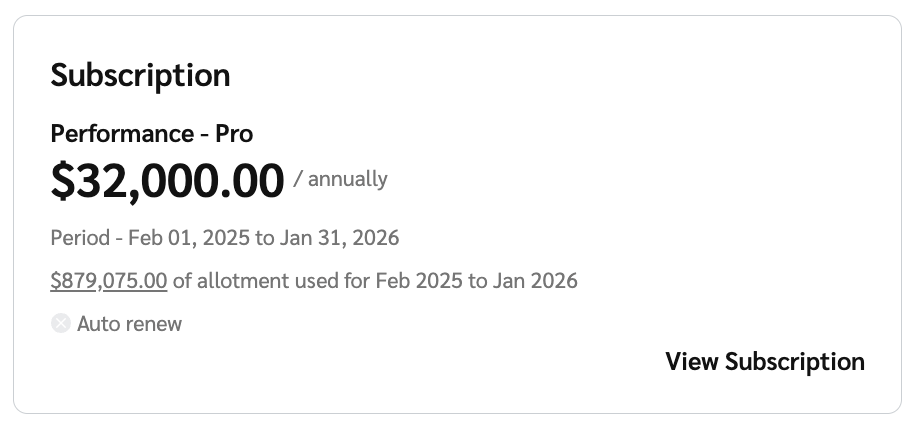
2. 在……上 *概览* 在此屏幕中,查看显示您的订阅摘要的订阅小组件。
* 您每月的 impact.com 订阅费用
* 您的订阅期
* 订阅期内使用的采购价格差异(PPV)总额度。请参阅 [使用详情部分](#view-your-usage-details-0-1) 以了解更多信息。
3. 选择 **查看订阅** 以查看更多有关您的订阅的信息。
* 查看 *详情* 和 *订阅费用* 请参阅下面的参考部分,了解此屏幕上的字段的更多信息。
详情参考
| | |
| --- | ---------------------------------------------------------- |
| 产品 | 您所订阅的 impact.com 版本名称。也可选择 **下载订单表** 以下载您的 impact.com 订单表。 |
| 订阅期 | 您订阅的开始和结束日期。 |
| 续订期 | 您的订阅将自动续订的日期,以及新订阅期的开始和结束日期。 |
订阅费用参考
| | |
| ------------- | ------------------------------------------------------------------------------------------------------ |
| impact.com 费用 | 有关您的 impact.com 费用的详情。 |
| 每月订阅费用 | 有关您的订阅费用、相关付款日期以及可包含多少 \* 的详情支付处理量 包含在您的订阅中。
\*每月可在 impact.com 上处理且不产生增量费用的付款金额。
|
| 额外使用量的增量费用 | 一旦您的使用量超过约定的合同限额,就会产生的额外费用。 |
| 查看使用量 | 选择 **查看使用量** 按钮,以查看更多有关支付量使用情况的信息。 |
4. 选择 **查看使用量** 以查看您的使用详情,其中显示您的每月包含量和增量或累计量的详细信息,以及任何增量使用费用。
* 请参见 *列说明* 以了解有关此屏幕列的更多信息。
*\*上方截图是年度订阅账户的示例。*
列说明
| | |
| --------------- | ------------------------------------------------------------------------------------------------------------------ |
| 月份 | 月份和年份。 |
| 包含量 | 可用使用量基于您的订阅。此数字会因期间内后续购买的用量而增加。适用于年度使用量。 |
| 当月用量(适用于年度订阅账户) | 当月使用量总计。 |
| 已使用总量 | 当月使用量总计。 |
| 累计用量(适用于年度订阅账户) | 一年内累计的用量。 |
| 增量用量 | 超出包含量的用量部分。 |
| 增量使用费用 | 与超额使用相关的费用。 |
| 状态 | 作为以下任一状态 估算 用于当前月份,或 最终 用于前几个月。
状态为 估算 表示数值仍可能变化,而 最终 表示数值预计不会变化。
|
---
# Agent Instructions
This documentation is published with GitBook. GitBook is the documentation platform designed so that both humans and AI agents can read, navigate, and reason over technical content effectively. Learn more at gitbook.com.
## Querying This Documentation
If you need additional information that is not directly available in this page, you can query the documentation by asking a question.
Perform an HTTP GET request on the following URL with the `ask` and `goal` query parameters:
```
GET https://help.impact.com/brand/zh/what-would-you-like-to-learn-about/platform-features/finance/your-subscription/view-your-impactcom-subscription-and-usage-details.md?ask=&goal=
```
`ask` is the immediate question: it should be specific, self-contained, and written in natural language.
`goal` is what the user is ultimately trying to achieve, the reason they need the answer. Sharing it helps GitBook give you a better, more relevant answer. A goal is most helpful when it describes the outcome the user wants rather than restating the question. For example, with `ask=how do I create an API token`, a goal like `automate deployments from our CI pipeline` lets GitBook tailor the answer to that use case.
The response will contain a direct answer to the question and relevant excerpts and sources from the documentation.
Use this mechanism when the answer is not explicitly present in the current page, you need clarification or additional context, or you want to retrieve related documentation sections.