> For the complete documentation index, see [llms.txt](https://help.impact.com/llms.txt). Markdown versions of documentation pages are available by appending `.md` to page URLs; this page is available as [Markdown](https://help.impact.com/brand/zh/what-would-you-like-to-learn-about/platform-features/finance/partner-funds-transfer/transfer-funds-to-a-partner.md).

# 向合作伙伴转账

<a href="https://pxa.impact.com/student/activity/1117596?sid=0c0e3e5c-54c9-4435-9bee-ebcdccb7f292&#x26;sid_i=0?utm_source=app.impact.com&#x26;utm_medium=owned-platform&#x26;utm_content=con-350&#x26;utm_campaign=help-center" class="button primary">参加 PXA 课程</a>

使用合作伙伴资金转账（PFT）向您的合作伙伴发送款项，超出合同支付条款范围，例如用于 *奖金支付* 给有未结佣金的合作伙伴。PFT 按以下项目计费： [支付处理量（PPV）](/brand/zh/what-would-you-like-to-learn-about/platform-features/finance/your-subscription/how-are-volume-usage-rates-calculated.md) 在 *月* 所在的处理月份（录入系统的月份），而不是发票月份、计划月份或清算月份。例如，如果您在 1 月安排了一笔 PFT，清算日期为 3 月，但它在 1 月处理，则该金额计入 1 月的 PPV。

您可以通过两份报告查看已安排的 PFT： [即将到来的合作伙伴付款报告](/brand/zh/what-would-you-like-to-learn-about/platform-features/finance/finance-reporting/upcoming-partner-payments-report.md) 和 [按状态和交易类型划分的使用量](/brand/zh/what-would-you-like-to-learn-about/platform-features/finance/your-subscription/view-your-usage-volume-by-status-and-transaction-type.md).

{% hint style="warning" %}
**警告：** 如有疑问，请联系您的 *客户成功经理* （CSM）或 [支持](https://app.impact.com/support/portal.ihtml?createTicket=true) 后再继续。
{% endhint %}

{% embed url="<https://files.gitbook.com/v0/b/gitbook-x-prod.appspot.com/o/spaces%2FwMLlMoFBtKJa8ptd3zaw%2Fuploads%2FedhgLHnZjFTrUfdxSZSG%2Fcon-250-2.mp4?alt=media&token=ebfcde7e-7f86-4b02-bf24-0cd95d303c0d>" %}

#### 创建合作伙伴资金转账

1. 从顶部导航栏中选择 **您的余额** → **转账**.
2. 在右上角，选择 **创建转账**.
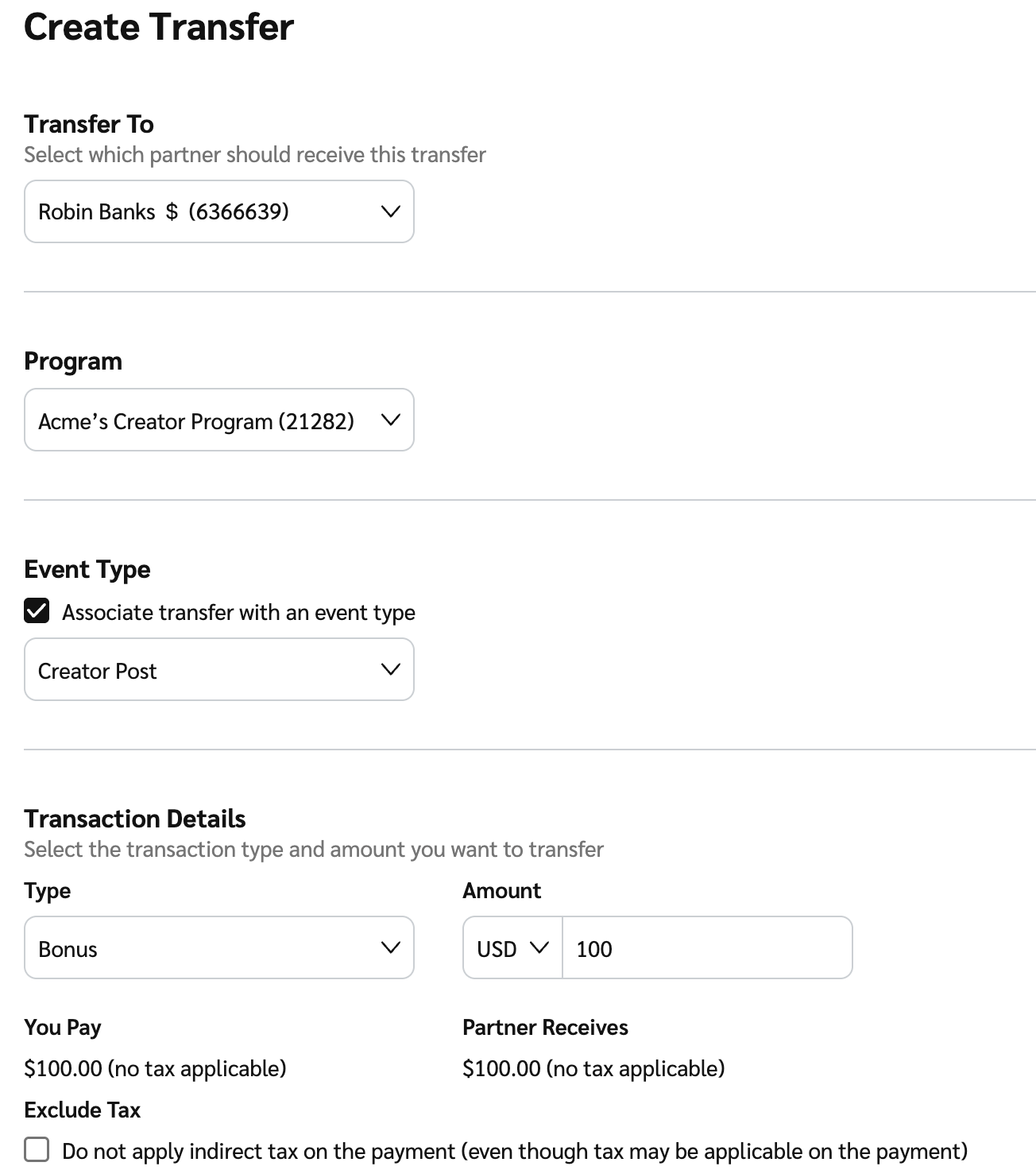
3. 请完成以下字段后继续：

   * **转账至：** 从 ![](/files/9ee7bd3c79aae4d0667377d18611647c3469f8d1) **\[下拉菜单]**，选择将接收资金的合作伙伴。
   * **项目：** 从 ![](/files/9ee7bd3c79aae4d0667377d18611647c3469f8d1) **\[下拉菜单]**，选择此转账应从哪个项目发起。
   * **事件类型：** 如需将此转账与特定事件关联用于报告，请选择 ![](/files/d4151d93ed2da7b33e79d07ae02bdd88dbd67390) **\[已勾选的复选框]** 并从中选择事件类型 ![](/files/9ee7bd3c79aae4d0667377d18611647c3469f8d1) **\[下拉菜单]**.

   <div data-with-frame="true"><figure><img src="/files/45e78d79dc6d2a3aa03ea40b4a8b96e886bba6fb" alt="" width="563"><figcaption></figcaption></figure></div>
4. 完成 *交易详情* 部分。

<details>

<summary>交易详情参考</summary>

| 字段名称 | 说明                                                                                                 |
| ---- | -------------------------------------------------------------------------------------------------- |
| 类型   | 从 ![](/files/9ee7bd3c79aae4d0667377d18611647c3469f8d1) **\[下拉菜单]**，选择将发送给所选合作伙伴的 PFT 类型。           |
| 金额   | <p>输入将发送给所选合作伙伴的金额（以及发送所用货币）。</p><p>• 如果交易需要添加任何税费或增值税，或者所选合作伙伴的账户货币与您的账户或该交易的货币不同，这些金额将显示在此处。</p> |
| 不含税  | 选择 ![](/files/48509e0f0c9ae68203294f8aae7777211a4315e1) **\[未勾选框]** 如果您不希望对付款适用间接税。                |

</details>

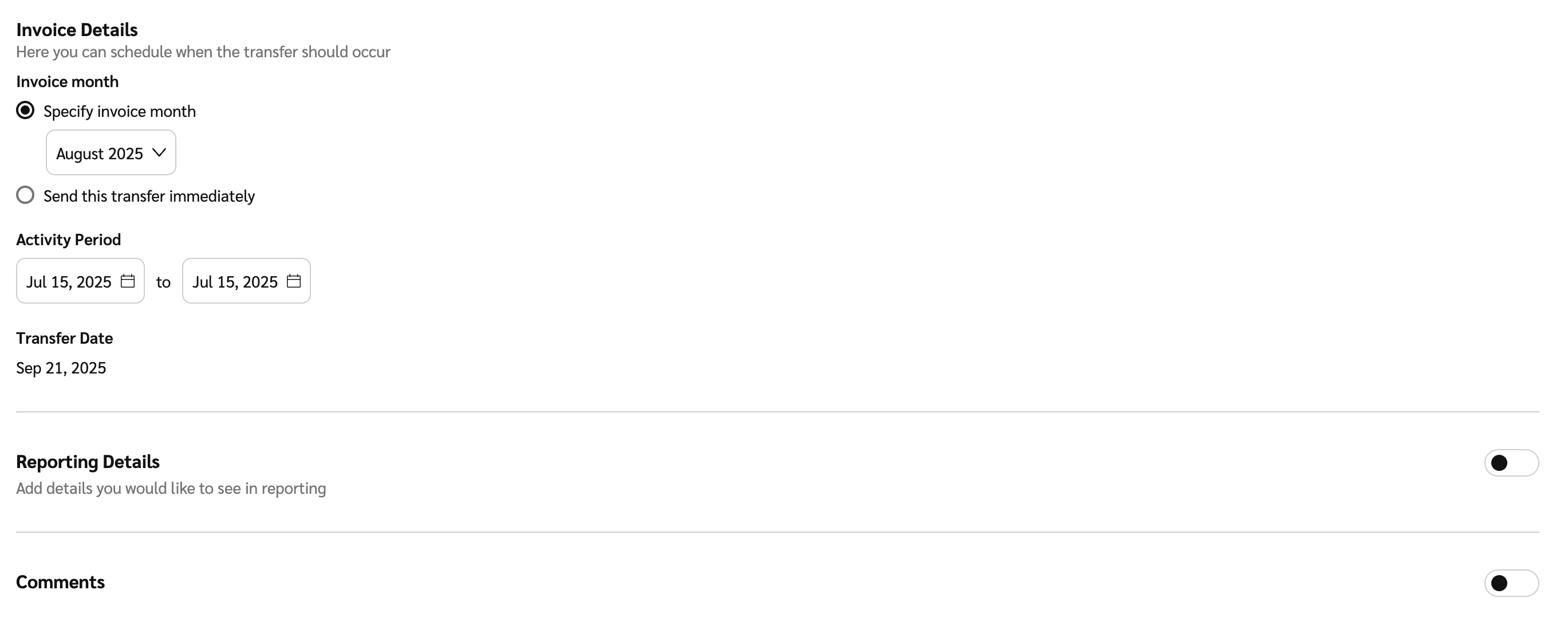
5. 在 *发票详情* 部分，设置转账应发生的时间。

<details>

<summary>发票详情参考</summary>

| 字段   | 说明                                                                                                                                                                                                                                                                                                                                                                                                                                                     |
| ---- | ------------------------------------------------------------------------------------------------------------------------------------------------------------------------------------------------------------------------------------------------------------------------------------------------------------------------------------------------------------------------------------------------------------------------------------------------------ |
| 发票月份 | <p>选择 <img src="/files/ab9a3d8dd653502900038f5f352bd3f23c771f2c" alt=""> <strong>\[单选按钮]</strong> 如果您想指定发票月份。所选发票月份会使该转账包含在该发票月份结束后生成的发票中。</p><p>例如，如果您选择 5 月作为发票月份，则该转账将显示在 6 月生成的发票上。</p><p>或者，如果您的账户 <a href="/pages/917ef4da8db69deb31e1ef58caf1382474b07184">资助方类型</a> 允许，您可以通过选择 <img src="/files/ab9a3d8dd653502900038f5f352bd3f23c771f2c" alt=""> <strong>\[单选按钮]</strong>立即支付该转账。然后，该转账将包含在下一发票周期中。</p><p>如果您选择此选项，但资金账户中资金不足，则该转账将不会被处理。</p> |
| 活动期间 | <p>处理 PFT 时，您可以选择开始日期和结束日期。这两个日期都包含在所选期间内。</p><p><strong>注意：</strong> 您只能将 <strong>开始日期</strong> 设置得不早于您与合作伙伴的合同以及所选发票月份所允许的范围。</p><p>默认情况下，只选择单个日期——除非您更改，否则结束日期将与开始日期相同。您可以将结束日期设置为开始日期之后最多 12 个月。</p><p>费用将平均分摊到整个日期范围，用于绩效报告。</p>                                                                                                                                                                                                                  |
| 转账日期 | <p>查看此转账将在哪一天发生。</p><p>如果 <strong>转账日期</strong> 无法根据您与合作伙伴的合同以及所选 <strong>发票月份</strong>确定，则需要在此输入您偏好的转账日期。</p>                                                                                                                                                                                                                                                                                                                                         |

<div data-with-frame="true"><figure><img src="/files/f4283ad724e3c12095d0116cc13ddf15ddba6853" alt=""><figcaption></figcaption></figure></div>

</details>

2. 可选地， ![](/files/3980f01ba7b178cc917bfb7b270feb4fac2992c6) **\[打开切换]** **报告详情** 为您账户的报告添加任何报告字段。添加字段后，请输入字段值。
3. 可选地， ![](/files/3980f01ba7b178cc917bfb7b270feb4fac2992c6) **\[打开切换]** **备注** 添加有关该转账的任何备注。所选合作伙伴可以在其报告中看到此备注。
4. 选择 **下一步**.
5. 确认转账详情，然后选择 **转账**.
   * 在您选择 **转账**后，您将被重定向到 *转账* 屏幕。您可以选择一个 **转账行** 以查看已创建的转账，或选择 ![](/files/48274f9251fd79e93a99aad7b4393690b07a61c9) **\[菜单] → 下载 PDF** 以下载转账确认。

了解更多关于 [查看转账详情并筛选](/brand/zh/what-would-you-like-to-learn-about/platform-features/finance/partner-funds-transfer/view-transfer-details.md) 它们。


---

# Agent Instructions
This documentation is published with GitBook. GitBook is the documentation platform designed so that both humans and AI agents can read, navigate, and reason over technical content effectively. Learn more at gitbook.com.

## Querying This Documentation
If you need additional information that is not directly available in this page, you can query the documentation dynamically by asking a question.

Perform an HTTP GET request on the current page URL with the `ask` query parameter:

```
GET https://help.impact.com/brand/zh/what-would-you-like-to-learn-about/platform-features/finance/partner-funds-transfer/transfer-funds-to-a-partner.md?ask=<question>
```

The question should be specific, self-contained, and written in natural language.
The response will contain a direct answer to the question and relevant excerpts and sources from the documentation.

Use this mechanism when the answer is not explicitly present in the current page, you need clarification or additional context, or you want to retrieve related documentation sections.