> For the complete documentation index, see [llms.txt](https://help.impact.com/llms.txt). Markdown versions of documentation pages are available by appending `.md` to page URLs; this page is available as [Markdown](https://help.impact.com/brand/zh/what-would-you-like-to-learn-about/platform-features/finance/finance-settings/manage-general-finance-settings-as-a-brand.md).

# 作为品牌管理通用财务设置

<a href="https://pxa.impact.com/student/activity/1087833?sid=0c0e3e5c-54c9-4435-9bee-ebcdccb7f292&#x26;sid_i=0?utm_source=app.impact.com&#x26;utm_medium=owned-platform&#x26;utm_content=con-250&#x26;utm_campaign=help-center" class="button primary">参加 PXA 课程</a>

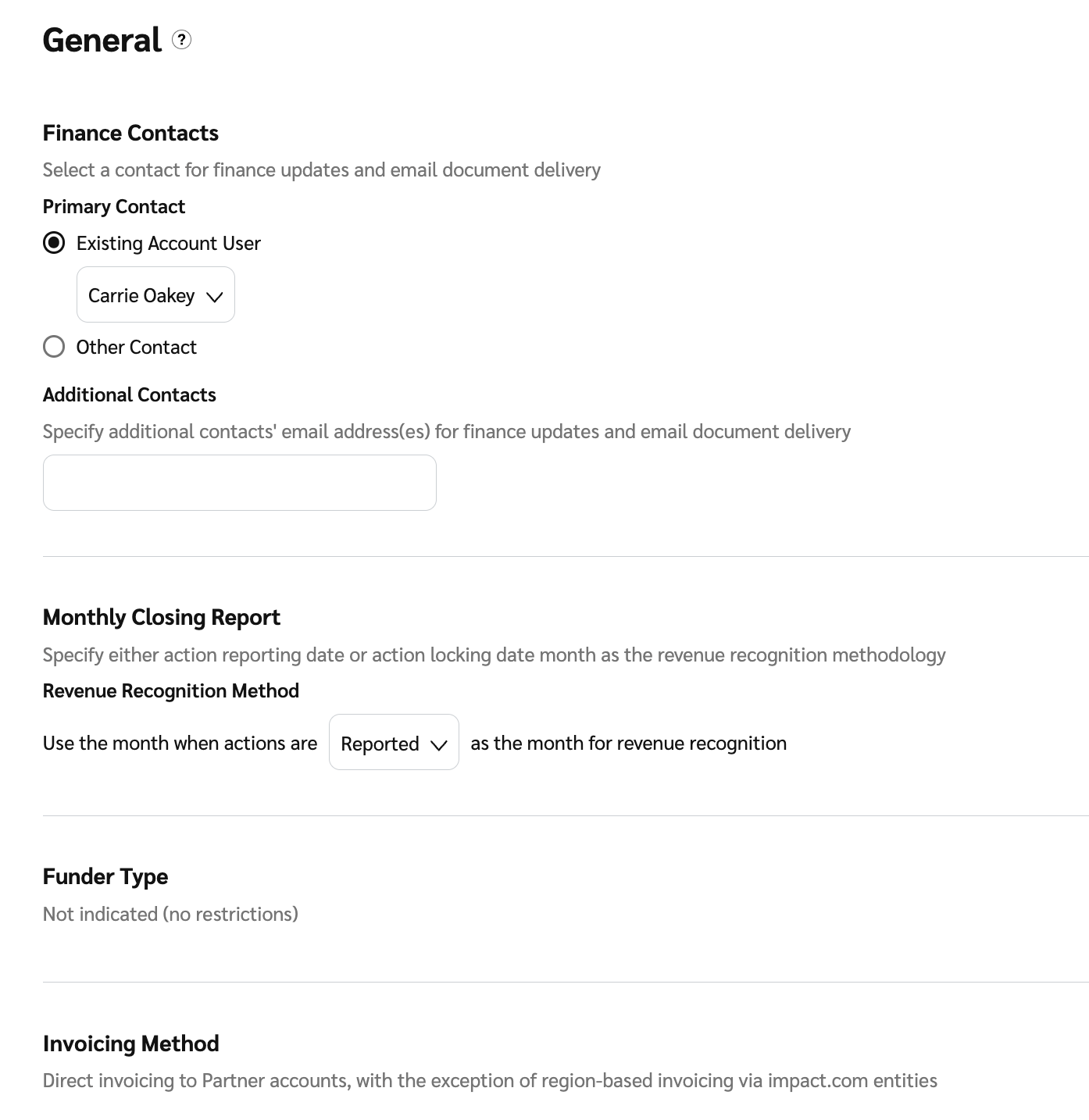
使用 *一般财务设置* 用于管理关键偏好设置，包括您的 **主要财务联系人**，以及您的 **每月结账报告** 如何生成，并查看您的 **资助方类型** 和 **开票方式**.

1. 从顶部导航栏中选择 **你的余额** → **设置**.
2. 查看并更改您的 *一般财务设置*.

   | 用户设置   | 描述                                                                                                                                                                                                                                                                                                  |
   | ------ | --------------------------------------------------------------------------------------------------------------------------------------------------------------------------------------------------------------------------------------------------------------------------------------------------- |
   | 财务联系人  | <p>添加或更改您的 <a href="/pages/993d25985fbe0a143bde3f64f02b57e04f456fdf">主要财务联系人</a> 以及您希望通知有关财务更新和电子邮件文件发送的其他联系人。在配置文件设置时，这些联系人可作为默认选项使用。</p><p>当您首次设置账户时，此设置非常有用，因为这些信息可在配置财务文件设置时重复使用。</p><p><strong>注意：</strong> 在此处更新联系人详细信息不会更新任何现有的文件设置。您需要在每个相应文件的设置页面上直接更新这些详细信息。</p>                          |
   | 月度结账报告 | <p>选择最适合您需求的报告版本。</p><p>从 <img src="/files/9ee7bd3c79aae4d0667377d18611647c3469f8d1" alt=""> <strong>\[下拉菜单]</strong> 在 <em>收入确认方法</em>下，选择 <strong>已报告</strong> 或 <strong>锁定</strong> 作为您的报告日期。</p><p>• 操作报告日期：此方法会将成本反映在操作发生日期对应的月份中。</p><p>• 操作锁定日期：此方法会将成本反映在成本最终确定日期对应的月份中。对于操作来说，这就是锁定日期。</p> |
   | 资助方类型  | 查看您的账户设置了哪种资助方类型。某些资助方类型会相应调整功能，以防止使用与该默认资助方式相违背的系统功能。例如，如果账户的资助方类型为“SOI 资助方 - 基于发票资助”，由于这些发票是按月生成的，您将无法向合作伙伴执行即时转账。                                                                                                                                                                                |
   | 开票方式   | 查看您的 [开票方式](/other/zh/reference-documentation/discover-your-invoicing-method.md).                                                                                                                                                                                                                   |
3. 选择 **保存**.

   <div data-with-frame="true"><figure><img src="/files/346fdeb5bc5ed2be26cc49e21ccf63ba7cb6e606" alt="" width="563"><figcaption></figcaption></figure></div>


---

# Agent Instructions
This documentation is published with GitBook. GitBook is the documentation platform designed so that both humans and AI agents can read, navigate, and reason over technical content effectively. Learn more at gitbook.com.

## Querying This Documentation
If you need additional information that is not directly available in this page, you can query the documentation dynamically by asking a question.

Perform an HTTP GET request on the current page URL with the `ask` query parameter:

```
GET https://help.impact.com/brand/zh/what-would-you-like-to-learn-about/platform-features/finance/finance-settings/manage-general-finance-settings-as-a-brand.md?ask=<question>
```

The question should be specific, self-contained, and written in natural language.
The response will contain a direct answer to the question and relevant excerpts and sources from the documentation.

Use this mechanism when the answer is not explicitly present in the current page, you need clarification or additional context, or you want to retrieve related documentation sections.