> For the complete documentation index, see [llms.txt](https://help.impact.com/llms.txt). Markdown versions of documentation pages are available by appending `.md` to page URLs; this page is available as [Markdown](https://help.impact.com/brand/zh/what-would-you-like-to-learn-about/platform-features/finance/add-funds-to-your-funding-account/your-funding-account-overview-explained.md).

# 您的资金账户概览说明

作为 impact.com 上的品牌方，您会与合作伙伴开展合作，并需要支付与他们产生的相关费用。您还负责承担 impact.com 平台的使用费用。为便于完成这些付款，impact.com 会为您提供一个或多个注资账户（也称为数字钱包）。您可以在此向这些账户存入资金，以确保您的财务义务在到期时能够自动履行。保持充足的余额对于维持账户良好状态以及确保您的项目在市场中保持活跃至关重要。

## 财务总览页面说明

1. 在顶部导航栏中，选择 **您的余额** → [**概览**](https://app.impact.com/secure/advertiser/finance/fr/finance-overview.ihtml).
2. 在 *概览* 页面上，查看所需注资和交易摘要。

   <div data-gb-custom-block data-tag="hint" data-style="success" class="hint hint-success"><p><strong>注意：</strong> 如果您有多个注资账户，每个账户都会显示为单独的小组件。</p></div>

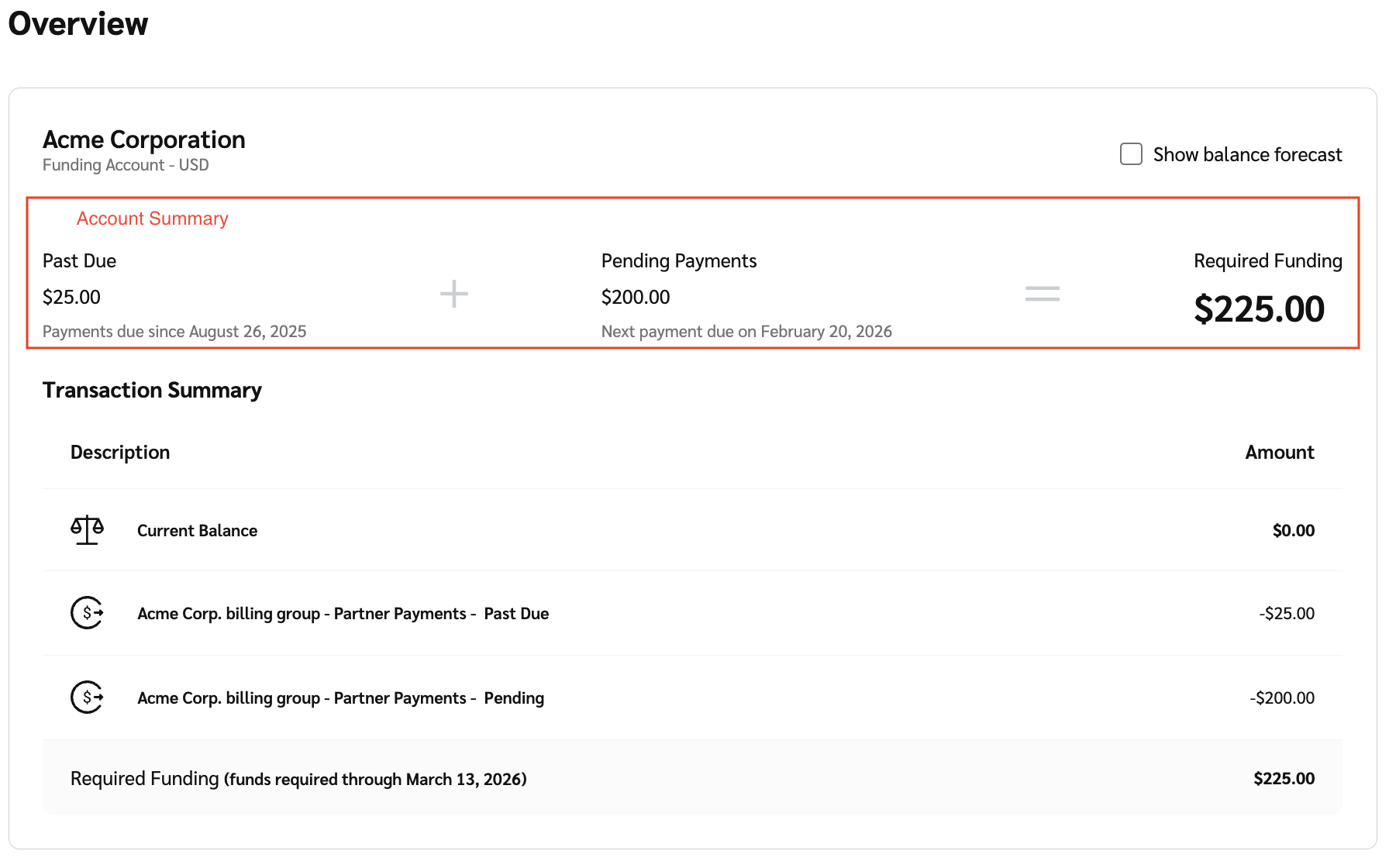
   “ *财务总览* ”页面会显示您的注资账户，并细分如下内容：

   * **账户摘要：** 您账户所需总注资的明细。所需注资细分为 *逾期*, *待处理付款* 和 *所需注资。* 请参阅下方的 *账户摘要参考* 和 *所需注资场景* 了解更多信息。
   * **交易摘要：** 您的注资账户余额，以及在系统当前交易情况下，为在 45 天窗口期内保持充足资金您需要支付的金额。请参阅 *交易摘要参考* 了解更多信息。
   * **订阅：** 这会显示为单独的小组件，并显示您的 [订阅详情](/brand/zh/what-would-you-like-to-learn-about/platform-features/finance/your-subscription/view-your-impactcom-subscription-and-usage-details.md) 以及您账户中包含的任何附加项。

     <div data-with-frame="true"><figure><img src="/files/cafdde65d30f5c992b663e72cd98d554a2872d84" alt=""><figcaption></figcaption></figure></div>

<details>

<summary>交易摘要参考</summary>

| 说明                                                     | 说明                                                                                                                                                                  |
| ------------------------------------------------------ | ------------------------------------------------------------------------------------------------------------------------------------------------------------------- |
| 当前余额                                                   | 您当前的注资账户余额。                                                                                                                                                         |
| 待入账存款                                                  | <p>所有尚未清算的自动清算所（ACH）待处理付款总额。</p><p><strong>注意：</strong> 这些付款在发起存款后需要 3–5 个工作日处理。</p>                                                                                |
| impact.com 费用 - <mark style="color:$danger;">逾期</mark> | <p>未结清的 <a href="/pages/66e1461e34dde10ec5c7086b4a83b836d92bab88">impact.com 费用</a>.</p><p>选择 <strong>impact.com 费用</strong> 以查看发票详情的下钻信息，状态为 <em>逾期</em> 。</p>     |
| 合作伙伴付款 - <mark style="color:$danger;">逾期</mark>        | <p>合作伙伴付款，包括已锁定的合同成本以及已到预定清算日期但因您的注资账户资金不足而无法结算的已处理合作伙伴资金转账。</p><p>选择 <strong>合作伙伴付款</strong> 以查看 <em>逾期合作伙伴付款</em> 发票详情的下钻信息。</p>                                  |
| 待处理的 impact.com 费用                                     | <p>即将到来的总额 <a href="/pages/66e1461e34dde10ec5c7086b4a83b836d92bab88">impact.com 费用</a>.</p><p>选择 <strong>impact.com 费用</strong> 以查看发票详情的下钻信息，状态为 <em>未到期</em> 。</p> |
| 待处理的合作伙伴付款                                             | <p>即将到来的合作伙伴付款总额。这些付款包括将在未来 45 天内清算的费用，无论它们是否已锁定。</p><p>选择 <strong>合作伙伴付款</strong> 以查看 <em>即将到来的合作伙伴付款</em> 发票详情的下钻信息。</p>                                          |
| 所需注资                                                   | 覆盖您所有待处理和逾期付款所需的资金总额。                                                                                                                                               |

</details>

<details>

<summary>账户摘要参考</summary>

| 字段    | 说明                                   |
| ----- | ------------------------------------ |
| 逾期    | 显示未在到期日之前支付的付款总额。                    |
| 待处理付款 | 显示已安排但尚未到期的付款。这包括未来到期的即将产生费用或合作伙伴付款。 |
| 所需注资  | 为覆盖逾期和待处理付款而添加到您的注资账户中的资金总额。         |

</details>

<details>

<summary>所需注资场景</summary>

|             |                                                                                                                                                                             |
| ----------- | --------------------------------------------------------------------------------------------------------------------------------------------------------------------------- |
| **场景**      | **说明**                                                                                                                                                                      |
| 您有逾期付款      | 如果您有逾期付款，余额将反映您需要 [注资](/brand/zh/what-would-you-like-to-learn-about/platform-features/finance/add-funds-to-your-funding-account/deposit-funds-into-your-account.md) 以及截止时间。 |
| 您的付款均已是最新状态 | 如果您的付款均为最新状态，则会显示您当前的余额以及在要求日期前的最低存款金额。                                                                                                                                     |

</details>

3. 您也可以选择 ![](/files/48509e0f0c9ae68203294f8aae7777211a4315e1) **\[未选中复选框]** **显示余额预测** 以查看您的 *余额预测*。将光标悬停在图表上可查看具体日期。

   * 您的 *余额预测* 是一个 45 天的时间序列图，从当前日期开始并延伸到未来 45 天。该图根据您当前余额和即将发生的交易，直观显示您的注资账户何时可能资金耗尽。

   <div data-with-frame="true"><figure><img src="/files/d590e74d41f3ed069e3450558714d40356003c33" alt=""><figcaption></figcaption></figure></div>


---

# Agent Instructions
This documentation is published with GitBook. GitBook is the documentation platform designed so that both humans and AI agents can read, navigate, and reason over technical content effectively. Learn more at gitbook.com.

## Querying This Documentation
If you need additional information that is not directly available in this page, you can query the documentation dynamically by asking a question.

Perform an HTTP GET request on the current page URL with the `ask` query parameter:

```
GET https://help.impact.com/brand/zh/what-would-you-like-to-learn-about/platform-features/finance/add-funds-to-your-funding-account/your-funding-account-overview-explained.md?ask=<question>
```

The question should be specific, self-contained, and written in natural language.
The response will contain a direct answer to the question and relevant excerpts and sources from the documentation.

Use this mechanism when the answer is not explicitly present in the current page, you need clarification or additional context, or you want to retrieve related documentation sections.
