> For the complete documentation index, see [llms.txt](https://help.impact.com/llms.txt). Markdown versions of documentation pages are available by appending `.md` to page URLs; this page is available as [Markdown](https://help.impact.com/brand/zh/what-would-you-like-to-learn-about/platform-features/finance/add-funds-to-your-funding-account/manage-your-payment-methods.md).

# 管理您的付款方式

您可以在 impact.com 上创建、移除和更新您的信用卡和自动清算所（ACH）信息。

#### 添加付款方式

1. 从顶部导航栏中选择 **你的余额** → **设置**.
2. 在左侧，位于 *设置*旁边，选择 [**付款方式**](https://app.impact.com/secure/advertiser/finance/fr/payment-methods/ui.ihtml).
3. 在 *付款方式* 页面上，选择 **添加付款方式**.
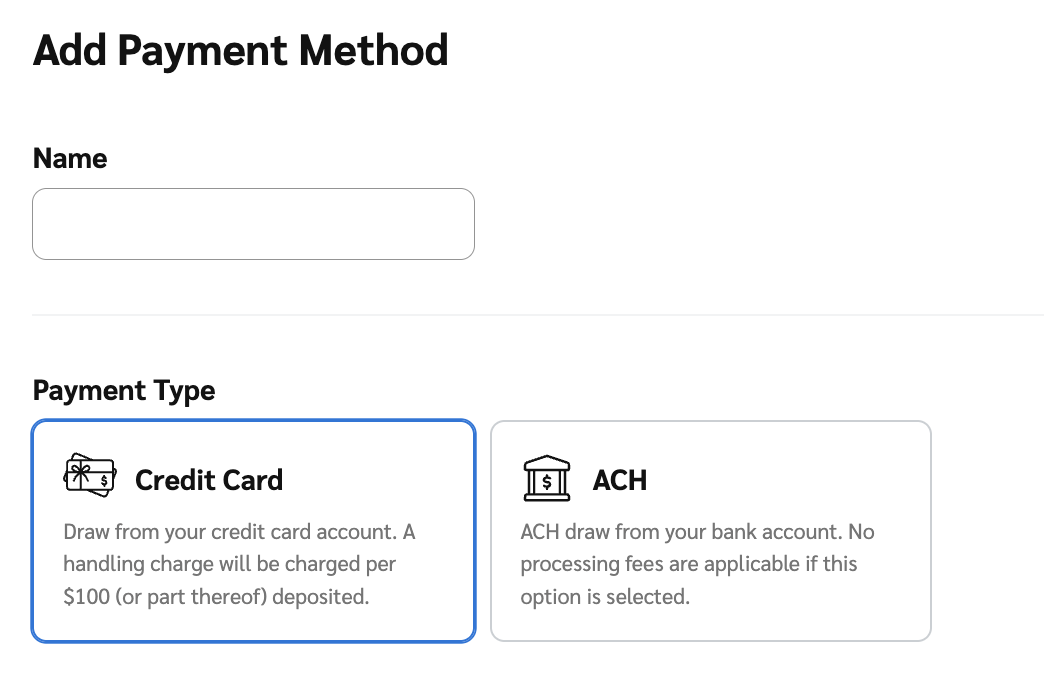
4. 选择您要创建的 *付款方式* ，可以是 **信用卡** 或 **ACH**.
   * 信用卡存款需支付处理费。应用商品及服务税（GST）后，总金额可能会略有增加。

     <div data-with-frame="true"><figure><img src="/files/fde704dde77ec4f5f09c1c1c404e99816282b3a8" alt="" width="375"><figcaption></figcaption></figure></div>
5. 输入您所选付款方式的详细信息。请参阅下方的 *信用卡详细信息* 和 *银行账户详细信息* 参考内容以了解更多信息。

<details>

<summary>信用卡详细信息参考</summary>

输入您的 *信用卡详细信息* 如果您已选择添加信用卡作为付款方式。

| 数据输入字段 | 描述                                       |
| ------ | ---------------------------------------- |
| 名称     | 您想为此付款方式使用的名称。                           |
| 卡号     | 这是您银行卡上的唯一编号。它用于识别您的账户。                  |
| 到期日期   | 这是您的银行卡将不再有效的日期。                         |
| CVV    | 这是一个 3 位或 4 位数的安全代码。它用于验证进行交易的人是否为合法持卡人。 |

</details>

<details>

<summary>银行账户详细信息参考</summary>

输入您的 *银行账户详细信息* 如果您已选择将 ACH 添加为付款方式。

| 数据输入字段    | 描述                                                                                       |
| --------- | ---------------------------------------------------------------------------------------- |
| 名称        | 您想为此付款方式使用的名称。                                                                           |
| 账户类型      | 从 ![](/files/9ee7bd3c79aae4d0667377d18611647c3469f8d1) **\[下拉菜单]**&#x4E2D;选择您将使用的银行账户类型。 |
| 账户持有人     | 拥有该银行账户的个人或实体的全名。                                                                        |
| 账户号码      | 由您的金融机构分配给您特定银行账户的唯一编号。                                                                  |
| 路由号码（ABA） | 这是一个 9 位数代码，用于识别您的特定银行或信用合作社。它相当于您银行的地址，将资金导向正确的金融机构。                                    |

</details>

6. 选择 **保存** 在左下角。

{% hint style="success" %}
**注意：** 同一时间只能激活一张信用卡和一种 ACH 付款方式。在添加新的付款方式之前，您需要移除现有的付款方式。请按照以下步骤移除现有的付款方式。
{% endhint %}

#### 查看、编辑和移除付款方式

您可以 **查看**, **编辑** 和 **移除** 付款方式，位于 *付款方式* 页面上。

<div data-with-frame="true"><figure><img src="/files/773c679ad374c8d43bf9d07cc20244261915fcae" alt=""><figcaption></figcaption></figure></div>

{% tabs %}
{% tab title="查看" %}

1. 从顶部导航栏中选择 **你的余额** → **设置**.
2. 在左侧，位于 *设置*旁边，选择 [**付款方式**](https://app.impact.com/secure/advertiser/finance/fr/payment-methods/ui.ihtml).
3. 将鼠标悬停在 *付款方式* 您要查看的项目上，然后选择 ![](/files/48274f9251fd79e93a99aad7b4393690b07a61c9) **\[更多]** → **查看**.
   {% endtab %}

{% tab title="编辑" %}

1. 从顶部导航栏中选择 **你的余额** → **设置**.
2. 从左侧导航菜单中，在 *设置*旁边，选择 [**付款方式**](https://app.impact.com/secure/advertiser/finance/fr/view-edit-payment-method-flow.ihtml?u=%2Fsecure%2Ffinance%2Fapp%2Fview-edit-payment-method-flow.ihtml).
3. 将鼠标悬停在 *付款方式* 您要编辑的项目上，然后选择 **编辑**.
4. 更新您所选付款方式的详细信息。
5. 选择 **保存** 在左下角。
   {% endtab %}

{% tab title="移除" %}

1. 从顶部导航栏中选择 **你的余额** → **设置**.
2. 从左侧导航菜单中，在 *设置*旁边，选择 [**付款方式**](https://app.impact.com/secure/advertiser/finance/fr/payment-methods/ui.ihtml).
3. 将鼠标悬停在 *付款方式* 您要移除的项目上，然后选择 ![](/files/48274f9251fd79e93a99aad7b4393690b07a61c9) **\[更多]** → **移除**.
4. 选择 **确认** 如果您确定要移除您的付款方式。

   <div data-with-frame="true"><figure><img src="/files/8c3c4fa68c99715f8b61a26d70ef2b6ca3a99632" alt="" width="375"><figcaption></figcaption></figure></div>

{% endtab %}
{% endtabs %}


---

# Agent Instructions
This documentation is published with GitBook. GitBook is the documentation platform designed so that both humans and AI agents can read, navigate, and reason over technical content effectively. Learn more at gitbook.com.

## Querying This Documentation
If you need additional information that is not directly available in this page, you can query the documentation dynamically by asking a question.

Perform an HTTP GET request on the current page URL with the `ask` query parameter:

```
GET https://help.impact.com/brand/zh/what-would-you-like-to-learn-about/platform-features/finance/add-funds-to-your-funding-account/manage-your-payment-methods.md?ask=<question>
```

The question should be specific, self-contained, and written in natural language.
The response will contain a direct answer to the question and relevant excerpts and sources from the documentation.

Use this mechanism when the answer is not explicitly present in the current page, you need clarification or additional context, or you want to retrieve related documentation sections.