> For the complete documentation index, see [llms.txt](https://help.impact.com/llms.txt). Markdown versions of documentation pages are available by appending `.md` to page URLs; this page is available as [Markdown](https://help.impact.com/brand/zh/what-would-you-like-to-learn-about/platform-features/cross-channel-performance-insights/optimize-reports/incrementality-dashboard-explained.md).

# 增量仪表盘说明

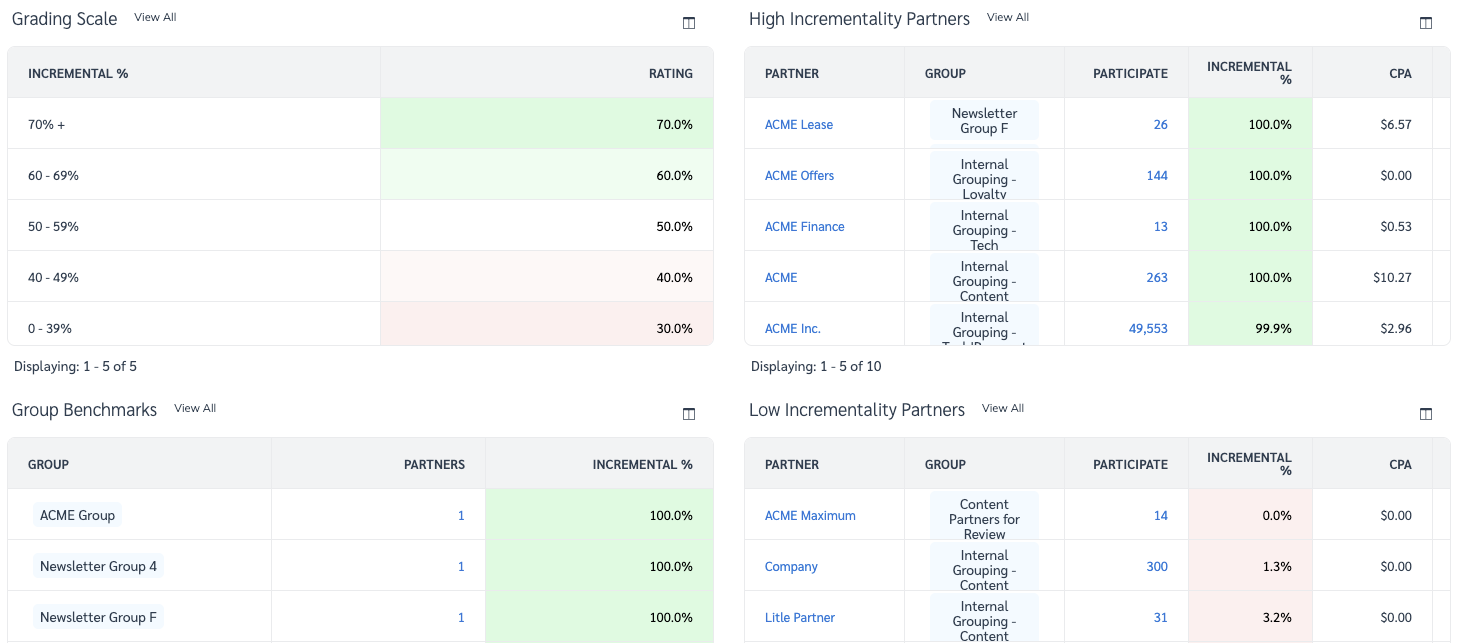
增量仪表盘包含 3 份独特报告，旨在帮助你了解每个合作伙伴为你的项目带来了多少增量价值、移除合作伙伴可能会如何影响你的增量销售，以及在哪些方面存在提升高价值合作关系的机会。本文将分解这 3 份报告，并让你更好地了解如何使用它们来推动项目增长。了解更多关于 [Optimize Essentials & Pro](/brand/zh/what-would-you-like-to-learn-about/platform-features/cross-channel-performance-insights/compare-optimize-essentials-and-pro-tiers.md).

#### 为什么衡量增量很重要？

仅仅看到每个客户旅程中的最后一次点击是不够的。你需要知道各方如何为最终购买做出贡献。仅分析每笔销售的最后接触点可能会歪曲事实，并错误归因于那些在转化路径中产生了重大影响的合作伙伴。衡量合作伙伴和渠道的增量效果可确保正确归因给合作伙伴，并优化表现。在以下内容中了解更多 [增量常见问题](/brand/zh/what-would-you-like-to-learn-about/platform-features/cross-channel-performance-insights/optimize-reports/incrementality-faq.md).

#### 访问增量仪表盘

1. 在左侧导航栏中，选择 ![](/files/dd9b9b71e0a8abffbc19dd6a3c4d28626449f744) **\[Optimize]** → **参与价值** → [增量](https://app.impact.com/secure/advertiser/optimize/Adv_Attribution_Report/r2119/report/viewReport.report?handle=insights_incrementality).
2. 调整筛选条件以满足你的需求，并选择 ![](/files/34cdd2217d627a308c301c2567d5dfe7d669a2cc) **\[Search]**.

   * 请参阅下方的 *Filter reference* 下方部分，了解更多关于筛选器的信息。

   <div data-with-frame="true"><figure><img src="/files/0f7799931e3250980daa32195fcb23b2afe37401" alt="" width="563"><figcaption></figcaption></figure></div>

<details>

<summary>Filter reference</summary>

| 筛选     | 说明                                                                                                                                                                                  |
| ------ | ----------------------------------------------------------------------------------------------------------------------------------------------------------------------------------- |
| 日期范围   | <p>按特定日期范围筛选数据。</p><p>• 至少选择 30 天，以获得具有统计显著性的洞察。</p>                                                                                                                                |
| 衡量     | 选择你希望查看与以下内容相关的数值： **收入** 或 **行动** 由合作伙伴驱动。                                                                                                                                         |
| 组      | 按以下内容筛选结果： [Partner Groups](/brand/zh/what-would-you-like-to-learn-about/platform-features/reach-out-to-partners/partner-groups/create-and-manage-partner-groups.md).               |
| 客户状态   | 按以下条件筛选结果： [客户类型](/brand/zh/what-would-you-like-to-learn-about/platform-features/tracking/set-up-tracking/configure-customer-status-mapping.md)。你可以选择查看 **全部**, **新建**，或 **回头** 客户。 |
| 最低参与次数 | 按所驱动的行动量阈值筛选结果。                                                                                                                                                                     |
| 事件类型   | 选择 [事件类型](/brand/zh/what-would-you-like-to-learn-about/platform-features/event-types/event-types-explained.md) 以查看合作伙伴贡献数据。                                                         |

</details>

#### 评分标准

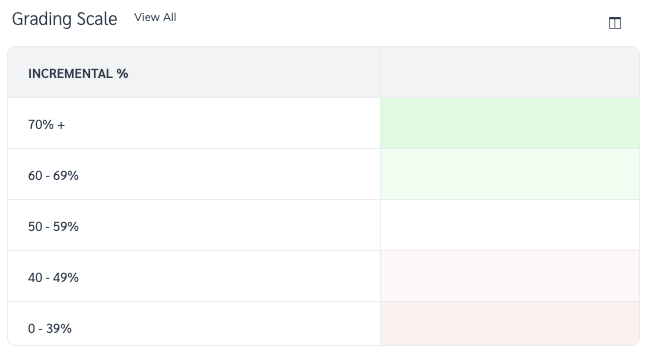
评分标准会按百分比向你展示合作伙伴的增量效果，从低（0%）到优秀（100%），并为这些百分比分配颜色，以显示仪表盘上 3 份报告的条件格式是如何确定的。 *增量仪表盘* 屏幕上的条件格式是如何确定的。

<div data-with-frame="true"><figure><img src="/files/45ab0ea8362e2f609c678fc6a620dce4800b2953" alt="" width="484"><figcaption></figcaption></figure></div>

#### 组别基准报告

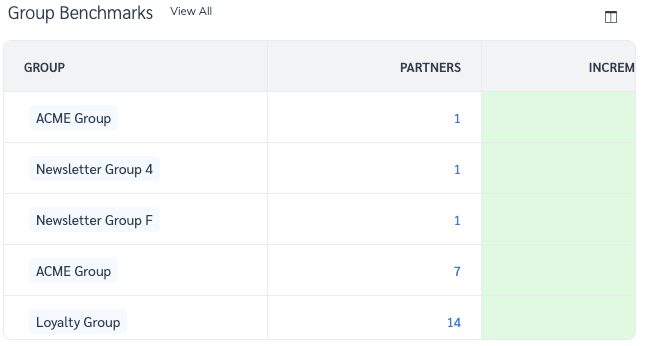
你可以使用组别基准报告查看你的 [合作伙伴组](/brand/zh/what-would-you-like-to-learn-about/platform-features/reach-out-to-partners/partner-groups/create-and-manage-partner-groups.md) 的增量价值，并将合作伙伴的增量价值与其同行进行比较。

选择 **查看全部** 旁的报告名称，访问 [按合作伙伴划分的增量报告](/brand/zh/what-would-you-like-to-learn-about/platform-features/cross-channel-performance-insights/optimize-reports/incrementality-by-partner-report.md).

<div data-with-frame="true"><figure><img src="/files/7025578bd37de55abdeba7e0bc5af13e18340b6c" alt="" width="485"><figcaption></figcaption></figure></div>

#### 高增量和低增量合作伙伴报告

{% tabs %}
{% tab title="高" %}
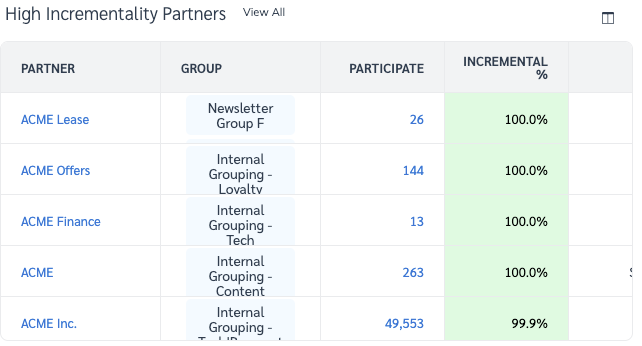
以下是为你的项目贡献最多增量价值的前 10 个合作伙伴。具有较高 *单独*, *引入*，或 *接近* 百分比的合作伙伴将具有较高的增量价值。

选择 **查看全部** 旁的报告名称，访问 [按合作伙伴划分的增量报告](/brand/zh/what-would-you-like-to-learn-about/platform-features/cross-channel-performance-insights/optimize-reports/incrementality-by-partner-report.md).

* 请参阅下方的 *报告列参考* 下方部分，了解更多关于此表中显示的数据的信息。

<div data-with-frame="true"><figure><img src="/files/2ab6316d7f4777e14e74d66e48b06de0f7cadfe3" alt="" width="482"><figcaption></figcaption></figure></div>
{% endtab %}

{% tab title="低" %}
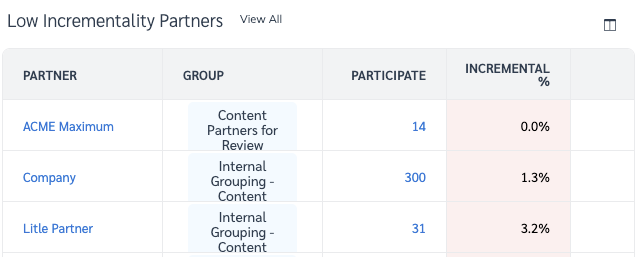
以下是为你的项目贡献最少增量价值的后 10 个合作伙伴。具有较低 *单独*, *引入*，或 *接近* 百分比的合作伙伴将具有较低的增量价值。

选择 **查看全部** 以访问 [按合作伙伴划分的增量报告](/brand/zh/what-would-you-like-to-learn-about/platform-features/cross-channel-performance-insights/optimize-reports/incrementality-by-partner-report.md).

* 请参阅下方的 *报告列参考* 下方部分，了解更多关于此表中显示的数据的信息。

<div data-with-frame="true"><figure><img src="/files/be941aa81bddb79dfd2ac079ea6ba20777c1ec1b" alt="" width="477"><figcaption></figcaption></figure></div>
{% endtab %}
{% endtabs %}


---

# Agent Instructions
This documentation is published with GitBook. GitBook is the documentation platform designed so that both humans and AI agents can read, navigate, and reason over technical content effectively. Learn more at gitbook.com.

## Querying This Documentation
If you need additional information that is not directly available in this page, you can query the documentation dynamically by asking a question.

Perform an HTTP GET request on the current page URL with the `ask` query parameter, and the optional `goal` query parameter:

```
GET https://help.impact.com/brand/zh/what-would-you-like-to-learn-about/platform-features/cross-channel-performance-insights/optimize-reports/incrementality-dashboard-explained.md?ask=<question>&goal=<endgoal>
```

`ask` is the immediate question: it should be specific, self-contained, and written in natural language.
`goal` is optional and describes the broader end goal you are ultimately trying to accomplish on behalf of the user. GitBook uses it to tailor the answer towards what is most useful for that goal.

The response will contain a direct answer to the question and relevant excerpts and sources from the documentation.

Use this mechanism when the answer is not explicitly present in the current page, you need clarification or additional context, or you want to retrieve related documentation sections.