> For the complete documentation index, see [llms.txt](https://help.impact.com/llms.txt). Markdown versions of documentation pages are available by appending `.md` to page URLs; this page is available as [Markdown](https://help.impact.com/brand/zh/what-would-you-like-to-learn-about/platform-features/cross-channel-performance-insights/opt-in-to-the-impactcom-consortium.md).
# 选择加入 impact.com 联盟
impact.com 联盟是跨设备匹配的最高级别。选择使用 impact.com 的身份联盟后,您可以更深入地了解您的消费者在转化路径中跨设备移动的方式。
所有数据都会匿名化,impact.com 用于关联跨渠道洞察的标识符绝不会与其用户共享。impact.com 绝不会在任何时候与其他品牌共享任何可识别数据。
{% hint style="warning" %}
**重要:** 选择加入 impact.com 联盟后,您同意与其他品牌共享并接收经匿名化的已跟踪流量触点——您不会失去对自己数据的所有权。
{% endhint %}
#### 选择加入 impact.com 联盟
1. 从顶部导航栏中,选择  **\[用户资料] → 设置**.
2. 在右侧,位于 *跟踪*,选择 **常规**.
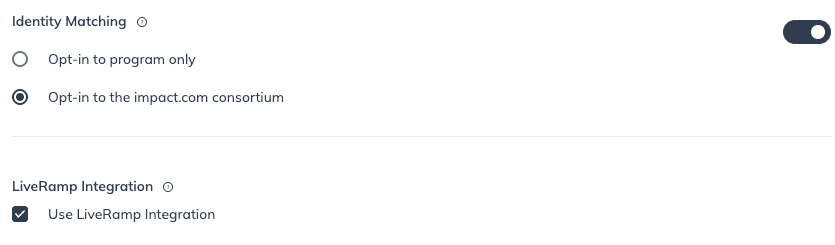
3.  打开开关 **身份匹配**.
4. 选择 **选择加入 Impact 联盟**.
5. 选择 **保存**.
---
# Agent Instructions
This documentation is published with GitBook. GitBook is the documentation platform designed so that both humans and AI agents can read, navigate, and reason over technical content effectively. Learn more at gitbook.com.
## Querying This Documentation
If you need additional information that is not directly available in this page, you can query the documentation by asking a question.
Perform an HTTP GET request on the following URL with the `ask` and `goal` query parameters:
```
GET https://help.impact.com/brand/zh/what-would-you-like-to-learn-about/platform-features/cross-channel-performance-insights/opt-in-to-the-impactcom-consortium.md?ask=&goal=
```
`ask` is the immediate question: it should be specific, self-contained, and written in natural language.
`goal` is what the user is ultimately trying to achieve, the reason they need the answer. Sharing it helps GitBook give you a better, more relevant answer. A goal is most helpful when it describes the outcome the user wants rather than restating the question. For example, with `ask=how do I create an API token`, a goal like `automate deployments from our CI pipeline` lets GitBook tailor the answer to that use case.
The response will contain a direct answer to the question and relevant excerpts and sources from the documentation.
Use this mechanism when the answer is not explicitly present in the current page, you need clarification or additional context, or you want to retrieve related documentation sections.