> For the complete documentation index, see [llms.txt](https://help.impact.com/llms.txt). Markdown versions of documentation pages are available by appending `.md` to page URLs; this page is available as [Markdown](https://help.impact.com/brand/zh/what-would-you-like-to-learn-about/performance-program/performance-program-reports/competitive-insights/finance-benchmark-report/finance-benchmark-overview.md).
# 金融基准概览
该 *财务基准概览* 是对您的合作伙伴计划与您竞争细分市场中合作伙伴计划平均表现之间关键指标的比较分析。在本文中,您将学习如何使用仪表板的不同部分,更好地了解您的计划与竞争对手相比的情况。
#### 访问报告
1. 从左侧导航菜单中,选择  **\[竞争洞察]** → **财务基准 → 概览**.
2. 在页面顶部,下方 *财务基准概览*,筛选您想查看的数据。
筛选项参考
| 筛选器 | 说明 |
| ---- | ------------------------------------------------------------------------------------------------------------------------------------------------------------------------------------------------------------- |
| 季度 | 按您要查看基准数据的特定 3 个月期间进行筛选。 |
| 项目 | 按您要查看基准数据的项目进行筛选。 |
| 地区 | 按您要查看基准数据的地区进行筛选。 |
| 垂直行业 | 按您要查看基准数据的市场细分进行筛选。 |
| 漏斗阶段 | 选择要查看漏斗顶部还是底部。
• 初始行动 将数据限制为向潜在客户介绍转化旅程的合作伙伴。在此阶段,通常尚未发生资金交换,因此给予合作伙伴的任何报酬都相对较少。
• 最终行动 将数据限制为已实现您期望最终目标的合作伙伴。这涉及资金交换,例如存入账户的资金,或发放贷款或信用卡。对合作伙伴的报酬通常会更高。
|
初始行动和最终行动示例
| 金融产品 | 初始行动示例 | 最终行动示例 |
| ---- | --------- | ------------------ |
| 保险 | 潜在客户,报价 | 购买 |
| 贷款 | 提交申请,申请批准 | 已放款贷款 |
| 银行业务 | 创建账户,申请批准 | 账户已注资,达到门槛(例如最低余额) |
| 信用卡 | 提交申请,申请批准 | 发卡 |
| 信贷服务 | 潜在客户,创建账户 | 订阅,达到门槛(例如关联银行账户) |
| 投资 | 创建账户,申请批准 | 账户已注资,达到门槛(例如最低余额) |
| 加密货币 | 创建账户 | 账户已注资,达到门槛(例如最低余额) |
{% hint style="info" %}
**注意:** 应用下载通常会针对银行和信贷服务等类别进行追踪。虽然应用下载可以是可计费事件,但它们被视为与从初始到最终行动的主要转化漏斗分开的事件。
{% endhint %}
3. 查看您的垂直行业洞察细分:
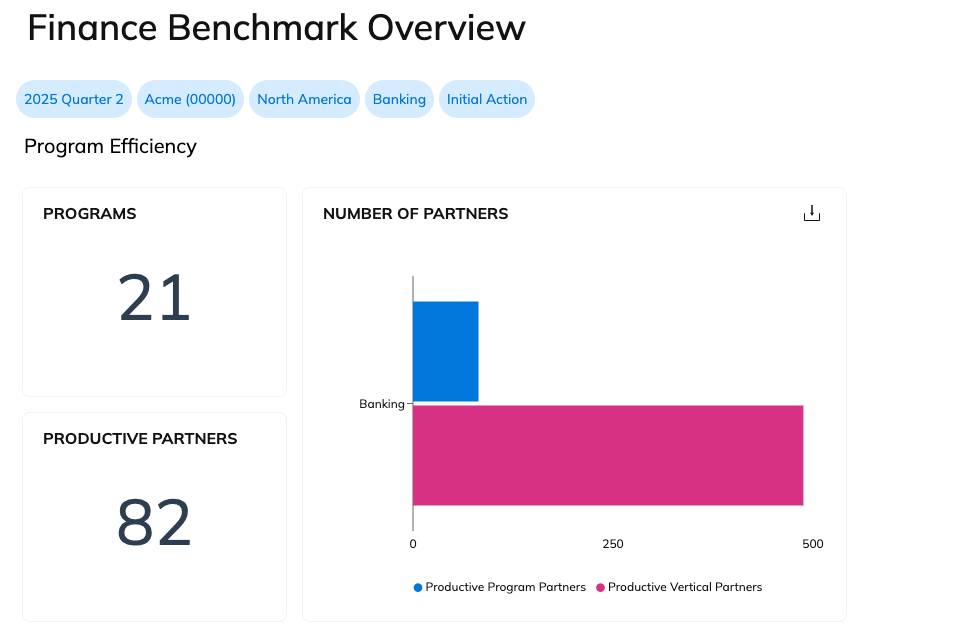
项目效率
项目效率显示您所在垂直行业中的项目数量和有产出的合作伙伴数量。您还可以将您项目中的有产出合作伙伴数量与整个垂直行业中的有产出合作伙伴总数进行比较。
一个 **有产出** 合作伙伴是指在所选季度至少带来过一次行动的合作伙伴。
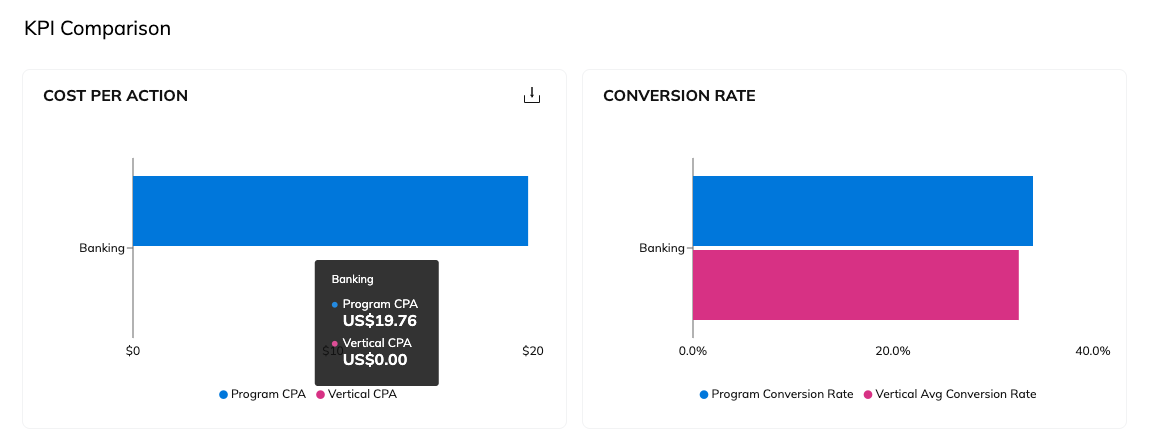
KPI 对比
将您的每次行动成本和转化率与所选垂直行业中的其他项目进行比较。
将鼠标悬停在图表上查看具体数值。
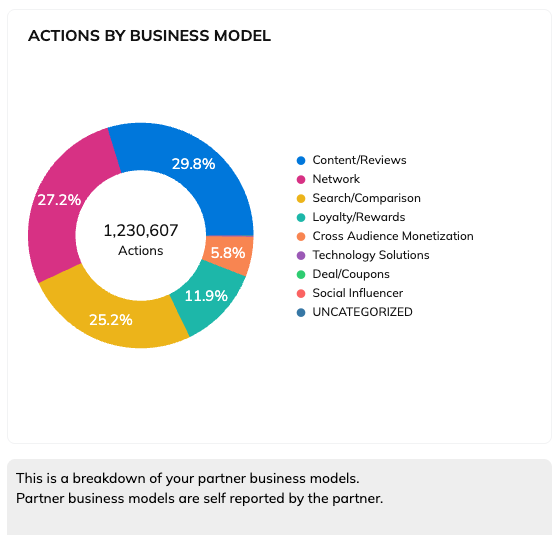
项目多样性
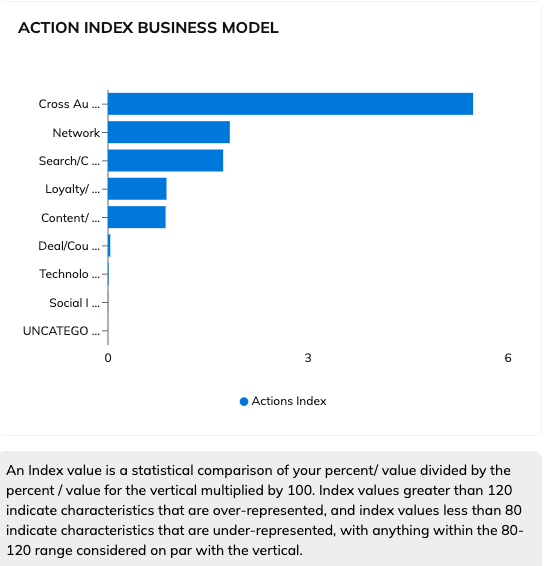
该 *项目多样性* 部分包含两张图表: *按业务模式划分的行动* 和 *行动指数(业务模式)*.
{% hint style="info" %}
**注意:** 如果您的任何合作伙伴未标识其主要推广方式,则该合作伙伴带来的收入将不会被分类。
{% endhint %}
在……中 *按业务模式划分的行动* 图表中,您可以查看来自不同业务模式的合作伙伴所带来的行动数量。
使用 *行动指数(业务模式)* 图表,用于比较您在某一业务模式下的表现与您所在垂直行业中其他业务模式的表现。
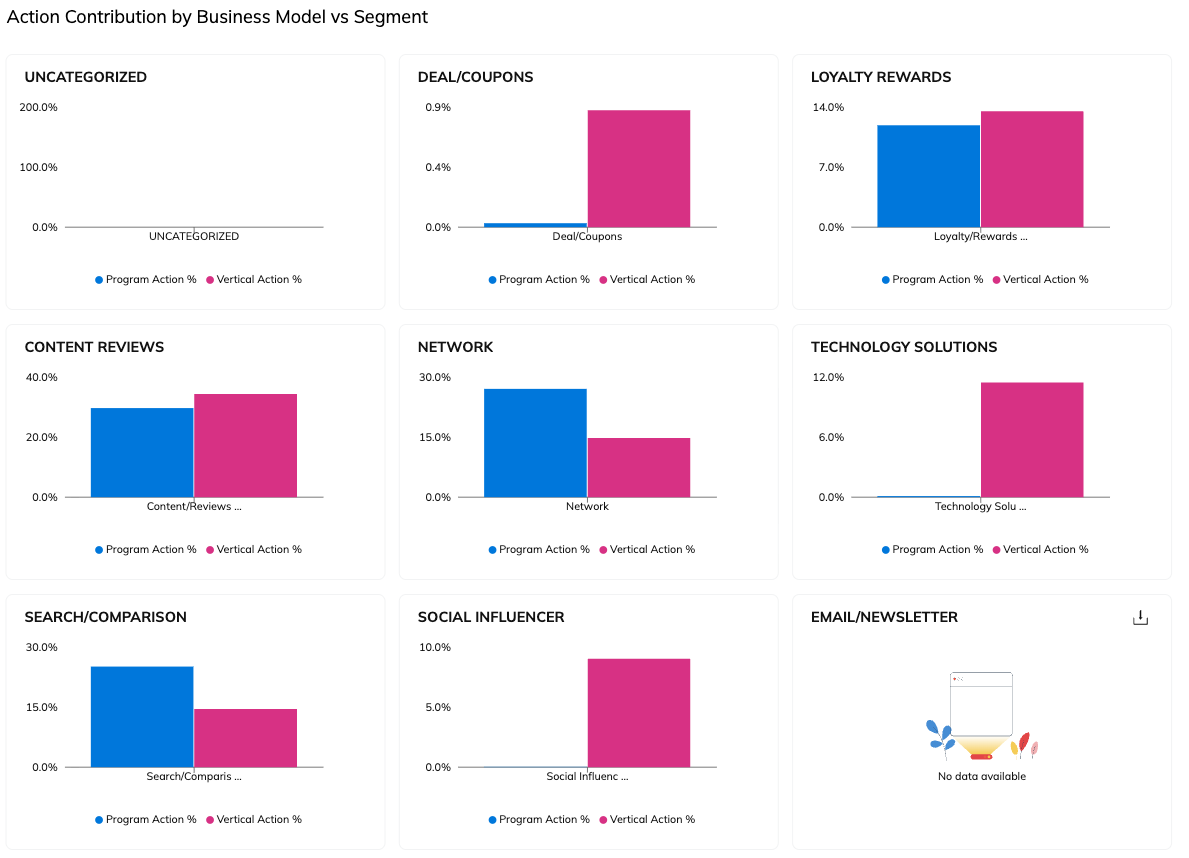
按业务模式与细分市场划分的行动贡献
该 *按业务模式与细分市场划分的行动贡献* 部分可让您比较不同业务模式在推动您项目行动方面与您所在垂直行业中其他业务模式的贡献情况。它提供的信息与 *项目多样性* 上方部分中的饼图相同,但以柱状图形式呈现,便于与行业细分进行比较。
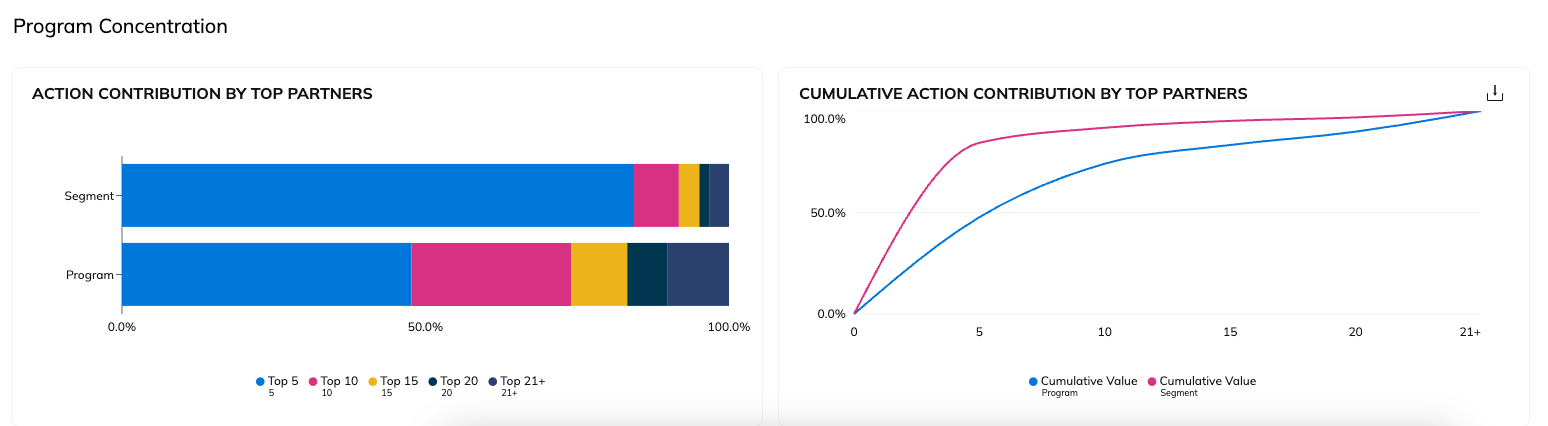
项目集中度
该 *项目集中度* 该部分显示您的表现最佳合作伙伴在您的项目中推动了多少比例的行动,并将其与行业细分进行比较。您可以通过与行业细分对比,利用此报告帮助判断您的项目是否过度依赖表现最佳的合作伙伴。
2. 此外,你还可以  **\[Share]** 或  **\[下载]** 使用报告右上角的按钮查看概览。
---
# Agent Instructions
This documentation is published with GitBook. GitBook is the documentation platform designed so that both humans and AI agents can read, navigate, and reason over technical content effectively. Learn more at gitbook.com.
## Querying This Documentation
If you need additional information that is not directly available in this page, you can query the documentation by asking a question.
Perform an HTTP GET request on the following URL with the `ask` and `goal` query parameters:
```
GET https://help.impact.com/brand/zh/what-would-you-like-to-learn-about/performance-program/performance-program-reports/competitive-insights/finance-benchmark-report/finance-benchmark-overview.md?ask=&goal=
```
`ask` is the immediate question: it should be specific, self-contained, and written in natural language.
`goal` is what the user is ultimately trying to achieve, the reason they need the answer. Sharing it helps GitBook give you a better, more relevant answer. A goal is most helpful when it describes the outcome the user wants rather than restating the question. For example, with `ask=how do I create an API token`, a goal like `automate deployments from our CI pipeline` lets GitBook tailor the answer to that use case.
The response will contain a direct answer to the question and relevant excerpts and sources from the documentation.
Use this mechanism when the answer is not explicitly present in the current page, you need clarification or additional context, or you want to retrieve related documentation sections.