> For the complete documentation index, see [llms.txt](https://help.impact.com/llms.txt). Markdown versions of documentation pages are available by appending `.md` to page URLs; this page is available as [Markdown](https://help.impact.com/brand/zh/what-would-you-like-to-learn-about/performance-program/performance-program-reports/competitive-insights/benchmarking/brand-benchmarking-overview.md).

# 品牌基准对比概览

品牌基准分析是对比您的合作伙伴计划关键指标与竞争细分市场中合作伙伴计划平均表现的分析。本文将介绍如何使用控制面板的不同部分，更好地了解您的计划与竞争对手相比的表现。

{% hint style="warning" %}
**您的身份信息在我们这里安全无虞：** 基准分析洞察基于汇总指标以及竞争细分市场中的匿名参与数据。与品牌计划相关的所有可识别信息都会在与他人共享之前删除，并与其他匿名数据合并。impact.com 不会披露任何可能暴露品牌身份或客户数据的信息。细分市场中的参与者均为匿名。
{% endhint %}

#### 访问基准概览

1. 在左侧导航栏中，选择 ![](https://1186853034-files.gitbook.io/~/files/v0/b/gitbook-x-prod.appspot.com/o/spaces%2FwMLlMoFBtKJa8ptd3zaw%2Fuploads%2Fgit-blob-81365ab1e9414f66498604921f52870f117b8cc7%2Fd33a611679a65f191574b81820ac09c98c5cc774faa6ff5a8a739a9cc7a87234.svg?alt=media) **\[竞争洞察]** → **基准 → 概览**.
2. 在 *基准概览* 页面顶部附近的筛选栏中：
   * 选择要查看基准数据的 **季度** 。
   * 选择要查看基准数据的 **地区** 。

     <div data-gb-custom-block data-tag="hint" data-style="success" class="hint hint-success"><p><strong>注意：</strong> 目前，品牌基准分析适用于 <em>北美</em>, <em>欧洲</em>和 <em>大洋洲</em>.</p></div>
   * 选择要查看基准数据的行业 **类别** 。

     <div data-gb-custom-block data-tag="hint" data-style="success" class="hint hint-success"><p><strong>注意：</strong> 目前，品牌基准分析适用于 <em>零售</em>, <em>旅游</em>和 <em>教育</em>相关计划。</p></div>
   * 您看到的筛选选项与您的计划相关。
3. 您也可以使用报告右上角的按钮，通过电子邮件发送、安排或下载概览。

#### 行业基准细分市场规模

在此部分，您可以查看计划中的合作伙伴总数，以及其中有多少是 *活跃* 或 *有成效的* 合作伙伴。

| 状态        | 说明                                    |
| --------- | ------------------------------------- |
| 合作伙伴总数    | 所选行业细分市场中加入您计划的合作伙伴总数。                |
| 活跃合作伙伴    | 本季度至少带来一次点击的合作伙伴数量。                   |
| 有成效的合作伙伴  | 本季度至少带来一次转化的合作伙伴数量。                   |
| 建议加入的合作伙伴 | impact.com 建议您的计划在所选行业细分市场中加入的合作伙伴数量。 |

#### 合作伙伴概览

“ *合作伙伴概览* ”部分会显示您计划中的合作伙伴数量、非活跃合作伙伴数量、可带来成效的合作伙伴数量、活跃但未带来成效的合作伙伴数量，以及与行业细分市场相比的合作伙伴活跃率和成效率。使用此报告可将您的计划规模与行业平均水平进行比较。

* 有关此部分所含数据的更多信息，请参阅下方的 *合作伙伴状态* 表格。

| 合作伙伴状态   | 说明                                                                       |
| -------- | ------------------------------------------------------------------------ |
| 非活跃      | *非活跃* 合作伙伴已与您签约，但在所选季度内未带来任何点击或操作。                                       |
| 活跃但未带来成效 | *活跃但未带来成效* 合作伙伴在所选季度内至少带来了一次点击，但没有带来任何操作。                                |
| 有成效      | *可带来成效* 合作伙伴在所选季度内至少带来了一次操作。                                             |
| 活跃率      | “ *活跃率* ”是指 *活跃合作伙伴* （包括 *活跃但未带来成效* 和 *可带来成效* 的合作伙伴）数量占合作伙伴总数的比例，以百分比表示。 |
| 成效率      | “ *成效率* ”是指 *可带来成效* 的合作伙伴数量占 *活跃*合作伙伴数量的比例，以百分比表示。                       |

<div data-with-frame="true"><figure><img src="https://1186853034-files.gitbook.io/~/files/v0/b/gitbook-x-prod.appspot.com/o/spaces%2FwMLlMoFBtKJa8ptd3zaw%2Fuploads%2FWaZ4e5csA3OgAE3tibLj%2Fimage%20(27).png?alt=media&amp;token=60bcbb27-d25a-4aca-9793-1bc4cdf26d43" alt=""><figcaption></figcaption></figure></div>

#### 计划效率

“ *计划效率* ”部分会将与您计划效率相关的指标（例如 AOV、单次操作成本、转化率、ROAS、有效 CPC、佣金率和固定佣金指标）与行业细分市场进行比较。将光标悬停在图表上，即可查看精确数值。

<div data-with-frame="true"><figure><img src="https://1186853034-files.gitbook.io/~/files/v0/b/gitbook-x-prod.appspot.com/o/spaces%2FwMLlMoFBtKJa8ptd3zaw%2Fuploads%2FfQvLfqTVGoCQVtiId1TN%2Fimage%20(28).png?alt=media&amp;token=a74d7925-a032-4d2a-86e7-234eba4a0d9d" alt=""><figcaption></figcaption></figure></div>

#### 合作伙伴类型分布

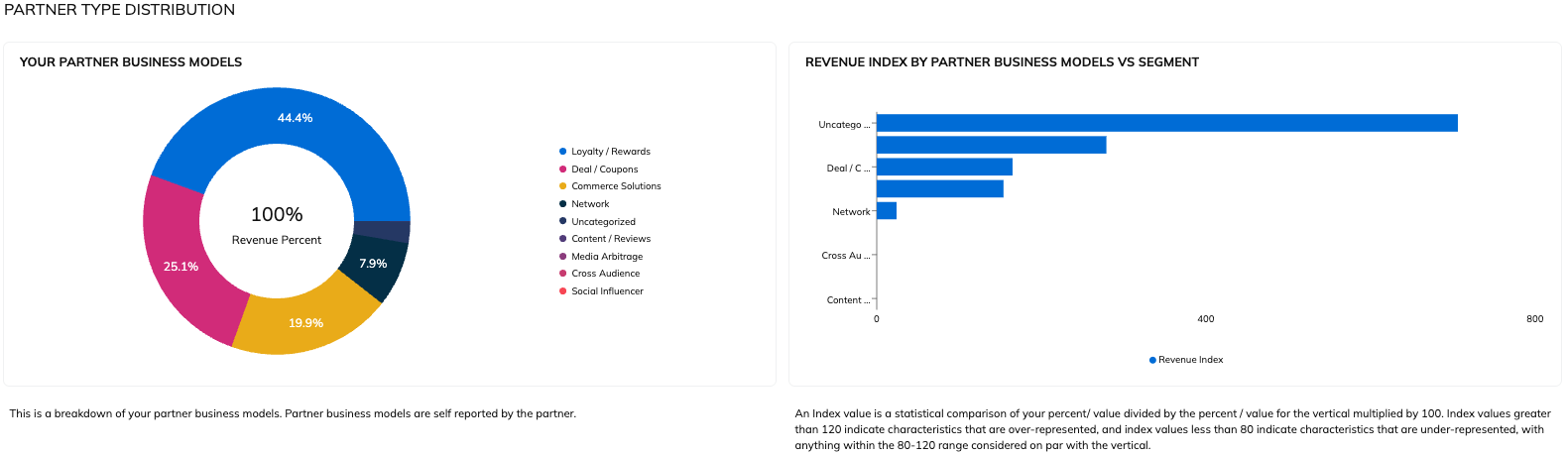
“ *合作伙伴类型分布* ”部分会按合作伙伴的主要推广方式，展示他们为您的计划带来的收入构成，并与行业细分市场进行比较。使用此报告可了解您的合作伙伴组合多样性与竞争对手相比如何。

<div data-with-frame="true"><figure><img src="https://1186853034-files.gitbook.io/~/files/v0/b/gitbook-x-prod.appspot.com/o/spaces%2FwMLlMoFBtKJa8ptd3zaw%2Fuploads%2Fgit-blob-a979a1637e0433921593aed5dd65a74139518ce1%2F70d0f2cde6d5a4521b94986579c5a929863870e2bcfb9a529104e382b8c8fae2.png?alt=media" alt=""><figcaption></figcaption></figure></div>

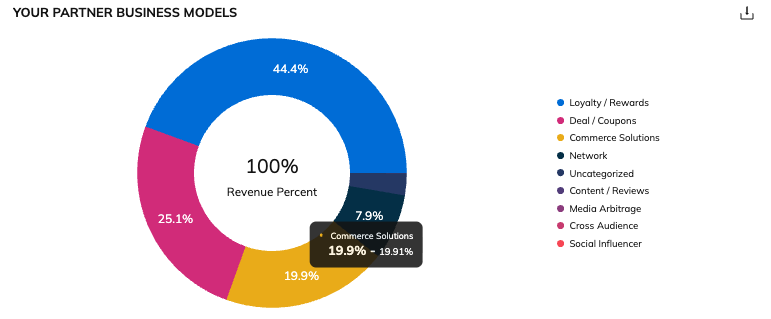
将光标悬停在 *您的合作伙伴业务模式* 饼图的某个区块上，即可查看特定推广方式带来的收入占总收入的百分比，以及该比例与该推广方式在行业细分市场中的平均水平相比如何。第一个数字表示您的收入占比，第二个数字表示行业细分市场的占比。

<div data-with-frame="true"><figure><img src="https://1186853034-files.gitbook.io/~/files/v0/b/gitbook-x-prod.appspot.com/o/spaces%2FwMLlMoFBtKJa8ptd3zaw%2Fuploads%2Fgit-blob-7c2092a63e5abb137683267bffac23e1682cbddd%2F6730f570fde784c2004f5496ed4a3fcac8b6549b480c29722d983692beb267e0.png?alt=media" alt=""><figcaption></figcaption></figure></div>

{% hint style="info" %}
**注意：** 如果您的某些合作伙伴未注明其主要推广方式，该合作伙伴带来的收入将归为 *未分类*.
{% endhint %}

#### 按合作伙伴业务模式划分的收入贡献与行业细分市场对比

“ *按合作伙伴业务模式划分的收入贡献与行业细分市场对比* 本部分提供的信息与上方的 *合作伙伴多样性* 部分中的饼图相同，但以条形图形式呈现，便于与行业板块进行比较。

<div data-with-frame="true"><figure><img src="https://1186853034-files.gitbook.io/~/files/v0/b/gitbook-x-prod.appspot.com/o/spaces%2FwMLlMoFBtKJa8ptd3zaw%2Fuploads%2FzCFY0N2fvAgsZQPrSyk4%2Fimage%20(29).png?alt=media&amp;token=088dac2c-f915-44c8-993c-9b5f03c75f13" alt=""><figcaption></figcaption></figure></div>

#### 收入集中度

“ *收入集中度* ”部分显示表现最佳的合作伙伴为您的计划带来的收入占比，并与行业板块进行比较。您可以将报告结果与行业板块进行比较，判断您的计划是否过度依赖表现最佳的合作伙伴。

<div data-with-frame="true"><figure><img src="https://1186853034-files.gitbook.io/~/files/v0/b/gitbook-x-prod.appspot.com/o/spaces%2FwMLlMoFBtKJa8ptd3zaw%2Fuploads%2FbRtK8ba1WvYrBKSp8AiL%2Fimage%20(30).png?alt=media&amp;token=bd5da715-f91f-420d-948b-98aa1185615a" alt=""><figcaption></figcaption></figure></div>

将光标悬停在横向条形图上，即可查看百分比明细。

**实用报告**

* 想了解您的合作伙伴在您的计划中的表现与行业板块相比如何？请参阅 [基准合作伙伴分析报告](https://help.impact.com/brand/zh/what-would-you-like-to-learn-about/performance-program/performance-program-reports/competitive-insights/benchmarking/benchmark-partner-analysis.md).
* 如需了解在您的细分市场中表现出色、且能为您的计划带来良好收入机会的合作伙伴推荐，请参阅 [基准推荐报告](https://help.impact.com/brand/zh/what-would-you-like-to-learn-about/performance-program/performance-program-reports/competitive-insights/benchmarking/benchmark-recommendations.md).


---

# Agent Instructions
This documentation is published with GitBook. GitBook is the documentation platform designed so that both humans and AI agents can read, navigate, and reason over technical content effectively. Learn more at gitbook.com.

## Querying This Documentation
If you need additional information that is not directly available in this page, you can query the documentation by asking a question.

Perform an HTTP GET request on the following URL with the `ask` and `goal` query parameters:

```
GET https://help.impact.com/brand/zh/what-would-you-like-to-learn-about/performance-program/performance-program-reports/competitive-insights/benchmarking/brand-benchmarking-overview.md?ask=<question>&goal=<user_goal>
```

`ask` is the immediate question: it should be specific, self-contained, and written in natural language.
`goal` is what the user is ultimately trying to achieve, the reason they need the answer. Sharing it helps GitBook give you a better, more relevant answer. A goal is most helpful when it describes the outcome the user wants rather than restating the question. For example, with `ask=how do I create an API token`, a goal like `automate deployments from our CI pipeline` lets GitBook tailor the answer to that use case.

The response will contain a direct answer to the question and relevant excerpts and sources from the documentation.

Use this mechanism when the answer is not explicitly present in the current page, you need clarification or additional context, or you want to retrieve related documentation sections.