> For the complete documentation index, see [llms.txt](https://help.impact.com/llms.txt). Markdown versions of documentation pages are available by appending `.md` to page URLs; this page is available as [Markdown](https://help.impact.com/brand/zh/what-would-you-like-to-learn-about/creator-program/recruit-creators/invite-creators-to-your-campaign.md).

# 查找并邀请创作者参加您的活动

impact.com 提供多项功能，您可以使用这些功能查找创作者并邀请他们加入您的营销活动。根据您邀请创作者加入营销活动的方式不同，他们可能会被自动接受，或需要审批。有关邀请场景和 AI 推荐的详细信息，请参阅 [创作者招募说明](/brand/zh/what-would-you-like-to-learn-about/creator-program/recruit-creators/recruiting-creators-explained.md) 和 [咨询 impact 技巧与窍门](/brand/zh/what-would-you-like-to-learn-about/platform-features/ask-impact/ask-impact-tips-and-tricks.md#get-new-partner-recommendations).

### 从创作者市场查找并邀请新创作者

{% hint style="warning" %}
**重要提示：** 要从市场邀请创作者，他们需要拥有一个有效的 impact.com 账户。
{% endhint %}

该 *创作者市场* 是一个发现工具，可帮助您查找并邀请已经在平台上活跃的创作者。&#x20;

1. 从左侧导航菜单中，选择 ![](/files/fd2b2d51e9ef2d0d5d51aec8732f6c735cfd0cb5) **\[发现]** → **查找创作者** → [**创作者市场**](https://app.impact.com/secure/advertiser/discover/radius/fr/partner_discover.ihtml).
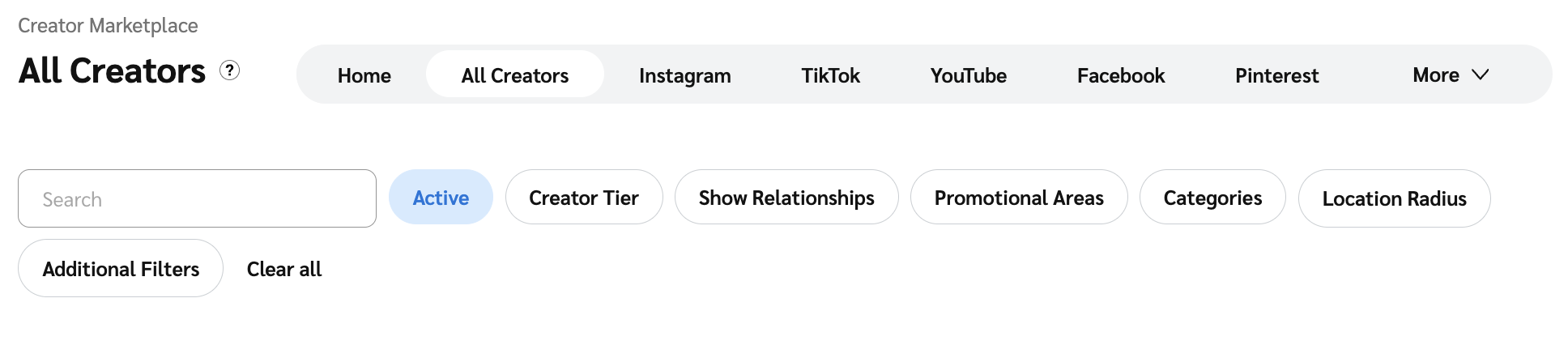
2. 使用 *市场* 页面顶部的选项卡，按特定社交渠道筛选创作者。请参阅我们的帮助文章 [查找特定类型的合作伙伴和创作者](/brand/zh/what-would-you-like-to-learn-about/performance-program/recruiting-partners/look-for-specific-types-of-partners.md) 以了解更多信息。
3. 选择社交渠道后，可使用筛选栏细化搜索。请参阅 [*筛选选项*](/brand/zh/what-would-you-like-to-learn-about/performance-program/recruiting-partners/look-for-specific-types-of-partners.md#filter-options) 参考资料以了解更多信息。

<div data-with-frame="true"><figure><img src="/files/2b8591d7a78825dac7da1799aed3e8873e484a2f" alt=""><figcaption></figcaption></figure></div>

4. 选择创作者卡片以 [查看其个人资料](/brand/zh/what-would-you-like-to-learn-about/creator-program/working-with-creators/view-a-creators-profile.md)，然后在个人资料滑出面板中，选择 **邀请** ![](/files/9ee7bd3c79aae4d0667377d18611647c3469f8d1) **\[下拉菜单]**:
   * 若仅邀请该创作者加入您的创作者营销活动，请选择 **邀请至营销活动** 并选择相应的营销活动。
   * 若邀请该创作者加入您的整个计划，请选择 **邀请至品牌** 并选择相应的合同设置。

### 从 Social Listening 查找并邀请创作者

Social Listening 允许您使用关键词在各社交平台上查找创作者发布的帖子。在您 [创建社交监听器](https://help.impact.com/brand/what-would-you-like-to-learn-about/creator-program/working-with-creators/social-listening/create-a-social-listener) 和 [找到您感兴趣的创作者](https://help.impact.com/brand/what-would-you-like-to-learn-about/creator-program/working-with-creators/social-listening/view-social-listening-results-and-dashboard) 之后，您可以邀请他们加入您的营销活动或计划。

1. 从左侧导航菜单中，选择 ![](/files/fd2b2d51e9ef2d0d5d51aec8732f6c735cfd0cb5) **\[发现]** → [**Social Listening**](https://app.impact.com/secure/advertiser/discover/protect/fr/social-listening.ihtml?u=%2Fsecure%2Fcompliance%2Fdata%2Fsocial-listening-flow.ihtml).
2. 将鼠标悬停在您想查看的监听器上，选择 **查看结果**，选择您感兴趣的帖子，然后从帖子滑出面板中选择 **查看个人资料** 。
   1. 或者，将鼠标悬停在帖子的标题上并选择 **查看个人资料**.
3. 在个人资料滑出面板中，选择 **邀请** ![](/files/9ee7bd3c79aae4d0667377d18611647c3469f8d1) **\[下拉菜单]**:
   1. 若仅邀请该创作者加入您的创作者营销活动，请选择 **邀请至营销活动** 并选择相应的营销活动。
   2. 若邀请该创作者加入您的整个计划，请选择 **邀请至品牌** 并选择相应的合同设置。
4. 选择 ![](/files/87765d47f42a38d8c7fb407cb686be5fc30a73e8) **\[电子邮件]** 在顶部，撰写您的电子邮件并选择 **发送**.
   * 您可以在电子邮件中包含注册链接。请参阅 [邀请合作伙伴加入品牌计划](/brand/zh/what-would-you-like-to-learn-about/performance-program/recruiting-partners/invite-partners-to-join-a-brands-program.md) 以了解更多信息。
   * 如果没有 ![](/files/87765d47f42a38d8c7fb407cb686be5fc30a73e8) **\[电子邮件]** 选项，则表示我们无法访问该创作者的电子邮件地址。您可以直接在社交平台上联系他们。

<div data-with-frame="true"><figure><img src="/files/4b265efda6f8741ee907214f4f69b03c3634e543" alt="" width="375"><figcaption></figcaption></figure></div>

### 从 Creator Search 查找并邀请创作者

使用 Creator Search 查找并邀请位于 impact.com 市场内外的创作者。在您 [找到您感兴趣的创作者](/brand/zh/what-would-you-like-to-learn-about/platform-features/creator-search/find-creators-with-creator-search.md) 对使用 Creator Search 工具感兴趣

1. 从左侧导航菜单中，选择 ![](/files/fd2b2d51e9ef2d0d5d51aec8732f6c735cfd0cb5) **\[发现]** → **查找创作者** → [**Creator Search**](https://app.impact.com/secure/advertiser/discover/fr/discover/creator-rt-searches.ihtml).
2. 使用顶部的选项卡和筛选器查找您感兴趣的创作者，然后选择 **获取结果。**
3. 从结果中，选择创作者以 [查看其个人资料](/brand/zh/what-would-you-like-to-learn-about/creator-program/working-with-creators/view-a-creators-profile.md)。请参阅 [*筛选栏* 和 *其他筛选器* 参考资料](/brand/zh/what-would-you-like-to-learn-about/platform-features/creator-search/find-creators-with-creator-search.md) 了解更多信息。
4. 在创作者姓名下方，您可以看到他们是否位于 impact.com 市场内：
   * **活跃**：该创作者在 impact.com 市场中处于活跃状态。他们姓名旁边的蓝色勾选标记表示他们已通过 Marketplace Verified 验证。
   * **新加入**：该创作者是 impact.com 的新用户，并在过去 90 天内获得了 Marketplace Verified 验证。他们姓名旁边的蓝色勾选标记表示他们已通过 Marketplace Verified 验证。
   * **不在 impact.com 上**：该创作者不在 impact.com 市场中。他们仍可能拥有 impact.com 账户，但可能是 [直接合作伙伴](https://help.impact.com/brand/what-would-you-like-to-learn-about/performance-program/recruiting-partners/marketplace-vs-direct-partner-recruiting-explained?q=invite+partners+to+join)、多重直接合作伙伴，或直接在 impact.com 注册，但未申请加入市场或未获批准进入市场。
5. 要邀请 impact.com 内的创作者，请选择 **邀请** ![](/files/9ee7bd3c79aae4d0667377d18611647c3469f8d1) **\[下拉菜单]**:
   * 若仅邀请该创作者加入您的营销活动，请选择 **邀请至营销活动** 并选择相应的营销活动。
   * 若邀请该创作者加入您的计划，请选择 **邀请至品牌** 并选择相应的合同设置。
6. 要邀请 impact.com 之外的创作者，请选择顶部的 ![](/files/87765d47f42a38d8c7fb407cb686be5fc30a73e8) **\[电子邮件]** ，撰写您的电子邮件，然后选择 **发送**.

   * 您可以在电子邮件中包含注册链接。请参阅 [邀请合作伙伴加入品牌计划](/brand/zh/what-would-you-like-to-learn-about/performance-program/recruiting-partners/invite-partners-to-join-a-brands-program.md) 以了解更多信息。
   * 如果没有 ![](/files/87765d47f42a38d8c7fb407cb686be5fc30a73e8) **\[电子邮件]** 选项，则 impact.com 无法访问该创作者的电子邮件地址。您可以直接在社交平台上联系他们。

   <div data-with-frame="true"><figure><img src="/files/d086f6c81a7b345b23625613c2ec6bcc1e8cc7d5" alt="" width="375"><figcaption></figcaption></figure></div>

### 从 Extended Search 查找并邀请新创作者

[Extended Search](/brand/zh/what-would-you-like-to-learn-about/creator-program/working-with-creators/extended-search-for-creator/extended-search-for-creator-explained.md) 允许您使用关键词查找市场内外的创作者，并邀请他们加入您的营销活动或品牌。

1. 从左侧导航菜单中，选择 ![](/files/fd2b2d51e9ef2d0d5d51aec8732f6c735cfd0cb5) **\[发现]** → **Extended Search** → [**所有结果**](https://app.impact.com/secure/advertiser/discover/fr/discover/creator-extended-search-results.ihtml).
   * 或者，如果仅查看特定搜索的结果，请选择 **我的搜索**，然后选择所需搜索。
2. 选择创作者卡片以 [查看其个人资料](/brand/zh/what-would-you-like-to-learn-about/creator-program/working-with-creators/view-a-creators-profile.md)，然后在个人资料滑出面板中，选择 **邀请** ![](/files/9ee7bd3c79aae4d0667377d18611647c3469f8d1) **\[下拉菜单]**.
   * 若邀请该创作者加入您的创作者营销活动，请选择 **邀请至营销活动**.
   * 若邀请该创作者加入您的整个计划，请选择 **邀请至品牌**.

### 直接邀请创作者加入营销活动

该 *Campaign Manager* 允许您通过拟议的 SOW 或营销活动邀请链接来邀请新的或已有合作关系的创作者。

1. 从左侧导航菜单中，选择 ![](/files/209022bdb234289211a24a980f6227a8684cc439) **\[Engage] → Campaign Manager →** [**创作者**](https://app.impact.com/secure/advertiser/engage/campaigns/influencer-campaign-manager-flow.ihtml).
2. 将鼠标悬停在您想邀请创作者加入的营销活动上，然后选择 **管理营销活动**.
3. 在右上角，选择 **邀请创作者**.
4. 通过以下 1 种方式直接邀请创作者：

| 选项      | 步骤                                                                                                                                                                                                                             |
| ------- | ------------------------------------------------------------------------------------------------------------------------------------------------------------------------------------------------------------------------------ |
| 默认 SOW  | <ol><li>输入您要邀请的创作者 <em>群组</em>、单个 <em>合作伙伴</em>或 <em>电子邮件地址</em> 。</li><li>选择 <strong>发送邀请</strong>.</li></ol>                                                                                                                 |
| 自定义 SOW | <ol><li>输入您要邀请的创作者 <em>群组</em>、单个 <em>合作伙伴</em>或 <em>电子邮件地址</em> 。</li><li>选择 <strong>通过自定义提案邀请</strong>.</li><li>按需修改 SOW 设置，然后选择 <strong>发送邀请</strong>.</li></ol>                                                            |
| 邀请链接    | <ol><li>选择  <strong>复制邀请链接</strong>.</li><li><p>将链接粘贴到您的社交平台上，供创作者注册加入您的营销活动。</p><ol><li>如果创作者通过这种方式注册，您需要将他们作为申请人进行处理——详情请参阅 <a href="/pages/9ca9d0390e8bd69f2fa2f69c9ac8f7f4b2252b14">管理创作者营销活动申请人</a> 。</li></ol></li></ol> |

<div data-with-frame="true"><figure><img src="/files/483985f9daee4579a93e414a063f8a5ba9e7936a" alt="" width="563"><figcaption></figcaption></figure></div>

### 撤销营销活动邀请

{% hint style="warning" %}
**警告：** 将受邀人从营销活动中移除后将无法撤销。
{% endhint %}

1. 从左侧导航菜单中，选择 ![](/files/209022bdb234289211a24a980f6227a8684cc439) **\[Engage] → Campaign Manager →** [**创作者**](https://app.impact.com/secure/advertiser/engage/campaigns/influencer-campaign-manager-flow.ihtml).
2. 将鼠标悬停在您想邀请创作者加入的营销活动上，然后选择 **管理营销活动**.
3. 确保您位于 *申请人* 选项卡中，并选择 **已邀请** 状态筛选器。
4. 将鼠标悬停在您想移除的申请人上，然后选择 ![](/files/48274f9251fd79e93a99aad7b4393690b07a61c9) **\[更多]** → **从营销活动中移除**.

<div data-with-frame="true"><figure><img src="/files/24d7663dc0c60a8c0bdf03c10bb888eaaae3a478" alt="" width="563"><figcaption></figcaption></figure></div>


---

# Agent Instructions
This documentation is published with GitBook. GitBook is the documentation platform designed so that both humans and AI agents can read, navigate, and reason over technical content effectively. Learn more at gitbook.com.

## Querying This Documentation
If you need additional information that is not directly available in this page, you can query the documentation dynamically by asking a question.

Perform an HTTP GET request on the current page URL with the `ask` query parameter:

```
GET https://help.impact.com/brand/zh/what-would-you-like-to-learn-about/creator-program/recruit-creators/invite-creators-to-your-campaign.md?ask=<question>
```

The question should be specific, self-contained, and written in natural language.
The response will contain a direct answer to the question and relevant excerpts and sources from the documentation.

Use this mechanism when the answer is not explicitly present in the current page, you need clarification or additional context, or you want to retrieve related documentation sections.