> For the complete documentation index, see [llms.txt](https://help.impact.com/llms.txt). Markdown versions of documentation pages are available by appending `.md` to page URLs; this page is available as [Markdown](https://help.impact.com/brand/zh/what-would-you-like-to-learn-about/advocate-program/manage-advocate-participants/custom-and-calculated-fields/tracking-windows-for-calculated-fields-explained.md).
# 计算字段跟踪窗口说明
{% hint style="info" %}
**注意**:查看我们关于……的文章 [计算字段](/brand/zh/what-would-you-like-to-learn-about/advocate-program/manage-advocate-participants/custom-and-calculated-fields/calculated-fields-explained.md) ,了解它们是什么以及何时有用。如果你正在寻找为你的计算字段设置追踪窗口的帮助,请参见 [设置计算字段](/brand/zh/what-would-you-like-to-learn-about/advocate-program/manage-advocate-participants/custom-and-calculated-fields/set-up-a-calculated-field.md).
{% endhint %}
追踪窗口允许你为计算字段添加基于时间的元素。你可以为任何使用求和或计数计算的计算字段添加追踪窗口。
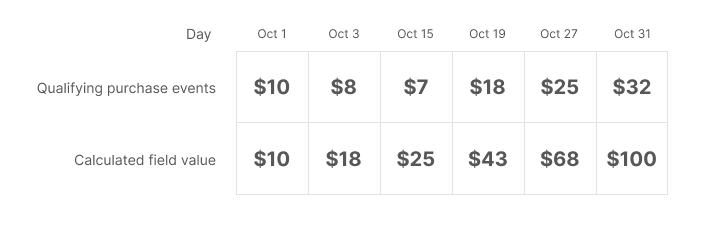
如果你希望让参与者定期累积一个数值(例如购买金额),然后根据该数值给予奖励,那么在计算字段中包含追踪窗口会很有用。事件数据只会在你选择的窗口内进行计算——随着时间推移和窗口更新,之前的数据将不会被考虑在内。
你可以使用该字段中的值来设置项目规则,以激励参与者与你的目标保持一致,例如:
* **最近活跃度**:鼓励沉睡参与者重新激活或进行新的购买。
* **频率**:激励你最频繁的客户持续与你的项目和服务互动。
* **金额价值**:奖励达到特定购买金额门槛的高消费用户。
在设置计算字段时,你可以从两种追踪窗口类型中进行选择:
{% tabs %}
{% tab title="固定追踪窗口" %}
固定窗口允许你在一个日历日、周、月或年内追踪某个数值。窗口从该时间段开始时启动,并在结束时滚动到下一周期。开始和结束时间将取决于你 impact.com 账号的时区设置。
当你创建带有固定窗口的计算字段时,它会从字段创建的那一刻开始计数——它不会等到下一个完整时间段开始,也不会默认追溯计算当前时间段开始以来的任何数值(如果你错过了这些数据)。
示例
你想设置一条项目规则,为每月消费超过一定金额的参与者发放特殊奖励。为此,你需要一个计算字段,用于汇总 1 个月固定窗口内的购买金额。一旦设置完成,购买事件将从每月第一天的午夜开始,一直到当月最后一天的晚上 11:59 被纳入计算。
{% endtab %}
{% tab title="滑动追踪窗口" %}
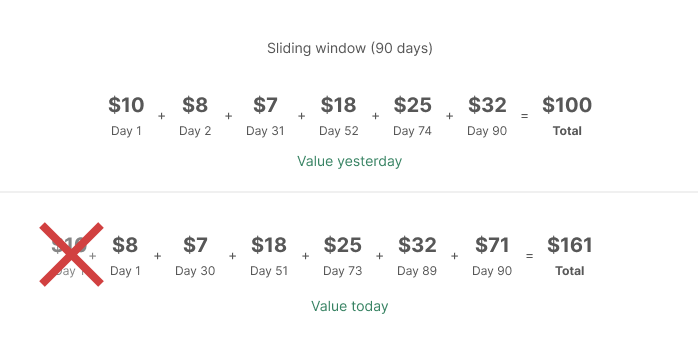
滑动窗口允许你在最长 90 天、周、月或年的自定义时间段内衡量某个数值。与固定窗口不同,滑动窗口不依赖于固定的单独日历时间段——你可以将窗口设置为 10 天、5 周、3 个月、2 年,等等。
每个时间段内都有一个单独的 **单位** 时间。随着每个单位的结束以及我们收到符合你条件的新事件,计算字段将会更新。
| 示例时间段 | 时间单位 | 你的字段将更新…… |
| ----- | ----------------------- | --------- |
| 10 天 | 1 天(凌晨 12:00 到晚上 11:59) | 每经过一天后 |
| 5 周 | 1 周(周日到周六) | 每经过一周后 |
| 3 个月 | 1 个月(从每月第一天到当月最后一天) | 每经过一个月后 |
| 2 年 | 1 年(1 月 1 日到 12 月 31 日) | 每经过一年后 |
滑动窗口允许你为追踪窗口的每个单位设置可被求和或计数的最大值,例如,90 天窗口中的每天,或 12 周窗口中的每周。这不会为整个时间段设置最大值。它只会为每个单位设置最大值。
无论你的时间段如何,我们都会将每个单位的开始时间视为凌晨 12:00(午夜),结束时间视为晚上 11:59。我们会使用你 impact.com 账号的时区设置来确定这一点。
示例
你想让参与者根据他们在 90 天内的消费金额累积积分。随着每一天过去,并且我们收到新的匹配事件数据,计算字段的值会更新,以反映过去 90 天的消费金额。
{% endtab %}
{% endtabs %}
---
# Agent Instructions
This documentation is published with GitBook. GitBook is the documentation platform designed so that both humans and AI agents can read, navigate, and reason over technical content effectively. Learn more at gitbook.com.
## Querying This Documentation
If you need additional information that is not directly available in this page, you can query the documentation by asking a question.
Perform an HTTP GET request on the following URL with the `ask` and `goal` query parameters:
```
GET https://help.impact.com/brand/zh/what-would-you-like-to-learn-about/advocate-program/manage-advocate-participants/custom-and-calculated-fields/tracking-windows-for-calculated-fields-explained.md?ask=&goal=
```
`ask` is the immediate question: it should be specific, self-contained, and written in natural language.
`goal` is what the user is ultimately trying to achieve, the reason they need the answer. Sharing it helps GitBook give you a better, more relevant answer. A goal is most helpful when it describes the outcome the user wants rather than restating the question. For example, with `ask=how do I create an API token`, a goal like `automate deployments from our CI pipeline` lets GitBook tailor the answer to that use case.
The response will contain a direct answer to the question and relevant excerpts and sources from the documentation.
Use this mechanism when the answer is not explicitly present in the current page, you need clarification or additional context, or you want to retrieve related documentation sections.