> For the complete documentation index, see [llms.txt](https://help.impact.com/llms.txt). Markdown versions of documentation pages are available by appending `.md` to page URLs; this page is available as [Markdown](https://help.impact.com/brand/zh/what-would-you-like-to-learn-about/advocate-program/advocate-rewards/pay-with-cash/cash-payouts-for-advocate-explained.md).
# Advocate 现金付款说明
#### 了解现金支付
{% hint style="success" %}
**注意**:所有现金奖励计划的默认奖励选项是一个 [佣金奖励](/brand/zh/what-would-you-like-to-learn-about/advocate-program/advocate-rewards/pay-with-cash/set-up-a-commission-reward.md).
{% endhint %}
您的 Advocate 计划可以配置为向您的客户倡导者及其推荐的朋友发放现金奖励。当您的账户启用现金支付后,您的小组件或微站点可以设置为收集参与者的税务和银行信息。该信息归档后,他们即可直接将现金奖励领取到银行账户中,并与您的计划目标保持一致。
Advocate 支付的运作方式类似于 [合作伙伴资金转账](/brand/zh/what-would-you-like-to-learn-about/platform-features/finance/partner-funds-transfer/transfer-funds-to-a-partner.md),但它们会由您的 Advocate 计划自动处理,无需手动发放。了解如何 [为 Advocate 设置现金支付](/brand/zh/what-would-you-like-to-learn-about/advocate-program/advocate-rewards/pay-with-cash/set-up-cash-payouts-for-advocate.md).
{% hint style="warning" %}
**警告:** 你的 impact.com 账户中必须有足够资金来支持现金支付。否则,你的参与者将无法收到他们已获得的奖励。了解如何 [向你的 impact.com 账户存入资金](/brand/zh/what-would-you-like-to-learn-about/platform-features/finance/add-funds-to-your-funding-account/deposit-funds-into-your-account.md).
{% endhint %}
## 参与者注册与支付流程
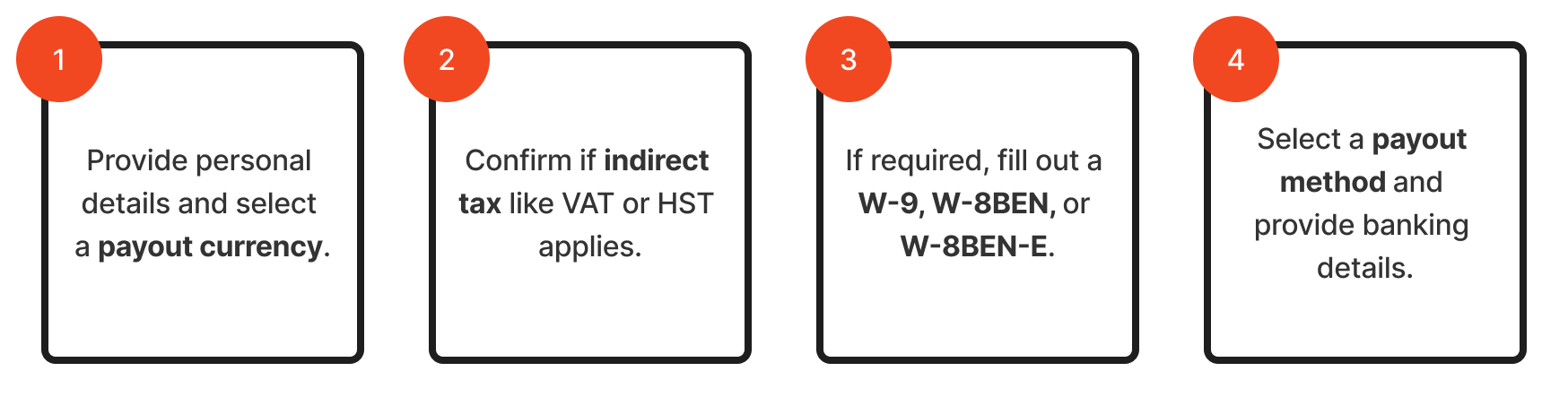
参与者必须先向 impact.com 提交税务申报和银行信息,之后才能收到现金支付。您的计划小组件或微站点将通过一个 4 步的 *税务问卷*.
通过您的小组件访问该问卷的参与者需要在继续之前提供验证码。该验证码会发送到其个人资料关联的电子邮件地址。
```mermaid
flowchart LR
A[1. 提供个人信息并选择支付货币。] --> B[2. 确认是否适用增值税 (VAT) 或 HST 等间接税。]
B --> C[3. 如有需要,填写 W-9、W-8BEN 或 W-8BEN-E。]
C --> D[4. 选择支付方式并提供银行信息。]
```
1. 首先,参与者填写姓名、电子邮件地址和个人信息,然后选择支付货币。
* 如果参与者使用的电子邮件地址关联了 impact.com 合作伙伴账户,我们会检测到并将其现有信息填入表单。参与者仍需完成此步骤——检查信息、接受条款并选择 **继续** — 然后这两个账户才会连接。
2. 然后,如适用,他们提供任何间接税信息,例如 VAT 或 HST 编号。
3. 接下来,根据您的品牌所在地以及参与者所在地区,他们可能需要填写 W-9、W-8BEN 或 W-8BEN-E 表格。
{% hint style="success" %}
**注意:** 参与者获得的所有奖励都会处于待处理状态,直到他们完成税务申报并在需要时向 impact.com 提供有效的税表。
{% endhint %}
4. 最后,参与者选择一个 [支付频率](/partner/zh/ni-xiang-liao-jie-shen-me/platform-features/finance/payments-withdrawals-and-balance/payout-setup/select-how-often-you-get-paid-as-a-partner.md) 以及支付方式——直接转入银行账户或通过 PayPal。付款发放前,参与者必须确保满足所有 [合作伙伴付款要求](/partner/zh/ni-xiang-liao-jie-shen-me/platform-features/finance/payments-withdrawals-and-balance/payout-troubleshooting/payment-requirements-explained-for-partners.md).
* impact.com 会在参与者选择的支付日期创建付款,并在次日转入其收益账户。
* 如果该交易适用手续费或汇率,则相应金额会从客户倡导者的奖励中扣除。汇率由品牌账户的注资货币、奖励货币以及合作伙伴账户货币决定。
* 了解有关提现方式、处理时间、费用和支持货币的更多信息,请参见 [将资金提现到您的银行账户](/partner/zh/ni-xiang-liao-jie-shen-me/platform-features/finance/payments-withdrawals-and-balance/payout-setup/withdraw-funds-to-your-bank-account.md).
* 对于同时也是现有合作伙伴的参与者,银行信息的更新是在其 impact.com 账户内完成,而不是在您的小组件或微站点中。
* 如果参与者遇到支付冻结问题或对付款有疑问,他们可以联系 [impact.com 支持团队](mailto:saasquatch-support@impact.com) 寻求帮助。
## 税务合规与资源
{% hint style="success" %}
**注意:** 以下有关税务合规与资源的部分仅在您的计划包含美国地区的倡导者时适用,这些倡导者在美国纳税年度(1 月 1 日至 12 月 31 日)内有资格赚取 2,000 美元。
{% endhint %}
impact.com 平台会为支付给美国地区倡导者的现金奖励处理 1099 税务申报,从而简化您品牌的合规流程。
* **1099 流程:** impact.com 会收集所需税务信息,并向在一个日历年内赚取 2,000 美元或以上的美国倡导者发放 1099 表格。
以下资源可帮助需要了解更多税表和付款信息的倡导者:
* **付款常见问题:** 该 [倡导者现金支付常见问题](/other/zh/reference-documentation/cash-payouts-faq-for-advocates.md) 帮助文档解答有关付款处理的常见问题。
* **税务文件:** 大多数倡导者没有 impact.com 合作伙伴账户,并通过 PayQuicker 的电子邮件接收其 1099 表格。请分享此文章,以获取有关税务流程、门槛和时间安排的一般信息: [作为合作伙伴,我在哪里可以找到我的 1099 税表?](/partner/zh/ni-xiang-liao-jie-shen-me/platform-features/finance/finance-documents/where-do-i-find-my-tax-form-1099-as-a-partner.md)
## 我什么时候应该使用现金奖励?
现金支付非常适合高价值奖励。对于这些参与者来说,直接存入其银行账户的一笔可观金额(例如 250 美元)通常比等值礼品卡更有激励作用。
现金是一个极佳且极具激励性的选择,适用于:
* 高价值奖励的推荐计划:现金是最有效的奖励,能直接吸引倡导者。
* 社区专家计划:现金也是奖励参与、知识分享或在社区中的特定贡献的不错选择。
{% hint style="success" %}
**注意:** 如果您的计划提供的是低价值奖励,请考虑其他 [计划奖励类型](/brand/zh/what-would-you-like-to-learn-about/advocate-program/advocate-rewards/program-reward-options-explained.md)——例如礼品卡——这类奖励无需参与者向 impact.com 提供税务或银行信息。
{% endhint %}
通过您的小组件访问该问卷的参与者需要在继续之前提供验证码。该验证码会发送到其个人资料关联的电子邮件地址。
#### 了解现金支付
{% hint style="success" %}
**注意**:所有现金奖励计划的默认奖励选项是一个 [佣金奖励](/brand/zh/what-would-you-like-to-learn-about/advocate-program/advocate-rewards/pay-with-cash/set-up-a-commission-reward.md).
{% endhint %}
您的 Advocate 计划可以配置为向您的客户倡导者及其推荐的朋友发放现金奖励。当您的账户启用现金支付后,您的小组件或微站点可以设置为收集参与者的税务和银行信息。该信息归档后,他们即可直接将现金奖励领取到银行账户中,并与您的计划目标保持一致。
Advocate 支付的运作方式类似于 [合作伙伴资金转账](/brand/zh/what-would-you-like-to-learn-about/platform-features/finance/partner-funds-transfer/transfer-funds-to-a-partner.md),但它们会由您的 Advocate 计划自动处理,无需手动发放。了解如何 [为 Advocate 设置现金支付](/brand/zh/what-would-you-like-to-learn-about/advocate-program/advocate-rewards/pay-with-cash/set-up-cash-payouts-for-advocate.md).
{% hint style="warning" %}
**警告:** 你的 impact.com 账户中必须有足够资金来支持现金支付。否则,你的参与者将无法收到他们已获得的奖励。了解如何 [向你的 impact.com 账户存入资金](/brand/zh/what-would-you-like-to-learn-about/platform-features/finance/add-funds-to-your-funding-account/deposit-funds-into-your-account.md).
{% endhint %}
#### 参与者注册与支付流程
参与者必须先向 impact.com 提交税务申报和银行信息,之后才能收到现金支付。您的计划小组件或微站点将通过一个 4 步的 *税务问卷*.
通过您的小组件访问该问卷的参与者需要在继续之前提供验证码。该验证码会发送到其个人资料关联的电子邮件地址。
1. 首先,参与者填写姓名、电子邮件地址和个人信息,然后选择支付货币。
* 如果参与者使用的电子邮件地址关联了 impact.com 合作伙伴账户,那么我们会连接这两个账户。
2. 然后,如适用,他们提供任何间接税信息,例如 VAT 或 HST 编号。
3. 接下来,根据您的品牌所在地以及参与者所在地区,他们可能需要填写 W-9、W-8BEN 或 W-8BEN-E 表格。
{% hint style="success" %}
**注意:** 参与者获得的所有奖励都会处于待处理状态,直到他们完成税务申报并在需要时向 impact.com 提供有效的税表。
{% endhint %}
4. 最后,参与者选择一个 [支付频率](/partner/zh/ni-xiang-liao-jie-shen-me/platform-features/finance/payments-withdrawals-and-balance/payout-setup/select-how-often-you-get-paid-as-a-partner.md) 以及支付方式——直接转入银行账户或通过 PayPal。付款发放前,参与者必须确保满足所有 [合作伙伴付款要求](/partner/zh/ni-xiang-liao-jie-shen-me/platform-features/finance/payments-withdrawals-and-balance/payout-troubleshooting/payment-requirements-explained-for-partners.md).
* impact.com 会在参与者选择的支付日期创建付款,并在次日转入其收益账户。
* 如果该交易适用手续费或汇率,则相应金额会从客户倡导者的奖励中扣除。汇率由品牌账户的注资货币、奖励货币以及合作伙伴账户货币决定。
* 了解有关提现方式、处理时间、费用和支持货币的更多信息,请参见 [将资金提现到您的银行账户](/partner/zh/ni-xiang-liao-jie-shen-me/platform-features/finance/payments-withdrawals-and-balance/payout-setup/withdraw-funds-to-your-bank-account.md).
* 对于同时也是现有合作伙伴的参与者,银行信息的更新是在其 impact.com 账户内完成,而不是在您的小组件或微站点中。
* 如果参与者遇到支付冻结问题或对付款有疑问,他们可以联系 [impact.com 支持团队](mailto:saasquatch-support@impact.com) 寻求帮助。
#### 税务合规与资源
{% hint style="success" %}
**注意:** 以下有关税务合规与资源的部分仅在您的计划包含美国地区的倡导者时适用,这些倡导者在美国纳税年度(1 月 1 日至 12 月 31 日)内有资格赚取 2,000 美元。
{% endhint %}
impact.com 平台会为支付给美国地区倡导者的现金奖励处理 1099 税务申报,从而简化您品牌的合规流程。
* **1099 流程:** impact.com 会收集所需税务信息,并向在一个日历年内赚取 2,000 美元或以上的美国倡导者发放 1099 表格。
以下资源可帮助需要了解更多税表和付款信息的倡导者:
* **付款常见问题:** 该 [倡导者现金支付常见问题](/other/zh/reference-documentation/cash-payouts-faq-for-advocates.md) 帮助文档解答有关付款处理的常见问题。
* **税务文件:** 大多数倡导者没有 impact.com 合作伙伴账户,并通过 PayQuicker 的电子邮件接收其 1099 表格。请分享此文章,以获取有关税务流程、门槛和时间安排的一般信息: [作为合作伙伴,我在哪里可以找到我的 1099 税表?](/partner/zh/ni-xiang-liao-jie-shen-me/platform-features/finance/finance-documents/where-do-i-find-my-tax-form-1099-as-a-partner.md)
#### 我什么时候应该使用现金奖励?
现金支付非常适合高价值奖励。对于这些参与者来说,直接存入其银行账户的一笔可观金额(例如 250 美元)通常比等值礼品卡更有激励作用。
现金是一个极佳且极具激励性的选择,适用于:
* 高价值奖励的推荐计划:现金是最有效的奖励,能直接吸引倡导者。
* 社区专家计划:现金也是奖励参与、知识分享或在社区中的特定贡献的不错选择。
{% hint style="success" %}
**注意:** 如果您的计划提供的是低价值奖励,请考虑其他 [计划奖励类型](/brand/zh/what-would-you-like-to-learn-about/advocate-program/advocate-rewards/program-reward-options-explained.md)——例如礼品卡——这类奖励无需参与者向 impact.com 提供税务或银行信息。
{% endhint %}
---
# Agent Instructions
This documentation is published with GitBook. GitBook is the documentation platform designed so that both humans and AI agents can read, navigate, and reason over technical content effectively. Learn more at gitbook.com.
## Querying This Documentation
If you need additional information that is not directly available in this page, you can query the documentation by asking a question.
Perform an HTTP GET request on the following URL with the `ask` and `goal` query parameters:
```
GET https://help.impact.com/brand/zh/what-would-you-like-to-learn-about/advocate-program/advocate-rewards/pay-with-cash/cash-payouts-for-advocate-explained.md?ask=&goal=
```
`ask` is the immediate question: it should be specific, self-contained, and written in natural language.
`goal` is what the user is ultimately trying to achieve, the reason they need the answer. Sharing it helps GitBook give you a better, more relevant answer. A goal is most helpful when it describes the outcome the user wants rather than restating the question. For example, with `ask=how do I create an API token`, a goal like `automate deployments from our CI pipeline` lets GitBook tailor the answer to that use case.
The response will contain a direct answer to the question and relevant excerpts and sources from the documentation.
Use this mechanism when the answer is not explicitly present in the current page, you need clarification or additional context, or you want to retrieve related documentation sections.