> For the complete documentation index, see [llms.txt](https://help.impact.com/llms.txt). Markdown versions of documentation pages are available by appending `.md` to page URLs; this page is available as [Markdown](https://help.impact.com/brand/zh/what-would-you-like-to-learn-about/advocate-program/advocate-rewards/create-bulk-cash-rewards-with-advocate.md).

# 使用 Advocate 创建批量现金奖励

虽然许多奖励会根据程序规则自动触发（例如推荐转化），但有时你可能需要针对手动或线下行为奖励参与者——例如完成问卷调查或赢得比赛。

该 **批量奖励** 导入工具允许你通过上传 CSV 文件，一次性向多位倡导者发放现金、积分或礼品卡。此功能包含试运行安全机制，可在发放任何资金之前确保你的数据正确无误。

### 准备你的导入文件

{% hint style="success" %}
**注意**：如果你使用全局导入设置，那么你只需要提交一个 `userId` 列表。
{% endhint %}

首先，你需要一个包含你希望奖励的用户列表的 CSV 或 JSONL 文件。

* **必填列**：你的文件至少必须包含 `userId` 以识别用户。
* **可选列**：你可以在文件中包含奖励详情（例如金额、单位、类型）。或者，我们建议你在导入过程中将这些设置为平台中的 *全局默认值* ，以简化你的文件。

#### 文件列参考

<table data-header-hidden><thead><tr><th width="297.484375">列</th><th>说明</th><th>要求</th></tr></thead><tbody><tr><td><code>userId</code></td><td>用户的唯一 ID。</td><td><mark style="color:$danger;">必填</mark></td></tr><tr><td><code>assignedCreditInCurrencyBaseUnit</code></td><td>要奖励的金额（例如 50）。</td><td>有条件<br>（如果已设置全局默认值，则不需要）</td></tr><tr><td><code>rewardUnit</code></td><td>奖励的单位（例如 USD、POINTS）。</td><td>有条件<br>（如果已设置全局默认值，则不需要）</td></tr><tr><td><code>globalRewardKey</code></td><td>要发放的预配置奖励的键。</td><td><p>有条件<br>（如果已设置全局默认值，则不需要）</p><p><br></p></td></tr><tr><td><code>discountPercent</code></td><td>以折扣形式奖励的金额</td><td>有条件<br>（如果已设置全局默认值，则不需要）</td></tr><tr><td><code>dateScheduledFor</code></td><td>将奖励挂起至此日期。</td><td>可选</td></tr><tr><td><code>uniqueId</code></td><td>交易的唯一标识符。</td><td><mark style="color:$success;">推荐</mark><br>用作安全键，以防止在重新运行文件时发放重复奖励。</td></tr><tr><td><code>customerNote</code></td><td>添加一条客户可见的备注。</td><td>可选</td></tr><tr><td><code>internalNote</code></td><td>添加一条仅供内部使用、客户无法看到的备注。</td><td>可选</td></tr></tbody></table>

{% stepper %}
{% step %}

#### 配置导入设置

1. 在左侧导航菜单中，选择 ![](/files/209022bdb234289211a24a980f6227a8684cc439) **\[Engage] → Reporting → Imports & Exports**.
2. 在右上角，选择 **导入**.
3. 在 *导入类型*中，选择 **奖励**.

<div data-with-frame="true"><figure><img src="/files/923aa9fdf6b901096331ef7c337122aef7bc617e" alt=""><figcaption></figcaption></figure></div>

**设置预设值（全局默认值）**

为了节省时间并减少 CSV 文件中的错误，你可以定义适用于导入中每一行的预设值。

* **奖励**：选择一个预配置奖励，或指定一个手动单位（例如“现金/USD”）。
* **项目**：出于报表目的，将这些奖励关联到特定项目。
* **奖励挂起时长**: ![](/files/3980f01ba7b178cc917bfb7b270feb4fac2992c6) **\[切换开启]** ，以在奖励对用户可用之前增加一个安全缓冲期（例如 30 天）。这样在必要时可留出撤回时间。

{% hint style="success" %}
**注意**：如果你在这里设置了一个值（例如，Reward Unit: USD），你 **不** 需要在你的 CSV 文件中包含该列。
{% endhint %}
{% endstep %}

{% step %}

#### 上传并试运行

由于现金奖励是最终性的且无法撤销，系统要求先进行试运行（测试导入），以便你在处理奖励之前放心地查看详细信息。

1. 在 *上传你的导入用户 CSV 或 JSONL 文件* 选择 **选择文件**.
2. 选择 **运行测试导入** 以启动测试状态。
3. 系统将处理该文件 **而不** 创建奖励。

<div data-with-frame="true"><figure><img src="/files/d27ffb0c47e8afebcf473c0471eaf5b4e61fface" alt=""><figcaption></figcaption></figure></div>
{% endstep %}

{% step %}

#### 审核并完成

测试运行完成后，你将在 Imports & Exports 列表中看到一条状态记录。审核过程中可能会发送电子邮件（礼品卡、付款配置等）。

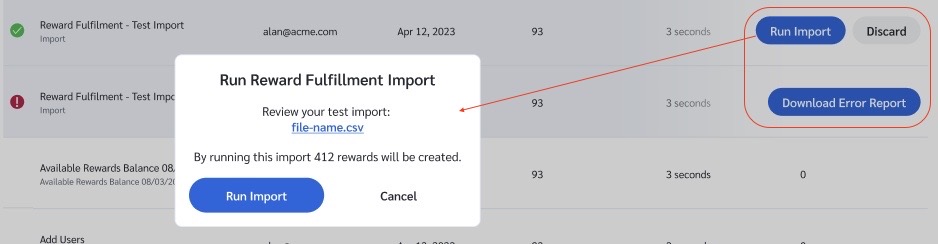
1. **审核**：如果有错误（以 ![](/files/5d5efaca67b8d67982b225a5f5872b252b0c8a29) **\[Exclaimation]**&#x8868;示），请选择 **下载错误报告** 以修复你的文件并重试。另请选中 **下载报告** 以获取所有将要创建的奖励记录。无论是否有错误，都建议下载以便审核。
2. **确认**：如果测试成功（以 ![](/files/03f63aaf7a9c63b8df9941b17292d4b9701088f5) **\[Checkmark]**&#x8868;示），请选择 **运行导入**.
3. 系统将显示一个确认弹窗，总结总体影响（例如：“运行此导入将创建 412 个奖励”）。选择 **运行导入** 以确认并发放奖励。

如果你决定不继续，可以直接取消此次运行，然后选择 Discard 删除测试运行。

<div data-with-frame="true"><figure><img src="/files/701d602d69de20d0baefeafe4cc426890f9d60bc" alt=""><figcaption></figcaption></figure></div>
{% endstep %}
{% endstepper %}


---

# Agent Instructions
This documentation is published with GitBook. GitBook is the documentation platform designed so that both humans and AI agents can read, navigate, and reason over technical content effectively. Learn more at gitbook.com.

## Querying This Documentation
If you need additional information that is not directly available in this page, you can query the documentation dynamically by asking a question.

Perform an HTTP GET request on the current page URL with the `ask` query parameter:

```
GET https://help.impact.com/brand/zh/what-would-you-like-to-learn-about/advocate-program/advocate-rewards/create-bulk-cash-rewards-with-advocate.md?ask=<question>
```

The question should be specific, self-contained, and written in natural language.
The response will contain a direct answer to the question and relevant excerpts and sources from the documentation.

Use this mechanism when the answer is not explicitly present in the current page, you need clarification or additional context, or you want to retrieve related documentation sections.