> For the complete documentation index, see [llms.txt](https://help.impact.com/llms.txt). Markdown versions of documentation pages are available by appending `.md` to page URLs; this page is available as [Markdown](https://help.impact.com/brand/zh/what-would-you-like-to-learn-about/advocate-program/advocate-rewards/create-a-reward-unit.md).

# 创建奖励单位

[奖励](/brand/zh/what-would-you-like-to-learn-about/advocate-program/advocate-rewards/program-reward-options-explained.md) 用于激励您的倡导者及其推荐好友参与您的推荐计划。当您设置 *积分* 奖励时，您还需要创建一个奖励单位，以定义该积分为参与者带来什么（例如，您的高级服务等级的一个免费月份）。

1. 从左侧导航菜单中，选择 ![](/files/209022bdb234289211a24a980f6227a8684cc439) **\[Engage] → 奖励 → 奖励单位**.
2. 在右上角，选择 **创建奖励单位**.
3. 选择一个 **奖励单位类型**.

{% tabs %}
{% tab title="积分" %}

* 从 **货币** 下拉列表中，选择此奖励单位的货币。只能选择一种货币。

如果您选择了 USD 作为货币，并且 [W-9 合规](/brand/zh/what-would-you-like-to-learn-about/advocate-program/advocate-program-settings/w-9-compliance-explained-for-advocate.md) 已为您的 Advocate 计划开启，那么获得 [奖励](/brand/zh/what-would-you-like-to-learn-about/advocate-program/advocate-rewards/create-a-reward.md) 的参与者，其基于该奖励单位获得的奖励价值将计入其当年的应税总额。
{% endtab %}

{% tab title="现金" %}

1. ![](/files/3980f01ba7b178cc917bfb7b270feb4fac2992c6) **\[打开切换]** **货币** 为此奖励单位分配一种货币。
2. 从下拉列表中选择一种或多种货币。

   <div data-gb-custom-block data-tag="hint" data-style="success" class="hint hint-success"><p><strong>注意：</strong> 多币种支持仅适用于某些 Advocate 版本。如果您有兴趣，请联系您的 CSM（或 <a href="https://app.impact.com/support/portal.ihtml?createTicket=true&#x26;&#x26;">联系支持</a>）咨询升级事宜。</p></div>
3. 如果 [现金支付](/brand/zh/what-would-you-like-to-learn-about/advocate-program/advocate-rewards/pay-with-cash/cash-payouts-for-advocate-explained.md) 已为您的账户启用，请选择 ![](/files/d4151d93ed2da7b33e79d07ae02bdd88dbd67390) **\[已勾选的复选框]** **使用 impact.com 向您的参与者发送付款**.
   {% endtab %}

{% tab title="月数" %}
月份奖励单位是一个标准单位，无法自定义。
{% endtab %}

{% tab title="积分" %}
积分奖励单位是一个标准单位，无法自定义。
{% endtab %}

{% tab title="自定义" %}

1. 输入一个 **单位 ID**。单位 ID 用于您的计划规则和奖励，因此 impact.com 建议使用简短但具有描述性的 ID，例如 `TICKETS`.
2. ![](/files/3980f01ba7b178cc917bfb7b270feb4fac2992c6) **\[打开切换]** **货币** 为此奖励单位分配一种货币。
3. 从下拉列表中选择一种或多种货币。

   <div data-gb-custom-block data-tag="hint" data-style="success" class="hint hint-success"><p><strong>注意：</strong> 多币种支持仅适用于某些 Advocate 版本。如果您有兴趣，请联系您的 CSM（或 <a href="https://app.impact.com/support/portal.ihtml?createTicket=true&#x26;&#x26;">联系支持</a>）咨询升级事宜。</p></div>

{% endtab %}
{% endtabs %}

4. 输入一个具有描述性的 **名称**.
5. 完成所选奖励单位类型特定的设置步骤。
6. 可选地，展开 **高级设置** 以进一步配置该奖励单位。
   * 分配一个 **美国应税价值** 给该奖励单位。
     * 该 *美国应税价值* 自定义功能可让您为不直接奖励 USD 的奖励分配应税价值。如果 [W-9 合规](/brand/zh/what-would-you-like-to-learn-about/advocate-program/advocate-program-settings/w-9-compliance-explained-for-advocate.md) 已为您的 Advocate 计划开启，并且您希望该奖励单位受奖励限制约束，建议使用此选项。
     * 定义奖励单位价值需要一个 JSONata 表达式。您可以在表达式中使用变量 `totalValue` 和 `计数` 。

       <div data-gb-custom-block data-tag="hint" data-style="info" class="hint hint-info"><p><strong>示例：</strong> 如果您希望每个获得的自定义奖励单位具有 5 美元的应税价值，则输入类似于 <code>500*totalValue</code>.</p></div>
   * 输入一个 **奖励显示值** 以定义该奖励单位对参与者的显示方式。
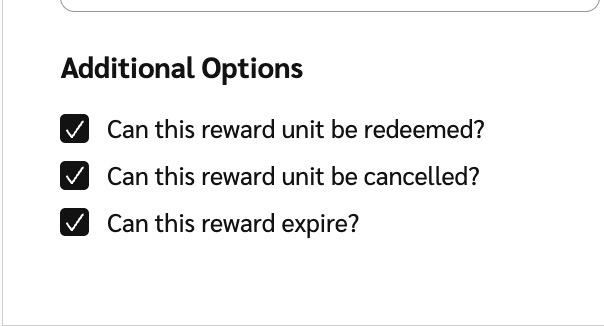
   * 取消选择 **其他选项** ，如果您不希望该奖励单位被 **兑换**，允许使用此单位的奖励 **过期**，或被 **取消**.

     <div data-with-frame="true"><figure><img src="/files/5ec45666874aa3a6d0186e81947440984745887f" alt="" width="302"><figcaption></figcaption></figure></div>
7. 选择 **创建奖励单位**.

#### 了解更多

* [计划奖励选项说明](/brand/zh/what-would-you-like-to-learn-about/advocate-program/advocate-rewards/program-reward-options-explained.md)
* [创建奖励](/brand/zh/what-would-you-like-to-learn-about/advocate-program/advocate-rewards/create-a-reward.md)


---

# Agent Instructions
This documentation is published with GitBook. GitBook is the documentation platform designed so that both humans and AI agents can read, navigate, and reason over technical content effectively. Learn more at gitbook.com.

## Querying This Documentation
If you need additional information that is not directly available in this page, you can query the documentation dynamically by asking a question.

Perform an HTTP GET request on the current page URL with the `ask` query parameter:

```
GET https://help.impact.com/brand/zh/what-would-you-like-to-learn-about/advocate-program/advocate-rewards/create-a-reward-unit.md?ask=<question>
```

The question should be specific, self-contained, and written in natural language.
The response will contain a direct answer to the question and relevant excerpts and sources from the documentation.

Use this mechanism when the answer is not explicitly present in the current page, you need clarification or additional context, or you want to retrieve related documentation sections.