> For the complete documentation index, see [llms.txt](https://help.impact.com/llms.txt). Markdown versions of documentation pages are available by appending `.md` to page URLs; this page is available as [Markdown](https://help.impact.com/brand/zh/what-would-you-like-to-learn-about/advocate-program/advocate-rewards/create-a-reward.md).
# 创建奖励
参加 PXA 课程
[奖励](/brand/zh/what-would-you-like-to-learn-about/advocate-program/advocate-rewards/program-reward-options-explained.md) 用于激励您的客户倡导者及其推荐的朋友参与您的推荐计划。在您的 Advocate 计划中,您可以从四种基本奖励类型中选择,然后进行自定义以满足您的需求。奖励可以在您的所有推荐计划中通用(全局奖励),也可以仅适用于一个计划(计划专属奖励)。
{% embed url="" %}
#### 创建全局奖励
全局奖励只需设置一次即可多次重复使用。我们建议在以下情况下创建全局奖励:
* 您希望该奖励可在多个推荐计划中使用。
* 该奖励具有固定的价值或金额。
1. 从左侧导航菜单中,选择  **\[Engage] → 奖励 → 目录**.
2. 在右上角,选择 **创建奖励**.
3. 输入一个具有描述性的 **奖励名称**.
4. 选择一个 **奖励类型** 并按照设置说明操作。
{% tabs %}
{% tab title="折扣" %}
1. 设置 **折扣百分比**.
2. 可选地,  **\[开启]** **奖励待定时长** 以便将奖励在选定时间内置于待定状态。
* 待定期限可以设置为 **年**, **月**,以及/或者 **天**.
* 待定期限可作为安全缓冲,以防参与者不再符合领取奖励的资格,例如,只有在您的 14 天退货期结束后才能兑换该奖励。
3. 可选地,  **\[开启]** **奖励到期** 为此奖励设置有效期。
* 有效期可以按以下单位设置: **年**, **月**,以及/或者 **天**.
* 当您希望确保奖励能及时兑换时,有效期很有帮助,例如,参与者必须在获得奖励后的 3 个月内领取其折扣。
{% endtab %}
{% tab title="积分" %}
{% hint style="danger" %}
**警告:** 对于积分奖励,您需要先 [创建奖励单位](/brand/zh/what-would-you-like-to-learn-about/advocate-program/advocate-rewards/create-a-reward-unit.md) 来定义该积分为参与者提供什么(例如您的高级服务等级一个月免费使用权)。
{% endhint %}
1. 选择一个 **奖励单位** 从下拉列表中。
2. 输入一个 **积分数量**.
3. 可选地,  **\[开启]** **奖励待定时长** 以便将奖励在选定时间内置于待定状态。
* 待定期限可以设置为 **年**, **月**,以及/或者 **天**.
* 待定期限可作为安全缓冲,以防参与者不再符合领取奖励的资格,例如,只有在您的 14 天退货期结束后才能兑换该奖励。
4. 可选地,  **\[开启]** **奖励到期** 为此奖励设置有效期。
* 有效期可以按以下单位设置: **年**, **月**,以及/或者 **天**.
* 当您希望确保奖励能及时兑换时,有效期很有帮助,例如,参与者必须在获得奖励后的 3 个月内兑换其积分。
{% endtab %}
{% tab title="Fuel Tank" %}
请参阅 [设置 Fuel Tank 奖励](/brand/zh/what-would-you-like-to-learn-about/advocate-program/advocate-rewards/set-up-a-fuel-tank-reward.md) 了解说明。
{% endtab %}
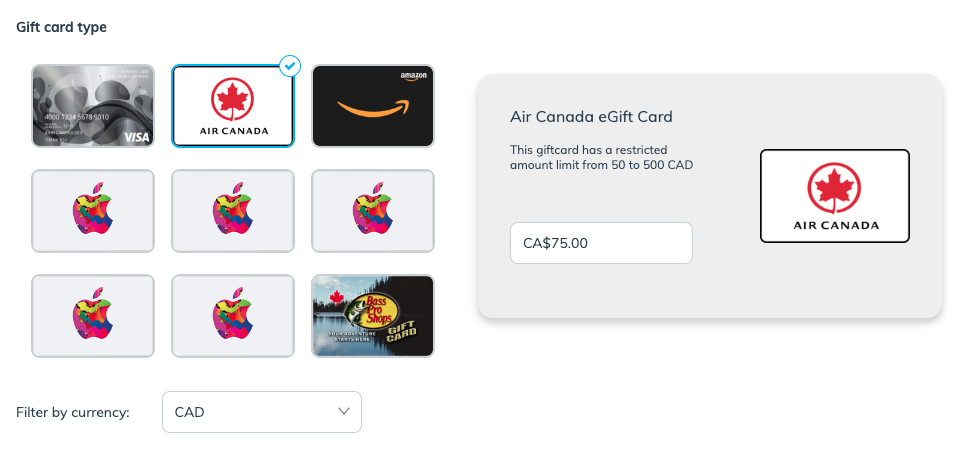
{% tab title="礼品卡" %}
要设置礼品卡奖励,您的账户必须 [已与 Tango Card 集成](https://integrations.impact.com/integration-guides/for-brands/advocate/advocate-plugin-integration/tango-card-integration-overview-for-advocate/integrate-with-tango-card-for-advocate-programs)。如需帮助,请联系由 impact.com 分配给您的实施工程师。
1. 选择一个 **礼品卡类型**.
* 此外,你还可以 **按货币筛选** 如果您只想查看某种货币可用的礼品卡。
2. 在所选卡片中,输入 **金额** 您要分配给礼品卡的金额。
* 礼品卡奖励不能分配动态值——每张发放的礼品卡都只会采用您在此输入的金额。
3. 如有需要,输入您的 **自定义 TangoCard 电子邮件模板 ID**.
* 电子邮件模板是 Tango Card 的一项功能,可让您配置他们在奖励达成时发送给参与者的电子邮件。了解有关 [电子邮件模板](https://help.rewardsgenius.com/s/article/EmailTemplatesFAQ) 在 Tango Card 帮助中心中的更多信息。
4. 可选地,  **\[开启]** **奖励待定时长** 以便将奖励在选定时间内置于待定状态。
* 待定期限可以设置为 **年**, **月**,以及/或者 **天**.
* 待定期限可作为安全缓冲,以防参与者不再符合领取奖励的资格,例如,只有在您的 14 天退货期结束后才能兑换该奖励。
{% endtab %}
{% endtabs %}
#### 创建计划专属奖励
计划专属奖励绑定到单个计划目标的操作。它们会在您配置计划规则时设置。我们建议在以下情况下使用计划专属奖励:
* 您不打算在其他推荐计划中重复使用此奖励。
* 您希望发放一个动态金额的奖励,例如,基于佣金的奖励。
* 礼品卡奖励是个例外。它们只能设置为静态值。
如需设置说明,请查看 *“创建奖励”部分* 在 [配置你的倡导者计划](/brand/zh/what-would-you-like-to-learn-about/advocate-program/getting-started-with-advocate/configure-your-advocate-program.md).
#### 了解更多
* [计划奖励选项说明](/brand/zh/what-would-you-like-to-learn-about/advocate-program/advocate-rewards/program-reward-options-explained.md)
* [创建奖励单元](/brand/zh/what-would-you-like-to-learn-about/advocate-program/advocate-rewards/create-a-reward-unit.md)
* [Fuel Tank 奖励说明](/brand/zh/what-would-you-like-to-learn-about/advocate-program/advocate-rewards/fuel-tank-rewards-explained.md)
* [礼品卡奖励说明](/brand/zh/what-would-you-like-to-learn-about/advocate-program/advocate-rewards/gift-card-rewards-explained.md)
---
# Agent Instructions
This documentation is published with GitBook. GitBook is the documentation platform designed so that both humans and AI agents can read, navigate, and reason over technical content effectively. Learn more at gitbook.com.
## Querying This Documentation
If you need additional information that is not directly available in this page, you can query the documentation by asking a question.
Perform an HTTP GET request on the following URL with the `ask` and `goal` query parameters:
```
GET https://help.impact.com/brand/zh/what-would-you-like-to-learn-about/advocate-program/advocate-rewards/create-a-reward.md?ask=&goal=
```
`ask` is the immediate question: it should be specific, self-contained, and written in natural language.
`goal` is what the user is ultimately trying to achieve, the reason they need the answer. Sharing it helps GitBook give you a better, more relevant answer. A goal is most helpful when it describes the outcome the user wants rather than restating the question. For example, with `ask=how do I create an API token`, a goal like `automate deployments from our CI pipeline` lets GitBook tailor the answer to that use case.
The response will contain a direct answer to the question and relevant excerpts and sources from the documentation.
Use this mechanism when the answer is not explicitly present in the current page, you need clarification or additional context, or you want to retrieve related documentation sections.