> For the complete documentation index, see [llms.txt](https://help.impact.com/llms.txt). Markdown versions of documentation pages are available by appending `.md` to page URLs; this page is available as [Markdown](https://help.impact.com/brand/zh/what-would-you-like-to-learn-about/advocate-program/advocate-reporting-and-analytics/advocate-program-analytics-explained.md).

# Advocate 计划分析说明

<a href="https://pxa.impact.com/student/activity/1687872?sid=0c0e3e5c-54c9-4435-9bee-ebcdccb7f292&#x26;sid_i=0?utm_source=app.impact.com&#x26;utm_medium=owned-platform&#x26;utm_content=&#x26;utm_campaign=help-center" class="button primary">参加 PXA 课程</a>

impact.com 提供多种指标和分析，帮助您评估 Advocate 计划的健康状况和成功情况。

本文解释 *程序分析* 页面，它提供了在所选时间段内单个 Advocate 程序的洞察。如果您想了解 Advocate 程序的历史总表现，或比较多个 Advocate 程序，请参阅 [Advocate Analytics Overview Explained](/brand/zh/what-would-you-like-to-learn-about/advocate-program/advocate-reporting-and-analytics/advocate-analytics-overview-explained.md).

{% hint style="info" %}
**注：** 已被 [标记为欺诈的推荐](/brand/zh/what-would-you-like-to-learn-about/advocate-program/protect-your-advocate-program/advocate-fraud-protection-explained.md) 会从您的分析中排除。
{% endhint %}

#### 访问您的程序分析

1. 从左侧导航菜单中，选择 ![](/files/209022bdb234289211a24a980f6227a8684cc439) **\[Engage] → Reporting → Program Analytics**.
2. 在页面顶部，选择 **程序** 和 **日期范围** 以查看该时间段内的分析。
3. 查看 *程序分析* 以获取洞察。

   * 有关可用分析的说明，请参阅 [*指标*](#metrics) 和 [*图表和图形*](#charts-and-graphs) 部分。

   <div data-with-frame="true"><figure><img src="/files/be01d4f1d0a7682e60baba461106350dad80a462" alt="" width="563"><figcaption></figcaption></figure></div>

#### 指标

从 *指标* 页面顶部的部分显示与您的程序表现相关的多个指标和统计数据。选择不同的推荐程序后，这些数字会发生变化。在主图表下方，每张卡片都会显示随时间的变化，帮助您快速评估您的推荐和转化与上一所选时间段相比如何，例如，8 月 1 日 - 8 月 31 日的分析将与 7 月 1 日 - 7 月 31 日进行比较。

<div data-with-frame="true"><figure><img src="/files/17a3501f86b5a4aff1af838cec38711957d479fb" alt=""><figcaption></figcaption></figure></div>

<details>

<summary>指标说明</summary>

| 指标          | 描述                                                                                                                                                                                                |
| ----------- | ------------------------------------------------------------------------------------------------------------------------------------------------------------------------------------------------- |
| 活跃 Advocate | 已复制并分享其推荐链接的唯一 Advocate 数量，和/或其链接导致被推荐用户在您所选时间范围内开始了一次推荐的数量。                                                                                                                                      |
| 被推荐访客       | 点击了某位倡导者分享链接的唯一人数。这包括属于 *已发起* 和/或 *已转化* 推荐的参与者。                                                                                                                                                   |
| 开始推荐        | <p>已完成计划初始规则的推荐。</p><div data-gb-custom-block data-tag="hint" data-style="info" class="hint hint-info"><p><strong>示例</strong>：您的程序规则要求被推荐好友注册您的服务免费试用。完成此程序规则即视为该推荐已开始。</p></div>                 |
| 已转化的推荐      | <p>根据您的程序规则定义，导致新客户获取的推荐。</p><div data-gb-custom-block data-tag="hint" data-style="info" class="hint hint-info"><p><strong>示例：</strong> 您的计划转化规则是被推荐朋友完成购买。被推荐朋友第一次购买您的产品或服务时，即视为已转化推荐。</p></div> |
| 收入          | 从初始推荐归因起直到最终转化（含）的所有购买总价值。最终转化点由您的程序规则设置决定。                                                                                                                                                       |

</details>

#### 图表和图形

图表和图形部分提供了程序表现的可视化拆解。

<details>

<summary>Advocates</summary>

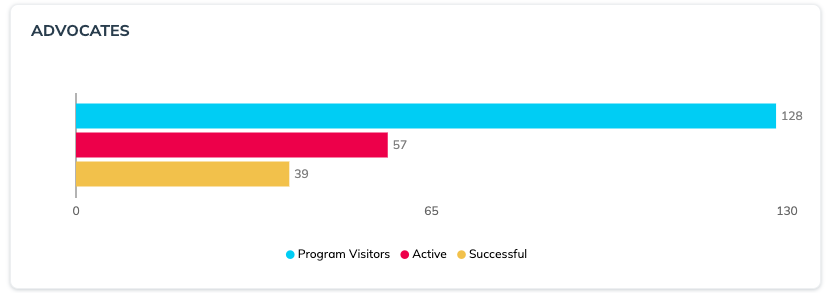
从 *Advocates* 图表显示在您所选时间段内，程序中 Advocate 的数量以及他们参与程序的情况。

<div data-with-frame="true"><figure><img src="/files/4d0adb47faeaafaa4721861abfa6a0009574f016" alt=""><figcaption></figcaption></figure></div>

| 指标   | 描述                                                                                                                                                                                                                                                                                                                                                               |
| ---- | ---------------------------------------------------------------------------------------------------------------------------------------------------------------------------------------------------------------------------------------------------------------------------------------------------------------------------------------------------------------- |
| 程序访客 | <p>以下唯一 Advocate 的数量：</p><ul><li>查看了微站。</li><li>查看了小组件（通过一个 <a href="/pages/9849be4430ac7325d0692bee36f2eee0a2269980#verified-access-widgets">Verified Access widget</a>).</li><li>输入他们的信息（姓名和/或电子邮件）以生成分享链接。</li><li>查看了 <a href="/pages/2f4b4c5ae233a2ec29eb91597a45eccf989a5e51">Shopify Post Check Out widget</a>，在此处，已登录其 Shopify 账户的用户可直接看到分享链接。</li></ul> |
| 活跃   | 已分享其分享链接的 Advocate 数量。                                                                                                                                                                                                                                                                                                                                           |
| 成功   | 完成成功推荐（即已转化推荐）的 Advocate 数量。                                                                                                                                                                                                                                                                                                                                     |

</details>

<details>

<summary>推荐数</summary>

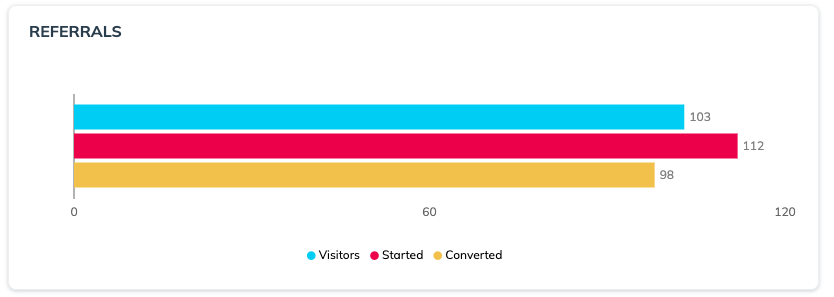
从 *推荐数* 图表显示从被推荐好友视角出发的推荐旅程。

<div data-with-frame="true"><figure><img src="/files/9e5cf7d0ba152b00315887da8d365898e3d35ed9" alt=""><figcaption></figcaption></figure></div>

| 指标  | 描述                                            |
| --- | --------------------------------------------- |
| 访客  | 点击了分享链接的被推荐用户数量。                              |
| 开始  | 已开始推荐旅程的被推荐用户数量，即已根据程序规则完成“开始推荐”规则的用户数量。      |
| 已转化 | 根据程序规则中定义的转化规则已完成转化的被推荐用户数量。例如， *被推荐用户已完成购买*. |

</details>

<details>

<summary>推荐活动</summary>

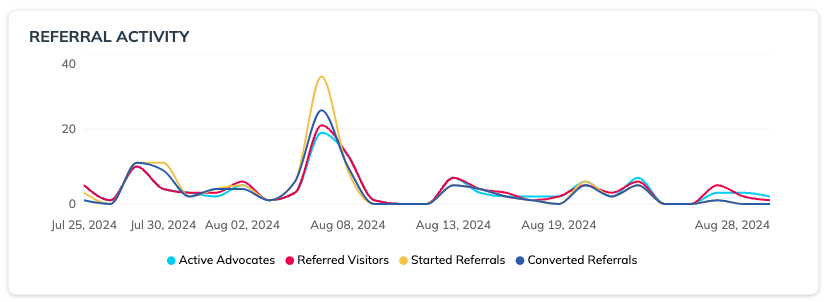
从 *推荐活动* 时间线显示 Advocate 和被推荐用户行为在您所选时间段内的波动情况。此图表有助于了解促销、营销活动或旺季等外部因素如何影响您的推荐程序。

<div data-with-frame="true"><figure><img src="/files/cfd5ac898040b7035c195282765b9788627c8d6c" alt=""><figcaption></figcaption></figure></div>

</details>

<details>

<summary>目标</summary>

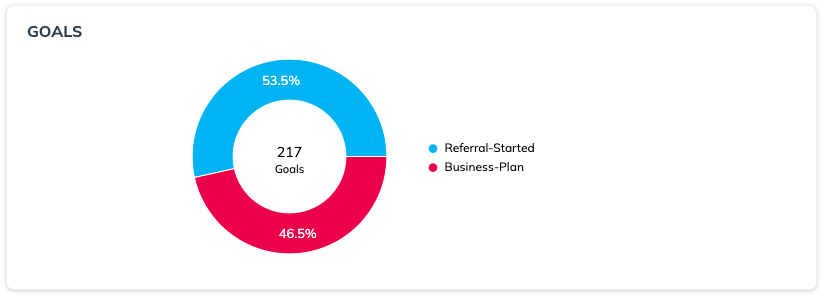
从 *目标* 图表显示在您的程序中已完成规则的拆分——包括转化规则和非转化规则。

如果您的程序有多条规则，那么此信息可为您提供程序推荐漏斗“中间”步骤的宝贵洞察——即从推荐开始到转化之间的时间。

<div data-with-frame="true"><figure><img src="/files/a20e0ec5335878443b1dbbff3ed63eb0df410c9c" alt=""><figcaption></figcaption></figure></div>

</details>

<details>

<summary>参与媒介</summary>

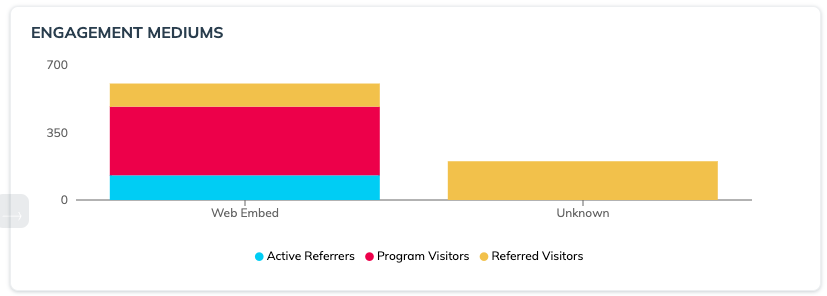
从 *参与媒介* 图表显示访客访问您的推荐程序的各种方式。

如果您的推荐程序在产品或网站的多个区域可见，这些信息可以帮助您评估哪些触点最受欢迎。它还可以揭示您的推荐程序在网页版应用与移动应用或其他媒介中的用户体验差异，并有助于指出不同平台之间的用户体验差别。

此图表显示 Active Referrers 和 Program Visitors 是如何获取分享链接，以及该参与媒介带来了多少相应的 Referred Visitors。此图表可帮助您确定哪些触点表现不佳，从而便于您调整策略。

{% hint style="info" %}
**注意**：该参与媒介通过 Advocate 使用复制按钮或其可用的任一社交分享选项进行跟踪。Unknown 表示 Advocate 未使用复制按钮或任何社交分享选项。
{% endhint %}

<div data-with-frame="true"><figure><img src="/files/31cbd24042c7873203bc77b2b7e85e452b567b49" alt=""><figcaption></figcaption></figure></div>

| 中等        | 描述                                                                                                                                                                                                                         |
| --------- | -------------------------------------------------------------------------------------------------------------------------------------------------------------------------------------------------------------------------- |
| 网页弹窗      | 此媒介包括 *instant access* 或 *verified access* [widgets](/brand/zh/what-would-you-like-to-learn-about/advocate-program/manage-advocate-participant-experiences/widget-experiences/widget-types-explained.md) ，这些组件会在访问网页时自动弹出。 |
| 网页嵌入      | 此媒介包括 *verified access* 嵌入网页中的 widgets。                                                                                                                                                                                    |
| 托管 widget | <p>此媒介包括与任何自托管的 <a href="https://integrations.impact.com/impact-brand/docs/build-a-custom-widget-with-graphql">自定义 advocate 体验</a>.</p><p>此媒介包括在网页移动版上的参与。</p>                                                             |
| 移动应用      | 此媒介包括通过移动应用产生的参与，前提是使用 [impact.com mobile SDK](https://integrations.impact.com/impact-brand/docs/saasquatch-mobile-overview-1).                                                                                            |
| 电子邮件      | 此媒介包括通过您的程序事务性邮件或营销邮件中的消息链接产生的参与。消息链接参数需要包含 `EMAIL` 才能计入此指标。                                                                                                                                                               |
| 未知        | 任何未与其他媒介之一相关联的参与都将显示为未知参与。您的程序出现大量未知参与可能有多种原因。例如，可能有少数高流量客户 Advocate 正通过其推荐代码进行推荐，或者未使用可用的复制按钮或社交分享选项。                                                                                                                     |

</details>

<details>

<summary>分享媒介</summary>

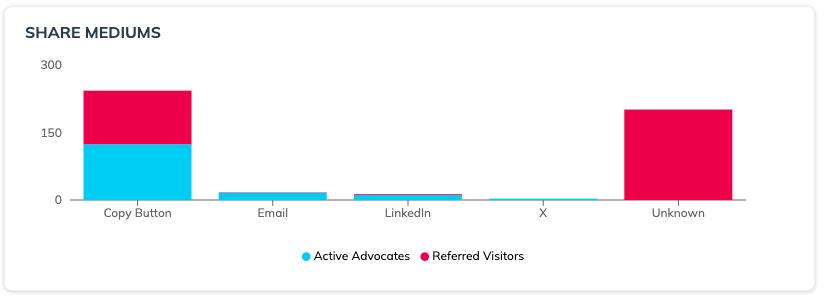
从 *分享媒介* 图表显示推荐所通过的网络或渠道。它可以帮助您评估在特定平台上进行了多少次分享（Active Advocates），以及该平台上有多少人点击了链接（Referred Visitors）。

{% hint style="info" %}
**示例：** 您的 Advocate 可能经常分享到他们的 LinkedIn 信息流，但您的程序可能无法从 LinkedIn 获得很多参与。当您看到这种情况时，您可以考虑重新查看 LinkedIn 的消息链接文案，看看是否可以改进或调整。

相反，如果您看到某个特定平台的分享次数较少，但被推荐访客数量较高，那么可能是少数非常成功的 Advocate 正在向该渠道分享。
{% endhint %}

根据您程序的设置，您的图表将包含以下部分或全部分享媒介：

* Facebook
* X
* 电子邮件
* LinkedIn
* SMS
* Line Messenger
* Messenger
* WhatsApp
* Pinterest
* 复制按钮

  当客户 Advocate 在您的 widget 或微站中选择通用分享按钮时显示。
* 未知

  如果有大量的 *unknown* 分享，这可能表示您的客户 Advocate 正通过尚未连接到您程序的服务发送其推荐详情。

<div data-with-frame="true"><figure><img src="/files/3e85507ab5b95b40d8612379442f9c957d80d5bf" alt=""><figcaption></figcaption></figure></div>

</details>


---

# Agent Instructions
This documentation is published with GitBook. GitBook is the documentation platform designed so that both humans and AI agents can read, navigate, and reason over technical content effectively. Learn more at gitbook.com.

## Querying This Documentation
If you need additional information that is not directly available in this page, you can query the documentation dynamically by asking a question.

Perform an HTTP GET request on the current page URL with the `ask` query parameter, and the optional `goal` query parameter:

```
GET https://help.impact.com/brand/zh/what-would-you-like-to-learn-about/advocate-program/advocate-reporting-and-analytics/advocate-program-analytics-explained.md?ask=<question>&goal=<endgoal>
```

`ask` is the immediate question: it should be specific, self-contained, and written in natural language.
`goal` is optional and describes the broader end goal you are ultimately trying to accomplish on behalf of the user. GitBook uses it to tailor the answer towards what is most useful for that goal.

The response will contain a direct answer to the question and relevant excerpts and sources from the documentation.

Use this mechanism when the answer is not explicitly present in the current page, you need clarification or additional context, or you want to retrieve related documentation sections.