> For the complete documentation index, see [llms.txt](https://help.impact.com/llms.txt). Markdown versions of documentation pages are available by appending `.md` to page URLs; this page is available as [Markdown](https://help.impact.com/brand/zh/what-would-you-like-to-learn-about/account-administration/account-settings/subscription-add-ons/get-the-optimize-add-on.md).
# 获取 Optimize 附加项
不知道您的客户旅程究竟是什么样子?不确定您是否正在为正确的合作伙伴记账?想更深入了解您的销售漏斗、营销渠道和品牌细分基准吗?获取 Optimize 附加组件!
#### 检查财务设置
1. 从顶部导航栏中,选择 **您的余额** **→** [**订阅**](https://app.impact.com/secure/advertiser/finance/fr/finance-overview.ihtml).
2. 检查您是否有 [*订阅* 小部件](/brand/zh/what-would-you-like-to-learn-about/platform-features/finance/your-subscription/view-your-impactcom-subscription-and-usage-details.md) 在 *概览* 界面中进行设置。
* 如果 *订阅* 小部件未显示, [联系支持团队](https://app.impact.com/secure/advertiser/support/customer-support-portal-flow.ihtml) 以便为您的帐户启用该功能。
* 如果 *订阅* 如果显示了小部件,您可以继续按照以下说明操作。
#### 订阅 Optimize
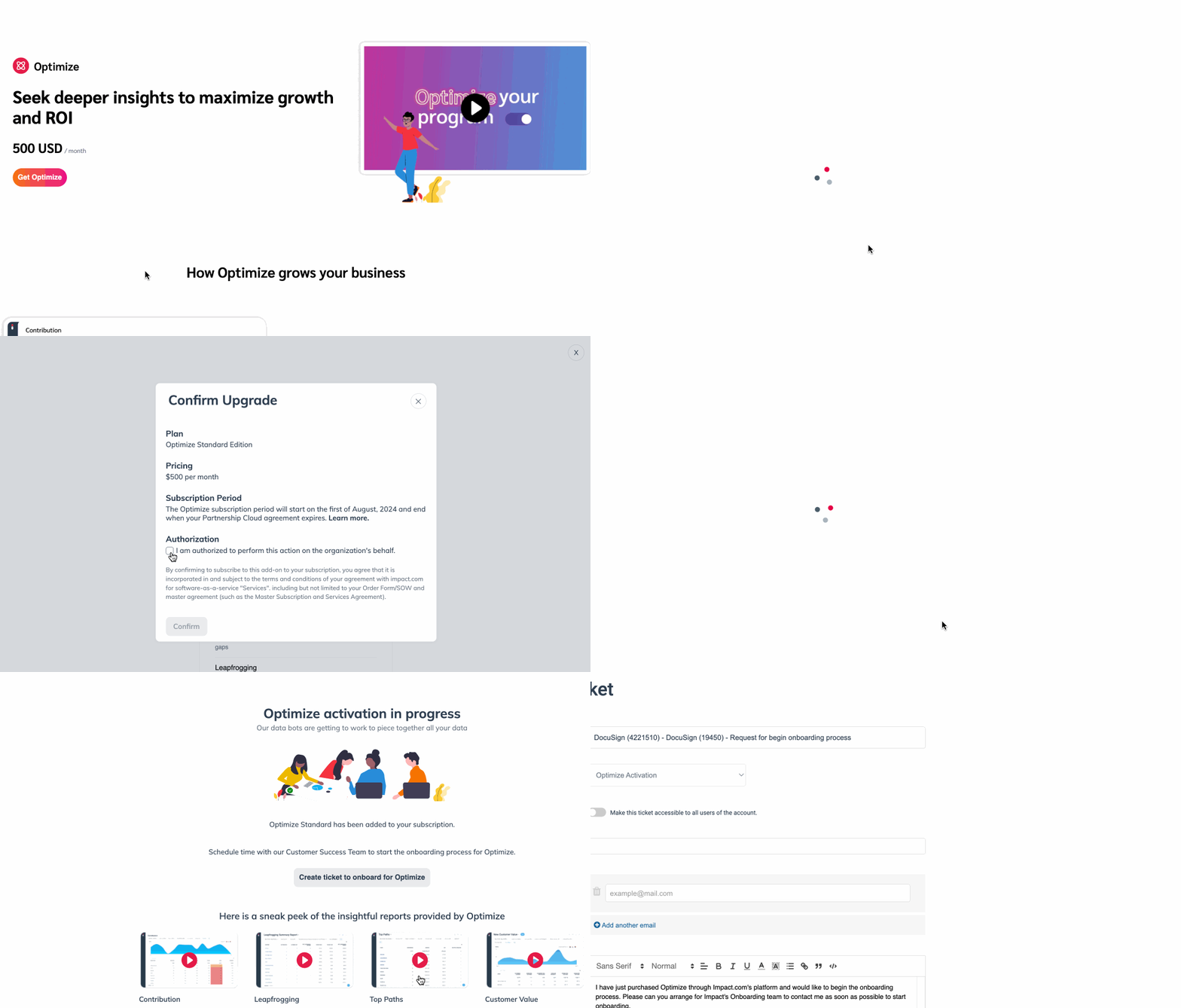
1. 在左侧导航栏中,选择  **优化** → **获取 Optimize**.
2. 选择您偏好的方案,例如: *标准*,然后选择 **选择方案**.
* 在弹出的窗口中,阅读 *价格*, *订阅期限*,以及 *授权* 以及您所选方案的协议。
3. 在……下 *授权*,选择  **\[已勾选复选框] 我已获授权代表该组织执行此操作。**
4. 选择 **确认**.
5. 确认订阅后,选择 **创建工单以接入 Optimize**.
* impact.com 的入驻团队将与您联系,并在您使用 Optimize 配置渠道的过程中为您提供协助。
6. 您也可以观看屏幕底部提供的视频,或查看我们的 [Optimize 入门指南](/brand/zh/what-would-you-like-to-learn-about/platform-features/cross-channel-performance-insights/optimize-startup-guide.md) 以了解更多信息。
---
# Agent Instructions
This documentation is published with GitBook. GitBook is the documentation platform designed so that both humans and AI agents can read, navigate, and reason over technical content effectively. Learn more at gitbook.com.
## Querying This Documentation
If you need additional information that is not directly available in this page, you can query the documentation by asking a question.
Perform an HTTP GET request on the following URL with the `ask` and `goal` query parameters:
```
GET https://help.impact.com/brand/zh/what-would-you-like-to-learn-about/account-administration/account-settings/subscription-add-ons/get-the-optimize-add-on.md?ask=&goal=
```
`ask` is the immediate question: it should be specific, self-contained, and written in natural language.
`goal` is what the user is ultimately trying to achieve, the reason they need the answer. Sharing it helps GitBook give you a better, more relevant answer. A goal is most helpful when it describes the outcome the user wants rather than restating the question. For example, with `ask=how do I create an API token`, a goal like `automate deployments from our CI pipeline` lets GitBook tailor the answer to that use case.
The response will contain a direct answer to the question and relevant excerpts and sources from the documentation.
Use this mechanism when the answer is not explicitly present in the current page, you need clarification or additional context, or you want to retrieve related documentation sections.