> For the complete documentation index, see [llms.txt](https://help.impact.com/llms.txt). Markdown versions of documentation pages are available by appending `.md` to page URLs; this page is available as [Markdown](https://help.impact.com/brand/zh/what-would-you-like-to-learn-about/account-administration/account-settings/send-data-to-impactcom/configure-a-data-download-connection.md).

# 配置数据下载连接

Connectors 是一种用于 impact.com 与品牌、合作伙伴或其他方之间所有批量数据文件传输的系统。每个连接（单个 connector）都有某些属性，例如数据类型（点击、转化、产品目录等）、方向（入站或出站）、方法（SFTP、FTP、电子邮件）等。

Connector Wizard 可让你设置到其他平台的连接，以便 impact.com 可以自动批量处理数据，将增强后的数据传送到你的系统中。

#### 创建一个出站连接

1. 从顶部导航栏中选择 ![](/files/1cbb667ec4878308f24ec4acd13cbf03ede0bdfe) **\[用户资料] → 设置**.
2. 在左侧栏中，位于 *技术*下，选择 **连接**.
3. 选择 **创建连接** 在右上角进入 Connector 向导。
   * 连接一旦创建，就无法删除。

<details>

<summary>Connector 术语</summary>

| 术语   | 描述                                                                               |
| ---- | -------------------------------------------------------------------------------- |
| 连接名称 | 提供一个能描述该连接的名称。（例如，下载汇总绩效数据。）。                                                    |
| 方向   | 此连接支持的数据方向：Inbound 是进入 impact.com 的数据，Outbound 是从 impact.com 发往其他平台的数据。          |
| 数据类型 | 此连接处理的数据类型（例如，转化数据、动作修改等）。                                                       |
| 方法   | 此连接使用的传输方法，（例如，FTP、SFTP 或电子邮件。）。                                                 |
| 方法论  | 传输方法论。入站连接支持“Push to Impact”和“Pull from 3rd Party”。出站连接支持“Pull from Impact”。     |
| 连接详情 | <p>所需的连接详情取决于所选方向、方法和方法论的组合。</p><p>在某些情况下，你需要提供详情；而在其他情况下，由 impact.com 提供详情。</p> |

{% hint style="info" %}
**注意：** 阅读更多关于如何 [将数据提供给 impact.com](/brand/zh/what-would-you-like-to-learn-about/account-administration/account-settings/send-data-to-impactcom/create-a-data-upload-connection.md).
{% endhint %}

</details>

#### 从 impact.com 接收数据

{% stepper %}
{% step %}

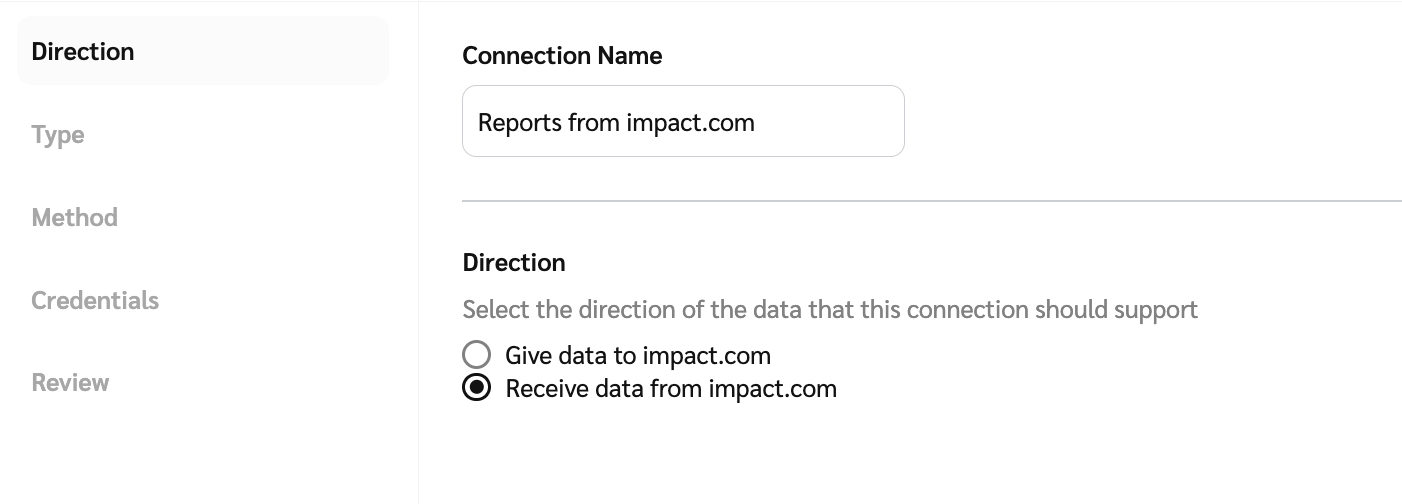
#### **步骤 1：方向**

1. 输入连接名称并选择 *方向* 数据的方向。
2. 选择 ![](/files/ab9a3d8dd653502900038f5f352bd3f23c771f2c) **\[单选按钮]** 来 **从 impact.com 接收数据**.
3. 选择 **下一步** 以继续。

<div data-with-frame="true"><figure><img src="/files/861b8418a58c89f2e7b616ab3d5659e96f6c6ff1" alt=""><figcaption></figcaption></figure></div>
{% endstep %}

{% step %}

#### **步骤 2：类型**

1. 选择该连接将支持的数据类型： **绩效奖金详情** 或 **报告**.
2. 选择 **下一步** 以继续。

<figure><img src="/files/4fa37bb7e0648b4d36be859160f49cff84e904c8" alt=""><figcaption></figcaption></figure>
{% endstep %}

{% step %}

#### **步骤 3：方法**

1. 该 *方法* 将为你选择： **SFTP**。你可以在需要时更改。
2. 该 *方法论* 将为你选择： **从 impact.com 拉取**.
3. 选择 **下一步** 以继续。

<div data-with-frame="true"><figure><img src="/files/666d68075daf0159b7bf2a9c3dbde80543d046eb" alt=""><figcaption></figcaption></figure></div>
{% endstep %}

{% step %}

#### **步骤 4：凭据**

1. 请选择 **现有凭据** ，从下拉菜单中， **编辑现有凭据** 或 **创建新凭据**.
   * 如果你要创建新凭据，请输入一个能描述其使用场景的凭据名称。例如， *下载汇总绩效数据*，然后选择以下之一： **公钥 → 创建** 或 **密码 → 创建**.
   * 如果你选择 **密码**，这些值将自动填充。请务必 **复制** 这些值。
2. 选择 **下一步** 以继续。

<div data-with-frame="true"><figure><img src="/files/13ccda5d97bea29716e43d95d5874eee4e7efbf7" alt=""><figcaption></figcaption></figure></div>
{% endstep %}

{% step %}

#### **步骤 5：审核**

1. 最后，检查配置，然后选择 **创建** 以创建连接。
   {% endstep %}
   {% endstepper %}


---

# Agent Instructions
This documentation is published with GitBook. GitBook is the documentation platform designed so that both humans and AI agents can read, navigate, and reason over technical content effectively. Learn more at gitbook.com.

## Querying This Documentation
If you need additional information that is not directly available in this page, you can query the documentation dynamically by asking a question.

Perform an HTTP GET request on the current page URL with the `ask` query parameter:

```
GET https://help.impact.com/brand/zh/what-would-you-like-to-learn-about/account-administration/account-settings/send-data-to-impactcom/configure-a-data-download-connection.md?ask=<question>
```

The question should be specific, self-contained, and written in natural language.
The response will contain a direct answer to the question and relevant excerpts and sources from the documentation.

Use this mechanism when the answer is not explicitly present in the current page, you need clarification or additional context, or you want to retrieve related documentation sections.