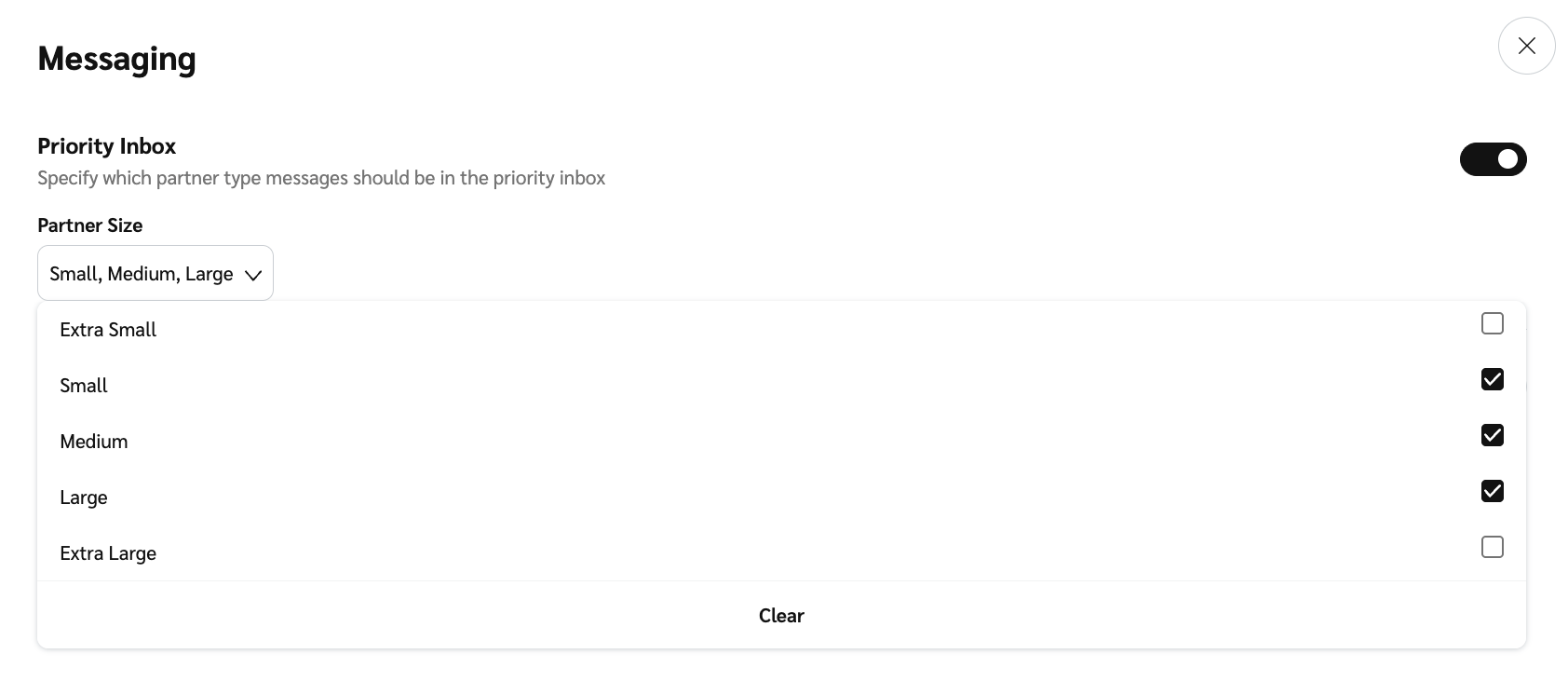
# 筛选高价值合作伙伴的消息
impact.com 允许您设置与消息相关的设置,以保持消息有用且相关。您可以对您的 *优先收件箱* 仅接收来自高价值合作伙伴的通知。您也可能想了解如何 [设置您的营业时间和离开消息](https://help.impact.com/brand/zh/nin-xiang-liao-jie-shen-me/platform-features/reach-out-to-partners/messaging/set-your-business-hours-and-away-message).
#### 设置合作伙伴规模筛选器
1. 从顶部导航栏,选择  **【用户资料】** → **设置**.
2. 在 *计划* 列,在 *常规*下,选择 **消息**.
3. 在页面顶部,  **\[切换]** 开启 **优先收件箱** 并使用  **\[下拉菜单]** 以应用一个 **合作伙伴规模**.
4. 选择 **保存** 在页面底部以保存您的设置。
---
# Agent Instructions: Querying This Documentation
If you need additional information that is not directly available in this page, you can query the documentation dynamically by asking a question.
Perform an HTTP GET request on the current page URL with the `ask` query parameter:
```
GET https://help.impact.com/brand/zh/nin-xiang-liao-jie-shen-me/platform-features/reach-out-to-partners/messaging/filter-messages-from-high-value-partners.md?ask=
```
The question should be specific, self-contained, and written in natural language.
The response will contain a direct answer to the question and relevant excerpts and sources from the documentation.
Use this mechanism when the answer is not explicitly present in the current page, you need clarification or additional context, or you want to retrieve related documentation sections.