> For the complete documentation index, see [llms.txt](https://help.impact.com/llms.txt). Markdown versions of documentation pages are available by appending `.md` to page URLs; this page is available as [Markdown](https://help.impact.com/brand/what-would-you-like-to-learn-about/platform-features/tracking/credit-policies/last-to-cart-credit-policy-explained.md).
# Last to Cart Credit Policy Explained
The Last to Cart policy is similar to the [Last Click](/brand/what-would-you-like-to-learn-about/platform-features/tracking/credit-policies/last-click-credit-policy-explained.md) policy in that it determines which partner receives credit and payout for a conversion based on a customer’s actions. Instead of the last click a customer makes deciding the outcome, the last time a customer *adds an item to their cart* will determine the winning partner.
Under the Last to Cart policy, the partner that leads the customer to add the final item to their cart before checking out will usually receive 100% of the credit and all of the payout for the conversion. However, the amount of credit and payout might be affected by your [participation bonus](/brand/what-would-you-like-to-learn-about/platform-features/contracts-and-template-terms/template-terms/payout-adjustments/participation-bonuses-explained.md) setup.
{% hint style="warning" %}
**Compatibility requirement:** Last to Cart requires a manual [Universal Tracking Tag (UTT)](/brand/what-would-you-like-to-learn-about/platform-features/tracking/javascript-tag-tracking/tracking-with-universal-tracking-tag-utt.md) setup and a [UTT `trackCart` implementation](/brand/what-would-you-like-to-learn-about/platform-features/tracking/javascript-tag-tracking/tracking-with-utt-javascript-functions.md) on your add-to-cart action. App and plug-in integrations do not support Last to Cart, including Shopify, WooCommerce, and BigCommerce. To use Last to Cart, you must use a manual UTT integration instead of an app or plug-in integration. If you need help migrating to a manual UTT integration, [contact support.](https://app.impact.com/support/portal.ihtml?createTicket=true)
{% endhint %}
Example scenario
ACME Corporation has an online direct-to-consumer (DTC) paint store. Due to partner feedback, they want to change from the First Click policy to the Last to Cart policy. After discussing this with their Customer Success Manager (CSM), ACME Corporation decides to focus on when customers add items to their cart.
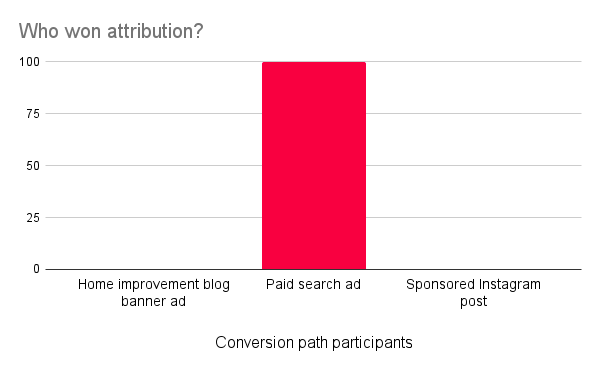
Despite this change, ACME Corporation’s conversion path does not change. Customers still add paint brushes after clicking on a home improvement blog’s banner ad, add tarps after clicking on a sponsored search result, and check out after clicking on a sponsored Instagram post. With the new policy, the partner responsible for the sponsored search result is now receiving all the conversions, as they lead customers to add the final item (the tarp) to their cart before checking out.
{% hint style="info" %}
**How do I request this credit policy?** Reach out to your CSM (or [contact support](https://app.impact.com/support/portal.ihtml?createTicket=true)) to discuss enabling the Last to Cart credit policy. You'll want to share why you want to use this policy and if all your partners will be on Last to Cart (and if not, which policy should take priority in a journey if more than one policy is present).
{% endhint %}
---
# Agent Instructions
This documentation is published with GitBook. GitBook is the documentation platform designed so that both humans and AI agents can read, navigate, and reason over technical content effectively. Learn more at gitbook.com.
## Querying This Documentation
If you need additional information that is not directly available in this page, you can query the documentation by asking a question.
Perform an HTTP GET request on the following URL with the `ask` and `goal` query parameters:
```
GET https://help.impact.com/brand/what-would-you-like-to-learn-about/platform-features/tracking/credit-policies/last-to-cart-credit-policy-explained.md?ask=&goal=
```
`ask` is the immediate question: it should be specific, self-contained, and written in natural language.
`goal` is what the user is ultimately trying to achieve, the reason they need the answer. Sharing it helps GitBook give you a better, more relevant answer. A goal is most helpful when it describes the outcome the user wants rather than restating the question. For example, with `ask=how do I create an API token`, a goal like `automate deployments from our CI pipeline` lets GitBook tailor the answer to that use case.
The response will contain a direct answer to the question and relevant excerpts and sources from the documentation.
Use this mechanism when the answer is not explicitly present in the current page, you need clarification or additional context, or you want to retrieve related documentation sections.