> For the complete documentation index, see [llms.txt](https://help.impact.com/llms.txt). Markdown versions of documentation pages are available by appending `.md` to page URLs; this page is available as [Markdown](https://help.impact.com/brand/what-would-you-like-to-learn-about/platform-features/tracking/credit-policies/first-click-credit-policy-explained.md).
# First Click Credit Policy Explained
If Last Click gives all the credit and payout to the final partner to drive a click in the conversion path, First Click gives it to the first partner to drive a click in the path. This is considered less popular by partners and is generally not recommended.
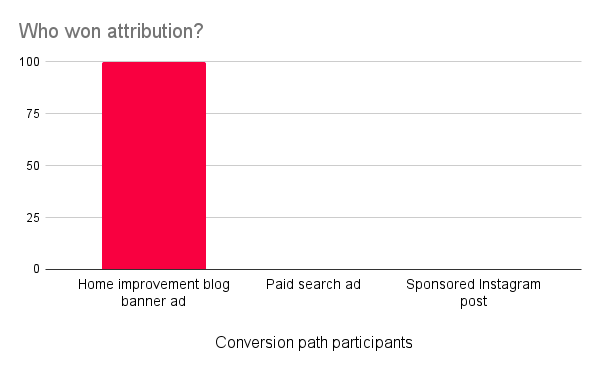
With the First Click credit policy, the partner that drove the first click in the conversion path will receive 100% of the credit, and usually all of the payout for the conversion. However, receiving full credit may be dependent on your [participation bonus](/brand/what-would-you-like-to-learn-about/platform-features/contracts-and-template-terms/template-terms/payout-adjustments/participation-bonuses-explained.md) setup.
{% hint style="info" %}
**Compatibility note:** Unlike [Last to Cart](/brand/what-would-you-like-to-learn-about/platform-features/tracking/credit-policies/last-to-cart-credit-policy-explained.md), First Click does not require a manual [Universal Tracking Tag (UTT)](/brand/what-would-you-like-to-learn-about/platform-features/tracking/javascript-tag-tracking/tracking-with-universal-tracking-tag-utt.md) `trackCart` implementation. If you use an app or plug-in integration, including Shopify, WooCommerce, or BigCommerce, use a credit policy that does not require `trackCart`.
{% endhint %}
A major difference between the First Click policy and the others is the need to set a lookback window. This window sets how far back impact.com should look for the first click in the conversion path. Since the conversion path is submitted when the [action locking window](/brand/what-would-you-like-to-learn-about/platform-features/actions-and-payouts/understand-the-action-life-cycle-and-finance.md) starts (i.e., when a conversion, like a sale, is tracked), the lookback window determines how far back impact.com should look for the introducing partner.
For example, a lookback window set for 90 days will only look 90 days back from the time of the conversion. The partner that drove the earliest click in that window will win credit for the conversion even if the true conversion path took longer than 90 days.
Example scenario
For example purposes we will look at the business of Duff Inc. They've decided to upgrade to the Professional edition for a handful of different reasons, and specifically want to switch over to the First Click credit policy as their crediting logic.
Duff Inc. decided on a lookback window of 45 days as all conversion paths took that long to convert when they were running Last Click. They also decide to prioritize the First Click policy over Last Click. Finally, all partners will be credited according to the First Click credit policy.
Somehow, their conversion paths look exactly the same as when they were using Last Click though. The customer always adds glasses through the merch blog's banner ad, add s branding after clicking on the sponsored search result, and makes the purchase after clicking through the sponsored Instagram post. Since the switch, however, the merch blog has been winning all conversions since they drove the first click in the conversion path.
#### How do I request this credit policy?
Reach out to your CSM (or [contact support](https://app.impact.com/support/portal.ihtml?createTicket=true)) to discuss enabling the First Click credit policy. You'll want to share why you want to use this policy, if all your partners will be on First Click (and if not, which policy should take priority in a journey if more than one policy is present), and if you had a lookback window in mind.
---
# Agent Instructions
This documentation is published with GitBook. GitBook is the documentation platform designed so that both humans and AI agents can read, navigate, and reason over technical content effectively. Learn more at gitbook.com.
## Querying This Documentation
If you need additional information that is not directly available in this page, you can query the documentation by asking a question.
Perform an HTTP GET request on the following URL with the `ask` and `goal` query parameters:
```
GET https://help.impact.com/brand/what-would-you-like-to-learn-about/platform-features/tracking/credit-policies/first-click-credit-policy-explained.md?ask=&goal=
```
`ask` is the immediate question: it should be specific, self-contained, and written in natural language.
`goal` is what the user is ultimately trying to achieve, the reason they need the answer. Sharing it helps GitBook give you a better, more relevant answer. A goal is most helpful when it describes the outcome the user wants rather than restating the question. For example, with `ask=how do I create an API token`, a goal like `automate deployments from our CI pipeline` lets GitBook tailor the answer to that use case.
The response will contain a direct answer to the question and relevant excerpts and sources from the documentation.
Use this mechanism when the answer is not explicitly present in the current page, you need clarification or additional context, or you want to retrieve related documentation sections.