# Manage Applications & Send Proposals

<a href="https://pxa.impact.com/student/activity/1087831?sid=0c0e3e5c-54c9-4435-9bee-ebcdccb7f292&#x26;sid_i=0?utm_source=app.impact.com&#x26;utm_medium=owned-platform&#x26;utm_content=part-351&#x26;utm_campaign=help-center" class="button primary">Take the PXA course</a>

{% embed url="<https://files.gitbook.com/v0/b/gitbook-x-prod.appspot.com/o/spaces%2FwMLlMoFBtKJa8ptd3zaw%2Fuploads%2F46mzhQDqXKHE3t38j6yR%2Fpro-250-2.mp4?alt=media&token=89f1d35d-c5a7-4eda-ae78-20cb50bc829e>" %}

When deciding whether you'd like to accept or decline a partner's application, you might want to first determine whether the partner is a good fit. To open an applicant's profile:

1. From the left navigation menu, select ![](https://4048883401-files.gitbook.io/~/files/v0/b/gitbook-x-prod.appspot.com/o/spaces%2FwMLlMoFBtKJa8ptd3zaw%2Fuploads%2Fgit-blob-230534471fef5f40808e921e41ee44e4a06ded03%2Fe6cb9548999afdc1ed3ce4942e4cb5b45b5cecbd323267aac2a7cd1915fccc09.svg?alt=media) **\[Engage] → Partners →** [**Applications**](https://app.impact.com/secure/advertiser/engage/contracts/activity/adv-manage-pending-public-ios-v2-flow.ihtml).
2. On the *Applications* screen, find the partner you're interested in and select **their name**.
   * This will open a slide-out with a range of details about the partner and allow you to reach out to the partner.

     <div data-gb-custom-block data-tag="hint" data-style="info" class="hint hint-info"><p><strong>Useful:</strong> To email a potential partner, select <img src="https://4048883401-files.gitbook.io/~/files/v0/b/gitbook-x-prod.appspot.com/o/spaces%2FwMLlMoFBtKJa8ptd3zaw%2Fuploads%2Fgit-blob-5e962e68a3cf6c87d7ade712b204bae70f02fe42%2F07666ee42fc00c5eb99a6545e1f573505a3888c370d4751169eab2b06d01158c.svg?alt=media" alt=""> <strong>[Email]</strong> and follow the <a href="../reach-out-to-partners/emails/email-a-partner"><em>Email details reference</em></a> for guidance.</p></div>
3. You can email the partner by selecting the ![](https://4048883401-files.gitbook.io/~/files/v0/b/gitbook-x-prod.appspot.com/o/spaces%2FwMLlMoFBtKJa8ptd3zaw%2Fuploads%2Fgit-blob-b851101b4b81a7445e5e35af29a59f1186248491%2F6cf6e4fefa0704c19e110aeb5933f03b5e42d94ec8f8cea0ea6bcc7c235923ce.svg?alt=media) **\[Email icon]** and proceeding with the following steps:
   1. Enter the **From Name** that the recipients will see when they receive the email.
   2. Enter the **Reply to email** address that the recipient will contact when they respond to this email.
   3. Enter the **Subject** of this email.
   4. In the *Content* section, use the WYSIWYG editor to create or edit your email content. Hover over the icons to view formatting and content options (e.g., to upload an attachment, select ![](https://4048883401-files.gitbook.io/~/files/v0/b/gitbook-x-prod.appspot.com/o/spaces%2FwMLlMoFBtKJa8ptd3zaw%2Fuploads%2Fgit-blob-73f6258ba255a029c0f09b68fcc140c9fce0399b%2F383abce743f40b458605f1a6c49dd744a83244f1e3c2d0cec9abb9aa143b7459.svg?alt=media) **\[File]** and drop your file).
   5. Optionally, select **Show special token options**. This allows you to embed special tokens into your email content that dynamically populate values.
      * See the *Special Token reference* below for more info about these options.
   6. Select **Send**.

<details>

<summary>Special Token reference</summary>

| Token              | Description                                                          |
| ------------------ | -------------------------------------------------------------------- |
| {adcode\<adid>}    | The ad code for a particular ad (example: {adcode\_12}).             |
| {mpid}             | The partner ID (e.g., 98765).                                        |
| {mpname}           | The partner company name.                                            |
| {firstName}        | The first name of the partner account user (e.g., John).             |
| {lastName}         | The last name of the partner account user (e.g., Doe).               |
| {currentDay}       | The current day (e.g., January 19, 2038).                            |
| {currentTime}      | The current time including seconds (e.g., 19-Jan-2038 03:14:08 UTC). |
| {currentMonthYear} | The current month and year (e.g., January 2038).                     |

</details>

#### View information of an applicant

{% tabs %}
{% tab title="Properties" %}
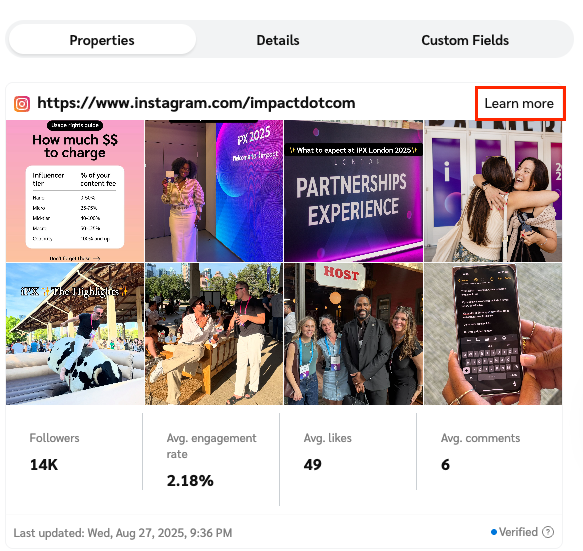
This tab lists the partner's media properties, namely their:

* Websites
* Social media pages
* Mobile apps
* Email newsletters
* Podcasts
* Offline and other media properties

<div data-with-frame="true"><figure><img src="https://4048883401-files.gitbook.io/~/files/v0/b/gitbook-x-prod.appspot.com/o/spaces%2FwMLlMoFBtKJa8ptd3zaw%2Fuploads%2Fgit-blob-2fe2e127a754cda9159d1f89154c67508a89e4d4%2F594a511068f22b5e3055eacc2e45f7b94b5ca5b324b0c2af3d7e1004f13056f1.png?alt=media" alt="" width="437"><figcaption></figcaption></figure></div>
{% endtab %}

{% tab title="Details" %}
This tab shows the partner's self-provided description, their business model, promotional categories, available media kit downloads, related links, promotional areas, and finance details.

<div data-with-frame="true"><figure><img src="https://4048883401-files.gitbook.io/~/files/v0/b/gitbook-x-prod.appspot.com/o/spaces%2FwMLlMoFBtKJa8ptd3zaw%2Fuploads%2Fgit-blob-a63c4f0bcf72ad7429fd69078ea930cf2f1d2ddf%2F36610a2a4c47fd19c92bc20c03a64c28b6f8bd8c1db3a7b92c31727ad49407bd.png?alt=media" alt="" width="448"><figcaption></figcaption></figure></div>
{% endtab %}

{% tab title="Custom Fields" %}
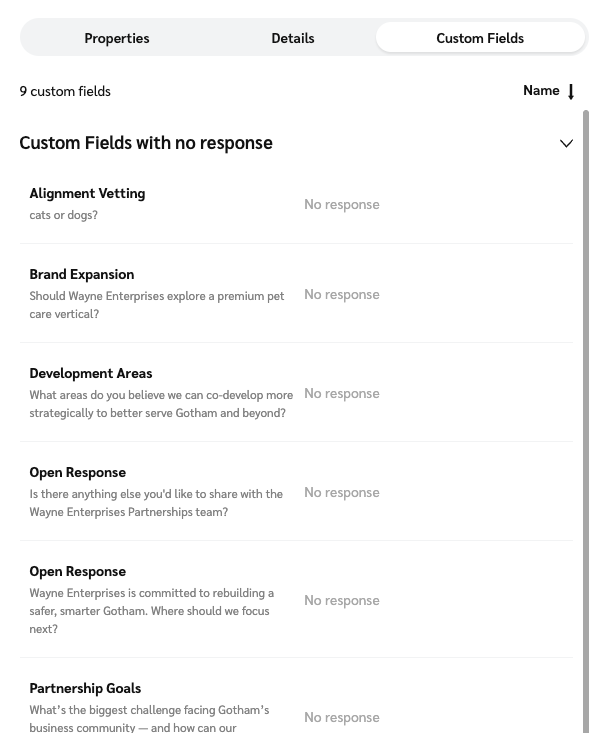
This tab is only visible if you have surveys enabled with [custom fields](https://help.impact.com/brand/what-would-you-like-to-learn-about/platform-features/reach-out-to-partners/surveys/create-custom-fields-for-surveys). It shows the partner's responses to your custom field questions and any files they've attached.

<div data-with-frame="true"><figure><img src="https://4048883401-files.gitbook.io/~/files/v0/b/gitbook-x-prod.appspot.com/o/spaces%2FwMLlMoFBtKJa8ptd3zaw%2Fuploads%2Fgit-blob-2e03d20c85a593eac3f9bcbecfc730d0a4262dd8%2F59251113737b4076eac57423d4f83b755823c8e71fe0181206c9a8eb75e59d8a.png?alt=media" alt="" width="448"><figcaption></figcaption></figure></div>
{% endtab %}
{% endtabs %}

#### Accept an applicant

1. From the left navigation menu, select ![](https://4048883401-files.gitbook.io/~/files/v0/b/gitbook-x-prod.appspot.com/o/spaces%2FwMLlMoFBtKJa8ptd3zaw%2Fuploads%2Fgit-blob-230534471fef5f40808e921e41ee44e4a06ded03%2Fe6cb9548999afdc1ed3ce4942e4cb5b45b5cecbd323267aac2a7cd1915fccc09.svg?alt=media) **\[Engage] → Partners →** [Applications](https://app.impact.com/secure/advertiser/engage/contracts/activity/adv-manage-pending-public-ios-v2-flow.ihtml).
2. On the *Applications* screen, find the applicant you're interested in and select **their name**, then on the slide-out modal, select **Accept**.
   * Alternatively, hover over the application in the *Applications* screen and select ![](https://4048883401-files.gitbook.io/~/files/v0/b/gitbook-x-prod.appspot.com/o/spaces%2FwMLlMoFBtKJa8ptd3zaw%2Fuploads%2Fgit-blob-8ec3e877b1397045c61d394485e72ac4d93120ee%2Fc6ddb46c637059f06e86c790a911217a9428f5c47b5efef046f90555e85b03cd.svg?alt=media) **\[More] → Accept**.
3. The *Accept Application* modal will appear. Review and update the following settings as necessary:
   * **Contract Terms:** Review the contract terms to which the partner applied, or send a new proposal. For more information, see [Send a counter-proposal to a new partner](#section-idm4519116039630433555135813086).
   * **Start Date:** Select whether the contract should take effect *Immediately* or *In the future*.
   * **Contract Length:** Select whether the contract should be *Ongoing* or *Temporary*. If temporary, select an end date and fallback terms for when the contract expires.
   * **Partner Groups:** Type a partner group name to add the partner to a specified group.
   * **Add selected applicants into additional programs:** ![](https://4048883401-files.gitbook.io/~/files/v0/b/gitbook-x-prod.appspot.com/o/spaces%2FwMLlMoFBtKJa8ptd3zaw%2Fuploads%2Fgit-blob-d0b6669ae76a7bef06a8d6940d7ad5c16bb8d018%2F7cb018d4face8d7cceb880eb5086c812e764fbcfe6f2a0377f88bc7576973070.svg?alt=media) **\[Toggle on]** if you manage multiple programs and want to add the partner to more programs besides the one to which they applied.
   * **Mark applicants as Pre-Selected Partners:** ![](https://4048883401-files.gitbook.io/~/files/v0/b/gitbook-x-prod.appspot.com/o/spaces%2FwMLlMoFBtKJa8ptd3zaw%2Fuploads%2Fgit-blob-d0b6669ae76a7bef06a8d6940d7ad5c16bb8d018%2F7cb018d4face8d7cceb880eb5086c812e764fbcfe6f2a0377f88bc7576973070.svg?alt=media) **\[Toggle on]** if you want to auto-accept the partner for any future programs you create.
   * **Message:** Optionally, leave an acceptance message for the partner. The message will be sent as a default or customized welcome email.
4. At the bottom of the modal, select **Accept**.

<div data-with-frame="true"><figure><img src="https://4048883401-files.gitbook.io/~/files/v0/b/gitbook-x-prod.appspot.com/o/spaces%2FwMLlMoFBtKJa8ptd3zaw%2Fuploads%2Fgit-blob-de1f63f107f9ced1524e2a7e4cadfad7ebd21fd5%2Fdee79616295f1ea7daa5beff84bab944b7f31a33b3da2782d8c69183cf6e138d.png?alt=media" alt="" width="407"><figcaption></figcaption></figure></div>

{% hint style="warning" %}
**Important:** When accepting a proposal from any partner, *new* or *joined*, review the terms **thoroughly**, because accepting the application will make the agreement binding upon you. If a partner proposes *Placement Fees*, this could affect your budget unexpectedly.
{% endhint %}

#### Reject an applicant

1. From the left navigation menu, select ![](https://4048883401-files.gitbook.io/~/files/v0/b/gitbook-x-prod.appspot.com/o/spaces%2FwMLlMoFBtKJa8ptd3zaw%2Fuploads%2Fgit-blob-230534471fef5f40808e921e41ee44e4a06ded03%2Fe6cb9548999afdc1ed3ce4942e4cb5b45b5cecbd323267aac2a7cd1915fccc09.svg?alt=media) **\[Engage] → Partners →** [**Applications**](https://app.impact.com/secure/advertiser/engage/contracts/activity/adv-manage-pending-public-ios-v2-flow.ihtml).
2. On the *Applications* screen, find the applicant you want to decline and **select their name**, then on the slide-out modal, select **Reject**.
   * Alternatively, hover over the application in the *Applications* screen and select ![](https://4048883401-files.gitbook.io/~/files/v0/b/gitbook-x-prod.appspot.com/o/spaces%2FwMLlMoFBtKJa8ptd3zaw%2Fuploads%2Fgit-blob-8ec3e877b1397045c61d394485e72ac4d93120ee%2Fc6ddb46c637059f06e86c790a911217a9428f5c47b5efef046f90555e85b03cd.svg?alt=media) **\[More] → Reject**.
3. The *Reject Application* modal will appear. Review and update the following settings as necessary:
   * **Contract Terms:** View the contract terms to which the partner applied.
   * **Reason:** Select a reason for declining the application to give the partner some insight into why they've been rejected.
   * **Block partner from reapplying:** Select whether you wish to block the partner from reapplying to the specific program or all programs. (Selecting *All my programs* only applies to programs to which you have access, and may not include all the available brand programs.)
   * **Message:** Optionally, leave a rejection message for the partner to receive via email. Here you can expand on why the partner didn't meet your requirements.
4. At the bottom of the modal, select **Reject**.

<div data-with-frame="true"><figure><img src="https://4048883401-files.gitbook.io/~/files/v0/b/gitbook-x-prod.appspot.com/o/spaces%2FwMLlMoFBtKJa8ptd3zaw%2Fuploads%2Fgit-blob-691c2b5b22573e1b913c6c038631f20ca6ee8d51%2Fee90450fd977a9da1060213a3e74b62bff2feeafdec87daebb66f7c1f5a24417.png?alt=media" alt="" width="407"><figcaption></figcaption></figure></div>

#### Send a counter-proposal

If a partner has proposed their own terms for joining your program, you can counter-propose with a different contract (e.g., a different set of terms that better fits the partner’s business model).

1. From the left navigation menu, select ![](https://4048883401-files.gitbook.io/~/files/v0/b/gitbook-x-prod.appspot.com/o/spaces%2FwMLlMoFBtKJa8ptd3zaw%2Fuploads%2Fgit-blob-230534471fef5f40808e921e41ee44e4a06ded03%2Fe6cb9548999afdc1ed3ce4942e4cb5b45b5cecbd323267aac2a7cd1915fccc09.svg?alt=media) **\[Engage] → Partners →** [**Applications**](https://app.impact.com/secure/advertiser/engage/contracts/activity/adv-manage-pending-public-ios-v2-flow.ihtml).
2. On the *Applications* screen, find the applicant you want to decline and **select their name**, then on the slide-out modal, select **Counter**.
   * Alternatively, hover over the application in the *Applications* screen and select ![](https://4048883401-files.gitbook.io/~/files/v0/b/gitbook-x-prod.appspot.com/o/spaces%2FwMLlMoFBtKJa8ptd3zaw%2Fuploads%2Fgit-blob-8ec3e877b1397045c61d394485e72ac4d93120ee%2Fc6ddb46c637059f06e86c790a911217a9428f5c47b5efef046f90555e85b03cd.svg?alt=media) **\[More] → Counter**.
3. On the *Counter* screen, review and update the following settings as necessary:
   * **Template Term:** Use the dropdown to select the new Template Term.
   * **Contract Dates:** Set the contract start date and specify whether the contract should be *Ongoing* or *Temporary*. If temporary, select an end date and fallback terms for when the contract expires.
   * **Approval Options:** Select *Propose* and use the checkboxes to specify whether this counter-proposal has an expiration date, and whether the partner can react to your counter-proposal with a counter-proposal of their own.
   * **Comments:** Optionally, leave a comment to explain your counter-proposal.
4. At the bottom of the screen, select **Save**.

<div data-with-frame="true"><figure><img src="https://4048883401-files.gitbook.io/~/files/v0/b/gitbook-x-prod.appspot.com/o/spaces%2FwMLlMoFBtKJa8ptd3zaw%2Fuploads%2Fgit-blob-33379002d834e0062827758b422e9a887864fb83%2F5110851d25dd893de91b08badead7109fe70fafe0d9ee5a3720c2cd8da1ef14f.png?alt=media" alt="" width="407"><figcaption></figcaption></figure></div>