> For the complete documentation index, see [llms.txt](https://help.impact.com/llms.txt). Markdown versions of documentation pages are available by appending `.md` to page URLs; this page is available as [Markdown](https://help.impact.com/brand/what-would-you-like-to-learn-about/platform-features/reach-out-to-partners/segments/best-practices-for-configuring-segment-conditions.md).
# Best Practices for Configuring Segment Conditions
Exploring the do's and don'ts of grouping *Conditions* in your partner [segments](/brand/what-would-you-like-to-learn-about/platform-features/reach-out-to-partners/segments/create-a-partner-segment.md) will help you utilize these segments effectively. Examples of effective and ineffective condition groupings will be demonstrated below. By following these guidelines, you’ll learn how to create dynamic segments that keep your partner lists relevant and organized.
{% hint style="info" %}
**Note:** The examples below will demonstrate how to use each condition correctly to avoid errors when creating your partner segments.
{% endhint %}
#### Performance conditions best practices
Use the example of **Do's** and **Don'ts** to identify which *Performance* conditions can be grouped together, helping you avoid errors when creating your partner segments.
Performance Conditions
| Do | Don't |
| ------------------------------------------------------------------------------------------------------------------------------------------------------------------------------------------------------------------------------------------------------------------------------------------------------------------------------------------------------------------------------------------------------------------------------------- | ------------------------------------------------------------------------------------------------------------------------------------------------------------------------------------------------------------------------------------------------------------------------------------------------------------------------------------------------------------------------------------------------------------------------------------ |
| Use *Performance* filters alongside the **Relationship Stage** filter set to **Joined** to evaluate only those partners who have established a relationship and generated *Performance* metrics. Without a **Joined** relationship, partners will not have any performance data to analyze. | Avoid using the same filter twice with the same operator. E.g., *Actions* `greater than` 1 + *Actions* `greater than` 1. |
| Use the Performance Date Range filter according to the same guidelines as the Last Transition Date.
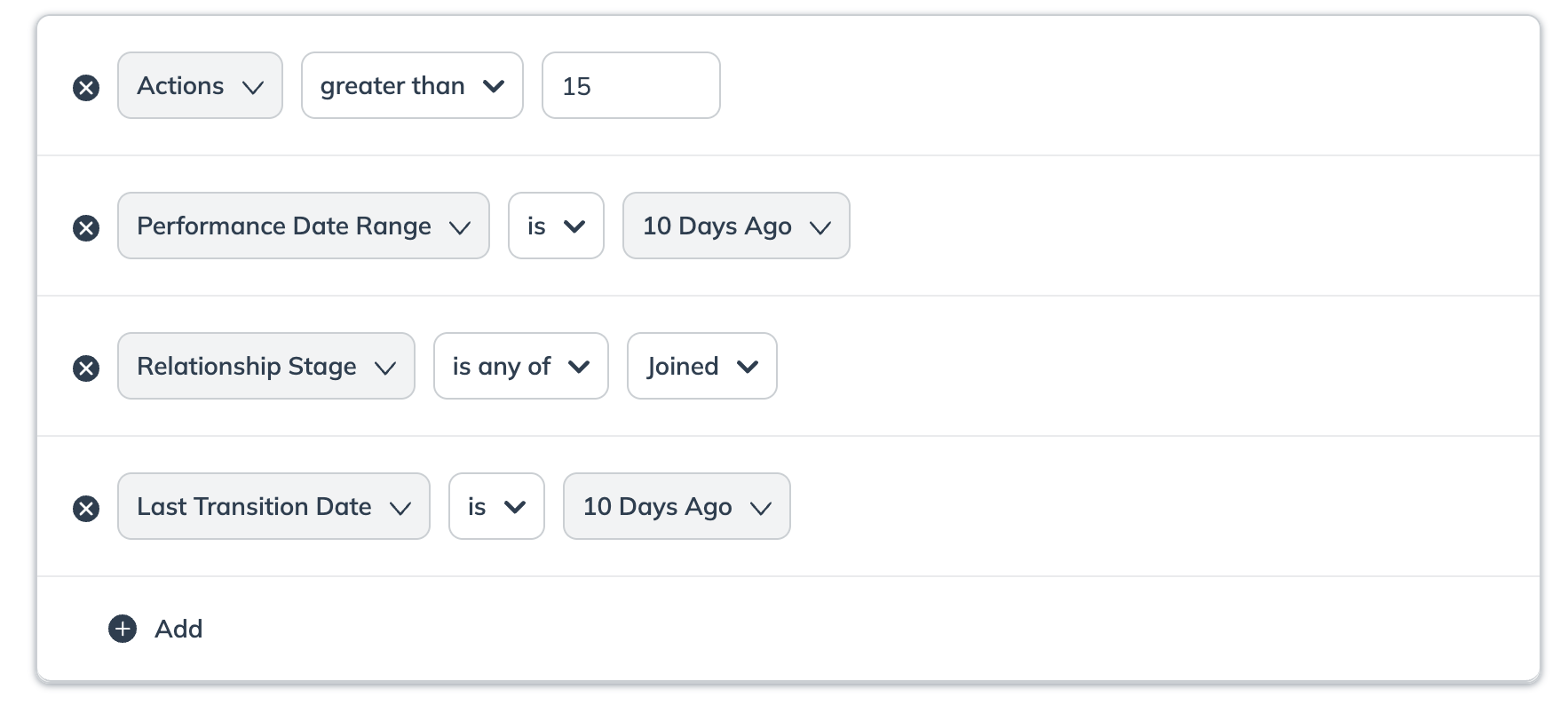
| Avoid using the same filter twice within the same segment, even when combined with the Performance Date Range, as it is redundant and may lead to unexpected results.
E.g., Actions less than 5 + Actions less than 3 + Performance Date Range is Yesterday.
|
| | Don't use the **Performance** condition filter without specifying the Performance metrics *Clicks*, *Commission*, *Revenue* and *Performance Date Range*. |
| Use the *Commission* filter to single out dormant partner. E.g., `is` 0 or `less than` 1. | |
| | The Performance filters should not be included with the Contract Stage filter.
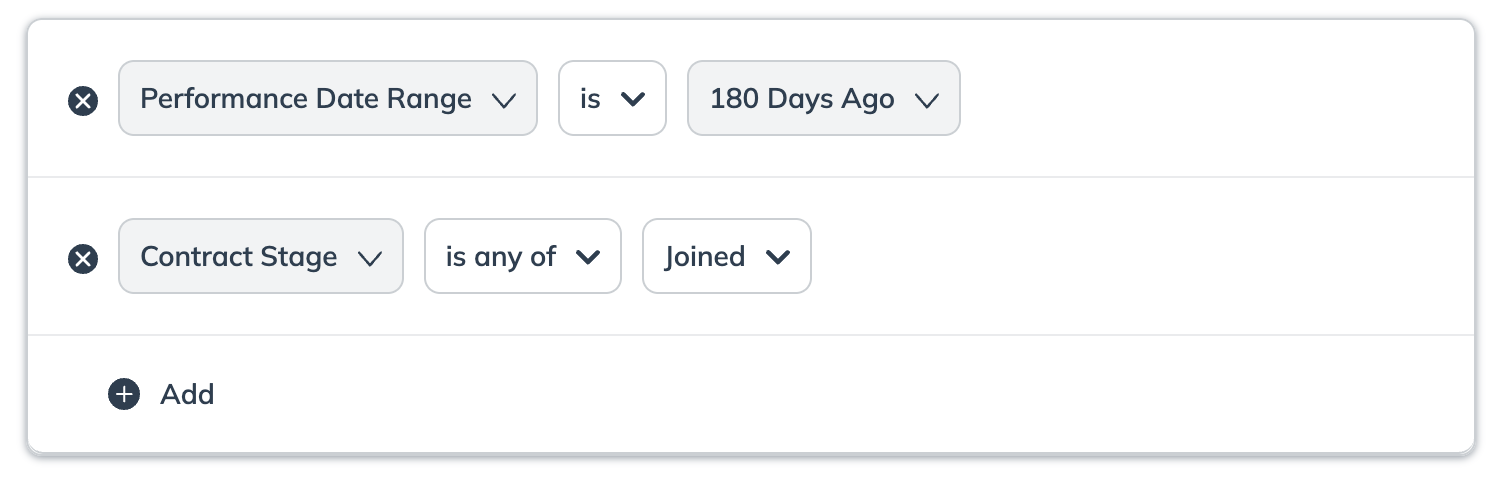
|
| | The Performance filters should not be included with the Relationship Stage filter.
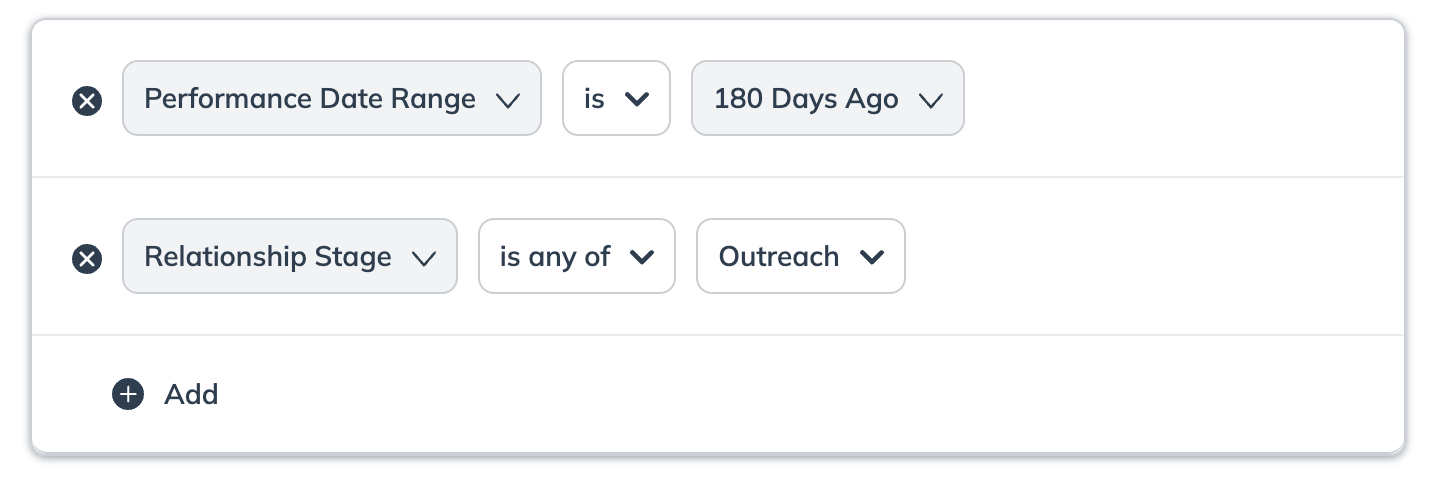
|
#### Partner conditions best practices
Use the example of **Do's** and **Don'ts** to identify which *Partner* conditions can be grouped together, helping you avoid errors when creating your partner segments.
Relationship Stage
| Do | Don't |
| --------------------------------------------------------------------------------------------------------------------------------------- | ---------------------------------------------------------------------------------------------------------------------------------------------------------------------------------------------------------------------------------------------------------------------------------------------------------------------------------------------------------------------------------------------------------------------------------------------- |
| Make sure you select and pair the correct **Relationship Stages** for the type of segment you intend to create. E.g., *New* + *Joined*. | Don't pair these Relationship Stages in a two-row setup, as seen below, as it can lead to inaccurate results.
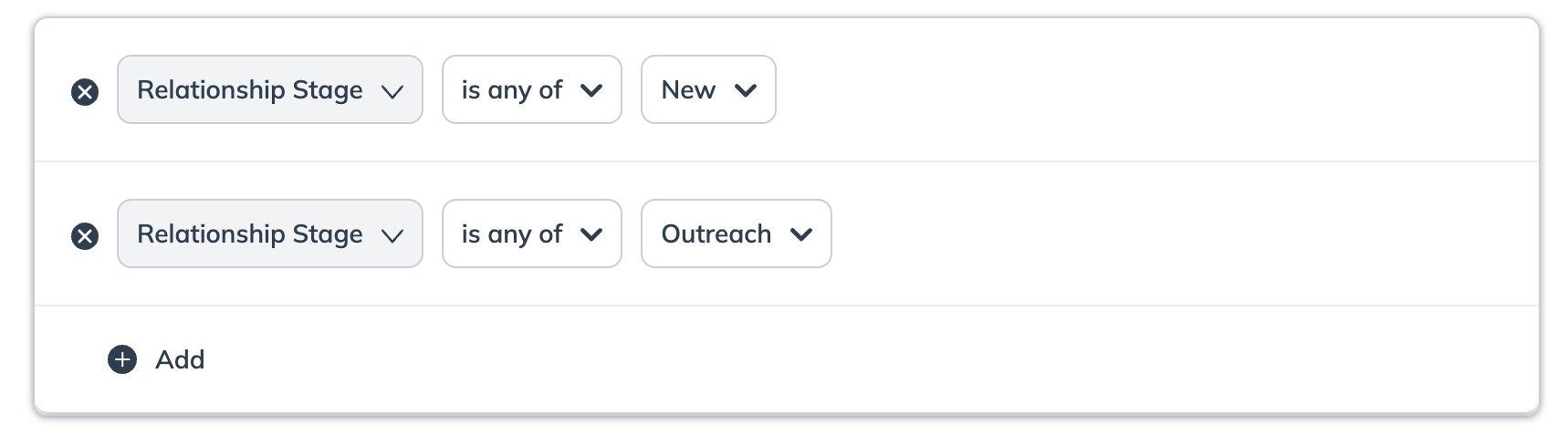
|
| | The **Relationship Stage** and **Contract Stage** filters should not be included together. |
| | The **Relationship Stage** and **Performance Date Range** filters should not be included together. |
Original Joined Date
| Do | Don't |
| -------------------------------------------------------------------------------------------------------------------------------------------------------------------------------------------------------------------------------------------------------------------------------------------------------------------------------- | -------------------------------------------------------------------------------------------------------------------------------- |
| Filtering by the same Original Joined Date and Last Transition Date fields can provide more precise and accurate search results.
For example, partners whose Last Transition Date is Today and Original Joined Date is Today.
| Avoid using the **Original Joined Date** paired with **Relationship Stage** is *Expired*. This could lead to inaccurate results. |
Last Transition Date
| Do | Don't |
| ---------------------------------------------------------------------------------------------------------------------------------------------------------------------------------------------------------------------------------------------------------------------------------------------------------------------------------------------------------------------------------------------------------------------------------------------------------------------------------------------------------------------------------------------------------------------------- | ------------------------------------------------------------------------------------------------------------------------------- |
| Combining the Last Transition Date and Relationship Stage fields can provide a more precise and accurate search result. E.g., If you want to find partners who recently transitioned to the Outreach Stage, use a filter for both the Outreach Stage and a recent Last Transition Date range.
• Filtering both fields ensures you select partners who have transitioned to the specified stage within a specific timeframe, avoiding discrepancies that could arise from using either field alone.
| Don't use the **Last Transition Date** field twice within the same segment, it is redundant and can lead to inaccurate results. |
| Use the Last Transition Date to filter partners who have transitioned to their current status today E.g., the date range would be from 2024-01-01 00:00:00 to 2024-01-01 23:59:59 UTC.
• Remember that this does not refer to the last 24 hours.
| |
| Use this filter to select partners who transitioned to their current status between dates. E.g,. 15 September, 2024, and 25 September, 2024.
• This will exclude the partners who transitioned on September 25.
| |
| Use this filter to select partners who transitioned to their current status exactly a specified number of days ago.
E.g., Last Transition Date interval between 20 & 45 days ago.
| |
Partner Group
| Do | Don't |
| ---------------------------------------------------------------------------------------------------------------------------------------------------------------------------------------------------------------------------------------------------------------------------------------------------------------------------------------------- | ---------------------------------------------------------------------------------------------------------------------------------------------------------------------------------------------------------------------------------------------------------------- |
| To include partners from multiple groups, use a single filter with the is any of operator.
Example: Partner Group is any of Influencers, Loyalty.
Result: This correctly finds partners who are in the Influencers group OR the Loyalty group.
| Don't use this filter if you intend to find partners from two different groups. A partner must belong to both groups to be included in the results; otherwise, they will be excluded. |
| To exclude partners from a specific group, use the is not operator.
Example: Partner Group is not Competitors.
Result: This removes any partner(s) in the Competitors group from your segment.
| Don't add multiple groups to a single `is not` filter. This operator is designed to exclude only one group at a time. If you need to exclude multiple groups (e.g., *Competitors* and *Internal Staff*), you must use a separate `is not` filter for each group. |
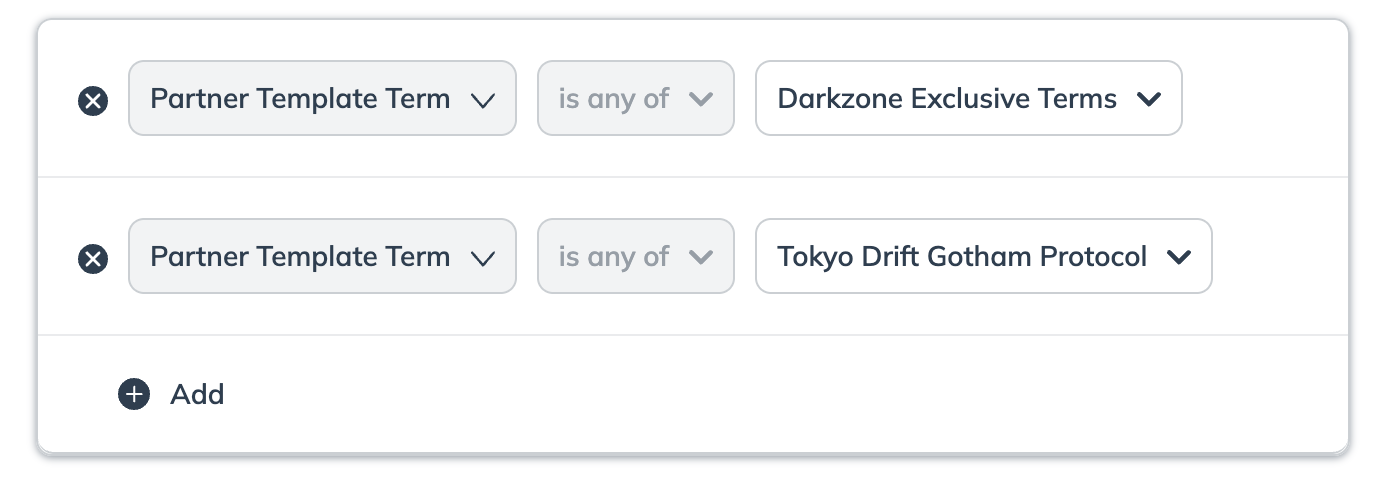
Partner Template Term
| Do | Don't |
| ----------------------------------------------------------------------------------------------------------------------- | ----------------------------------------------------------------------------------------------------------------------------------------------------------------------------------------------------------------------------------------------------------------------------------------------------------------------------------------------------------------------------------------------------------------------------------------- |
| Use this filter to include partners contracted under specific **Partner Template Terms**. E.g., Public Term. | Don't pair these Template Terms in a two-row setup, as seen below, as it can lead to inaccurate results.
|
| Use this filter to include partners under various **Partner Template Terms**. E.g., Public Terms **AND** Acme G3 Terms. | |
Contract Stage
| Do | Don't |
| ------------------------------------------------------------------------------------------------------------------------------------------------------------------------------------------------------------------------------------------------------------------------------------------------------------------------------------------------------------------------------------------------------------------------------------------ | ------------------------------------------------------------------------------------------------------------------------------------------------------------------------------------------------------------------------------------------------------------------------------- |
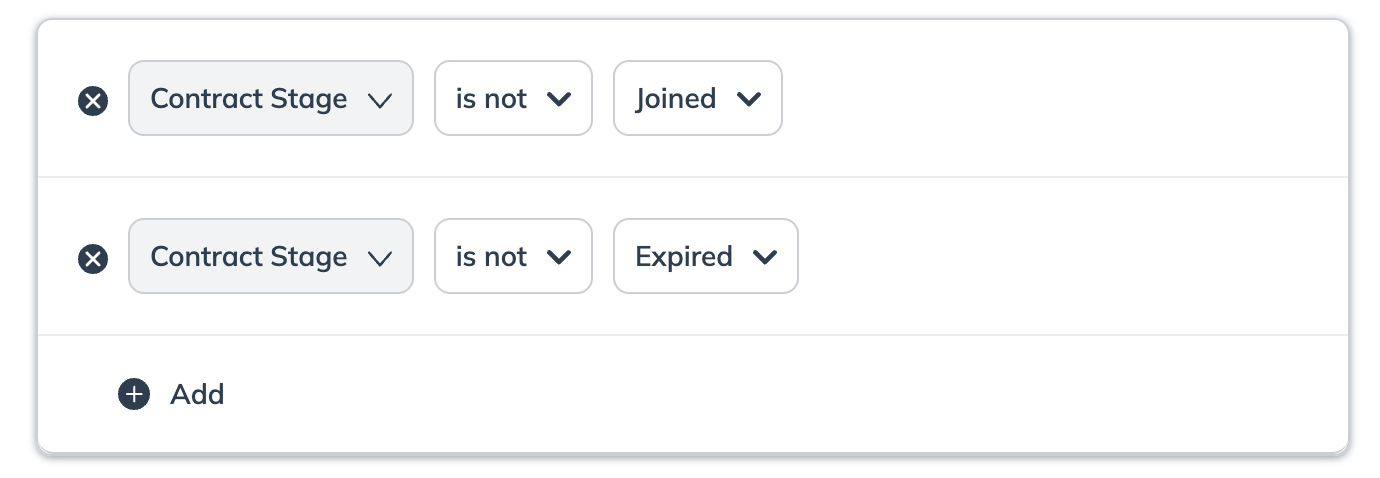
| Use this filter to apply multiple **Contract Stages**. E.g., *Joined* + *Awaiting Contract Start*. | Don't attempt to filter by partners who are in the Awaiting Publisher Approval AND Publisher Declined Contract Stages.
• These contract stages are mutually exclusive, and no partner will meet such criteria.
|
| To filter by is not for multiple Contract Stages in your segment, add them in separate rows.
| |
| | The **Contract Stage** and **Performance Date Range** filters should not be included together. |
| | The **Contract Stage** and **Relationship** filters should not be included together. |
Partner Name
| Do | Don't |
| ------------------------------------------------------------------------------------- | ----------------------------------------- |
| Use this filter to select multiple **Partner Names**. E.g., Justin Case + Hazel Nutt. | Don't select the same partner name twice. |
Partner ID
| Do | Don't |
| -------------------------------------------------------------------------------------------- | -------------------------------------------------------------------------------------------------------------------------------------------------------------------------------------------------------------------------------------------------------------------------------------- |
| Use this filter only if you know the exact **Partner ID** of the partner you want to filter. | Don't use a Partner ID that does not align with a Partner Name as the filter may produce unexpected results.
• For example, a partner with the name "Justin Case" might have a different ID than expected, causing incorrect filtering.
|
{% hint style="warning" %}
**Warning:** If you intend to use a segment for a Newsletter, the segment size must align with the number of ad codes you plan to include to avoid delivery failure. See [Create & Send Newsletters to Partners](/brand/what-would-you-like-to-learn-about/platform-features/reach-out-to-partners/newsletters/create-and-send-newsletters-to-partners.md) for specific size limitations based on ad code count.
{% endhint %}
---
# Agent Instructions
This documentation is published with GitBook. GitBook is the documentation platform designed so that both humans and AI agents can read, navigate, and reason over technical content effectively. Learn more at gitbook.com.
## Querying This Documentation
If you need additional information that is not directly available in this page, you can query the documentation by asking a question.
Perform an HTTP GET request on the following URL with the `ask` and `goal` query parameters:
```
GET https://help.impact.com/brand/what-would-you-like-to-learn-about/platform-features/reach-out-to-partners/segments/best-practices-for-configuring-segment-conditions.md?ask=&goal=
```
`ask` is the immediate question: it should be specific, self-contained, and written in natural language.
`goal` is what the user is ultimately trying to achieve, the reason they need the answer. Sharing it helps GitBook give you a better, more relevant answer. A goal is most helpful when it describes the outcome the user wants rather than restating the question. For example, with `ask=how do I create an API token`, a goal like `automate deployments from our CI pipeline` lets GitBook tailor the answer to that use case.
The response will contain a direct answer to the question and relevant excerpts and sources from the documentation.
Use this mechanism when the answer is not explicitly present in the current page, you need clarification or additional context, or you want to retrieve related documentation sections.