# Review Social Monitoring Results

Social monitoring lets you see where on social media partners promote your business, and if any risks are associated with these posts. You can then decide whether or not to log a violation for partners to correct these posts.

#### Access social monitoring results

{% hint style="info" icon="lock" %}
This feature is only accessible to specific impact.com editions or add-ons. [Contact us](https://app.impact.com/support/portal.ihtml?createTicket=true) to upgrade your account and get access!
{% endhint %}

1. From the left navigation bar, select ![](https://4048883401-files.gitbook.io/~/files/v0/b/gitbook-x-prod.appspot.com/o/spaces%2FwMLlMoFBtKJa8ptd3zaw%2Fuploads%2Fgit-blob-db1131f1b95ffbfa026aac99b07a7ffe0564b3b6%2F477fa23d9ffe966a6d1191fbd504e9a68f4c3918efe5cee5cb7bbd826e591fea.svg?alt=media) **\[Protect]** → **Monitoring** → **Social**.
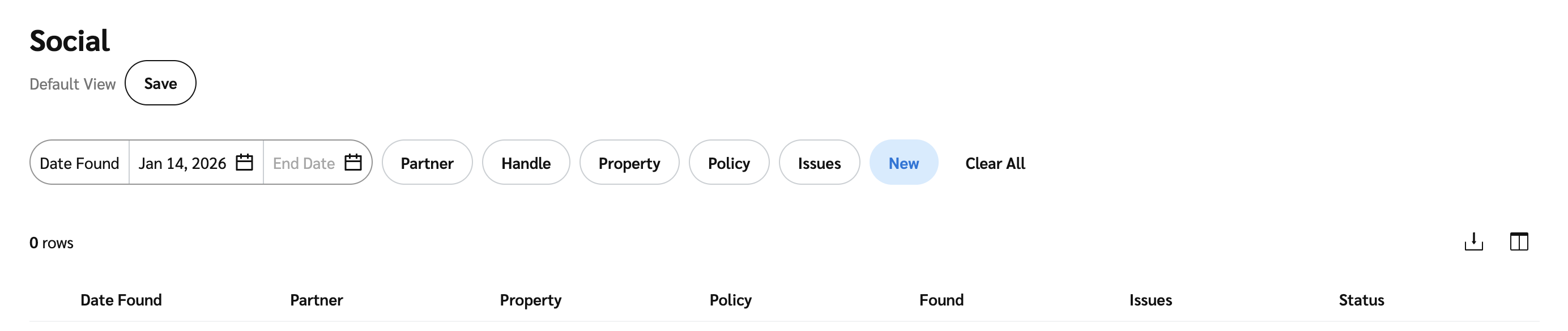
2. Use the filters to find specific social reviews.

   <div data-with-frame="true"><figure><img src="https://4048883401-files.gitbook.io/~/files/v0/b/gitbook-x-prod.appspot.com/o/spaces%2FwMLlMoFBtKJa8ptd3zaw%2Fuploads%2Fgit-blob-aab2e50c2f689e3c6cd8936a94f609438f0dc46d%2F92c4abb9887585616ed7b4722ceddd2cf9b026e0d99c3f58c8095c937f18e054.png?alt=media" alt=""><figcaption></figcaption></figure></div>

<details>

<summary>Filter reference</summary>

| Filter              | Description                                                                                                                                                                                        |
| ------------------- | -------------------------------------------------------------------------------------------------------------------------------------------------------------------------------------------------- |
| Date Found/End Date | The date range of the reviewed posts you want to view.                                                                                                                                             |
| Partner             | Filter social reviews by partners.                                                                                                                                                                 |
| Handle              | Filter by a partner's handle.                                                                                                                                                                      |
| Property            | Filter by a partner's social account.                                                                                                                                                              |
| Policy              | <p>Filter social reviews by the specific social policy setup.</p><p>There could be multiple policies set up to monitor for different compliance reasons. E.g., FTC Compliance or brand safety.</p> |
| Issues              | <p>Filter by issue type found on the specific handle.</p><p>Issues include unapproved terms, brand safety, or no disclosure found when one is expected.</p>                                        |
| Status              | <p>Filter by the status of the review record.</p><p>The status is set to <em>New</em> by default but other statuses like <em>Archive</em> or <em>handle Ignored</em> can also be viewed.</p>       |

</details>

<details>

<summary>Table reference</summary>

| Column name | Description                                                                                                                     |
| ----------- | ------------------------------------------------------------------------------------------------------------------------------- |
| Date found  | The date on which the social review was found.                                                                                  |
| Property    | The partner's social account.                                                                                                   |
| Partner     | <p>The partner's name and social handle.</p><p>You can select the partner's name to view more information or propose terms.</p> |
| Policy      | The policy associated with the review.                                                                                          |
| Found       | The number of posts and mentions for the date the social review(s) was found.                                                   |
| Issues      | The number of issues found in the review.                                                                                       |
| Status      | Shows the social review's status.                                                                                               |

</details>

#### Review partner posts

1. On the *Social* main screen, hover over a post you want to view, then select **View**.
2. Use the filter to find a specific post if there is more than one post by the partner.

<details>

<summary>Post filters</summary>

| Filter              | Description                                              |
| ------------------- | -------------------------------------------------------- |
| Search bar          | Search for specific text in the post.                    |
| Date Found/End Date | The date range of the post.                              |
| Mentions            | Filter for all posts with the specific mention selected. |
| Broken links        | Filter for all posts with broken links.                  |
| Sponsored           | Filter for all posts that are sponsored or not.          |

</details>

3. Once you've found the post you can view the post's details:
   * The post's image
     * Select the image to view the actual post in a new tab.
   * The post's content snippet
     * Hover over the content snippet to view the full post.
   * The number of mentions or broken links
   * The number of unapproved terms that you've configured in your policy and what they are
   * The number of brand safety categories configured in your policy and what they are
   * Sponsored
     * Whether the post is sponsored or not and if there is a disclosure.
