> For the complete documentation index, see [llms.txt](https://help.impact.com/llms.txt). Markdown versions of documentation pages are available by appending `.md` to page URLs; this page is available as [Markdown](https://help.impact.com/brand/what-would-you-like-to-learn-about/platform-features/product-catalogs/troubleshoot-product-catalog-errors-and-warnings.md).
# Troubleshoot Product Catalog Errors & Warnings
Each product catalog has a health score that shows any problems in your catalog. Use this guide to resolve the errors and warnings impact.com reports after it processes your catalog, and to fix partner visibility issues, so your catalog stays in the *Excellent* range.
If impact.com can't receive your catalog file, see [Troubleshoot Product Catalog Uploads & Connections](/brand/what-would-you-like-to-learn-about/platform-features/product-catalogs/troubleshoot-product-catalog-uploads-and-connections.md).
{% hint style="info" %}
**Tip:** A healthy catalog is about more than clearing errors. Follow the [Product Catalog Best Practices](/brand/what-would-you-like-to-learn-about/platform-features/product-catalogs/product-catalog-best-practices.md) to keep your data complete, well-structured, and set up for strong visibility and performance.
{% endhint %}
{% embed url="" %}
## Catalog health scores
1. From the left navigation menu, select  **\[Engage]** **→** **Content** **→** **Products** **→** [**Product Catalogs**](https://app.impact.com/secure/advertiser/engage/ads/productcatalogs/manage-ads-product-catalog-flow.ihtml).
2. If a catalog has any errors, warnings, or duplicate line items, the *Health* column shows how many of each are present.
* Automated upload methods update your catalog during the next scheduled fetch.
Each catalog shows one of the following health indicators in the *Health* column:
* *Pending*: Your product catalog is awaiting its first upload or data fetch.
* *Processing*: Your product catalog is being processed.
* *Excellent*: Indicates a healthy catalog. This product data set is complete and well-structured, giving it the best chance of performing effectively.
* *Good*: Indicates that certain suggested fields containing crucial data, like category or description, could be missing. Addressing these gaps improves the overall quality of your catalog.
* *Poor*: Indicates that required information is missing in more than 10% of the records you provided. This catalog must be fixed and re-uploaded.
## Troubleshoot errors & warnings after upload
Once a file is received, impact.com validates each record. Errors prevent records from being processed, while warnings flag data that was accepted but may cause problems. Use the sections below to interpret and resolve them.
### View errors & warnings
1. In the *Health* column, select the **errors**, **warnings**, or **duplicates** link.
* You'll be redirected to a page with more detail. Only the first item in a set of duplicates is represented in impact.com; all items duplicating the first are ignored.
2. Optionally, use the *Search* field and filters at the top of the page to sort through the issues.
3. Review the issues and make changes as required, then re-upload your product catalog.
Use the following filters on the details page to narrow down the issues:
* *Error Type*: Filter specifically for *Errors*, *Warnings*, *Duplicates*, or *All* issues.
* *Required*: Filter for any specific missing required product catalog fields, or *All* fields.
* *Suggested*: Filter for any specific missing recommended product catalog fields, or *All* fields.
* *Invalid*: Filter for any specific validation-based error, such as a duplicate SKU, an invalid Google Category Code, or other errors.
### Common error & warning messages
Find the message your catalog shows, either in the *Upload Status* column or on the details page you open from the *Health* column. Use the explanation to resolve it.
| Message | Explanation |
| ----------------------------------------------------------------------------------------------------------------------------------------------------- | ----------------------------------------------------------------------------------------------------------------------------------------------------------------------------------------------------------------------------------------------------------------------------------------------------------------------------------------------------- |
| *Record 'X': Required field(s) missing: (field name)* | The specified line is missing one or more required fields. |
| *Record 'X': CatalogItemId(CatalogItemId): Required field(s) missing: (field name)* | A line in the data file is missing a required field. |
| *No catalog found for the request. Check if the file name of uploaded file is the same as the one registered with the catalog* | The *Upload File Name* set in the *Upload Method* section when creating the catalog doesn't exactly match the name of the file you uploaded. |
| *No attributes present in the catalog file* | The product catalog data file doesn't have any processable data. |
| *Catalog item with ID occurs more than once in the catalog, and those after the first will be ignored* | Two or more items have the same ID. All products require a unique value, and duplicate items are not processed. |
| *Record 'X' has an error: (line X) invalid char between encapsulated token and delimiter* | A line contains an invalid use of double quotes. Enclose the field in double quotes and replace all other double quotes with two double quotes. |
| *(Startline X) EOF reached before encapsulated token finished* | EOF means "end of file". The start line mentioned has an opening double quote without a closing double quote, or an unexpected line break interrupted the data stream. |
| *Error parsing (catalog type) field: with value: (field)* | The product field is invalid and cannot be accepted. |
| *Record (recordNumber) has an error: The number of delimited values (FieldsLength) does not match the expected (ColumnNamesLength)* | For a given row, data exists in a column that has no header. |
| *No valid records were found in the catalog file. Please check the file contents against your configured catalog format and re-upload it.* | impact.com read the file, but it doesn't contain any product records. Check that the file includes your products and matches the catalog format you selected, then re-upload. |
| *More than 10% of the records in the file had errors, so the catalog was not updated. Please review and correct the records and re-upload the file.* | Too many records have errors for the catalog to update. This includes files where every record has errors. See [*Understand the 10% error threshold*](#understand-the-10-error-threshold) below. |
| *The catalog file is not valid XML and could not be read. Please ensure the file is well-formed XML and re-upload it.* | The XML file is empty, cut off, or has unclosed tags, so impact.com can't read it. Fix the XML so it's well-formed, then re-upload. |
| *The file does not appear to be a valid RSS or Atom feed format. Please check that the file matches your configured catalog format and re-upload it.* | The file isn't an RSS or Atom feed, for example when an error web page is saved in place of your feed. An XML catalog file must contain `rss`, `RDF`, or `feed` in its starting element. |
| *We were unable to read the contents of your catalog file...* | impact.com can't read the file's contents. Common causes are an empty file, an unexpected file structure, invalid delimiters, or an incorrect character encoding. Check that the file matches the catalog format you selected, then re-upload. If the problem persists, [contact support](https://app.impact.com/support/portal.ihtml). |
| *We were unable to retrieve the catalog file from the configured pull URL. Please verify the URL and that the file is reachable.* | impact.com can't download the file from the *Pull URL* in your catalog settings. See [*Pull From URL*](/brand/what-would-you-like-to-learn-about/platform-features/product-catalogs/troubleshoot-product-catalog-uploads-and-connections.md#pull-from-url-recommended) in Troubleshoot Product Catalog Uploads & Connections to troubleshoot the URL. |
| *The processing failed because of an internal system error...* | No action is required from you. The last catalog that processed successfully continues to be available to partners. Refer to the [impact.com status page](https://status.impact.com/) for details on service interruptions. |
| *Field (field name) with value (field value) does not have a valid protocol* | The field value is not a properly formatted URL. |
### Formatting & delimiter warnings
In delimited files (CSV and TSV), a misplaced delimiter or line break can split your data in the wrong place and stop records from processing correctly. Use the table below to resolve these warnings.
| Issue | How to fix it |
| --------------------------------------------------------------------------------------- | ----------------------------------------------------------------------------------------------------------------------------------------------- |
| Delimiter issues: a wrong comma, tab, or empty line breaks the boundary between fields. | Correct the delimiter usage in the catalog file so each field is separated consistently, then re-upload. |
| New lines in a description field break record processing. | New lines are not supported in delimited text formats (CSV and TSV). Remove line breaks from text fields such as descriptions before uploading. |
{% hint style="info" %}
**eBay Commerce Merchant Center format:** In a `.csv` file, replace the spaces in the field column values (categories) with underscores. For example, use `Item_Title` rather than `Item Title`.
{% endhint %}
### Google Merchant Center format errors
If you use the Google Merchant Center (GMC) format, most issues arise around the format's `Category` section, predefined field values, or the XML structure.
#### Missing Google Product Category
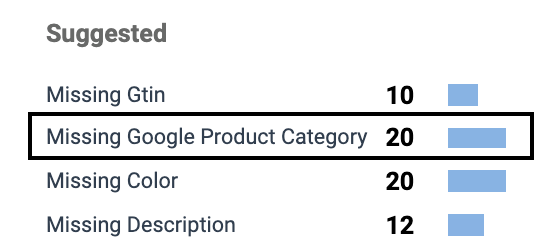
When you select *errors* on the *Product Catalogs* screen, you may see *Missing Google Product Category* in the *Suggestions* column. This means no Google Category Code or full Google category string was included in your catalog.
To resolve this, refer to your [Google Merchant Center account](https://merchants.google.com/). Google automatically suggests categories for items; use these suggestions when uploading the corrected catalog.
#### Google Product Category Mismatch
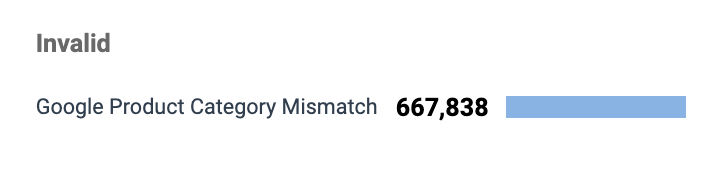
When you select *errors* on the *Product Catalogs* screen, you may see *Google Product Category Mismatch* in the *Invalid* column. This means the category used for items in your catalog does not match the expected [taxonomy code](https://www.google.com/basepages/producttype/taxonomy-with-ids.en-US.txt) (for example, 7386) or the full category format Google provides, for example:
`Animals & Pet Supplies > Pet Supplies > Bird Supplies > Bird Cage Accessories > Bird Cage Food & Water Dishes`
To resolve this, correct the format in which the Google Product Categories are listed, then re-upload your catalog.
#### Availability value not accepted
An error such as *Could not parse field: availability with value* means a predefined field is using a value GMC doesn't recognize. For GMC catalogs, categories and values must be exact.
* Use `availability` for the availability field.
* Supported availability values are `in_stock`, `out_of_stock`, `preorder`, and `backorder`.
* Check for special symbols that can affect formatting, such as a currency symbol appearing in a value field.
#### XML structure errors
If you upload a Google Merchant Center (XML format) catalog and see *The file does not appear to be a valid RSS or Atom feed format*, the XML structure is likely incorrect.
The XML file must contain `rss`, `RDF`, or `feed` in its starting element. Correct the root element and re-upload.
If you see *The catalog file is not valid XML and could not be read*, the file is empty, cut off, or has unclosed tags. Fix the XML so it's well-formed, then re-upload.
### Understand the 10% error threshold
If more than 10% of the records in an uploaded file contain errors, the file is not processed. When this happens:
* Your catalog continues to show the version from the last successful upload, so an older *last successful submission* timestamp is expected.
* The **View Products** option only appears if a file was previously uploaded successfully for that catalog ID.
Fix the flagged records so fewer than 10% contain errors, then re-upload.
## Troubleshoot partner visibility and tracking link issues
A healthy catalog still won't reach your partners until you [make it available](#partners-cant-see-the-catalog) and meet the [requirements for partner visibility](#partners-cant-see-or-search-specific-products). Use this section if your catalog processed successfully but partners are encountering issues with visibility, product access, or tracking links.
### Partners can't see the catalog
Check the following two settings:
* Make sure the catalog is available for use:
1. Select  **\[Engage]** **→** **Content** **→** **Products** **→** [**Product Catalogs**](https://app.impact.com/secure/advertiser/engage/ads/productcatalogs/manage-ads-product-catalog-flow.ihtml) and find the catalog.
2. Select  **\[More]** and then choose **Make Available for Use**.
* Check whether partner access is restricted:
1. Select  **\[Engage]** **→** **Content** **→** **Products** **→** [**Product Catalogs**](https://app.impact.com/secure/advertiser/engage/ads/productcatalogs/manage-ads-product-catalog-flow.ihtml) and find the catalog.
2. Hover over the catalog, then select **Edit**.
3. In the *Restrict Partner Access* section, check whether **Allow access to only specific Partners** is  toggled on.
4. If it is, .svg?alt=media\&token=a85366cd-4b70-41a6-83df-319f89597ede) toggle it off and select **Save**.
{% hint style="success" %}
**Note:** The **Make Available for Use** option only appears for catalogs with *Excellent* or *Good* health that are *Inactive* or *Pending Activation*.
{% endhint %}
### Partners can't see or search specific products
For a product to be visible in the partner UI, it must meet all of the following requirements:
* The original price is greater than $2.00 USD.
* The product's Stock Availability is not *Out of Stock.*
* The product has a valid product URL that leads to a live product details page.
* The product has an image URL.
* The product is in a catalog without [rules](/brand/what-would-you-like-to-learn-about/platform-features/product-catalogs/create-and-manage-product-catalog-rules.md) applied.
### Partner tracking links return a "malformed" error
If partners see "The link you clicked on is malformed" when using tracking links from your products, deep linking is usually not enabled, or the product's landing page domain isn't set as a permitted domain. To enable deep linking, set your permitted domains, and resolve this error, see [Set Up Permitted Domains for Deep Linking](/brand/what-would-you-like-to-learn-about/account-administration/program-settings/tracking-settings/set-up-permitted-domains-for-deep-linking.md).
---
# Agent Instructions
This documentation is published with GitBook. GitBook is the documentation platform designed so that both humans and AI agents can read, navigate, and reason over technical content effectively. Learn more at gitbook.com.
## Querying This Documentation
If you need additional information that is not directly available in this page, you can query the documentation by asking a question.
Perform an HTTP GET request on the following URL with the `ask` and `goal` query parameters:
```
GET https://help.impact.com/brand/what-would-you-like-to-learn-about/platform-features/product-catalogs/troubleshoot-product-catalog-errors-and-warnings.md?ask=&goal=
```
`ask` is the immediate question: it should be specific, self-contained, and written in natural language.
`goal` is what the user is ultimately trying to achieve, the reason they need the answer. Sharing it helps GitBook give you a better, more relevant answer. A goal is most helpful when it describes the outcome the user wants rather than restating the question. For example, with `ask=how do I create an API token`, a goal like `automate deployments from our CI pipeline` lets GitBook tailor the answer to that use case.
The response will contain a direct answer to the question and relevant excerpts and sources from the documentation.
Use this mechanism when the answer is not explicitly present in the current page, you need clarification or additional context, or you want to retrieve related documentation sections.