# Manage General Finance Settings as a Brand

<a href="https://pxa.impact.com/student/activity/1087833?sid=0c0e3e5c-54c9-4435-9bee-ebcdccb7f292&#x26;sid_i=0?utm_source=app.impact.com&#x26;utm_medium=owned-platform&#x26;utm_content=con-250&#x26;utm_campaign=help-center" class="button primary">Take the PXA course</a>

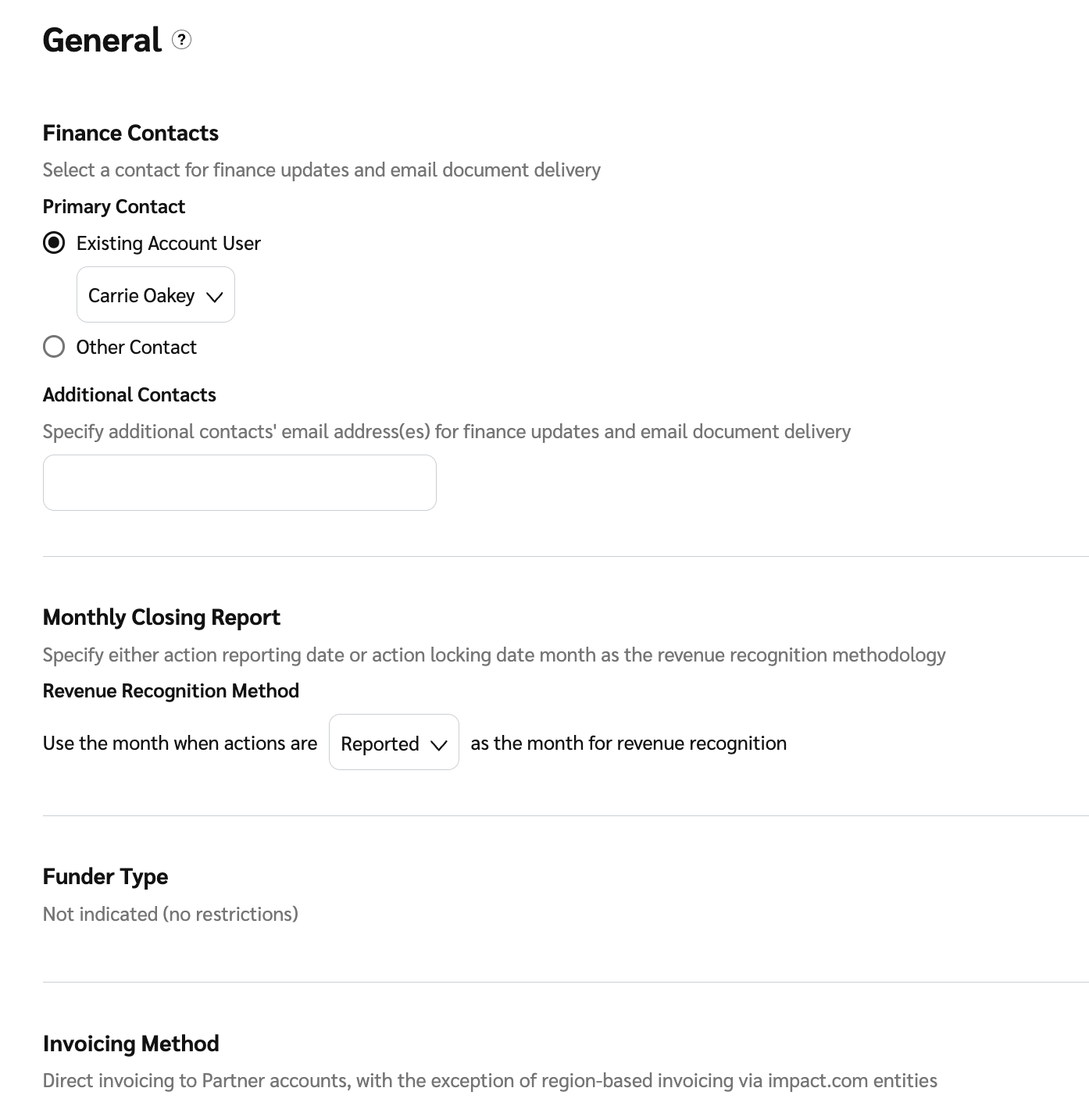
Use the *General Finance Settings* to manage key preferences, including your **primary finance contact**, how your **monthly close reports** are generated, and view your **funder type** and **invoicing method**.

1. From the top navigation bar, select **your balance** → **Settings**.
2. Review and make your changes to your *general finance settings*.

   | User setting           | Description                                                                                                                                                                                                                                                                                                                                                                                                                                                                                                                                                                                                                                                                                                                                                                                                                      |
   | ---------------------- | -------------------------------------------------------------------------------------------------------------------------------------------------------------------------------------------------------------------------------------------------------------------------------------------------------------------------------------------------------------------------------------------------------------------------------------------------------------------------------------------------------------------------------------------------------------------------------------------------------------------------------------------------------------------------------------------------------------------------------------------------------------------------------------------------------------------------------- |
   | Finance Contacts       | <p>Add or change your <a href="assign-primary-finance-contact">primary finance contact</a> and additional contacts you want to notify about finance updates and email document delivery. These contacts are available as default options when configuring document settings.</p><p>This setting is useful when you set up your account for the first time, as the information can be reused when configuring finance document settings.</p><p><strong>Note:</strong> Updating contact details here will not update any existing document settings. You will need to update these details directly on each corresponding document's settings page.</p>                                                                                                                                                                            |
   | Monthly Closing Report | <p>Select the version of the report that best suits your needs.</p><p>From the <img src="https://4048883401-files.gitbook.io/~/files/v0/b/gitbook-x-prod.appspot.com/o/spaces%2FwMLlMoFBtKJa8ptd3zaw%2Fuploads%2Fgit-blob-c2cb550b55c51ea1eeff0acbd6f437a03b621a2c%2F60d033ae8a04c14498d5229c3c0160ac05feea7f605dbd770741793c900469f0.svg?alt=media" alt=""> <strong>\[Drop-down menu]</strong> under <em>Revenue Recognition Method</em>, select either <strong>Reported</strong> or <strong>Locked</strong> as your reporting date.</p><p>• Action reported date: This method reflects costs in the month corresponding to the date that action occurred.</p><p>• Action locked date: This method reflects costs in the month corresponding to the date that the cost is finalized. For actions, this is the locking date.</p> |
   | Funder Type            | View what funder type your account has been set up with. Some funder types will adapt functionality appropriately to prevent use of the system that is contrary to this implied funding method. For example, if the account has the Funder Type of “SOI Funder - Fund based on invoices”, you will not be able to perform an immediate transfer to a partner as these invoices are generated monthly.                                                                                                                                                                                                                                                                                                                                                                                                                            |
   | Invoicing Method       | View your [invoicing method](https://app.gitbook.com/s/hRN1rcrim887TwHLBjac/readme/discover-your-invoicing-method).                                                                                                                                                                                                                                                                                                                                                                                                                                                                                                                                                                                                                                                                                                              |
3. Select **Save**.

   <div data-with-frame="true"><figure><img src="https://4048883401-files.gitbook.io/~/files/v0/b/gitbook-x-prod.appspot.com/o/spaces%2FwMLlMoFBtKJa8ptd3zaw%2Fuploads%2Fgit-blob-f2a17484235b21bfed13305c8f3d6ff02933e608%2Fbb77b17e1ae7af16b2d0bc3b48b76ad7c9ddd20cd56169b88dc2771c5ca3b304.png?alt=media" alt=""><figcaption></figcaption></figure></div>