# Set Up Rules to Identify Channel Traffic

*Rules to Identify* in your *Optimize Channel* determine how traffic is attributed to that channel. Each rule uses at least one element from either the *Referring URL* or the *Landing Page URL* captured for a referral to identify the traffic source.

*Rules to Identify* are configured when you [create an Optimize Channel](https://help.impact.com/brand/what-would-you-like-to-learn-about/platform-features/cross-channel-performance-insights/optimize-channels/create-an-optimize-channel) and can be updated at any time by [editing the channel](https://help.impact.com/brand/what-would-you-like-to-learn-about/platform-features/cross-channel-performance-insights/optimize-channels/edit-an-optimize-channel).

#### Rules to identify components

{% hint style="info" %}
This feature is only available with the Optimize add-on. [Click here](https://app.impact.com/secure/advertiser/fr/upgrade.ihtml?u=/secure/advertiser/optimize/landing-page.html) to get the add-on!
{% endhint %}

When creating a *Rule To Identify*, there will be between 3 and 4 fields you must fill in. Refer to the tabs below to learn more about each field.

{% tabs %}
{% tab title="Rule Target" %}
"Where" the rule will look to find the *Rule Value(s)*. This is selected from the 1st drop-down menu when creating a *Rule To Identify*.

See the 1st table in the *Update Rules To Identify* section to view all available *Rule Target* options.

{% hint style="info" %}
**Example**: Landing Page URL
{% endhint %}
{% endtab %}

{% tab title="Rule Logic" %}
"How" the *Rule* will attempt to identify traffic. This is selected from the 2nd drop-down menu when creating a *Rule to Identify*.

See the 2nd table in the *Update Rules To Identify* section to view all available *Rule Logic* options.

{% hint style="info" %}
**Example**: Exactly Matches
{% endhint %}
{% endtab %}

{% tab title="Rule Value 1" %}
What parameter key the *Rule Logic* will use to attempt to identify traffic. This is entered between the *Rule Target* and the *Rule Logic*.

This is needed only when the *Rule Target* is **Landing Page Parameter** or **Referring Parameter**.

{% hint style="info" %}
**Example**: utm\_medium
{% endhint %}
{% endtab %}

{% tab title="Rule Value 2" %}
What value the *Rule Logic* will use to attempt to identify traffic. While this value can vary between *Rules To Identify*, this can be best thought of as "What" the rule will look for to identify traffic.

This is not needed if the *Rule Logic* is **Is Present** or **Is Not Present**.

{% hint style="info" %}
**Example**: ppc
{% endhint %}
{% endtab %}
{% endtabs %}

#### Set up a Rule To Identify

The *Rules To Identify* (RTI) works in an *AND/OR* system:

Selecting ![](https://4048883401-files.gitbook.io/~/files/v0/b/gitbook-x-prod.appspot.com/o/spaces%2FwMLlMoFBtKJa8ptd3zaw%2Fuploads%2Fgit-blob-6282f271b7521383385339243690b303086736d9%2F3b5a585dd2895bdf1c30d1236c72ba590dddd18717863b27074c8d313d05ae20.svg?alt=media) **\[Add]** **AND** will add conditions to a rule, whereas selecting ![](https://4048883401-files.gitbook.io/~/files/v0/b/gitbook-x-prod.appspot.com/o/spaces%2FwMLlMoFBtKJa8ptd3zaw%2Fuploads%2Fgit-blob-6282f271b7521383385339243690b303086736d9%2F3b5a585dd2895bdf1c30d1236c72ba590dddd18717863b27074c8d313d05ae20.svg?alt=media) **\[Add]** **OR** will add a "separate" rule. When OR is selected, any of the conditions linked by an OR will identify the channel's referral. When AND is selected, all of the conditions linked by an AND are required to identify the channel's referral.

When creating or updating a **Rule To Identify**, impact.com recommends keeping the logic as simple and readable as possible. This will make ongoing support of your rules more effective and efficient.

Below are the *Rule Target* descriptions that can be used in a *Rule To Identify*. Be sure to select **Save** after making changes. Refer to the [Optimize Setup Scenarios](https://help.impact.com/brand/what-would-you-like-to-learn-about/platform-features/cross-channel-performance-insights/optimize-channels/optimize-channel-setup-scenario-examples) article for examples of *Rules To Identify*.

{% hint style="info" %}
**Note**: You cannot configure the *Rules To Identify* for *Direct* (where there is no referrer) and *Organic Referral* (where there is a referrer) channels, also known as the *Default Channels*. These channels are specifically for cases where traffic does not meet the qualifications for any Rules To Identify to be applied.
{% endhint %}

**Rule Targets**

|                           |                                                                                                                                                         |                                                                       |
| ------------------------- | ------------------------------------------------------------------------------------------------------------------------------------------------------- | --------------------------------------------------------------------- |
| **Rule Target**           | **Description**                                                                                                                                         | **Example**                                                           |
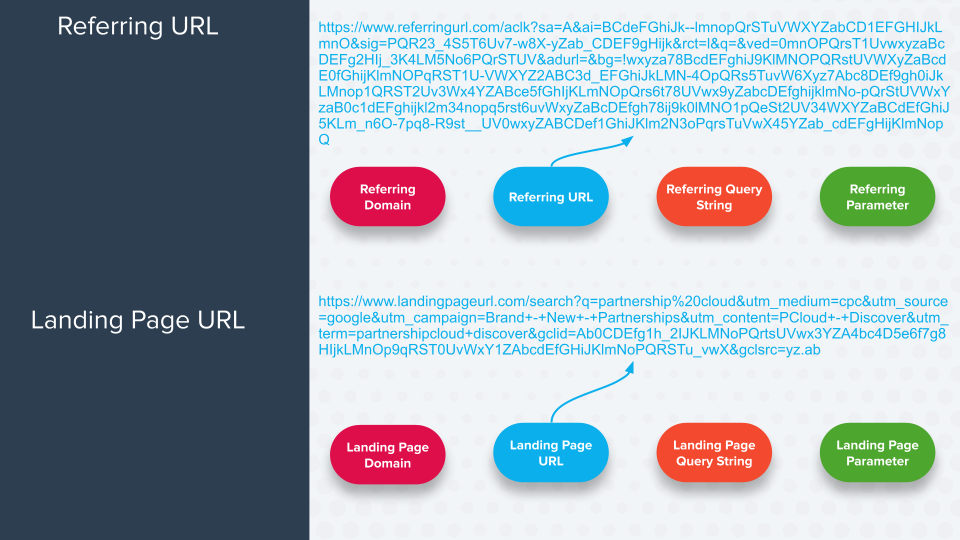
| Landing Page URL          | The entire URL on which referred traffic lands.                                                                                                         | `https://www.landingpage.com?key=valueparameter&key=parametervalue`   |
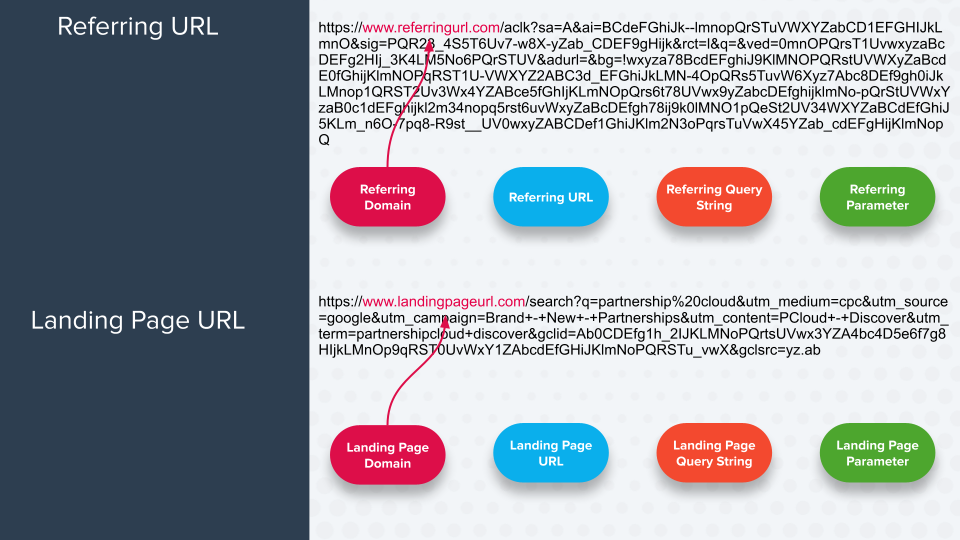
| Landing Page Domain       | The part of the URL that follows the protocol and precedes the subdirectory/path (if a path is present) or the query string (if a path is not present). | `www.landingpage.com`                                                 |
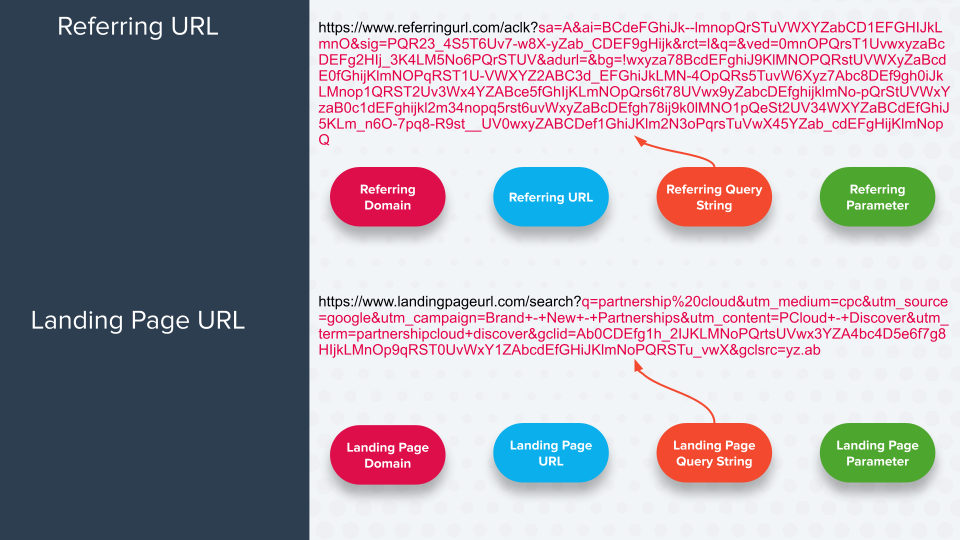
| Landing Page Query String | All parameter key-value pairs that follow the question mark (**?**), which marks the beginning of the query string.                                     | `key=value&parameterkey=parametervalue`                               |
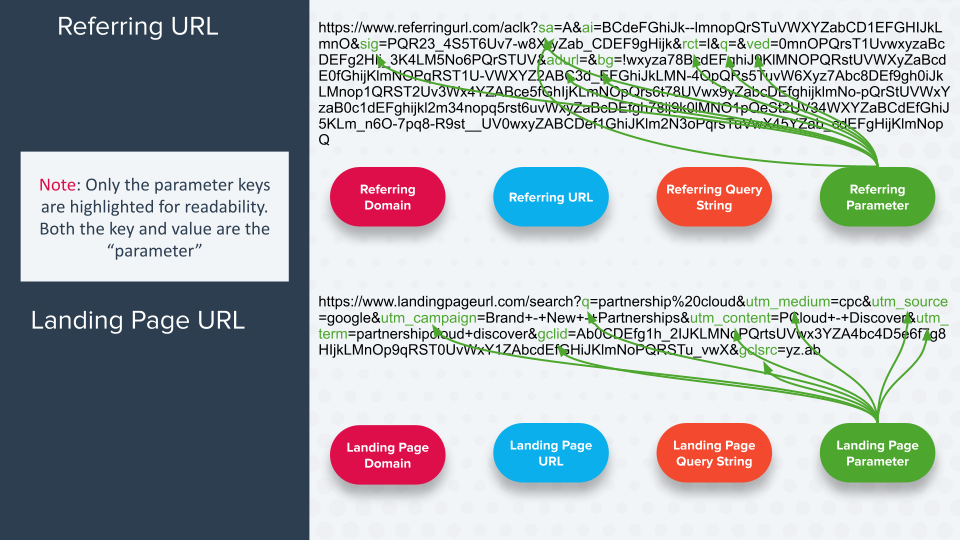
| Landing Page Parameter    | A specific key-value pair present in the query string.                                                                                                  | `parameterkey=parametervalue`                                         |
| Referring URL             | The entire URL that traffic comes from.                                                                                                                 | `https://www.referringpage.com?key=value&parameterkey=parametervalue` |
| Referring Domain          | The part of the URL that follows the protocol and precedes the subdirectory/path (if a path is present) or the query string (if a path is not present). | `www.referringpage.com`                                               |
| Referring Query String    | Everything after the URLs path (if present) or after the top-level domain (if no path exists).                                                          | `key=value&parameterkey=parametervalue`                               |
| Referring Parameter       | A specific key-value pair present in the query string.                                                                                                  | `parameterkey=parametervalue`                                         |

<details>

<summary>See what each Rule Target would look for</summary>

<div data-with-frame="true"><figure><img src="https://4048883401-files.gitbook.io/~/files/v0/b/gitbook-x-prod.appspot.com/o/spaces%2FwMLlMoFBtKJa8ptd3zaw%2Fuploads%2Fgit-blob-ee3dab75f8931eca712a926d578dc28a0f7ad7ce%2F4d153ee5b947e07c2521f4c6096a0bfa1eefbe6618e191eba77994558a3ff7c2.png?alt=media" alt=""><figcaption></figcaption></figure></div>

<div data-with-frame="true"><figure><img src="https://4048883401-files.gitbook.io/~/files/v0/b/gitbook-x-prod.appspot.com/o/spaces%2FwMLlMoFBtKJa8ptd3zaw%2Fuploads%2Fgit-blob-53d9f84174a13448cde5ee5b47068a3a2467dca4%2F6a0b63b79d2e0a0de1d540cb68bd0e0eed60bcca9aab77a98c8108322b4dfe1f.png?alt=media" alt=""><figcaption></figcaption></figure></div>

<div data-with-frame="true"><figure><img src="https://4048883401-files.gitbook.io/~/files/v0/b/gitbook-x-prod.appspot.com/o/spaces%2FwMLlMoFBtKJa8ptd3zaw%2Fuploads%2Fgit-blob-ecefd79844282e80d4a074ce48ebcf2585a00e20%2F92a1c3d1a67d8759a3633b86025f3fa605754878b4da947726e211e31703c151.png?alt=media" alt=""><figcaption></figcaption></figure></div>

<div data-with-frame="true"><figure><img src="https://4048883401-files.gitbook.io/~/files/v0/b/gitbook-x-prod.appspot.com/o/spaces%2FwMLlMoFBtKJa8ptd3zaw%2Fuploads%2Fgit-blob-4203a86fe1f2a0537a1e555390f2c5543b2c206e%2F421f7539bfdbad9d71563cabef639ef056029c0f5e12483495f14e1ba3407283.png?alt=media" alt=""><figcaption></figcaption></figure></div>

</details>

**Rule Logic options**

You can also select how a *Rule Target* (found in the table above) is applied to the **Rule Value 2** (what you enter in the final field of a *Rule To Identify*) by selecting the **Rule Logic**. See the table below for more information on *Rule Logic* options.

<details>

<summary>Options</summary>

|                        |                                                                                                                                                                                                                                                                                                                                                            |                                                                                                                                                                                                                                                                                                                   |
| ---------------------- | ---------------------------------------------------------------------------------------------------------------------------------------------------------------------------------------------------------------------------------------------------------------------------------------------------------------------------------------------------------- | ----------------------------------------------------------------------------------------------------------------------------------------------------------------------------------------------------------------------------------------------------------------------------------------------------------------- |
| **Rule Logic Option**  | **Description**                                                                                                                                                                                                                                                                                                                                            | **Example**                                                                                                                                                                                                                                                                                                       |
| Exactly Matches        | The exact *Rule Value 2* configured must be found in the *Rule Target*, with no additional characters before or after.                                                                                                                                                                                                                                     | <p><strong>Rule:</strong></p><p>Landing Page Parameter <code>utm\_medium</code> Exactly Matches <code>search</code></p><p><strong>Example included URL:</strong></p><p><code><https://www.impact.com?utm_medium=search></code></p>                                                                                |
| Contains               | The *Rule Value 2* must be found in the *Rule Target*.                                                                                                                                                                                                                                                                                                     | <p><strong>Rule:</strong></p><p>Landing Page Parameter <code>utm\_medium</code> Contains <code>search</code></p><p><strong>Example included URL:</strong></p><p><code><https://www.impact.com?utm_medium=somesearchentry></code></p>                                                                              |
| Starts With            | The *Rule Value 2* configured must be found at the beginning of the *Rule Target*.                                                                                                                                                                                                                                                                         | <p><strong>Rule:</strong></p><p>Landing Page Parameter <code>utm\_medium</code> Starts With <code>search</code></p><p><strong>Example included URL:</strong></p><p><code><https://www.impact.com?utm_medium=searchentry></code></p>                                                                               |
| Ends With              | The *Rule Value 2* configured must be found at the end of the *Rule Target*.                                                                                                                                                                                                                                                                               | <p><strong>Rule:</strong></p><p>Landing Page Parameter <code>utm\_medium</code> Ends With <code>search</code></p><p><strong>Example included URL:</strong></p><p><code><https://www.impact.com?utm_medium=someentry></code></p>                                                                                   |
| Matches Regex          | The *Rule Target's* value must be a [regex](https://help.impact.com/brand/what-would-you-like-to-learn-about/platform-features/promo-codes/regular-expression/regex-explained) match to the *Rule Value 2*. Learn more about [regular expressions](https://en.wikipedia.org/wiki/Regular_expression) and [test a regular expression](https://regexr.com/). | Reach out to your CSM (or [create a support ticket](https://app.impact.com/support/portal.ihtml?createTicket=true)) for help with this Rule Logic option.                                                                                                                                                         |
| Does Not Exactly Match | The exact *Rule Value 2* configured must **NOT** be found in the *Rule Target*.                                                                                                                                                                                                                                                                            | <p><strong>Rule:</strong></p><p>Landing Page Parameter <code>utm\_medium</code> Does Not Exactly Match <code>search</code></p><p><strong>Example excluded URL:</strong></p><p><code><https://www.impact.com?utm_medium=search></code></p>                                                                         |
| Does Not Contain       | The *Rule Value 2* configured must **NOT** be found in the *Rule Target*.                                                                                                                                                                                                                                                                                  | <p><strong>Rule:</strong></p><p>Landing Page Parameter <code>utm\_medium</code> Does Not Contain <code>search</code></p><p><strong>Example excluded URL:</strong></p><p><code><https://www.impact.com?utm_medium=search></code></p>                                                                               |
| Does Not Match Regex   | The *Rule Target's* value must not be a regex match to the *Rule Value 2*. Learn more about [regular expressions](https://en.wikipedia.org/wiki/Regular_expression). [Test a regular expression](https://regexr.com/).                                                                                                                                     | Reach out to your CSM (or [create a support ticket](https://app.impact.com/support/portal.ihtml?createTicket=true)) for help with this Rule Logic option.                                                                                                                                                         |
| Matches Any            | The *Rule Value 2* is a comma-separated series of *Exactly Matches* values (see the *Exactly Matches* row). Do not use spaces between each entries.                                                                                                                                                                                                        | <p><strong>Rule:</strong></p><p>Landing Page Parameter <code>utm\_medium</code> Matches Any <code>search,ppc</code></p><p><strong>Example included URLs:</strong></p><p><code><https://impact.com?utm_medium=search></code></p><p><code><https://impact.com?utm_medium=ppc></code></p>                            |
| Contains Any           | The *Rule Value 2* is a comma-separated series of *Contains* values (see the *Contains* row). Do not use spaces between entries.                                                                                                                                                                                                                           | <p><strong>Rule:</strong></p><p>Landing Page Parameter <code>utm\_medium</code> Contains Any <code>search,ppc</code></p><p><strong>Example included URLs:</strong></p><p><code><https://www.impact.com?utm_medium=somesearchentry></code></p><p><code><https://www.impact.com?utm_medium=someppcentry></code></p> |
| Is Present             | The provided Landing Page Parameter value must be included in the URL. Only available when `Rule Target=Landing Page Parameter`.                                                                                                                                                                                                                           | <p><strong>Rule:</strong></p><p>Landing Page Parameter <code>utm\_medium</code> Is Present</p><p><strong>Example included URL:</strong></p><p><code><https://www.impact.com?utm_medium_ppc></code></p>                                                                                                            |
| Is Not Present         | The provided Landing Page Parameter value must **NOT** be included in the URL. Only available when `Rule Target=Landing Page Parameter`.                                                                                                                                                                                                                   | <p><strong>Rule:</strong></p><p>Landing Page Parameter <code>utm\_medium</code> Is Not Present</p><p><strong>Example excluded URL:</strong></p><p><code><https://www.impact.com?utm_medium_ppc></code></p>                                                                                                        |

</details>