.png?alt=media&token=74e23223-e1ff-4ea2-baf0-e37d93a0e26a)
Filter data by when it was created. You can pull a maximum of 366 days of data at a time, however, you can also compare 2 periods of time against each other.
To perform year-over-year reporting, select  \[Checked box] compare to →
  \[Drop-down menu] → \[Tick] Previous year.
Data older than 2 years may be periodically archived.
| | Insights Level |This sets the level on which you want to view new customer data:
• Partner — Select this option to compare new customer data across all of your partners on impact.com. This is the default option for this report.
• Group — Select this option to compare new customer data across all of your partner groups.
• Channel — Select this option to compare new customer data across all of your partner channels.
| | Event Type | Select the event types for which you want to view data, or select **All** to view data for all your event types. | | Interaction Type |This sets the type of interactions for which you want to see behavior data:
• Closer — Select this option to see new customer data on the insights level that closed an action (i.e., last click).
• Introducer — Select this option to see new customer data on the selected insight level that introduced the ad to the user (i.e., first click).
• Participant — Select this option to see new customer data on the selected insight level when a partner was a participant in the action lifecycle (i.e., partner didn't introduce or close).
• Solo — Select this option to see new customer data on the selected insight level when a partner was the only driver in the full action lifecycle.
| | Margin Override % | Use this filter to generate a margin that will override the *Margin Per Customer* column in the report. | | Evaluated Period | The number of days after a customer’s first conversion that you want the report to consider when analyzing customer value. | | Participated | Use this  **\[Drop-down menu]** to filter for specific partners to see if they participated in the action lifecycle based on the insights level & interaction type you've selected. | | Show |Optionally, select one of these data points to include in your report.
• Revenue — Select this option to show the revenue generated by the newly-acquired customers for each partner over the chosen period.
• Margin — Select this option to show the margin generated by the newly-acquired customers for each partner over the chosen period.
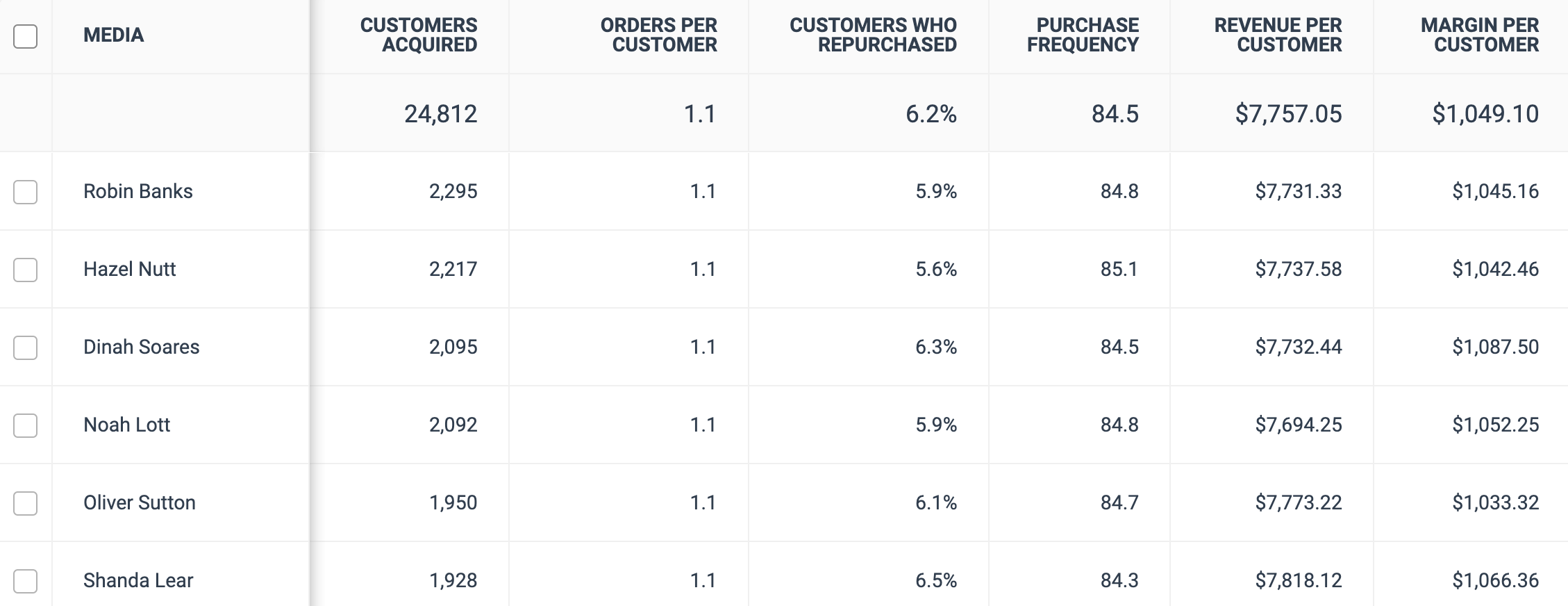
|A measure that returns the following:
(Evaluated Period \* Customers Acquired) / Actions
In other words, the closer the purchase frequency is to the number of days in the Evaluated Period (or greater than), the better reflection this is on the partner's ability to convert customers.
| | Revenue per Customer | The average generated revenue per newly-acquired customer for each partner over the evaluated period. | | Margin per Customer | The average generated margin per newly-acquired customer for each partner over the evaluated period. | | Revenue | The revenue generated by the newly-acquired customers for each partner over the evaluated period. | | Margin | The margin generated by the newly-acquired customers for each partner over the evaluated period. | | New Customer Revenue (1st Purchase) | The revenue the partner generated through first-time customers over the evaluated period. This gives you insight into which partners draw new customers and which draw repeat purchasers. | | AOV per New Customer (1st Purchase) | The Average Order Value the partner generated through first-time customers over the evaluated period. This gives you insight into which partners draw new customers and which draw repeat purchasers. | | New Customer Revenue (2nd and Subsequent Purchases) | The revenue the partner generated through non-first-time customers over evaluated period. This gives you insight into which partners draw customers who increase their expenditure after their first purchase and which draw customers who maintain their initial expenditure. | | AOV per New Customer (2nd and Subsequent Purchases) | The Average Order Value the partner generated through non-first-time customers over the evaluated period. This gives you insight into which partners draw customers who increase their expenditure after their first purchase and which draw customers who maintain their initial expenditure. |