> For the complete documentation index, see [llms.txt](https://help.impact.com/llms.txt). Markdown versions of documentation pages are available by appending `.md` to page URLs; this page is available as [Markdown](https://help.impact.com/brand/what-would-you-like-to-learn-about/performance-program/performance-program-reports/competitive-insights/industry-insights-report.md).
# Industry Insights Report
Take the PXA course
The *Industry Insights* report provides industry-level insights, allowing you to see the average program metrics for your vertical. These insights are grouped to give you an overview, key program metrics, and the top partners in your vertical.
{% hint style="info" %}
**Note:** The *Industry Insights* report is currently only available for retail-based (excluding Arts and Entertainment), travel-based, and education-based programs located in North America, Europe, and Oceania.
{% endhint %}
#### Access the report
1. From the left navigation menu, select  **\[Competitive Insights]** → **Industry Insights**.
2. Below *Industry Insights*, filter for the data you want to view.
* You can  **\[Share]** and  **\[Download]** the report by selecting the icons in the right-hand corner.
* View the *Filter reference* table below for more information.
Filter reference
| Filter | Description |
| -------- | ---------------------------------------------------------------------------------------- |
| Vertical | Filter by the market segment for which you want to view industry insights data. |
| Region | Filter by the area for which you want to view industry insights data. |
| Quarter | Filter by the specific 3-month period for which you want to view industry insights data. |
3. View a breakdown of your vertical insights according to 3 main sections:
{% tabs %}
{% tab title="Vertical Overview" %}
*Vertical Overview* shows you:
* **Total partners:** The total number of partners joined to programs for the chosen industry segment.
* **Active partners:** The number of partners who drove at least one click or action during the quarter.
* **Productive partners:** The number of partners who drove at least one action during the quarter.
{% endtab %}
{% tab title="Average Vertical Program Metrics" %}
*Average Vertical Program Metrics* are divided into the following sections:
{% endtab %}
{% tab title="Top Vertical Partners" %}
View the top partners for your vertical. Refer to the *Top vertical partners reference* table for more information.
Where the partner ranks in revenue generated for the vertical market.
E.g., A rank of 3 would indicate that two other partners drive more revenue for the vertical market.
|
| Partner Name | The partner's name. |
| Partner ID | The partner's system-generated identifier. |
| Partner Business Model | The main way this partner promotes brands. If the partner does not specify a primary promotional method, their business model will be *uncategorized*. |
| Email | The partner's email address. |
Program Efficiency
Program Efficiency shows a comparison of the number of partners in the vertical, how many are inactive, productive, active but not productive, active and productive, as well as the active and productive percentage rate of partners in a specific vertical.
* **Inactive:** Partners that have not driven a single click or action over the chosen quarter.
* **Active but not productive:** Partners that have driven at least one click but no actions over the chosen quarter.
* **Active productive:** Partners that have driven at least one action over the chosen quarter.
* **Active rate:** The number of active partners (this includes active but not productive and productive partners) divided by the total number of partners, shown as a percentage.
* **Productive rate:** The number of productive partners divided by the number of active, shown as a percentage.
Key Program KPIs
* **# Partnership Programs:** The number of partnership programs in the vertical.
* **Average Order Value:** The average order value generated from the vertical’s audience. This value is calculated as revenue generated divided by the number of conversions (also known as actions). *Revenue* divided by the number of *Actions*.
* **Conversion Rate:** Conversion rate represents the percentage of link clicks generated that result in conversions (aka actions). This rate is calculated as the number of conversions driven divided by the number of unique clicks. Number of *Actions* divided by the number of *Clicks*.
* **ROAS (Return on ad spent):** This is calculated as the credited revenue driven by the winner crediting model divided by the total action cost.
* **Cost Per Action:** Total **Cost of Actions** divided by number of actions.
* **Cost Per Click:** The total cost divided by the total number of clicks.
* **Commission Rate:** Commission rate is action cost divided by revenue.
* **Commission Rate Flat:** Commission rate flat is your flat fees divided by revenue.
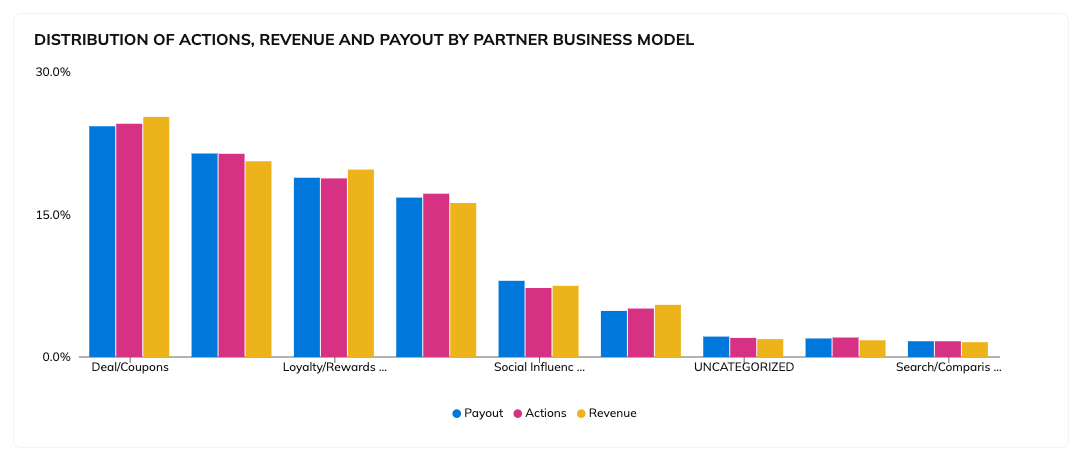
Distribution of Key Metrics by Partner Type
View actions, revenue, and payout distribution percentage per business model.
Program Concentration
This section shows you what percentage of revenue top-performing partners drive in programs in the vertical. You can use this report to help determine how top partners in your program compare to top-performing partners in the vertical market.
---
# Agent Instructions
This documentation is published with GitBook. GitBook is the documentation platform designed so that both humans and AI agents can read, navigate, and reason over technical content effectively. Learn more at gitbook.com.
## Querying This Documentation
If you need additional information that is not directly available in this page, you can query the documentation by asking a question.
Perform an HTTP GET request on the following URL with the `ask` and `goal` query parameters:
```
GET https://help.impact.com/brand/what-would-you-like-to-learn-about/performance-program/performance-program-reports/competitive-insights/industry-insights-report.md?ask=&goal=
```
`ask` is the immediate question: it should be specific, self-contained, and written in natural language.
`goal` is what the user is ultimately trying to achieve, the reason they need the answer. Sharing it helps GitBook give you a better, more relevant answer. A goal is most helpful when it describes the outcome the user wants rather than restating the question. For example, with `ask=how do I create an API token`, a goal like `automate deployments from our CI pipeline` lets GitBook tailor the answer to that use case.
The response will contain a direct answer to the question and relevant excerpts and sources from the documentation.
Use this mechanism when the answer is not explicitly present in the current page, you need clarification or additional context, or you want to retrieve related documentation sections.