# Finance Benchmark Overview

The *Finance Benchmark Overview* is a comparative analysis of key metrics between your partner program and the average performance of partner programs in your competitive segment. In this article, you will learn how to use the different sections of the dashboard to gain a better understanding of how your program compares to your competitors’.

#### Access the report

![](https://4048883401-files.gitbook.io/~/files/v0/b/gitbook-x-prod.appspot.com/o/spaces%2FwMLlMoFBtKJa8ptd3zaw%2Fuploads%2Fgit-blob-ce68cfb317a0bdf2b9e82f3df63b400f7764cbf2%2F6b9ec025210c2878ab8e126697a41af04cef94403a452d5dee89cf87e9f2cf2d.svg?alt=media) This feature is only accessible to specific impact.com editions or add-ons. [Contact us](https://app.impact.com/support/portal.ihtml?createTicket=true) to upgrade your account and get access!

1. From the left navigation menu, select ![](https://4048883401-files.gitbook.io/~/files/v0/b/gitbook-x-prod.appspot.com/o/spaces%2FwMLlMoFBtKJa8ptd3zaw%2Fuploads%2Fgit-blob-81365ab1e9414f66498604921f52870f117b8cc7%2Fd33a611679a65f191574b81820ac09c98c5cc774faa6ff5a8a739a9cc7a87234.svg?alt=media) **\[Competitive Insights]** → **Finance Benchmark → Overview**.
2. At the top of the page, below *Finance Benchmark Overview*, filter for the data you want to view.

<details>

<summary>Filter reference</summary>

| Filter       | Description                                                                                                                                                                                                                                                                                                                                                                                                                                                                                                                                                                                                         |
| ------------ | ------------------------------------------------------------------------------------------------------------------------------------------------------------------------------------------------------------------------------------------------------------------------------------------------------------------------------------------------------------------------------------------------------------------------------------------------------------------------------------------------------------------------------------------------------------------------------------------------------------------- |
| Quarter      | Filter by the specific 3-month period for which you want to view benchmarking data.                                                                                                                                                                                                                                                                                                                                                                                                                                                                                                                                 |
| Program      | Filter by the program for which you want to view benchmarking data.                                                                                                                                                                                                                                                                                                                                                                                                                                                                                                                                                 |
| Region       | Filter by the area for which you want to view benchmarking data.                                                                                                                                                                                                                                                                                                                                                                                                                                                                                                                                                    |
| Vertical     | Filter by the market segment for which you want to view benchmarking data.                                                                                                                                                                                                                                                                                                                                                                                                                                                                                                                                          |
| Funnel Stage | <p>Select whether you want to view the top or bottom of the funnel.</p><p>• <strong>Initial Action</strong> limits the data to partners who introduce the potential customer to the conversion journey. At this point, money has not generally been exchanged and any payouts granted to the partner will be relatively small.</p><p>• <strong>Final Action</strong> limits the data to partners who are achieving your desired end goal. This involves the exchange of money, e.g., funds deposited into an account or a loan or credit card issued. Payouts to a partner are generally expected to be larger.</p> |

</details>

<details>

<summary>Examples of initial and final actions</summary>

| Financial product | Initial action examples                      | Final action examples                               |
| ----------------- | -------------------------------------------- | --------------------------------------------------- |
| Insurance         | Lead, Quote                                  | Purchase                                            |
| Loans             | Application submission, Application approval | Funded loan                                         |
| Banking           | Account creation, Application approval       | Account funded, Quota met (e.g., minimum balance)   |
| Credit Cards      | Application submission, Application approval | Card issued                                         |
| Credit Service    | Lead, Account creation                       | Subscription, Quota met (e.g., linked bank account) |
| Investment        | Account creation, Application approval       | Account funded, Quota met (e.g., minimum balance)   |
| Crypto            | Account creation                             | Account funded, Quota met (e.g., minimum balance)   |

{% hint style="info" %}
**Note:** App downloads are often tracked for categories like Banking and Credit Services. While app downloads can be a payable event, they are considered separate from the primary conversion funnel of Initial to Final actions.
{% endhint %}

</details>

3. View a breakdown of your vertical insights:

<details>

<summary>Program Efficiency</summary>

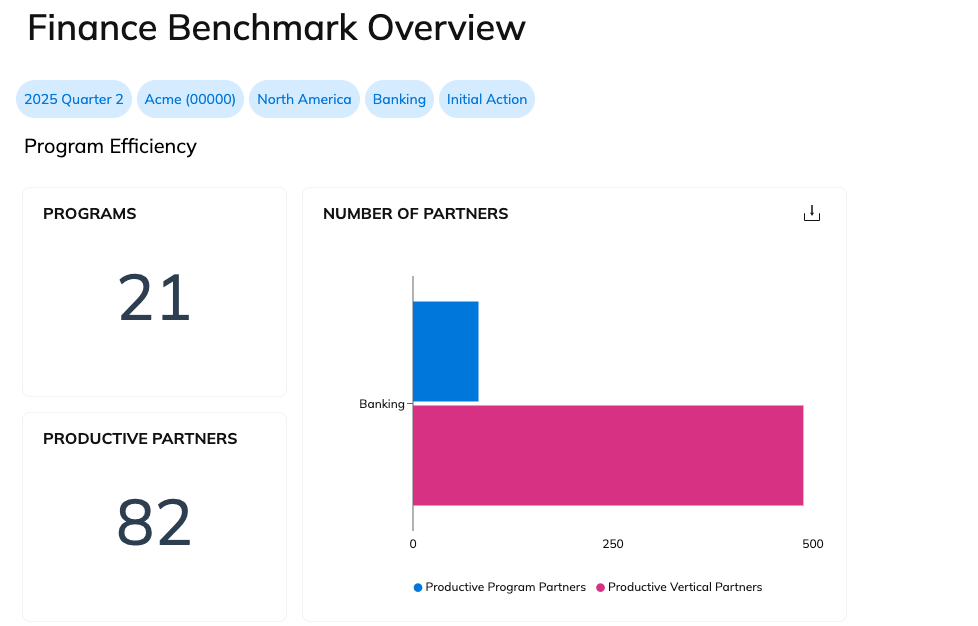
Program Efficiency shows the number of programs and productive partners in your vertical. You can also compare the number of productive partners in your program with the overall number of productive partners in the vertical.

A **productive** partner is one who has driven at least one action during the selected quarter.

<div data-with-frame="true"><figure><img src="https://4048883401-files.gitbook.io/~/files/v0/b/gitbook-x-prod.appspot.com/o/spaces%2FwMLlMoFBtKJa8ptd3zaw%2Fuploads%2Fgit-blob-27f02cd9a93c38bad2db3aea06b99b0ee682bc2c%2F8d8262435aef0a0198e0ccbb0267e199dd246bad735a2dbcd101ab0c732ae36b.png?alt=media" alt=""><figcaption></figcaption></figure></div>

</details>

<details>

<summary>KPI Comparison</summary>

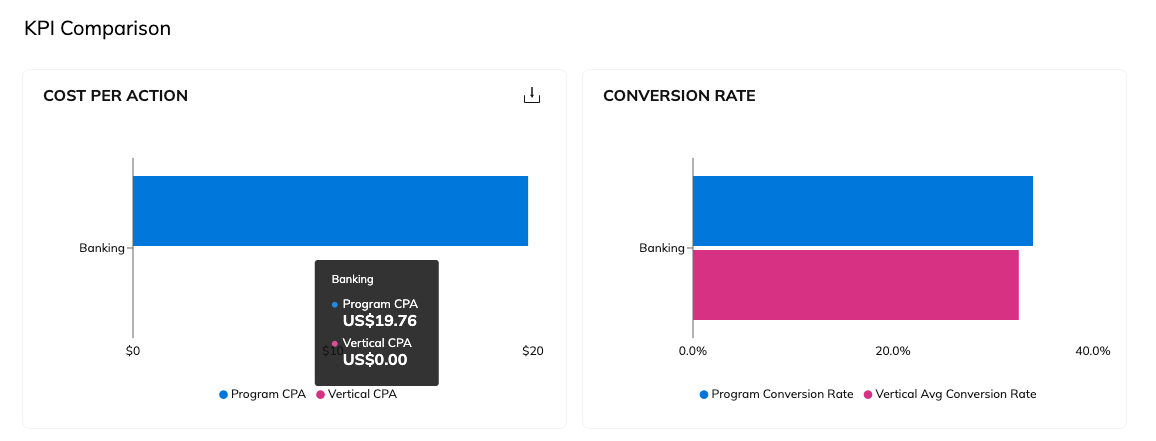
Compare your cost-per-action and conversion rate against other programs in your selected vertical.

Hover your cursor over the chart to see specific figures.

<div data-with-frame="true"><figure><img src="https://4048883401-files.gitbook.io/~/files/v0/b/gitbook-x-prod.appspot.com/o/spaces%2FwMLlMoFBtKJa8ptd3zaw%2Fuploads%2Fgit-blob-2248c164bd70a8a007f303dc3a8822564a626a74%2F510586323ec8f044a0f3517d09f15aa003705e7b09584d63081eb76e614ca9a2.png?alt=media" alt=""><figcaption></figcaption></figure></div>

</details>

<details>

<summary>Program Diversity</summary>

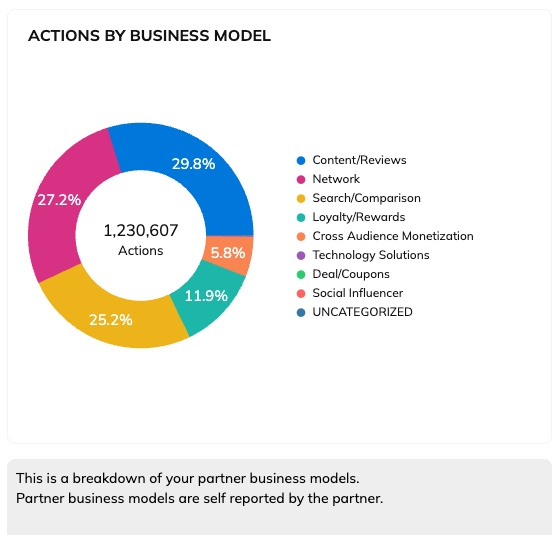
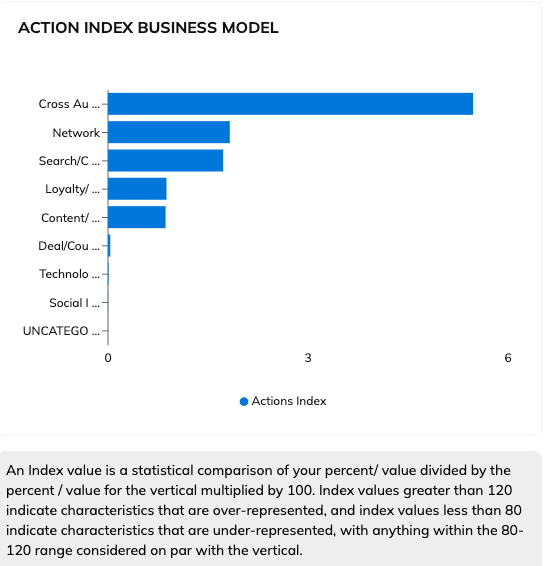
The *Program Diversity* section contains two charts: *Actions by Business Model* and *Action Index Business Model*.

{% hint style="info" %}
**Note:** If any of your partners do not identify their primary promotional method, the revenue driven by that partner will be uncategorized.
{% endhint %}

In the *Actions by Business Model* chart, you can review the number of actions taken by partners from different business models.

<div data-with-frame="true"><figure><img src="https://4048883401-files.gitbook.io/~/files/v0/b/gitbook-x-prod.appspot.com/o/spaces%2FwMLlMoFBtKJa8ptd3zaw%2Fuploads%2Fgit-blob-352851d1a9f06b2f4ab50b97db33825ce7dafeac%2Fe3ef1c044b9aa2dd70bb70eef4c04f0bd0b836cf75dc3f72bf9b9fe2f67a6618.png?alt=media" alt=""><figcaption></figcaption></figure></div>

Use the *Action Index Business Model* chart to compare how your performance within a business model compares with others in your vertical.

<div data-with-frame="true"><figure><img src="https://4048883401-files.gitbook.io/~/files/v0/b/gitbook-x-prod.appspot.com/o/spaces%2FwMLlMoFBtKJa8ptd3zaw%2Fuploads%2Fgit-blob-05fea0f2b1f1525af2250db9e937dcbae0e9af19%2Fbd359556488058f0af8f3ab864486a69c2bfad7340815699c3ce2f7bcdfdbc0b.png?alt=media" alt=""><figcaption></figcaption></figure></div>

</details>

<details>

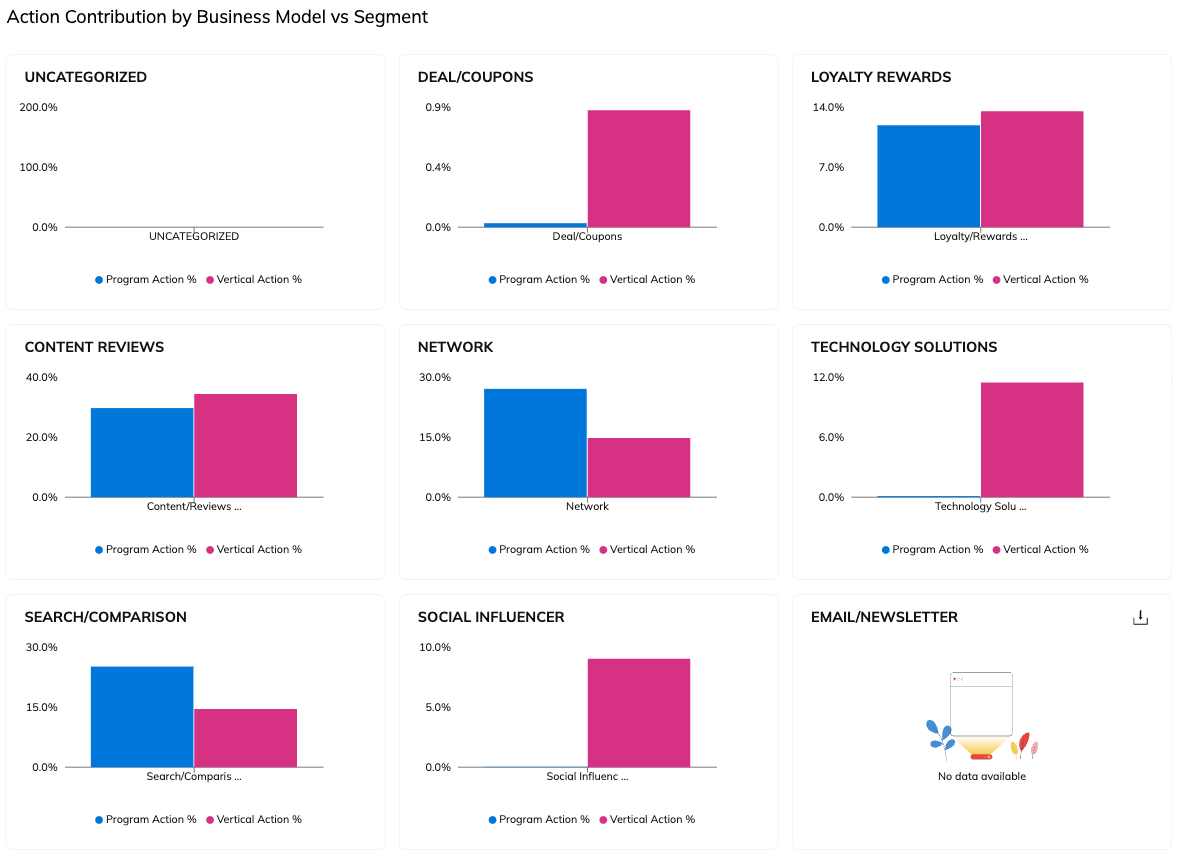
<summary>Action Contribution by Business Model vs Segment</summary>

The *Action Contribution by Business Model vs Segment* section allows you to compare how different business models are contributing to driving actions for your program against others in your vertical. It provides the same information as the pie chart in the *Program Diversity* section above, but in bar graph form for easier comparison to the industry segment.

<div data-with-frame="true"><figure><img src="https://4048883401-files.gitbook.io/~/files/v0/b/gitbook-x-prod.appspot.com/o/spaces%2FwMLlMoFBtKJa8ptd3zaw%2Fuploads%2Fgit-blob-389bf0f7f747071eaf7c7f98f19665ff0cb02c74%2Fb4be535100c33d7db35891c95e16a9b41f7a1312fec86d471095a633ca7f6e0c.png?alt=media" alt=""><figcaption></figcaption></figure></div>

</details>

<details>

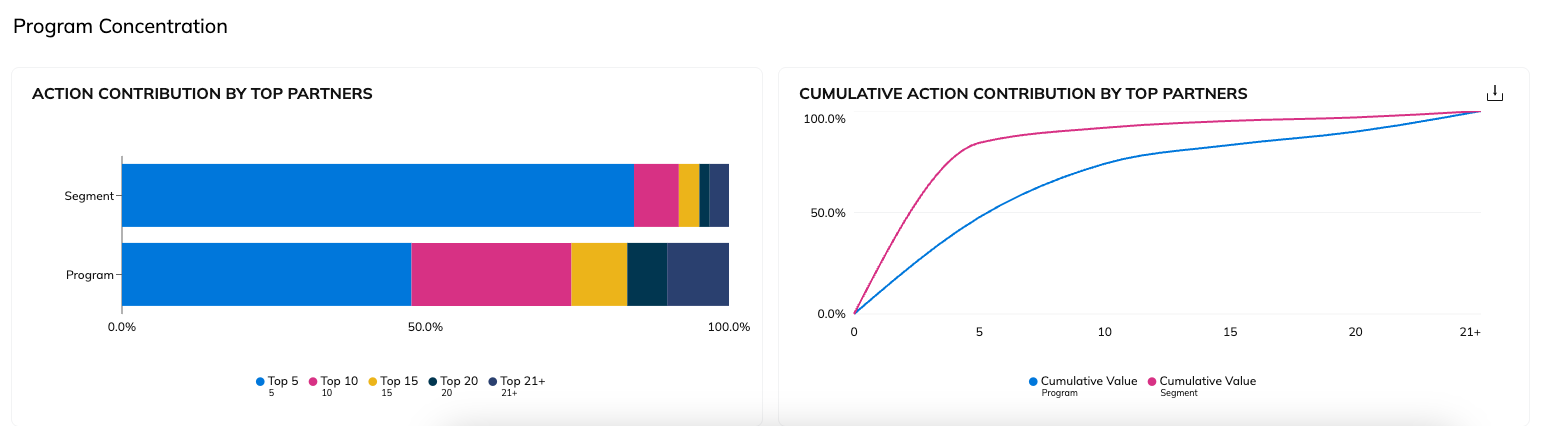
<summary>Program Concentration</summary>

The *Program Concentration* section shows you what percentage of action your top-performing partners drive in your program measured against the industry segment. You can use this report to help determine if your program is too dependent on your top-performing partners by comparing it to the industry segment.

<div data-with-frame="true"><figure><img src="https://4048883401-files.gitbook.io/~/files/v0/b/gitbook-x-prod.appspot.com/o/spaces%2FwMLlMoFBtKJa8ptd3zaw%2Fuploads%2Fgit-blob-0caaf648fa9bc91b5230cb34789e631a1b0ac8e8%2F16de03541ece5960c2b3f1699d3ff62e2e2c6cef5ca7a5c4ed759d8e62f3c907.png?alt=media" alt=""><figcaption></figcaption></figure></div>

</details>

2. Optionally, you can ![](https://4048883401-files.gitbook.io/~/files/v0/b/gitbook-x-prod.appspot.com/o/spaces%2FwMLlMoFBtKJa8ptd3zaw%2Fuploads%2Fgit-blob-5e962e68a3cf6c87d7ade712b204bae70f02fe42%2F07666ee42fc00c5eb99a6545e1f573505a3888c370d4751169eab2b06d01158c.svg?alt=media) **\[Share]** or ![](https://4048883401-files.gitbook.io/~/files/v0/b/gitbook-x-prod.appspot.com/o/spaces%2FwMLlMoFBtKJa8ptd3zaw%2Fuploads%2Fgit-blob-1c990ed7d1179d6bc54ec8a2f98688d63ffdf977%2F1ca7fd10d94ed494c076e86be8f0d3f371693b11c47f1b26ec0435a27e0e48c5.svg?alt=media) **\[Download]** the overview using the buttons at the top-right of the report.


---

# Agent Instructions: Querying This Documentation

If you need additional information that is not directly available in this page, you can query the documentation dynamically by asking a question.

Perform an HTTP GET request on the current page URL with the `ask` query parameter:

```
GET https://help.impact.com/brand/what-would-you-like-to-learn-about/performance-program/performance-program-reports/competitive-insights/finance-benchmark-report/finance-benchmark-overview.md?ask=<question>
```

The question should be specific, self-contained, and written in natural language.
The response will contain a direct answer to the question and relevant excerpts and sources from the documentation.

Use this mechanism when the answer is not explicitly present in the current page, you need clarification or additional context, or you want to retrieve related documentation sections.