# Brand Benchmarking Overview

Brand Benchmarking is a comparative analysis of key metrics between your partner program and the average performance of partner programs in your competitive segment. In this article, you will learn how to use the different sections of the dashboard to gain a better understanding of how your program compares to your competitors’.

{% hint style="warning" %}
**Your identity is safe with us:** Benchmarking insights are based on aggregate metrics and anonymous participation in the competitive segment. All identifiable information about the brands’ program is removed and combined with other anonymous data before it’s shared with others. impact.com does not disclose any data that could reveal a brand’s identity or customer data. Segment participants are anonymous.
{% endhint %}

#### Access the benchmark overview

![](https://4048883401-files.gitbook.io/~/files/v0/b/gitbook-x-prod.appspot.com/o/spaces%2FwMLlMoFBtKJa8ptd3zaw%2Fuploads%2Fgit-blob-ce68cfb317a0bdf2b9e82f3df63b400f7764cbf2%2F6b9ec025210c2878ab8e126697a41af04cef94403a452d5dee89cf87e9f2cf2d.svg?alt=media) This feature is only accessible to specific impact.com editions or add-ons. [Contact us](https://app.impact.com/support/portal.ihtml?createTicket=true) to upgrade your account and get access!

1. From the left navigation bar, select ![](https://4048883401-files.gitbook.io/~/files/v0/b/gitbook-x-prod.appspot.com/o/spaces%2FwMLlMoFBtKJa8ptd3zaw%2Fuploads%2Fgit-blob-81365ab1e9414f66498604921f52870f117b8cc7%2Fd33a611679a65f191574b81820ac09c98c5cc774faa6ff5a8a739a9cc7a87234.svg?alt=media) **\[Competitive Insights]** → **Benchmark → Overview**.
2. From the filter bar near the top of your *Benchmark Overview* screen:
   * Select the **Quarter** for which you want to view benchmarking data.
   * Select the **Region** for which you want to view benchmark data.

     <div data-gb-custom-block data-tag="hint" data-style="info" class="hint hint-info"><p><strong>Note:</strong> Brand Benchmarking is currently available for <em>North America</em>, <em>Europe</em>, and <em>Oceania</em>.</p></div>
   * Select the industry **Category** for which you want to view benchmark data.

     <div data-gb-custom-block data-tag="hint" data-style="info" class="hint hint-info"><p><strong>Note:</strong> Brand Benchmarking is currently available to <em>Retail</em>, <em>Travel</em>, and <em>Education</em>-related programs.</p></div>
   * The filter options visible to you are those relevant to your program(s).
3. Optionally, you can email, schedule, or download the overview using the buttons at the top-right of the report.

#### Size of Industry Benchmark Segment

In this section, you can see the total number of partners in your program and how many of them are *active* or *productive* partners.

| Status                       | Description                                                                                             |
| ---------------------------- | ------------------------------------------------------------------------------------------------------- |
| Total Partners               | The total number of total partners that are joined to your program for the chosen industry segment.     |
| Active Partners              | The number of partners who drove at least one click during the quarter.                                 |
| Productive Partners          | The number of partners who drove at least one action during the quarter.                                |
| Recommended Partners to Join | The number of partners that impact.com recommends to join your program for the chosen industry segment. |

#### Partner Overview

The *Partner Overview* section shows you the number of partners in your program, how many are inactive, productive, active but not productive, as well as the active and productive rate of partners compared to the industry segment. Use this report to compare the size of your program to the industry average.

* See the *Partner Status* table below for more information on the data available in this section.

| Partner Status            | Description                                                                                                                                                                                |
| ------------------------- | ------------------------------------------------------------------------------------------------------------------------------------------------------------------------------------------ |
| Inactive                  | *Inactive* partners are contracted to you but have not driven a single click or action over the chosen quarter.                                                                            |
| Active but not Productive | *Active but not Productive* partners have driven at least one click but no actions over the chosen quarter.                                                                                |
| Productive                | *Productive* partners have driven at least one action over the chosen quarter.                                                                                                             |
| Active Rate               | The *Active Rate* is the number of *Active Partners* (this includes *Active but not Productive* and *Productive* partners) divided by the total number of partners, shown as a percentage. |
| Productive Rate           | The *Productive Rate* is the number of *Productive* partners divided by the number of *Active*, shown as a percentage.                                                                     |

<div data-with-frame="true"><figure><img src="https://4048883401-files.gitbook.io/~/files/v0/b/gitbook-x-prod.appspot.com/o/spaces%2FwMLlMoFBtKJa8ptd3zaw%2Fuploads%2Fgit-blob-f4f72db3b2e7da8cd45a20805bdea386523843c1%2Ff4e6edaa3139a8d5fa8e2d7fffddfee74cad5dc04c3f1ac1d8252111051d7df3.png?alt=media" alt=""><figcaption></figcaption></figure></div>

#### Program Efficiency

The *Program Efficiency* section compares metrics relating to your program’s efficiency (such as the AOV, Cost per Action, Conversion Rate, ROAS, Effective CPC, Commission Rate, and Commission Flat metrics) to the industry segment. Hover your cursor over the graph to see the precise value.

<div data-with-frame="true"><figure><img src="https://4048883401-files.gitbook.io/~/files/v0/b/gitbook-x-prod.appspot.com/o/spaces%2FwMLlMoFBtKJa8ptd3zaw%2Fuploads%2Fgit-blob-7a8cfcb71c3941cfff5397f8af3c15cc0da694e3%2F0c12ea8841d1b71899d627b1edabe04b37249316e20c859069eb61b606c9c1d6.png?alt=media" alt=""><figcaption></figcaption></figure></div>

#### Partner Type Distribution

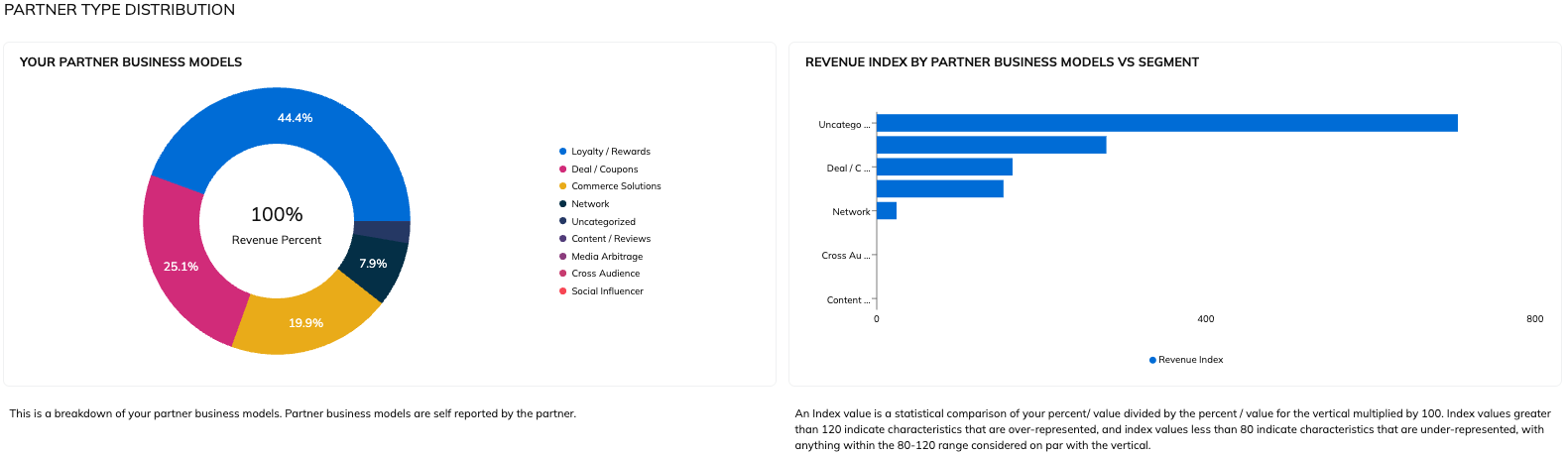
The *Partner Type Distribution* section shows you the breakdown of how partners drove revenue for your program by their primary promotional method measured against the industry segment. Use this report to determine the diversity of your partner mix compared to that of your competitors.

<div data-with-frame="true"><figure><img src="https://4048883401-files.gitbook.io/~/files/v0/b/gitbook-x-prod.appspot.com/o/spaces%2FwMLlMoFBtKJa8ptd3zaw%2Fuploads%2Fgit-blob-a979a1637e0433921593aed5dd65a74139518ce1%2F70d0f2cde6d5a4521b94986579c5a929863870e2bcfb9a529104e382b8c8fae2.png?alt=media" alt=""><figcaption></figcaption></figure></div>

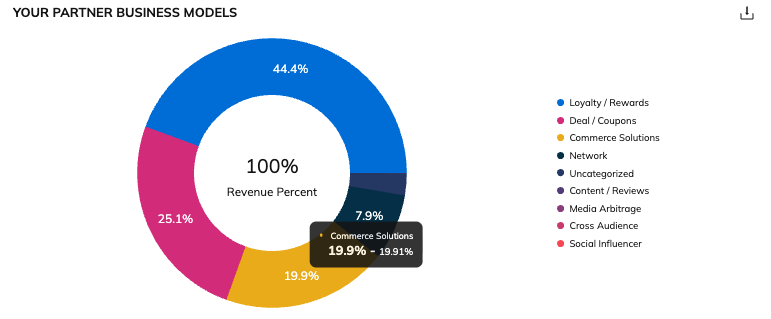
Hover over a section of the *Your Partner Business Models* pie chart to see what percentage of your total revenue was driven by a specific promotional method and how it compares against the industry segment average for that promotional method. Your revenue percentage is the first number and the industry segment is the second number.

<div data-with-frame="true"><figure><img src="https://4048883401-files.gitbook.io/~/files/v0/b/gitbook-x-prod.appspot.com/o/spaces%2FwMLlMoFBtKJa8ptd3zaw%2Fuploads%2Fgit-blob-7c2092a63e5abb137683267bffac23e1682cbddd%2F6730f570fde784c2004f5496ed4a3fcac8b6549b480c29722d983692beb267e0.png?alt=media" alt=""><figcaption></figcaption></figure></div>

{% hint style="info" %}
**Note:** If any of your partners do not identify their primary promotional method, the revenue driven by that partner will be *uncategorized*.
{% endhint %}

#### Revenue Contribution by Partner Business Model vs Segment

The *Revenue Contribution by Partner Business Model vs Segment* section provides the same information as the pie chart in the *Program Diversity* section above, but in bar graph form for easier comparison to the industry segment.

<div data-with-frame="true"><figure><img src="https://4048883401-files.gitbook.io/~/files/v0/b/gitbook-x-prod.appspot.com/o/spaces%2FwMLlMoFBtKJa8ptd3zaw%2Fuploads%2Fgit-blob-4bd778232c221e8a5e9081ee98856e4af3607b85%2F12bcc7769034ea7ad4b1362acb9427c6268a3b202693e4a9f65d8a88e63c9e17.png?alt=media" alt=""><figcaption></figcaption></figure></div>

#### Concentration

The *Concentration* section shows you what percentage of revenue your top-performing partners drive in your program measured against the industry segment. You can use this report to help determine if your program is too dependent on your top-performing partners by comparing it to the industry segment.

<div data-with-frame="true"><figure><img src="https://4048883401-files.gitbook.io/~/files/v0/b/gitbook-x-prod.appspot.com/o/spaces%2FwMLlMoFBtKJa8ptd3zaw%2Fuploads%2Fgit-blob-d021bbdd1f78b78e3252a81f39be5e54a50dee72%2Fe7b780ef21985391ce15d07256e9f76156e661a9baf87484f1b88d8d19c79ebd.png?alt=media" alt=""><figcaption></figcaption></figure></div>

Hover your cursor over the horizontal bar chart to see a breakdown of percentages.

**Helpful reports**

* How do your partners perform in your program vs. the industry segment? See the [Benchmark Partner Analysis report](https://help.impact.com/brand/what-would-you-like-to-learn-about/performance-program/performance-program-reports/competitive-insights/benchmarking/benchmark-partner-analysis).
* For recommendations of partners that perform well in your segment and have good revenue opportunities for your program, see the [Benchmark Recommendations report](https://help.impact.com/brand/what-would-you-like-to-learn-about/performance-program/performance-program-reports/competitive-insights/benchmarking/benchmark-recommendations).