> For the complete documentation index, see [llms.txt](https://help.impact.com/llms.txt). Markdown versions of documentation pages are available by appending `.md` to page URLs; this page is available as [Markdown](https://help.impact.com/brand/what-would-you-like-to-learn-about/creator-program/working-with-creators/view-a-creators-profile.md).
# View a Creator's Profile
Gain more insights on a creator by viewing information such as their contact details, media properties and performance.
You can view a creator's profile in 4 ways, depending on where they are in your recruitment funnel: the *Marketplace,* *Creator Search*, your *Prospects* screen, or the *My Creators* screen.
{% tabs %}
{% tab title="Marketplace" %}
1. From the left navigation menu, select .svg?alt=media\&token=8a0e56eb-ff89-4046-8e72-ad2b503f8bf9) **\[Discover]** → **Find Creators** → [**Creator Marketplace**](https://app.impact.com/secure/advertiser/discover/radius/fr/partner_discover.ihtml).
2. Select a **creator** to see more information about their profile.
* To contact the creator, select  **\[Message]** or  **\[Email].** If the creator has an Instagram media property, you can also select  **\[Instagram direct message]** to contact via Instagram.
* Select **Invite** to invite the creator to a brand or campaign.
* Select  **\[Add Prospect]** to add them to your prospects list.
* Select  **\[Archive]** to hide the creator from the Marketplace for you.
* Select  **\[Report]** to report this creator. Refer to [Report a Partner](/brand/what-would-you-like-to-learn-about/platform-features/protect-and-monitor-your-performance-program/report-a-partner.md) to learn more.
{% endtab %}
{% tab title="Creator Search" %}
1. From the left navigation menu, select .svg?alt=media\&token=8a0e56eb-ff89-4046-8e72-ad2b503f8bf9) **\[Discover]** → **Find Creators** → [**Creator Search**](https://app.impact.com/secure/advertiser/discover/fr/discover/creator-rt-searches.ihtml).
2. Select a **creator** to see more information about their profile. The options available may vary depending on the creator.
* To contact the creator, select  **\[Message]** or  **\[Email].** If the creator has an Instagram media property, you can also select  **\[Instagram direct message]** to contact via Instagram.
* Select **Invite** to invite the creator to a brand or campaign.
* Select  **\[Add prospect]** to add them to your prospects list.
* Select  **\[Report]** to report this creator. Refer to [Report a Partner](/brand/what-would-you-like-to-learn-about/platform-features/protect-and-monitor-your-performance-program/report-a-partner.md) to learn more.
{% endtab %}
{% tab title="Prospects" %}
1. From the left navigation menu, select .svg?alt=media\&token=8a0e56eb-ff89-4046-8e72-ad2b503f8bf9) **\[Discover]** → [**Prospects**](https://app.impact.com/secure/advertiser/discover/radius/fr/partner_prospecting.ihtml)**.**
2. Select a **creator** to see more information about their profile.
* Select  **\[Message]** or  **\[Email]** to contact the creator.
* Select **Invite** to invite the creator to a brand or campaign.
* Select  **\[Archive]** to archive the creator from your Prospects page.
* Select  **\[Report]** to report this creator. Refer to [Report a Partner](/brand/what-would-you-like-to-learn-about/platform-features/protect-and-monitor-your-performance-program/report-a-partner.md) to learn more.
{% endtab %}
{% tab title="My Creators" %}
1. From the left navigation menu, select  **\[Engage] → Partners** → [**Creators**](https://app.impact.com/secure/advertiser/engage/discover/radius/fr/partner_ui.ihtml).
2. Select a **creator** to see more information about their profile.
* Select  **\[Message]** or  **\[Email]** to contact the creator.
* Select **View Performance** to view the partner dashboard report.
* Select  **\[More]** to manage client cost settings, view performance, and more. See the *More menu reference* below for more details.
* See the creator-related metrics:
* **Clicks**: The total number of tracking link clicks for all of the creator's active links.
* **Actions**: The total number of conversions (sales, app installs, etc.) from a tracking link click.
* **Revenue**: The total amount of sales generated by tracking link conversions.
More menu reference
| Action | Descriptions |
| -------------------- | ---------------------------------------------------------------------------------------------------------------------------------------------------------------------------------------------------------------------------------------------------------------------------------------------- |
| Client cost settings |  **\[Toggle on]** if you want to charge creators to be partnered with you. |
| Invite to campaign |
Invite a creator to one or more active campaigns.
1. Enter a campaign name.
2. Enter a personalized message inviting the creator to participate in the campaign and share some details about it.
3. Select Send Invite.
|
| Invite to survey |
Invite a creator to participate in one or more surveys.
1. Enter a survey name.
2. Enter a personalized message inviting the creator to participate in the survey and share some details about it.
3. Select Send Invite.
|
| Manage account lists | You can make contact information available for each of your creators to enable them to contact the proper person on your team. |
| Partner Integration | This action allows you to manage tracking integrations for this creator. |
{% endtab %}
{% endtabs %}
## View the creator's basic information
You can review the creator's basic information from the left pane of the slideout. Refer to the *Creator details reference* below for more information.
Creator details reference
| Field | Description |
| ------------------ | -------------------------------------------------------------------------------------------------------------------------------------------------------------------------------------------------------------------------------------------------------------------------------------------------------------------------------------------------------------------------------------------------------------------------------------------------------------------------------------------------------------------------------------------------------------------------------------------------------------------------------------------------------- |
| Contract Stage | The contract stage of the creator (e.g., joined or expired). |
| Relationship Stage |
The relationship status between the creator and you:
New: Partners you've tagged as prospects, but have yet to email or send a proposal.
Outreach: Partners to whom you've sent an email or message.
Negotiating: Partners without an accepted contract, including those awaiting a decision, those who haven’t accepted your proposal, those who countered your proposal, and those whose application you’ve countered.
Joined: Partners joined to your program.
Expired: Partners with expired contracts.
|
| Assigned to | The account user who is responsible for the creator. |
| Groups | The [group](/brand/what-would-you-like-to-learn-about/platform-features/reach-out-to-partners/partner-groups/create-and-manage-partner-groups.md) to which the creator is assigned. |
| Campaigns | The campaign with which the creator is associated. |
| Surveys | [Surveys](/brand/what-would-you-like-to-learn-about/platform-features/reach-out-to-partners/surveys/create-a-partner-survey.md) completed by the creator. |
| Activity | The activity log of the creator, which can include emails, messages, and internal notes. |
## View the creator’s media properties and details
Select the *Properties*, *Details,* and *Custom Fields* tabs to view more information about the creator:
{% tabs %}
{% tab title="Properties" %}
In the *Properties* tab, you'll find a list of links with insights to the creator's social media and website pages.
Each property also has a *verification status* badge in the bottom right corner of the tile to help you quickly identify whether the creator has verified ownership of that media property.
* **Verified:** The creator successfully verified their ownership with impact.com.
* **Not verified:** The creator hasn't verified the property with impact.com, so we can't confirm whether they own it.
* **Verification not required:** This property type doesn't require verification, e.g., LinkedIn.
{% hint style="success" %}
**Note:** Verified properties might display a message that *content and metrics aren't available* on the property's overview. This can occur if it's been a while since the partner connected the media property to their impact.com account.
{% endhint %}
Some of these properties might also display a *Learn More* option in the top right corner of the tile. You can select **Learn More** to view even further insights into that particular property.
Learn more about social media properties
See more about the creator's content, engagement and their audience.
{% hint style="success" %}
**Note:** Content preview, engagement, and audience data will vary based on both social media platform and available profile data.
{% endhint %}
### **Content preview**
| Metric | Description |
| --------------- | --------------------------------------------------------------------------------------------------------------------------------------------------------------------------------------------------------------------------------------------------------------------------------------------------------------------------------------------------------------------------------------------------------------------------------------------------------------------------------------------------------------------------------------------------------------------------------------------------------------------------------------------------------------------------------------------------------------------------------------------------------------------------------------------------------------------------- |
| Content Preview |
Preview of the type of content the creator posts on their social media pages.
\[Instagram only] You can preview the creator's Recent content or Branded Content using the tabs in the Content Preview section.
Recent: Shows the creator's latest posts.
Branded Content: Shows the content creator's made in partnership with brands. Select \[Next] at the top of the modal to slide through the creator's branded posts.
|
### **Engagement**
| Metric | Description |
| ------------------------------------------------ | -------------------------------------------------------------------------------------------------------------------------------------------------------------------------------------------------------------------------------------------------- |
| Followers **(Instagram & TikTok only)** | Shows the number of followers the creator's social media page has. |
| Subscribers **(YouTube only)** | Shows the number of subscribers the creator's social media page has. |
| Engaged accounts **(Instagram only)** | Shows the number of accounts that have interacted with the creator's content through actions such as likes, saves, comments, shares, or replies. Content includes the creator's posts, stories, reels, videos, and live videos. |
| Avg. engagement rate **(TikTok & YouTube only)** | Shows the average rate of engagement a creator received on their posts. This is calculated by adding the average likes, comments, and, when available, shares per post, and dividing the result by the total followers. |
| Avg. likes **(TikTok & YouTube only)** | Shows the average amount of likes the creator received on their posts. |
| Avg. comments **(TikTok & YouTube only)** | Shows the average amount of comments the creator received on their posts. |
| Avg. views | Shows the average number of views per video or post. |
| Avg. impressions | Shows the average number of times the creator’s posts appeared on their audiences screen. |
| Avg. reach | Shows the average number of unique users the creator’s post has reached. |
| Avg. shares | Shows the average number of times the creator’s posts are shared by others. |
| Reels interaction rate **(Instagram only)** | Shows the percentage of views that liked, commented, shared and saved the creator's recent reels. |
| Reels hook rate **(Instagram only)** | Shows the percentage of views that watched past the first 3 seconds of the creator's recent reels. This is calculated as the number of 3-second views divided by the number of initial views (when a Reel first starts playing in a user session). |
| Post count | Shows the number of posts the creator has on their social media property. |
| Board count **(Pinterest only)** | Shows the number of Pinterest boards this creator has. |
| Last post date **(TikTok & YouTube only)** | Shows the date of the most recent post published by the creator. |
### **Reached audience**
| Metric | Description |
| ----------------------------------------- | ------------------------------------------------------------------------------------------------------------------------------------------------------------------------------------------------------------------------------------------------------------------------------------------------------------------------------------------------------------------------------------------------------------------------------------------------------- |
| Gender | Shows the distribution of gender across the creator’s audience. |
| Age | Shows the distribution of age across the creator’s audience. |
| Languages | Shows the primary language used in the creator’s social platform. |
| States | Shows the top states where the creator’s audience is located. |
| Countries | Shows the countries where the creator's audience is located. |
| Cities | Shows the cities where the creator's audience is located. |
| Reach by Post Type **(Instagram only)** |
Shows the distribution of unique accounts that have seen this creator's content, at least once. Content includes posts, stories, reels, videos and live videos.
Note: Reach is different from impressions which may include multiple views of this content by the same account.
|
| Reach by Follow Type **(Instagram only)** |
Shows the distribution of unique accounts that have seen this creator's content, at least once, broken down by followers or non-followers. Content includes posts, stories, reels, videos and live videos.
Note: Reach is different from impressions which may include multiple views of this content by the same account.
|
Learn more about website properties
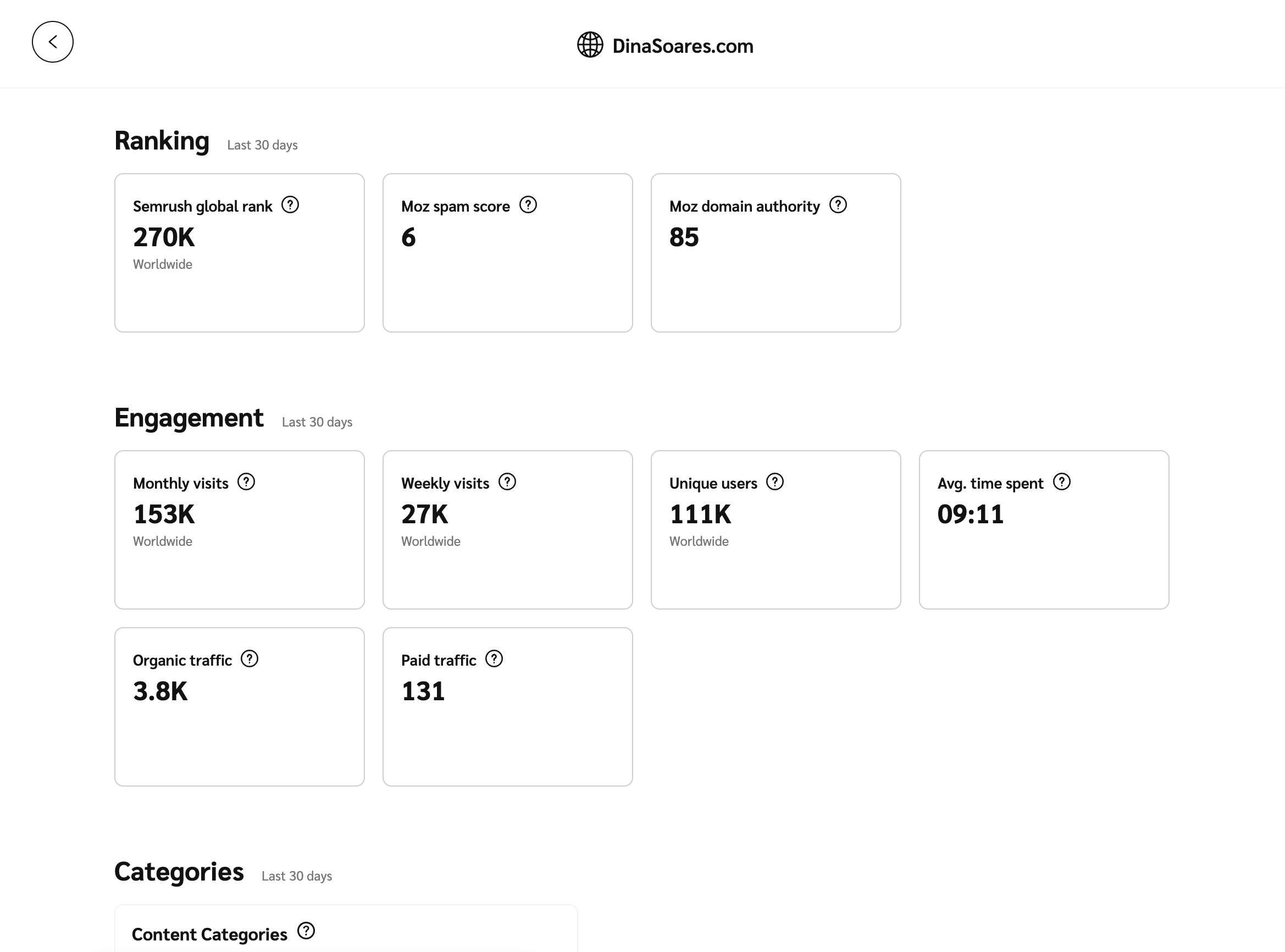
The learn more option can give you deeper insight into a creator’s website pages. You can view additional metrics on Semrush.com with a free account. See the *Website metrics reference* below.
1. Select any Semrush-provided metric in the *Ranking* or *Engagement* sections to drill deeper into the website analytics on Semrush.com.
* Optionally, at the bottom of the slideout, select **Semrush.com**.
2. Create an account to view additional information.
* A free account provides access to key metrics such as AI Visibility, Keywords, Backlinks, Traffic Share, Competitive Positioning Map, and more.
* A paid subscription unlocks a broader range of data.
#### **Website metrics reference**
**Ranking**
| Metric | Description |
| -------------------- | ------------------------------------------------------------------------------------------------------------------------------------------------------------------------------------------------------------- |
| Semrush global rank | Shows how a domain ranks globally using estimated traffic from Google’s first 10 results pages. |
| Moz spam score | Shows how likely a site might be penalized or banned by Google, based on how many sites with similar features have been penalized. A lower score means lower risk, while a higher score suggests higher risk. |
| Moz domain authority | Shows how likely a website is to rank higher in search results. The higher the score, the stronger the ranking potential. |
**Engagement**
| Metric | Description |
| --------------- | --------------------------------------------------------------------------------------------------------------------------------------------------------- |
| Monthly visits | Shows the amount of unique visitors the website had globally over the most recent month. |
| Weekly visits | Shows the weekly amount of unique visitors the website had globally. |
| Unique users | Shows the amount of unique users over a specific time frame. |
| Avg. time spent | Shows the average amount of time spent on the website during each visit. |
| Organic traffic | Shows the amount of traffic a website receives from unpaid search engine results. |
| Paid traffic | Shows the amount of traffic a website receives from paid advertisements on social media websites like Facebook, Twitter, Reddit, Pinterest, YouTube, etc. |
**Categories**
| Metric | Description |
| ------------------ | ----------------------------------------------------------------------------------------------------------- |
| Content categories | Shows a breakdown by percentage of the top content categories that helps understand the website’s audience. |
**Reached audience**
| Metric | Description |
| --------- | ------------------------------------------------------------- |
| Gender | Shows the gender distribution of the website’s audience. |
| Age | Shows the age distribution of the website’s audience. |
| Countries | Shows the countries that contribute to the website’s traffic. |
{% endtab %}
{% tab title="Details" %}
In the *Details* tab you'll find all the relevant contact information. Have a look at the *Details reference* table below for more information on what details you can find in this section.
Details reference
| Details | Description |
| ---------------------- | ------------------------------------------------------------------------------------------------------------------------------------------------------------------------------------------------------------------------------------------------------------------------------------------------------------------------------------------------------------------------------------------------------------------------------------------------------------------------------------------------------------------------------------------------------------------------ |
| Contacts | A list of contact persons you could contact if you want to message or propose a contract. |
| Performance categories |
See the percentage of revenue this creator drives in each product category, mapped to Google Merchant Categories. Only categories that account for more than 1% of the partner's sales appear.
Note: These categories are based on retail product sales, so they don't appear on every profile. A creator who drives revenue outside of retail — in financial services, for example — may show no categories even if their revenue is high.
|
| Personal information | See the personal information of the creator such as their gender, language, and age. |
| Promotional areas | These are the locations or countries in which the creator promotes. |
| Corporate address | The physical address at which the creator is located. |
| Content categories | These are the partner's Google Content Categories, based on their media properties over the past 6 months. The data refreshes every 90 days. |
| Tags | The tags will tell you more about the fields in which this creator works. |
| Currency | The currency with which the creator operates and gets paid in. |
| Partner ID | The impact.com identification number of the creator. |
{% endtab %}
{% tab title="Custom Fields" %}
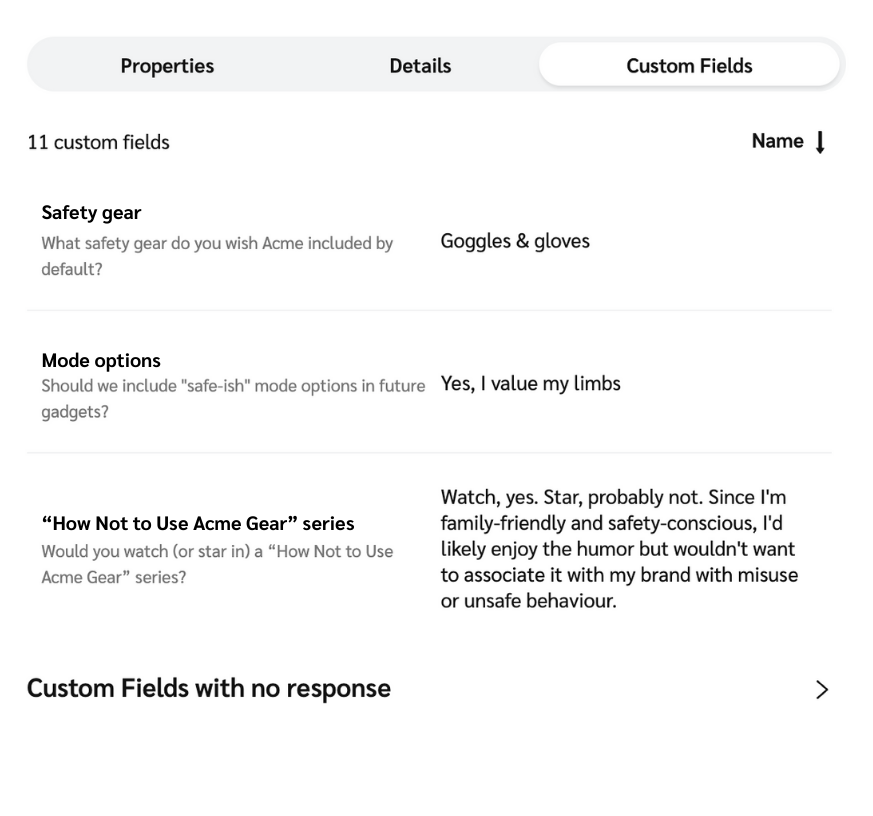
The *Custom Fields* tab is only visible if you have surveys enabled with custom fields. It shows the partner's responses to your custom field questions and any files they've attached. To learn about setting up surveys and custom fields, see [Create Custom Fields for Surveys](/brand/what-would-you-like-to-learn-about/platform-features/reach-out-to-partners/surveys/create-custom-fields-for-surveys.md).
{% endtab %}
{% endtabs %}
---
# Agent Instructions
This documentation is published with GitBook. GitBook is the documentation platform designed so that both humans and AI agents can read, navigate, and reason over technical content effectively. Learn more at gitbook.com.
## Querying This Documentation
If you need additional information that is not directly available in this page, you can query the documentation by asking a question.
Perform an HTTP GET request on the following URL with the `ask` and `goal` query parameters:
```
GET https://help.impact.com/brand/what-would-you-like-to-learn-about/creator-program/working-with-creators/view-a-creators-profile.md?ask=&goal=
```
`ask` is the immediate question: it should be specific, self-contained, and written in natural language.
`goal` is what the user is ultimately trying to achieve, the reason they need the answer. Sharing it helps GitBook give you a better, more relevant answer. A goal is most helpful when it describes the outcome the user wants rather than restating the question. For example, with `ask=how do I create an API token`, a goal like `automate deployments from our CI pipeline` lets GitBook tailor the answer to that use case.
The response will contain a direct answer to the question and relevant excerpts and sources from the documentation.
Use this mechanism when the answer is not explicitly present in the current page, you need clarification or additional context, or you want to retrieve related documentation sections.
.png?alt=media&token=136c8b76-caa3-4487-903f-6b2ccf7134c5)

.png?alt=media&token=0ebd1b92-ca4a-4ad0-8cb4-5a2aeea07587)
 \[Next] at the top of the modal to slide through the creator's branded posts.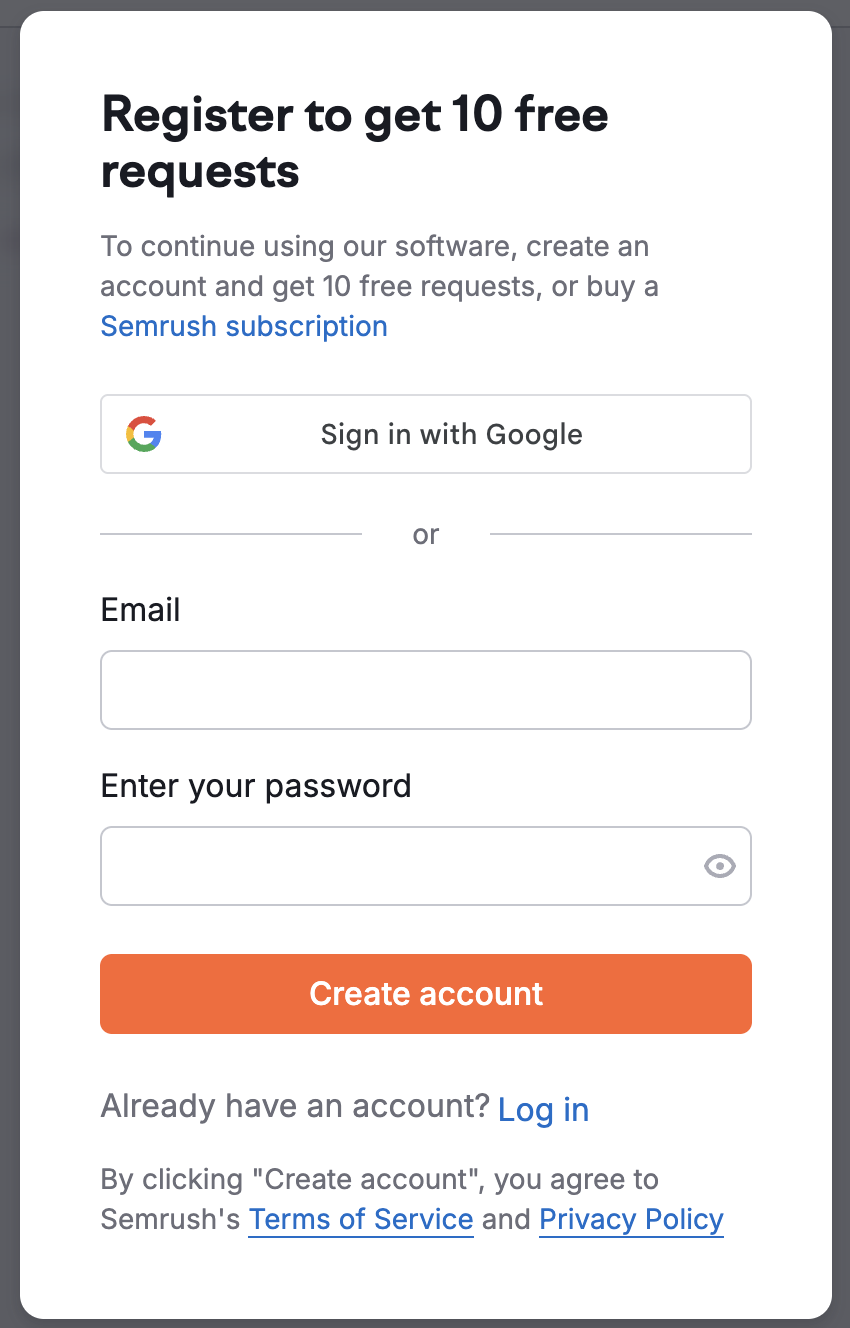
.png?alt=media&token=23b6603a-af95-43f1-b499-7e6738b7ddc0)