# Invite Creators to Your Campaign

When inviting creators to a campaign, you can use impact.com's *Discover* feature, the *Campaign Manager* or *Extended Search*. Depending on how you invite a creator, they may be automatically accepted or need additional approval before being accepted to your campaign. To better understand the possible scenarios, see [Recruiting Creators Explained](https://help.impact.com/brand/what-would-you-like-to-learn-about/creator-program/recruit-creators/recruiting-creators-explained).

{% embed url="<https://res.cloudinary.com/product-enablement/video/upload/v1748613767/PXA%20Microlearnings/crea-250-1.mp4>" %}

#### Discover and invite new creators from the marketplace

{% hint style="warning" %}
**Important:** To invite a creator from the marketplace, they'll need to have an active impact.com account.
{% endhint %}

The *Discover* feature lets you filter for perfectly aligned creators that you can invite to your campaign or program.

1. From the left navigation bar, select ![](https://4048883401-files.gitbook.io/~/files/v0/b/gitbook-x-prod.appspot.com/o/spaces%2FwMLlMoFBtKJa8ptd3zaw%2Fuploads%2Fgit-blob-256572041ef9ad75d3e67aab1e9567ec34b8b0e8%2Fd99a087cccc9a98794d66a4acf8e8cafc425b112ce63c86d965965b30e3b91b4.svg?alt=media) **\[Discover]** → **Find Creators** → **Creator Marketplace**.
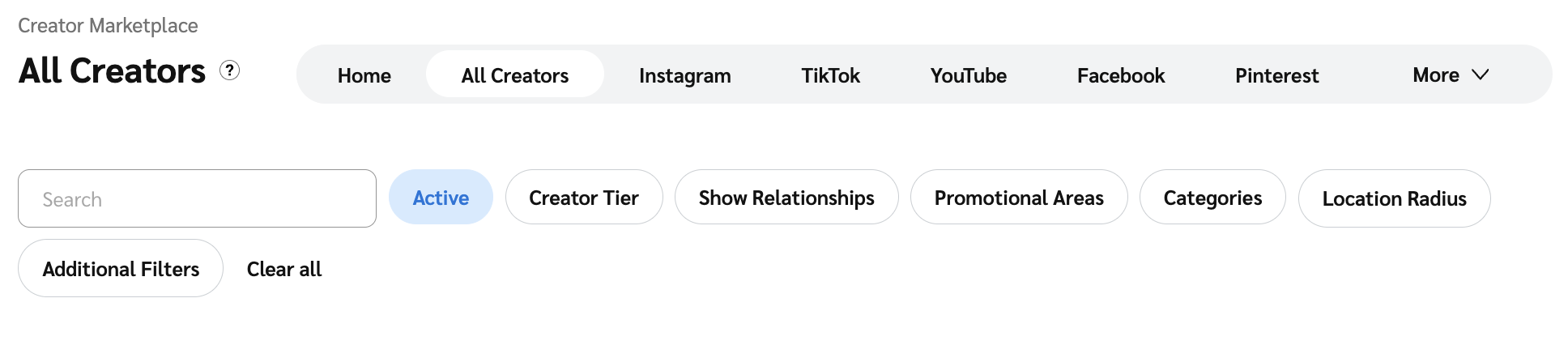
2. Use the tabs at the top of the *Marketplace* screen to filter for creators by a specific social channel.
3. Once you've selected a social channel, refine your search with the filter bar.

   <div data-with-frame="true"><figure><img src="https://4048883401-files.gitbook.io/~/files/v0/b/gitbook-x-prod.appspot.com/o/spaces%2FwMLlMoFBtKJa8ptd3zaw%2Fuploads%2Fgit-blob-17fc55a6c00686d294883b2d3d923ff9962fc2b5%2F217a22c6bef8b39100e563661fbf5a5b1db4c7c1c5f16b86cbb7a4adb722d315.png?alt=media" alt=""><figcaption></figcaption></figure></div>

   * See the *Filter bar reference* below for details.

<details>

<summary>Filter bar reference</summary>

| Filter tool        | Description                                                                                                                                                                                                                                                                                                                                                                                                                                                                                                                                                                                                                                                                                                                                                                                                                                                                                                                                                                                                                                                                                                                                                                                                                                                                                                                                                                                 |
| ------------------ | ------------------------------------------------------------------------------------------------------------------------------------------------------------------------------------------------------------------------------------------------------------------------------------------------------------------------------------------------------------------------------------------------------------------------------------------------------------------------------------------------------------------------------------------------------------------------------------------------------------------------------------------------------------------------------------------------------------------------------------------------------------------------------------------------------------------------------------------------------------------------------------------------------------------------------------------------------------------------------------------------------------------------------------------------------------------------------------------------------------------------------------------------------------------------------------------------------------------------------------------------------------------------------------------------------------------------------------------------------------------------------------------- |
| Search bar         | Enter the name, ID, or type of creator.                                                                                                                                                                                                                                                                                                                                                                                                                                                                                                                                                                                                                                                                                                                                                                                                                                                                                                                                                                                                                                                                                                                                                                                                                                                                                                                                                     |
| Status             | <p>The current state of the creator's profile (e.g., Inactive).</p><p><em>Active</em> is selected by default.</p><p>• The <em>Active</em> status includes new partners and any partners who have driven actions or commissions on impact.com within the last year.</p><p>• The <em>New</em> status limits results to partners who have become Marketplace verified within the last 90 days.</p>                                                                                                                                                                                                                                                                                                                                                                                                                                                                                                                                                                                                                                                                                                                                                                                                                                                                                                                                                                                             |
| Creator Tier       | The size of the creator measured by the number of followers or subscribers to their social properties. Learn more about the [size rating criteria](https://help.impact.com/brand/what-would-you-like-to-learn-about/platform-features/reach-out-to-partners/partner-management/partner-size-rating-criteria).                                                                                                                                                                                                                                                                                                                                                                                                                                                                                                                                                                                                                                                                                                                                                                                                                                                                                                                                                                                                                                                                               |
| Show Relationships | <p>Your joined creators and prospects are hidden by default from your marketplace search. Select the filters if you want to view them.</p><p>• <strong>Show Prospects</strong>: Include creators you've <a href="../../performance-program/recruiting-partners/prospective-partners/mark-potential-partners-as-prospects">marked as prospects</a>.</p><p>• <strong>Show Joined</strong>: Include creators already joined to your program.</p>                                                                                                                                                                                                                                                                                                                                                                                                                                                                                                                                                                                                                                                                                                                                                                                                                                                                                                                                               |
| Promotional Areas  | The country of the creator's audience.                                                                                                                                                                                                                                                                                                                                                                                                                                                                                                                                                                                                                                                                                                                                                                                                                                                                                                                                                                                                                                                                                                                                                                                                                                                                                                                                                      |
| Categories         | The type of products and services the creator believes would do well on their platform.                                                                                                                                                                                                                                                                                                                                                                                                                                                                                                                                                                                                                                                                                                                                                                                                                                                                                                                                                                                                                                                                                                                                                                                                                                                                                                     |
| Location Radius    | Search for creators within a specified distance of your selected geolocation. Choose the distance, unit of measurement (mi or km), and location.                                                                                                                                                                                                                                                                                                                                                                                                                                                                                                                                                                                                                                                                                                                                                                                                                                                                                                                                                                                                                                                                                                                                                                                                                                            |
| Additional filters | <p>• <strong>Social channels</strong> — <img src="https://4048883401-files.gitbook.io/~/files/v0/b/gitbook-x-prod.appspot.com/o/spaces%2FwMLlMoFBtKJa8ptd3zaw%2Fuploads%2Fgit-blob-d0b6669ae76a7bef06a8d6940d7ad5c16bb8d018%2F7cb018d4face8d7cceb880eb5086c812e764fbcfe6f2a0377f88bc7576973070.svg?alt=media" alt=""> <strong>\[Toggle on]</strong> to see creators with Instagram, Facebook, TikTok, or YouTube properties. Limit the results you see based on the creator's reach & engagement metrics, or audience demographics.</p><p>• <strong>Country</strong> — the country in which the creator is located.</p><p>• <strong>Language</strong> — the primary language of the creator's platform and content.</p><p>• <strong>Age</strong> — look for creators within a given age range.</p><p>• <strong>Gender</strong> — the creator's gender, as identified in their profile.</p><p>• <strong>Pronouns</strong> — the pronouns the creator uses.</p><p>• <strong>Marital status</strong> — the creator's current marital status.</p><p>• <strong>Parental status</strong> — whether the creator is a parent or not.</p><p>• <strong>Ethnicity</strong> — the creator's ethnic affiliation.</p><p>• <strong>Household Income</strong> — the total gross income received by the creator's household.</p><p>• <strong>Education</strong> — the creator's academic qualifications.</p> |

</details>

4. Select a creator's tile to [view their profile](https://help.impact.com/brand/what-would-you-like-to-learn-about/creator-program/working-with-creators/view-a-creators-profile), and on the profile slide-out, select **Invite \[Drop-down Menu]**:
   * To invite the creator to your creator campaign only, select **Invite to campaign** and choose the appropriate campaign.
   * To invite the creator to your overall program, select **Invite to brand** and choose the appropriate contract settings.

#### Invite new creators from extended search

[Extended Search](https://help.impact.com/brand/what-would-you-like-to-learn-about/creator-program/working-with-creators/extended-search-for-creator/extended-search-for-creator-explained) allows you use keywords to search for creators both within and outside the marketplace, and invite them to your campaign or brand.

1. From the left navigation menu, select ![](https://4048883401-files.gitbook.io/~/files/v0/b/gitbook-x-prod.appspot.com/o/spaces%2FwMLlMoFBtKJa8ptd3zaw%2Fuploads%2Fgit-blob-256572041ef9ad75d3e67aab1e9567ec34b8b0e8%2Fd99a087cccc9a98794d66a4acf8e8cafc425b112ce63c86d965965b30e3b91b4.svg?alt=media) **\[Discover]** → **Extended Search** → **All Results**.
   * Alternatively, to only view the results of a specific search, select **My Searches**, then select the desired search.
2. Select a creator's tile to [view their profile](https://help.impact.com/brand/what-would-you-like-to-learn-about/creator-program/working-with-creators/view-a-creators-profile), and on the profile slide-out, select **Invite \[Drop-down Menu]**.

   * To invite the creator to your creator campaign, select **Invite to campaign**.
   * To invite the creator to your overall program, select **Invite to brand**.

   <div data-with-frame="true"><figure><img src="https://4048883401-files.gitbook.io/~/files/v0/b/gitbook-x-prod.appspot.com/o/spaces%2FwMLlMoFBtKJa8ptd3zaw%2Fuploads%2Fgit-blob-288a12c83be7d171c2356ddd4c13415e97423152%2F8de0d618a0388b8e7040d6cc2bae620ecc2bf6b87d124d28f6eba5282520ed0c.png?alt=media" alt=""><figcaption></figcaption></figure></div>

#### Invite creators from social listening

Social Listening allows you to use key terms to search for posts by creators across social platforms. Once you've [found creators](https://help.impact.com/brand/what-would-you-like-to-learn-about/creator-program/working-with-creators/social-listening/view-social-listening-results-and-dashboard) you're interested in, you can invite them via email.

1. From the left navigation menu, select ![](https://4048883401-files.gitbook.io/~/files/v0/b/gitbook-x-prod.appspot.com/o/spaces%2FwMLlMoFBtKJa8ptd3zaw%2Fuploads%2Fgit-blob-256572041ef9ad75d3e67aab1e9567ec34b8b0e8%2Fd99a087cccc9a98794d66a4acf8e8cafc425b112ce63c86d965965b30e3b91b4.svg?alt=media) **\[Discover]** → **Social Listening**.
2. Hover over the listener you want to view, select **View Results**, select the post you're interested in, and select **View Profile** from the post slide-out.
3. Select ![](https://4048883401-files.gitbook.io/~/files/v0/b/gitbook-x-prod.appspot.com/o/spaces%2FwMLlMoFBtKJa8ptd3zaw%2Fuploads%2Fgit-blob-5e962e68a3cf6c87d7ade712b204bae70f02fe42%2F07666ee42fc00c5eb99a6545e1f573505a3888c370d4751169eab2b06d01158c.svg?alt=media) **\[Email]** at the top, compose your email and select **Send**.
   * You can include a sign-up link in your email. Refer to [Invite Partners to Join a Brand's Program](https://help.impact.com/brand/what-would-you-like-to-learn-about/performance-program/recruiting-partners/invite-partners-to-join-a-brands-program) to learn more.
   * If there is no ![](https://4048883401-files.gitbook.io/~/files/v0/b/gitbook-x-prod.appspot.com/o/spaces%2FwMLlMoFBtKJa8ptd3zaw%2Fuploads%2Fgit-blob-5e962e68a3cf6c87d7ade712b204bae70f02fe42%2F07666ee42fc00c5eb99a6545e1f573505a3888c370d4751169eab2b06d01158c.svg?alt=media) **\[Email]** option, then we don't have access to that creator's email address. You can reach out to them directly on the social platform.

#### Invite creators from creator search

Invite creators that are both inside and outside the impact.com marketplace using Creator Search. Once you've [found creators](https://help.impact.com/brand/what-would-you-like-to-learn-about/platform-features/creator-search/find-creators-with-creator-search) you're interested in using the Creator Search tool, you can invite them from their profile.

1. From the left navigation menu, select ![](https://4048883401-files.gitbook.io/~/files/v0/b/gitbook-x-prod.appspot.com/o/spaces%2FwMLlMoFBtKJa8ptd3zaw%2Fuploads%2Fgit-blob-256572041ef9ad75d3e67aab1e9567ec34b8b0e8%2Fd99a087cccc9a98794d66a4acf8e8cafc425b112ce63c86d965965b30e3b91b4.svg?alt=media) **\[Discover]** → **Find Creators** → **Creator Search**.
2. Use the tabs and filters at the top to find creators you're interested in, then **Get Results** and select the creator to view their profile. Refer to the [filter bar and additional filters reference](https://help.impact.com/brand/what-would-you-like-to-learn-about/platform-features/creator-search/find-creators-with-creator-search).
3. Below the creator's name, you can see if they're inside or outside the impact.com marketplace.
   * **Active**: The creator is active in the impact.com marketplace. A blue checkmark next to their name indicates they are Marketplace Verified.
   * **New**: The creator is new to impact.com and has become Marketplace Verified within the last 90 days. A blue checkmark next to their name indicates they are Marketplace Verified.
   * **Not on impact.com**: The creator is not in the impact.com marketplace. They may still have an impact.com account, but could be a direct partner, a multi-direct partner, or signed up directly with impact.com without applying to or being approved for the marketplace.
4. To invite creators within impact.com, select **Invite** ![](https://4048883401-files.gitbook.io/~/files/v0/b/gitbook-x-prod.appspot.com/o/spaces%2FwMLlMoFBtKJa8ptd3zaw%2Fuploads%2Fgit-blob-c2cb550b55c51ea1eeff0acbd6f437a03b621a2c%2F60d033ae8a04c14498d5229c3c0160ac05feea7f605dbd770741793c900469f0.svg?alt=media) **\[Drop-down menu]**.
   * To invite the creator to your campaign only, select **Invite to campaign** and choose the appropriate campaign.
   * To invite the creator to your program, select **Invite to brand** and choose the appropriate contract settings.
5. To invite creators outside of impact.com, select the ![](https://4048883401-files.gitbook.io/~/files/v0/b/gitbook-x-prod.appspot.com/o/spaces%2FwMLlMoFBtKJa8ptd3zaw%2Fuploads%2Fgit-blob-5e962e68a3cf6c87d7ade712b204bae70f02fe42%2F07666ee42fc00c5eb99a6545e1f573505a3888c370d4751169eab2b06d01158c.svg?alt=media) **\[Email]** at the top, compose your email, and select **Send**.

   * You can include a sign-up link in your email. Refer to [Invite Partners to Join a Brand's Program](https://help.impact.com/brand/what-would-you-like-to-learn-about/performance-program/recruiting-partners/invite-partners-to-join-a-brands-program) to learn more.
   * If there is no ![](https://4048883401-files.gitbook.io/~/files/v0/b/gitbook-x-prod.appspot.com/o/spaces%2FwMLlMoFBtKJa8ptd3zaw%2Fuploads%2Fgit-blob-5e962e68a3cf6c87d7ade712b204bae70f02fe42%2F07666ee42fc00c5eb99a6545e1f573505a3888c370d4751169eab2b06d01158c.svg?alt=media) **\[Email]** option, then we don't have access to that creator's email address. You can reach out to them directly on the social platform.

   <div data-with-frame="true"><figure><img src="https://4048883401-files.gitbook.io/~/files/v0/b/gitbook-x-prod.appspot.com/o/spaces%2FwMLlMoFBtKJa8ptd3zaw%2Fuploads%2Fgit-blob-00b7f225be75697fe67ef36fc03ae8d07b0693cf%2Fc01bec96938a0b6c424d6449963ba736843e754c2cd776528c88cc6b5812c8ae.png?alt=media" alt=""><figcaption></figcaption></figure></div>

#### Invite creators to a campaign directly

The *Campaign Manager* lets you invite new or partnered creators via a proposed SOW or a campaign invite link.

1. From the left navigation bar, select ![](https://4048883401-files.gitbook.io/~/files/v0/b/gitbook-x-prod.appspot.com/o/spaces%2FwMLlMoFBtKJa8ptd3zaw%2Fuploads%2Fgit-blob-230534471fef5f40808e921e41ee44e4a06ded03%2Fe6cb9548999afdc1ed3ce4942e4cb5b45b5cecbd323267aac2a7cd1915fccc09.svg?alt=media) **\[Engage] → Campaign Manager → Creator**.
2. Hover over the campaign to which you want to invite creators and select **Manage Campaign**.
3. In the upper-right corner, select **Invite Creators**.
4. Invite creators directly with 1 of the following options:

   | Option      | Steps                                                                                                                                                                                                                                                                                                                        |
   | ----------- | ---------------------------------------------------------------------------------------------------------------------------------------------------------------------------------------------------------------------------------------------------------------------------------------------------------------------------- |
   | Default SOW | <p>1. Enter the creator <em>Groups</em>, individual <em>Partners</em>, or <em>Email addresses</em> you want to invite.</p><p>2. Select <strong>Send Invite</strong>.</p>                                                                                                                                                     |
   | Custom SOW  | <p>1. Enter the creator <em>Groups</em>, individual <em>Partners</em>, or <em>Email addresses</em> you want to invite.</p><p>2. Select <strong>Invite with custom proposal</strong>.</p><p>3. Alter the SOW settings as desired and select <strong>Send Invite</strong>.</p>                                                 |
   | Invite link | <p>1. Select <strong>Copy Invite Link</strong>.</p><p>2. Paste the link on your socials for creators to sign up to your campaign.</p><p>• If creators sign up this way, you'll need to process them as applicants — see <a href="manage-creator-campaign-applicants">Manage Creator Campaign Applicants</a> for details.</p> |

#### Revoke a campaign invite

{% hint style="warning" %}
**Warning:** Removing an invitee from a campaign cannot be undone.
{% endhint %}

1. From the left navigation bar, select ![](https://4048883401-files.gitbook.io/~/files/v0/b/gitbook-x-prod.appspot.com/o/spaces%2FwMLlMoFBtKJa8ptd3zaw%2Fuploads%2Fgit-blob-230534471fef5f40808e921e41ee44e4a06ded03%2Fe6cb9548999afdc1ed3ce4942e4cb5b45b5cecbd323267aac2a7cd1915fccc09.svg?alt=media) **\[Engage] → Campaign Manager → Creator**.
2. Hover over the campaign to which you want to invite creators and select **Manage Campaign**.
3. Make sure you're in the *Applicants* tab, and select the **Invited** status filter.
4. Hover over an applicant you want to remove and select ![](https://4048883401-files.gitbook.io/~/files/v0/b/gitbook-x-prod.appspot.com/o/spaces%2FwMLlMoFBtKJa8ptd3zaw%2Fuploads%2Fgit-blob-8ec3e877b1397045c61d394485e72ac4d93120ee%2Fc6ddb46c637059f06e86c790a911217a9428f5c47b5efef046f90555e85b03cd.svg?alt=media) **\[More]** → **Remove from campaign**.

   <div data-with-frame="true"><figure><img src="https://4048883401-files.gitbook.io/~/files/v0/b/gitbook-x-prod.appspot.com/o/spaces%2FwMLlMoFBtKJa8ptd3zaw%2Fuploads%2Fgit-blob-5cba0f56786af6d3df18c7a91810d6f83b1ff554%2Fc85f8fe3e3539b732ab6d1de1aed979cf2b79fedc80a374cf2fa6081940c7d5e.png?alt=media" alt=""><figcaption></figcaption></figure></div>