> For the complete documentation index, see [llms.txt](https://help.impact.com/llms.txt). Markdown versions of documentation pages are available by appending `.md` to page URLs; this page is available as [Markdown](https://help.impact.com/brand/what-would-you-like-to-learn-about/advocate-program/manage-advocate-participant-experiences/leaderboards-explained.md).
# Leaderboards Explained
[Gamification](https://www.techtarget.com/searchhrsoftware/definition/gamification) uses gaming elements, like leaderboards and rewards, in non-gaming contexts to motivate participant behavior. In referral marketing, the use of leaderboards to rank your program participants alongside others can make completing program objectives more enjoyable and encourage competition for the top ranks. Offering rewards like gift cards or free products to top performers incentivizes participants to drive greater results in your program.
On impact.com, you can configure Leaderboards in a variety of ways to best suit the goals of your Advocate program. For guidance on how to do this, see [Set Up a Leaderboard](/brand/what-would-you-like-to-learn-about/advocate-program/manage-advocate-participant-experiences/set-up-a-leaderboard.md).
#### Leaderboard types
impact.com's Advocate program offers 3 leaderboard types, each ranking participants via different scoring systems.
Top Started Referrers
This type of leaderboard ranks participants by the number of referrals they've initiated. Your referrers' scores will correspond with the number of initiated referrals.
{% hint style="info" %}
**Example:** If Dinah refers 5 of her followers, her score will be 5.
{% endhint %}
Top Converted Referrers
This type of leaderboard ranks participants by the number of referrals they've converted. Referrals are regarded as converted once the referred friend achieves a program goal, such as making a purchase of a value you've defined. Your customer advocates' scores will correspond with the number of converted referrals.
{% hint style="info" %}
**Example:** If Dinah refers 5 of her followers and 2 of them continue until they become converted referrals, as defined by your program rules, her score will be 2.
{% endhint %}
Top Point Earners
This type of leaderboard ranks participants by the total number of points they've earned. All reward unit points count as long as they aren't pending or canceled. This leaderboard type is also only valid for the *Point* reward type.
{% hint style="info" %}
**Example:** If Dinah earns 5 points for driving a follower to sign up for a free trial on your app, 10 points for driving a follower to purchase a one-month membership, and 5 points for driving another follower to sign up for a free trial, but her points are still pending for the final task, her score will be 15.
{% endhint %}
Any of these leaderboard types can be converted into an ***Anonymous Leaderboard***, which displays participants' scores and ranks without including their names.
Anonymous Leaderboard
An *Anonymous Leaderboard* shows ranks and scores without displaying any participants' names, allowing for a greater level of privacy. You can choose whether you want an anonymous version of *Top Started Referrers*, *Top Converted Referrers*, or *Top Point Earners* within the **Leaderboard Type** dropdown list in the component's edit menu.
As with the other leaderboard types, the participant's ranking will be highlighted within the table to help them identify their position in the ranking.
#### Leaderboard filtering
You can set up your leaderboard to filter participants in different ways. You can have multiple leaderboards running alongside each other at any time.
Program
You can scope which participants are displayed on a leaderboard by filtering the leaderboard by a specific Advocate program or keeping the filter on a global level.
If scoped by program, the leaderboard will display participants as they are ranked in one specified program.
If scoped globally, the leaderboard will display participants as they are ranked across all Advocate programs.
Time interval
You can scope which activity is displayed on a leaderboard by filtering the leaderboard by a specific time interval.
When scoped by a time interval, the leaderboard will display participants as they are ranked only within the specified time frame, and any activity beyond that won't reflect.
#### Rank types
The leaderboard ranks participants by score from highest to lowest, meaning that the highest scorer gets rank 1, the second highest gets rank 2, etc. However, when two or more participants have the same score, you can select a rank type that determines how tied scores are displayed on the leaderboard.
Row Number
* With this ranking option, if two participants are tied in score, one of them will be stepped down to the next rank.
* The sequencing of tied participants is random.
{% hint style="info" %}
**Example:** If Oliver, Dinah, and Hazel have scores of 10, 15, and 10 respectively, then the leaderboard will rank them in either of the following ways:
{% endhint %}
| Rank | Participant | Score |
| ---- | ----------- | ----- |
| 1 | Dinah | 15 |
| 2 | Oliver | 10 |
| 3 | Hazel | 10 |
| Rank | Participant | Score |
| ---- | ----------- | ----- |
| 1 | Dinah | 15 |
| 2 | Hazel | 10 |
| 3 | Oliver | 10 |
Rank
* With this ranking option, if two participants are tied in score, they will share the uppermost rank available and the participant ranked next will skip one rank.
* Some ranks will be absent from the leaderboard.
{% hint style="info" %}
**Example:** If Oliver, Dinah, and Hazel have scores of 20, 15, and 20 respectively, then the leaderboard will rank them in either of the following ways:
{% endhint %}
| Rank | Participant | Score |
| ---- | ----------- | ----- |
| 1 | Oliver | 20 |
| 1 | Hazel | 20 |
| 3 | Dinah | 15 |
| Rank | Participant | Score |
| ---- | ----------- | ----- |
| 1 | Hazel | 20 |
| 1 | Oliver | 20 |
| 3 | Dinah | 15 |
Dense Rank
* With this ranking option, if two participants are tied in score, they will share the uppermost rank available and the participant ranked next won't skip a rank.
* The leaderboard won't have any missing missing ranks.
{% hint style="info" %}
**Example:** If Oliver, Dinah, and Hazel have scores of 20, 15, and 20 respectively, then the leaderboard will rank them in either of the following ways:
{% endhint %}
| Rank | Participant | Score |
| ---- | ----------- | ----- |
| 1 | Oliver | 20 |
| 1 | Hazel | 20 |
| 2 | Dinah | 15 |
| Rank | Participant | Score |
| ---- | ----------- | ----- |
| 1 | Hazel | 20 |
| 1 | Oliver | 20 |
| 2 | Dinah | 15 |
#### How the participant sees it
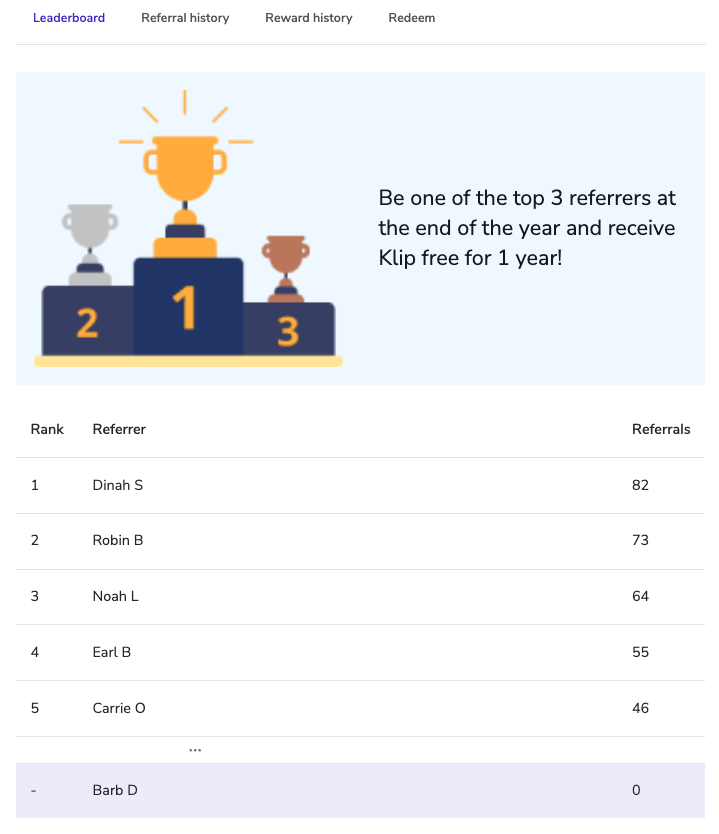
* The leaderboard will display participant ranks, scores, first names, and last initials.
* The participant viewing the leaderboard will have their row highlighted in your brand color, and will be able to hide the *Rank* column if they so wish.
* If there are no leaderboard results, an empty state will be displayed.
* If an *Anonymous Leaderboard* was selected, then the participant will only see ranks and scores.
---
# Agent Instructions
This documentation is published with GitBook. GitBook is the documentation platform designed so that both humans and AI agents can read, navigate, and reason over technical content effectively. Learn more at gitbook.com.
## Querying This Documentation
If you need additional information that is not directly available in this page, you can query the documentation by asking a question.
Perform an HTTP GET request on the following URL with the `ask` and `goal` query parameters:
```
GET https://help.impact.com/brand/what-would-you-like-to-learn-about/advocate-program/manage-advocate-participant-experiences/leaderboards-explained.md?ask=&goal=
```
`ask` is the immediate question: it should be specific, self-contained, and written in natural language.
`goal` is what the user is ultimately trying to achieve, the reason they need the answer. Sharing it helps GitBook give you a better, more relevant answer. A goal is most helpful when it describes the outcome the user wants rather than restating the question. For example, with `ask=how do I create an API token`, a goal like `automate deployments from our CI pipeline` lets GitBook tailor the answer to that use case.
The response will contain a direct answer to the question and relevant excerpts and sources from the documentation.
Use this mechanism when the answer is not explicitly present in the current page, you need clarification or additional context, or you want to retrieve related documentation sections.