> For the complete documentation index, see [llms.txt](https://help.impact.com/llms.txt). Markdown versions of documentation pages are available by appending `.md` to page URLs; this page is available as [Markdown](https://help.impact.com/brand/what-would-you-like-to-learn-about/advocate-program/getting-started-with-advocate/advocate-program-rules-explained.md).
# Set Up Program Rules in Advocate
Take the PXA course
Referral programs depend on pairings of rules and actions to appropriately reward participants or trigger actions (such as sending an email). Together, these rules and actions form program rules. A rule is what you want your target user to do. In referral programs, users can apply to both customer advocates and the friends they refer. An action is triggered when the participant achieves a rule.
Rules
The rules you set will depend on your program and the outcomes you want to drive. At least one conversion rule is required for every referral program. Examples of rules include:
* Referred friend makes a purchase
* Customer advocate makes 5 referrals
* Referred friend becomes a qualified lead
**Rule triggers**
impact.com relies on the events you send to us to act as triggers for the rule. During [program setup](/brand/what-would-you-like-to-learn-about/advocate-program/getting-started-with-advocate/configure-your-advocate-program.md), select your rule’s trigger and an event key.
| Trigger | Description |
| ------------------------------------- | ---------------------------------------------------------------------------------------- |
| Referral starts | When a referral is started. |
| Friend makes a purchase | When the referred friend makes a purchase tracked by an event. |
| Friend refunds a purchase | When a referred friend returns a product made on a purchase that's tracked by an event. |
| Friend performs an action | When the referred friend performs an action tracked by an event, like making a purchase. |
| Friend's segment and/or field changes | When a referred friend has a field or segment that updates or changes. |
**Rule conditions**
You can place conditions on a rule if you only want it to be triggered in specific situations. Here are a few conditions that can be applied to a rule.
* A referred friend makes a purchase, and the total of the purchase is at least $100.
* The customer advocate makes 5 referrals who remain active subscribers for at least six months.
* A referred friend starts a subscription, and the advocate must also be an active subscriber.
Rule conditions can be based on several different types of data from our databases:
| Data | Description |
| --------------------------------------------------------- | ----------------------------------------------------------------------------------------------------------------------------------------------------------------------------------------------------------------------------------------------------------------------------------------- |
| User object (either customer advocate or referred friend) | Includes their core details, like email and first name, as well as custom fields. |
| Event | Includes any fields inside of the event that can trigger a rule, like revenue, product name or plan. |
| Rules | A count of rules and referrals is made accessible in the program logic, as well as whether this is the first time the rule is being triggered. This is useful for running programs that issue rewards every X number of referrals, or ensuring that a rule/action is only triggered once. |
| Time | The system can reference the current time and compare it against key dates of the referral (like when the referral was started) or the user (like when the user was created). |
A *Time* condition determines whether the rule triggers. To apply different actions depending on when referral activity occurs, use [date-based actions](/brand/what-would-you-like-to-learn-about/advocate-program/advocate-program-settings/date-based-actions-in-advocate-program-rules-explained.md) instead.
Complete the following sections to set up your program rules and select **Next** after completing each section.
{% stepper %}
{% step %}
### Access program rules
1. From the left navigation menu, select  **\[Engage]** :arrow-right: **Program Rules** :arrow-right: **Program Rules**.
2. In the *Program rules* section, select **Add Rule**.
{% endstep %}
{% step %}
### Choose & configure a program rule
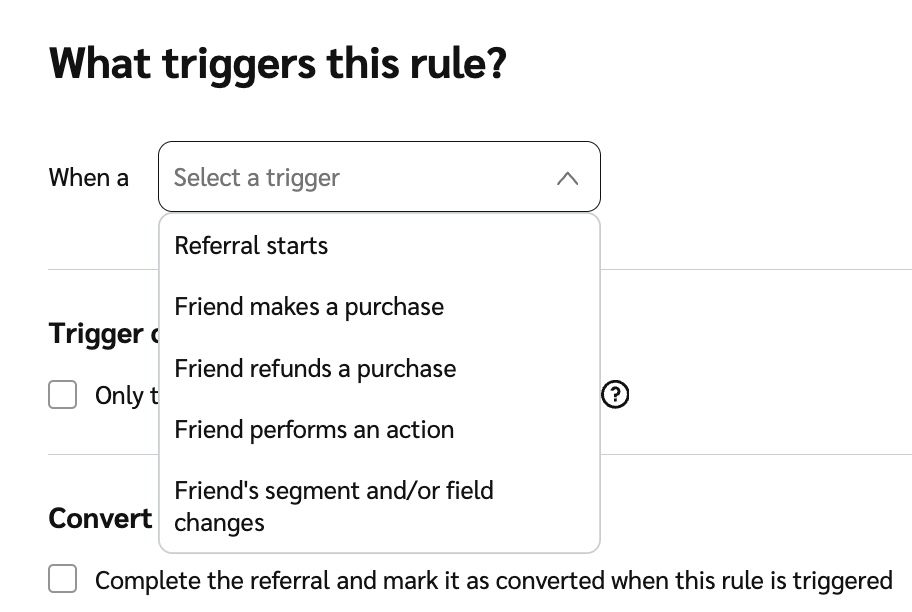
3. Below *What triggers this rule?*, from the  **\[Drop-down menu]**, select a trigger. Some of the configurations differ based on your rule selection.
Trigger reference
| Trigger | Description |
| ------------------------------------- | ---------------------------------------------------------------------------------------- |
| Referral starts | When a referral is started. |
| Friend makes a purchase | When the referred friend makes a purchase tracked by an event. |
| Friend refunds a purchase | When a referred friend returns a product made on a purchase that's tracked by an event. |
| Friend performs an action | When the referred friend performs an action tracked by an event, like making a purchase. |
| Friend's segment and/or field changes | When a referred friend has a field or segment that updates or changes. |
4. If applicable, select the purchase or action event that will trigger the rule, or specify a field or segment.
5.  **\[Toggle on]** **Date-based actions** to apply different actions depending on when referral activity occurs. Once enabled, under *Evaluate timing* *using*, select the date to compare against each action's date range. The dates you can choose from depend on the trigger. For details, see [Date-Based Actions in Advocate](/brand/what-would-you-like-to-learn-about/advocate-program/advocate-program-settings/date-based-actions-in-advocate-program-rules-explained.md).
6.  **\[Check box]** **Trigger on first time only** to trigger the rule only the first time the event happens for a given referral.
7.  **\[Check box]** **Convert the referral** to mark it as converted when the rule is triggered.
8. Enter a **Rule name**. Once saved, this cannot be changed.
{% endstep %}
{% step %}
### Add advanced settings (optional)
9. Select **Advanced Settings** to add rule limits or conditions.
10.  **\[Toggle on]** **Limit the number of rewards** to define the maximum number of rewards an advocate can earn when a rule is triggered.
11. Below the *If* section, place conditions on a rule if you only want it to be triggered in specific situations. Here are a few conditions that can be applied to a rule.
* A friend makes a purchase, and the total of the purchase is at least $100.
* The customer advocate makes 5 referrals who remain active subscribers for at least six months.
* A referred friend starts a subscription, and the advocate must also be an active subscriber.
Condition reference
Rule conditions can be based on several different types of data from our databases:
| Data | Description |
| --------------------------------------------------------- | ----------------------------------------------------------------------------------------------------------------------------------------------------------------------------------------------------------------------------------------------------------------------------------------- |
| User object (either customer advocate or referred friend) | Includes their core details, like email and first name, as well as custom fields. |
| Event | Includes any fields inside of the event that can trigger a rule, like revenue, product name or plan. |
| Rules | A count of rules and referrals is made accessible in the program logic, as well as whether this is the first time the rule is being triggered. This is useful for running programs that issue rewards every X number of referrals, or ensuring that a rule/action is only triggered once. |
| Time | The system can reference the current time and compare it against key dates of the referral, like when the referral was started, or the user, like when the user was created. |
A *Time* condition determines whether the rule triggers. To apply different actions depending on when referral activity occurs, use [date-based actions](/brand/what-would-you-like-to-learn-about/advocate-program/advocate-program-settings/date-based-actions-in-advocate-program-rules-explained.md) instead.
{% endstep %}
{% step %}
### Add an action
{% hint style="info" %}
**Limited**: If you need to add multiple actions for your program, you may need to upgrade your account. [Contact support](https://app.impact.com/support/portal.ihtml?createTicket=true&) to upgrade your advocate program.
{% endhint %}
It is possible to add criteria to both rules and actions, since multiple rules can apply to the same action. Although the conditions for a rule have been met, you might want to set action conditions to control which reward is issued, or which email is sent. This is only possible at certain program levels; reach out to [support](https://app.impact.com/support/portal.ihtml) for more information.
12. Select one of the action tiles. Actions include:
* **Reward and Email:** Give a reward and notify the participant with an email.
* **Email Only:** Send an email to the participant.
* **Tiered Rewards and Email:** Offer different rewards based on a participant's segment, purchase value, and more.
13. Choose who the action applies to:
* **Advocate**: The participant who shares their referral link or code to invite a friend to your brand.
* **Friend**: The participant who uses the referral link or code to sign up or make a purchase.
14. Give the action a name.
15. (Conditional) If you've enabled date-based actions,  **\[Toggle on]** **Limit action to a date range** and choose the period during which this action applies. If the date you selected in step 5 falls outside the range, a different action applies. For details, see [Date-Based Actions in Advocate](/brand/what-would-you-like-to-learn-about/advocate-program/advocate-program-settings/date-based-actions-in-advocate-program-rules-explained.md).
16. Optionally, select **Advanced Settings** to add conditions on an action if you only want it to be triggered in specific situations.
{% hint style="info" %}
**Example:** You could set a purchase-made rule with the associated action Reward and Email. With this rule and action pair, your customer advocate is notified by email and issued a reward whenever a friend they’ve referred makes a purchase.
{% endhint %}
{% endstep %}
{% step %}
### Add a reward (conditional)
If you've selected **Reward and Email** or **Tiered Reward and Email**, you'll need to configure the reward. For setup instructions, review the *Create a reward section* in [Configure Your Advocate Program](/brand/what-would-you-like-to-learn-about/advocate-program/getting-started-with-advocate/configure-your-advocate-program.md).
{% endstep %}
{% step %}
### Review your rule
Before saving, the *Review* screen summarizes the rule.
17. Optionally, update the rule:
1. Select  **\[Edit]** next to any line to change it.
2. Select  **\[Add Action]** to attach another action without going back through the earlier steps.
18. Select **Save** when you're done.
{% endstep %}
{% endstepper %}
## Rule & action examples
You can think of rules and actions as a series of if-then statements. Let’s take a look at a few examples.
| Desired Outcome | If (Rule) | Then (Action) |
| --------------------------------------------------------------------------------------------------------------------------------------------------------------------- | ---------------------------------------- | ------------------------------------------------------------------------------------------------- |
| Reward the customer advocate with a $20 gift card for every 5 qualified leads they refer | Referred friend becomes a qualified lead | Reward and Email |
| Reward the referred friend with a $100 credit on initial signup and the customer advocate with a $500 credit if the opportunity in Salesforce is set to “Closed Won.” | Referred friend completes initial signup |
Reward and Email (customer advocate)
Reward and Email (referred friend)
|
| Send the customer advocate a notification email when the person they referred successfully completes a demo. | Referred friend completes a demo | Email Only |
---
# Agent Instructions
This documentation is published with GitBook. GitBook is the documentation platform designed so that both humans and AI agents can read, navigate, and reason over technical content effectively. Learn more at gitbook.com.
## Querying This Documentation
If you need additional information that is not directly available in this page, you can query the documentation by asking a question.
Perform an HTTP GET request on the following URL with the `ask` and `goal` query parameters:
```
GET https://help.impact.com/brand/what-would-you-like-to-learn-about/advocate-program/getting-started-with-advocate/advocate-program-rules-explained.md?ask=&goal=
```
`ask` is the immediate question: it should be specific, self-contained, and written in natural language.
`goal` is what the user is ultimately trying to achieve, the reason they need the answer. Sharing it helps GitBook give you a better, more relevant answer. A goal is most helpful when it describes the outcome the user wants rather than restating the question. For example, with `ask=how do I create an API token`, a goal like `automate deployments from our CI pipeline` lets GitBook tailor the answer to that use case.
The response will contain a direct answer to the question and relevant excerpts and sources from the documentation.
Use this mechanism when the answer is not explicitly present in the current page, you need clarification or additional context, or you want to retrieve related documentation sections.