# View & Manage Your Referrals Feed

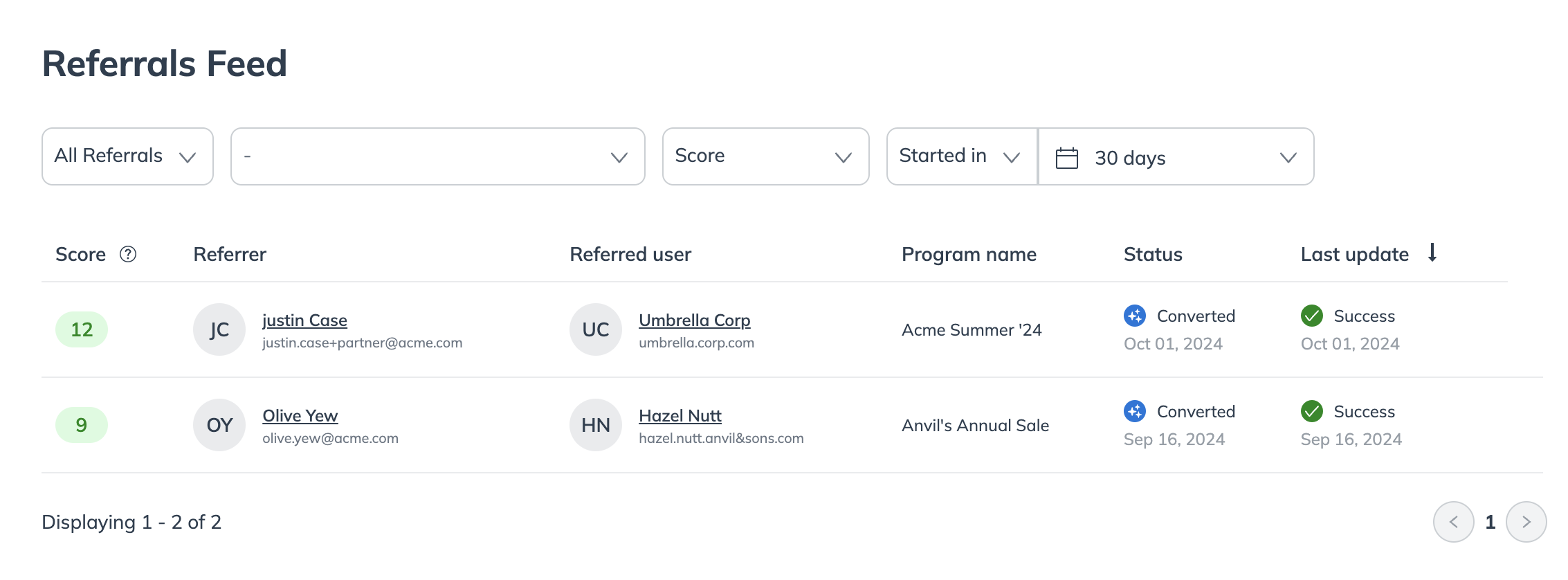
The referral feed shows all initiated referrals, where the advocate's link was clicked, and conversions, when the referred friend meets the program's goal, usually by making a purchase.

1. From the left navigation menu, select ![](https://4048883401-files.gitbook.io/~/files/v0/b/gitbook-x-prod.appspot.com/o/spaces%2FwMLlMoFBtKJa8ptd3zaw%2Fuploads%2Fgit-blob-230534471fef5f40808e921e41ee44e4a06ded03%2Fe6cb9548999afdc1ed3ce4942e4cb5b45b5cecbd323267aac2a7cd1915fccc09.svg?alt=media) **\[Engage]** → **Reporting**.
2. Then, select **Referral Feed**.

   <div data-with-frame="true"><figure><img src="https://4048883401-files.gitbook.io/~/files/v0/b/gitbook-x-prod.appspot.com/o/spaces%2FwMLlMoFBtKJa8ptd3zaw%2Fuploads%2Fgit-blob-9160eb2779c4ab4e314fd82ce27d46d9fef3b9ac%2F18d3cda1666ec5a8d6efc2de2506713bb25c902d75d2e022fcd5b65af97e5bde.png?alt=media" alt=""><figcaption></figcaption></figure></div>
3. Use the ![](https://4048883401-files.gitbook.io/~/files/v0/b/gitbook-x-prod.appspot.com/o/spaces%2FwMLlMoFBtKJa8ptd3zaw%2Fuploads%2Fgit-blob-c2cb550b55c51ea1eeff0acbd6f437a03b621a2c%2F60d033ae8a04c14498d5229c3c0160ac05feea7f605dbd770741793c900469f0.svg?alt=media) **\[Drop-down menu]** to filter data for the various fields.

   | Field           | Description                                                                                                                                                                                                                                                                                                                                                                                                                                                                                                                                                                                                                                                                                                                       |
   | --------------- | --------------------------------------------------------------------------------------------------------------------------------------------------------------------------------------------------------------------------------------------------------------------------------------------------------------------------------------------------------------------------------------------------------------------------------------------------------------------------------------------------------------------------------------------------------------------------------------------------------------------------------------------------------------------------------------------------------------------------------- |
   | Referral Status | <p>Select the status that you would like to pull referrals for.</p><p>• <strong>All Referrals</strong>: View referrals in all statuses.</p><p>• <strong>Not Converted Referrals</strong>: Filter by referrals that have been started but not converted.</p><p>• <strong>Converted Referrals</strong>: Filter by referral that have been converted.</p><p>• <strong>Pending Review</strong>: Filter by referrals that have been flagged for manual <a href="../manage-advocate-participants/referrals-and-events/review-pending-referrals-for-advocate">review</a>.</p><p>• <strong>Denied</strong>: Filter by referrals you have manually denied or that impact.com has automatically denied based Fraud Protection Settings.</p> |
   | Program         | Select the program for which you want to view referrals.                                                                                                                                                                                                                                                                                                                                                                                                                                                                                                                                                                                                                                                                          |
   | Score           | <p>The <a href="../protect-your-advocate-program/advocate-fraud-protection-explained">fraud score</a> ranges from 0 (no risk) to 100 (very high risk), calculated by comparing new referrals to previous ones for similarities. This score determines if a referral is automatically approved, denied, or sent for manual review.</p><p>Select a score range to filter by.</p><p>• 0 to 49</p><p>• 50 to 69</p><p>• 70 to 84</p><p>• 85 to 100</p><p>• Specific range</p>                                                                                                                                                                                                                                                         |
   | Activity filter | <p>Filter the referral feed by specific time period and referral status.</p><p><strong>Example:</strong> Started in 7 days.</p><p>• <strong>Modified in</strong>: The duration since the referral was last modified.</p><p>• <strong>Started in</strong>: The duration since the referral was initiated.</p><p>• <strong>Converted in</strong>: The duration since the referral was converted.</p><p>• <strong>Moderated in</strong>: The duration since the referral was moderated.</p>                                                                                                                                                                                                                                          |

#### View referral columns

* Score - The referral score of the participants.
* Referrer - The account user who referred the participant.
* Program name - The program the participant belongs to.
* Status - The current status of the referral.
* Last Update - The last date the referral was updated.

#### Manage a referral

Hover your cursor over the referral you want to manage, and proceed to either **Review** or **Delete** the referral. Follow the steps below depending on which action you want to perform.

{% tabs %}
{% tab title="Review" %}
When [reviewing a referral](https://help.impact.com/brand/what-would-you-like-to-learn-about/advocate-program/manage-advocate-participants/referrals-and-events/review-pending-referrals-for-advocate), the details provided will help you decide whether to **Approve** or **Deny** it.
{% endtab %}

{% tab title="Delete" %}
If want to **Delete** a referral follow the steps below:

1. Hover your cursor over the referral you want to delete and select **Delete**.
2. Review the referral details to ensure you are deleting the correct referral.
3. Select **Delete Referral**.
   {% endtab %}
   {% endtabs %}
