> For the complete documentation index, see [llms.txt](https://help.impact.com/llms.txt). Markdown versions of documentation pages are available by appending `.md` to page URLs; this page is available as [Markdown](https://help.impact.com/brand/what-would-you-like-to-learn-about/advocate-program/advocate-reporting-and-analytics/advocate-program-analytics-explained.md).
# Advocate Program Analytics Explained
Take the PXA course
impact.com has a variety of metrics and analytics available to help you assess the health and success of your Advocate program.
This article explains *Program Analytics* page, which offers insights for an individual Advocate program across a selected time period. If you’re looking for information about the all-time performance of your Advocate programs or for a comparison across multiple Advocate programs, then refer to [Advocate Analytics Overview Explained](/brand/what-would-you-like-to-learn-about/advocate-program/advocate-reporting-and-analytics/advocate-analytics-overview-explained.md).
{% hint style="success" %}
**Note:** Referrals that have been [marked as fraudulent](/brand/what-would-you-like-to-learn-about/advocate-program/protect-your-advocate-program/advocate-fraud-protection-explained.md) are excluded from your analytics.
{% endhint %}
## Access your program analytics
1. From the left navigation menu, select  **\[Engage] → Reporting → Program Analytics**.
2. At the top of the page, select the **program** and **date range** for which you want to view analytics.
3. Review the *Program Analytics* for insights.
* For descriptions of the available analytics, refer to the [*Metrics*](#metrics) and [*Charts & graphs*](#charts-and-graphs) sections.
{% hint style="success" %}
**Note:** The date range you select determines how unique visitors are counted throughout this report, across both *Metrics* and *Charts & graphs*. E.g., a visitor who clicks a share link in January and again in February counts as 1 referred visitor when the date range spans Jan 1–Feb 28, but counts once in each month if you view them separately.
{% endhint %}
## Metrics
Each metric card shows a change indicator below its main number, comparing your selected time period to the equivalent previous period. For example, the analytics for August 1–August 31 will be compared with July 1–July 31.
Metric descriptions
| Metric | Description |
| ------------------- | ------------------------------------------------------------------------------------------------------------------------------------------------------------------------------------------------------------------------------------------------------------------------------------------------------------------------------------------------------------------------------------------------------------ |
| Active advocates | The number of unique advocates who have copied and shared their referral link, and/or whose link led to a referred user starting a referral within your selected timeframe. |
| Referred visitors | The number of unique people who have clicked on an advocate's share links. This includes participants who are part of *started* and/or *converted* referrals. |
| Started referrals |
Referrals that have completed the initial rule of the program.
Example: Your program rules require the referred friend to sign up for a free trial of your service. The completion of this program rule considers the referral to be started.
|
| Converted referrals |
Referrals that resulted in a new customer acquisition, as defined by your program rules.
Example: Your program's conversion rule is that a referred friend makes a purchase. The first time a referred friend buys your product or service, they are considered a converted referral.
|
| Revenue | The total value of all purchases made by referred friends from the initial referral attribution up to and including the final conversion. The final conversion point is determined by your program rule setup. |
## Charts & graphs
The charts and graphs section provides a visual breakdown of your program's performance.
Advocates
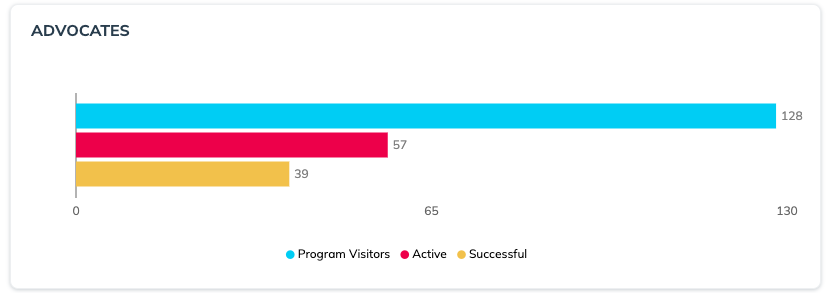
The *Advocates* chart shows the number of advocates in your program, within your selected time period, and how they are participating in your program.
Entered their information (name and/or email) to generate a share link.
Viewed the Shopify Post Check Out widget, where the share link is already visible for users logged into their Shopify account.
|
| Active | The number of advocates who have shared their share link. |
| Successful | The number of advocates who have made a successful referral (i.e. referrals that have converted). |
Referrals
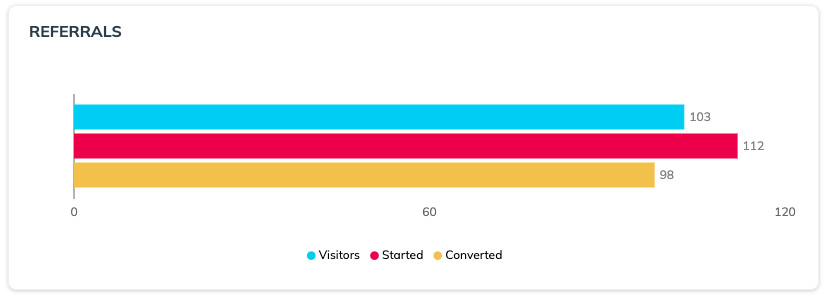
The *Referrals* chart shows the referral journey from the perspective of the referred friend.
| Metric | Description |
| --------- | --------------------------------------------------------------------------------------------------------------------------------------------------- |
| Visitors | The number of referred users who have clicked on a share link. |
| Started | The number of referred users who have started the referral journey. i.e. have completed the referral started rule as per the program rules. |
| Converted | The number of referred users who have converted as per the conversion rule defined in the program rules. E.g., *referred user has made a purchase*. |
Referral Activity
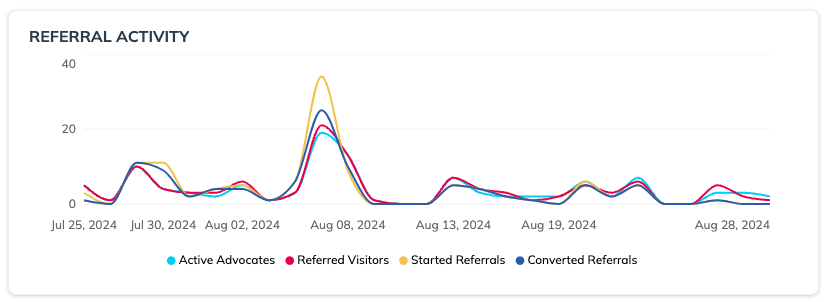
The *Referral Activity* timeline shows how your advocate and Referred User behavior have fluctuated across your selected time period. This chart is helpful for understanding how external factors—like promotions, marketing initiatives, or busy seasons—are impacting your referral program.
Goals
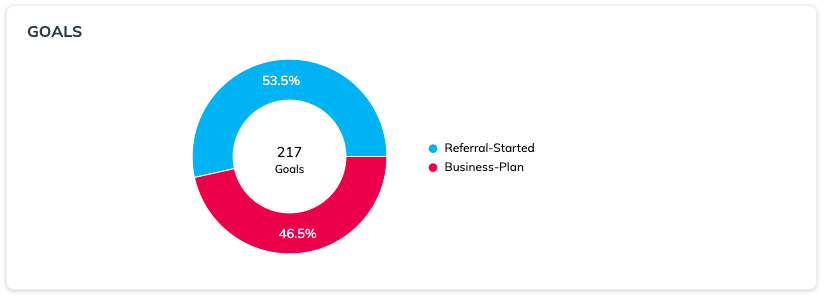
The *Goals* chart shows a breakdown of the rules being completed in your program — both conversion and non-conversion rules.
If your program has multiple rules, then this information can provide valuable insights into the "middle" steps of your program's referral funnel — i.e. the time between when the referral starts and converts.
Engagement Mediums
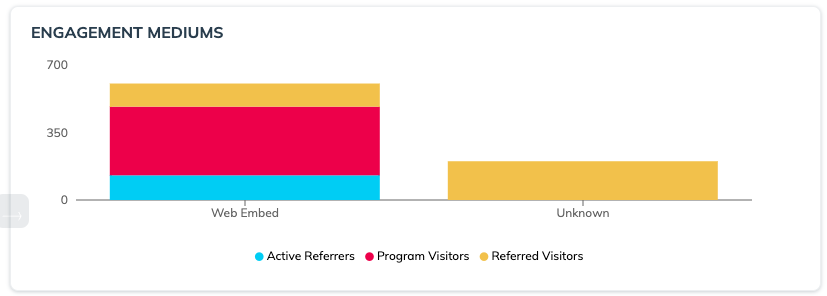
The *Engagement Mediums* chart shows the various methods by which visitors access your referral program.
If your referral program is visible in multiple areas of your product or website, this information can help you assess which touchpoints are most popular. It can also shed light on the user experience of your referral program in your web app vs. your mobile app or other mediums, and can help indicate differences in user experience across platforms.
This chart shows how Active Referrers and Program Visitors are gaining access to a share link and then the corresponding number of Referred Visitors that engagement medium has resulted in. This chart can help you determine which touchpoints are underperforming, allowing you to adjust your approach.
{% hint style="info" %}
**Note**: The engagement medium is tracked by an Advocate’s usage of the copy button or any of the social sharing options available to them. Unknown indicates the Advocate did not use the copy button or any of the social sharing options.
{% endhint %}
| Medium | Description |
| ------------- | ------------------------------------------------------------------------------------------------------------------------------------------------------------------------------------------------------------------------------------------------------------------------------------------------------------------------------------------------------------------------------------------------------ |
| Web popup | This medium includes *instant access* or *verified access* [widgets](/brand/what-would-you-like-to-learn-about/advocate-program/manage-advocate-participant-experiences/widget-experiences/widget-types-explained.md) that are configured to automatically pop up when a web page is visited. |
| Web embed | This medium includes *verified access* widgets that are embedded on a web page. |
| Hosted widget |
This medium includes engagements on a mobile version of a web page.
|
| Mobile app | This medium includes engagements that come from a mobile app when using an [impact.com mobile SDK](https://integrations.impact.com/integration-guides/for-brands/advocate/mobile-options-for-advocate/mobile-options-for-advocate-programs). |
| Email | This medium includes engagements via one of your program's transactional emails or your marketing emails that include our message links. The message link parameter needs to include `EMAIL` to be counted in this metric. |
| Unknown | Any engagements that aren't connected with one of the other mediums will show up as unknown engagements. There can be a variety of reasons why your program has a high number of unknown engagements. For example, you may have a handful of high-volume customer advocates who are making referrals via their referral code or who have not used the available copy button or social sharing options. |
Share Mediums
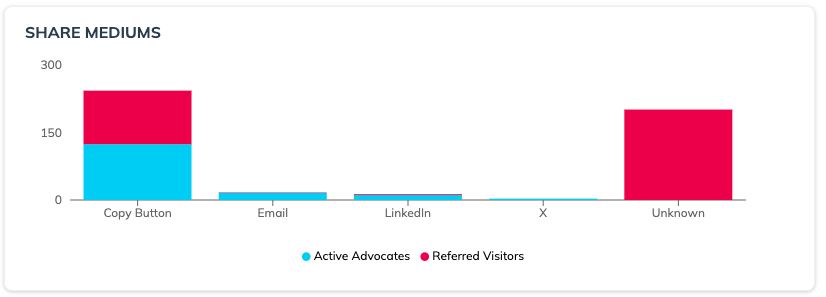
The *Share Mediums* chart the network or channel through which a referral was made. It can help you assess how many shares are being made to a specific platform (Active Advocates) against how many people are clicking the links on that platform (Referred Visitors).
{% hint style="info" %}
**Example:** Your advocates may frequently share to their LinkedIn feeds, but your program may not get a lot of engagement from LinkedIn. When you see this, you may decide to revisit your message link copy for LinkedIn to see if it can be improved or adjusted.
Conversely, if you see a low number of shares to a specific platform but a high number of referred visitors, you may have a few highly successful advocates who are sharing to that channel.
{% endhint %}
Depending on your program's setup, your graph will contain some or all of the following share mediums:
* Facebook
* X
* Email
* LinkedIn
* SMS
* Line Messenger
* Messenger
* WhatsApp
* Pinterest
* Copy Button
Appears if the customer advocate selects the general share button within your widget or microsite.
* Unknown
If there is a high number of *unknown* shares, it may indicate that your customer advocates are sending their referral details through a service you haven't connected to your program.
---
# Agent Instructions
This documentation is published with GitBook. GitBook is the documentation platform designed so that both humans and AI agents can read, navigate, and reason over technical content effectively. Learn more at gitbook.com.
## Querying This Documentation
If you need additional information that is not directly available in this page, you can query the documentation by asking a question.
Perform an HTTP GET request on the following URL with the `ask` and `goal` query parameters:
```
GET https://help.impact.com/brand/what-would-you-like-to-learn-about/advocate-program/advocate-reporting-and-analytics/advocate-program-analytics-explained.md?ask=&goal=
```
`ask` is the immediate question: it should be specific, self-contained, and written in natural language.
`goal` is what the user is ultimately trying to achieve, the reason they need the answer. Sharing it helps GitBook give you a better, more relevant answer. A goal is most helpful when it describes the outcome the user wants rather than restating the question. For example, with `ask=how do I create an API token`, a goal like `automate deployments from our CI pipeline` lets GitBook tailor the answer to that use case.
The response will contain a direct answer to the question and relevant excerpts and sources from the documentation.
Use this mechanism when the answer is not explicitly present in the current page, you need clarification or additional context, or you want to retrieve related documentation sections.
.png?alt=media&token=f1caf26f-efac-4ef1-968d-3b3d327e65a8)