> For the complete documentation index, see [llms.txt](https://help.impact.com/llms.txt). Markdown versions of documentation pages are available by appending `.md` to page URLs; this page is available as [Markdown](https://help.impact.com/brand/what-would-you-like-to-learn-about/advocate-program/advocate-reporting-and-analytics/advocate-analytics-overview-explained.md).
# Advocate Analytics Overview Explained
Take the PXA course
impact.com has a variety of metrics and analytics available to help you assess the health and success of your Advocate program.
This article explains the analytics *Overview* page, which offers at-a-glance data across all of your referral programs. For information about program-specific analytics, refer to [Advocate Program Analytics Explained](/brand/what-would-you-like-to-learn-about/advocate-program/advocate-reporting-and-analytics/advocate-program-analytics-explained.md).
{% hint style="success" %}
**Note:** Referrals that have been [marked as fraudulent](/brand/what-would-you-like-to-learn-about/advocate-program/protect-your-advocate-program/advocate-fraud-protection-explained.md) are excluded from your analytics.
{% endhint %}
#### Access the dashboard
1. From the left navigation menu, select  **\[Engage] → Reporting → Overview**.
2. At the top of the page, select the **date range** for which you want to view analytics.
3. Review the *Dashboard* for insights.
* The statistics on the *Dashboard* are divided into two sections: [*All Time*](#all-time) and [*All Programs*](#all-programs).
#### All Time
The *All Time* section displays some quick figures to help you gauge the overall impact of your program. The figures in this section are not limited to a specific time period.
| Metric | Description |
| --------------- | -------------------------------------------------------------------------------------------------------------------------------------------------------------------------------------------------------------------------------------------------------------------------------------------- |
| Participants | This figure represents everyone in your Advocate program, including your customer advocates, their referred friends, and imported customers. |
| Advocates | This is the number of people who have referred your program by sending out their share link and/or starting a referral. |
| Referrals | This is the number of unique referrals started by your customer advocates. |
| Conversion Rate | This is the percentage of referrals that have completed the conversion goal of your program, such as acquiring a new customer and making a qualifying purchase. Your conversion rate is calculated as the number of converted referrals divided by the all-time number of started referrals. |
| Revenue | The total value of all purchases made by the referred friend along their referral journey, from the initial referral attribution up to and including the final conversion. The final conversion point is determined by your program goal setup. |
| | |
#### All Programs
The *All Programs* section provides more detailed analytics, graphs and charts, and tables about the performance of all of your Advocate programs. The figures in this section will vary based on the date range you selected at the top of the page.
{% tabs %}
{% tab title="Metrics" %}
At the top of the section are additional metrics and statistics. These figures are aggregated across all of your referral programs.
Participants may be counted in more than one metric, dependent on where they are in the referral journey.
| Metric | Description |
| ------------------- | ----------------------------------------------------------------------------------------------------------------------------------------------------------------------------------------------------------------------------------------------------------------------------------------------------------------------------------------------------------------------------------------------------------- |
| Active Advocates | The unique number of Advocates that have copied and shared their link and/or have resulted in a referred user starting a referral within your selected timeframe. |
| Referred Visitors | The number of unique people who have clicked on an advocate's share links. This includes participants who are part of *started* and/or *converted* referrals. |
| Started Referrals |
Referrals that have completed the initial rule of the program.
Example: Your program rules require the referred friend to sign up for a free trial of your service. The completion of this program rule considers the referral to be started.
|
| Converted Referrals |
Referrals that resulted in a new customer acquisition, as defined by your program rule.
Example: Your program's conversion rule is that a referred friend makes a purchase. The first time a referred friend buys your product or service, they are considered a converted referral.
|
| Revenue | The total value of all purchases made by referred friends from the initial referral attribution up to and including the final conversion. Your program rule setup determines the final conversion point. |
| {% endtab %} | |
{% tab title="Graphs & charts" %}
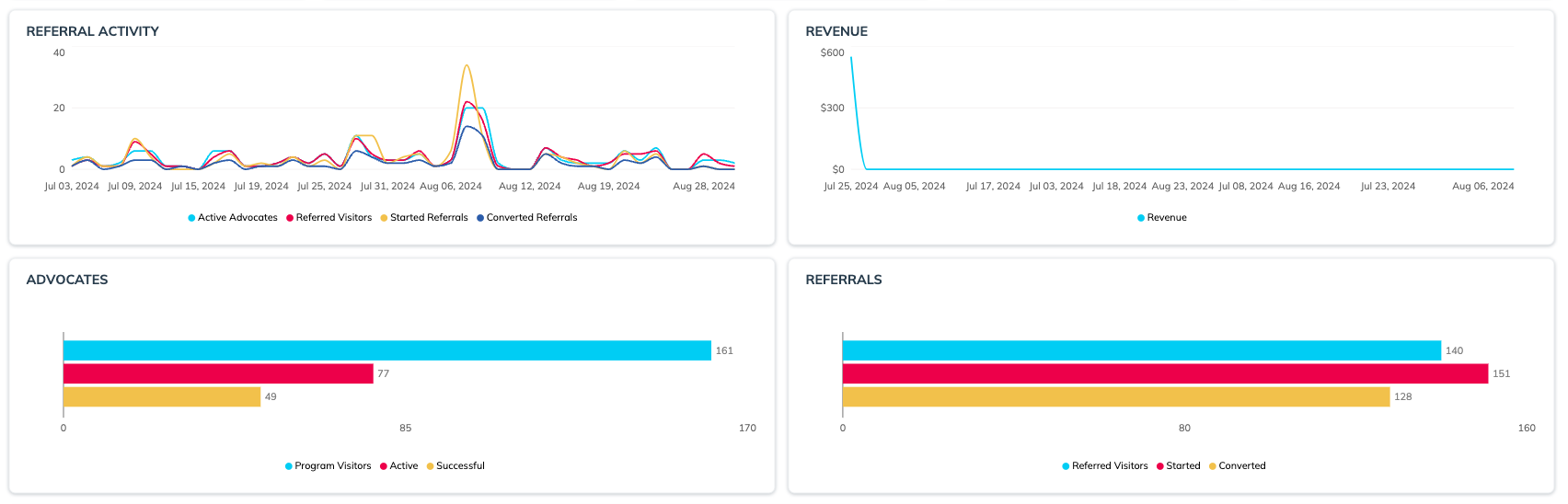
The *Referral Activity* and *Revenue* timelines visualize how these figures have changed across your selected time period. They can help you compare your program's performance across external factors, like limited-time promotions, holidays, or your brand's busy seasons.
The *Advocates* and *Referrals* charts give a handy visualization for what your referral funnel looks like in your selected time period. You can compare the number of visitors your advocates have driven to your program to the number of customers actively advocating for your brand and those who've made successful referrals. On the referral side, you can see how many referred visitors have started a referral and/or converted.
{% endtab %}
{% tab title="Tables" %}
This section shows the key analytics metrics broken down by individual programs based on the selected timeframe. These numbers mirror the graphs above but are broken down into individual programs.
{% hint style="success" %}
**Note:** These figures may not align with the all-time figure for *Participants* because it's possible for an individual participant to be part of multiple referral programs.
{% endhint %}
{% endtab %}
{% endtabs %}
---
# Agent Instructions
This documentation is published with GitBook. GitBook is the documentation platform designed so that both humans and AI agents can read, navigate, and reason over technical content effectively. Learn more at gitbook.com.
## Querying This Documentation
If you need additional information that is not directly available in this page, you can query the documentation by asking a question.
Perform an HTTP GET request on the following URL with the `ask` and `goal` query parameters:
```
GET https://help.impact.com/brand/what-would-you-like-to-learn-about/advocate-program/advocate-reporting-and-analytics/advocate-analytics-overview-explained.md?ask=&goal=
```
`ask` is the immediate question: it should be specific, self-contained, and written in natural language.
`goal` is what the user is ultimately trying to achieve, the reason they need the answer. Sharing it helps GitBook give you a better, more relevant answer. A goal is most helpful when it describes the outcome the user wants rather than restating the question. For example, with `ask=how do I create an API token`, a goal like `automate deployments from our CI pipeline` lets GitBook tailor the answer to that use case.
The response will contain a direct answer to the question and relevant excerpts and sources from the documentation.
Use this mechanism when the answer is not explicitly present in the current page, you need clarification or additional context, or you want to retrieve related documentation sections.