> For the complete documentation index, see [llms.txt](https://help.impact.com/llms.txt). Markdown versions of documentation pages are available by appending `.md` to page URLs; this page is available as [Markdown](https://help.impact.com/brand/what-would-you-like-to-learn-about/account-administration/account-settings/partner-test-accounts-for-brands.md).
# Partner Test Accounts for Brands
As a brand, you may sometimes want access to the partner user interface. This can give you a better understanding of the partner experience and help you answer questions partners may have. To access the partner platform, you'll need to create your own partner test account. While this test account won't have access to the Marketplace, it can help you preview things from the perspective of your partners.
## Use cases for a partner test account
* To have a better understanding of the partner UI and signup experience
* To test your own links, ads, and to create test orders
* To receive your own newsletters and view what partners see
* To receive partner-facing release notes from impact.com and keep up to date with partner-side changes.
{% hint style="success" %}
**Note:** The steps below demonstrate how to create a partner account without applying to the Brands Marketplace. The process links your test account directly to your program. Other brands cannot view the account, nor will you have access to the Marketplace.
{% endhint %}
{% stepper %}
{% step %}
## **Create a partner test account**
1. From the left navigation menu, select  **\[Engage] → Contracts →** [**Template Terms**](https://app.impact.com/secure/advertiser/engage/contracts/library/view-manage-ios-flow.ihtml).
2. Hover over the terms to which you want your test account signed up, at the end of the row, select  **\[More] →** **Get Branded Links**.
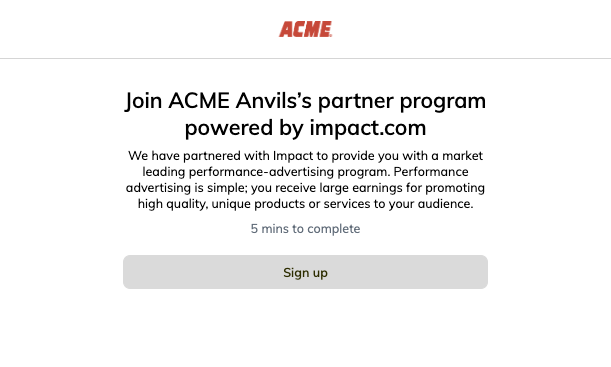
3. Open your sign-up link.
* You will be taken to the partner-facing sign-up page for your program.
4. Select **Sign up**.
5. Your own program terms will be presented for review. **Accept** the terms.
6. You will be requested to either log in or create a partner account. Select **Sign up with email**.
7. Fill in the fields as prompted, using an email address and a username that is not associated with an existing impact.com account.
8. Select **Get started**.
9. On the pages that follow, enter the same *personal*, *company*, and *promotional information* as your brand account.
* For more assistance with the signup process, see [Sign Up as a Partner on impact.com](/partner/what-would-you-like-to-learn-about/getting-started/sign-up-as-a-partner-on-impactcom.md).
10. Once you have completed the process, you will receive an email from impact.com confirming the creation of your user profile. Follow the prompts to activate your profile and create a new password.
{% endstep %}
{% step %}
## **Approve your test account**
1. Log in to your brand account.
2. From your left navigation bar, select  **\[Engage] → Partners →** [**Applications**](https://app.impact.com/secure/advertiser/engage/contracts/activity/adv-manage-pending-public-ios-v2-flow.ihtml).
3. Locate your own program application, and at the end of the row, select  **\[More] → Accept**.
{% endstep %}
{% step %}
## **Toggle between your brand and test accounts**
After creating a test partner account, you can [link it with your brand account](/partner/what-would-you-like-to-learn-about/account-management/account-settings/how-can-i-merge-my-impactcom-partner-accounts.md) to allow you to easily switch between accounts.
1. Log in to your brand account.
2. Select your program name in the upper-left corner to expand the dropdown and view your other accounts.
* From here, you can toggle between your brand and partner test accounts.
{% endstep %}
{% endstepper %}
---
# Agent Instructions
This documentation is published with GitBook. GitBook is the documentation platform designed so that both humans and AI agents can read, navigate, and reason over technical content effectively. Learn more at gitbook.com.
## Querying This Documentation
If you need additional information that is not directly available in this page, you can query the documentation by asking a question.
Perform an HTTP GET request on the following URL with the `ask` and `goal` query parameters:
```
GET https://help.impact.com/brand/what-would-you-like-to-learn-about/account-administration/account-settings/partner-test-accounts-for-brands.md?ask=&goal=
```
`ask` is the immediate question: it should be specific, self-contained, and written in natural language.
`goal` is what the user is ultimately trying to achieve, the reason they need the answer. Sharing it helps GitBook give you a better, more relevant answer. A goal is most helpful when it describes the outcome the user wants rather than restating the question. For example, with `ask=how do I create an API token`, a goal like `automate deployments from our CI pipeline` lets GitBook tailor the answer to that use case.
The response will contain a direct answer to the question and relevant excerpts and sources from the documentation.
Use this mechanism when the answer is not explicitly present in the current page, you need clarification or additional context, or you want to retrieve related documentation sections.