> For the complete documentation index, see [llms.txt](https://help.impact.com/llms.txt). Markdown versions of documentation pages are available by appending `.md` to page URLs; this page is available as [Markdown](https://help.impact.com/brand/pt-br/what-would-you-like-to-learn-about/platform-features/ads/manage-ads/add-labels-to-assets.md).
# Adicionar rótulos aos ativos
Os rótulos são uma ferramenta para ajudá-lo a organizar seus ativos em categorias como tamanho, promoções, datas de oferta, palavras-chave ou qualquer outra categoria que possa ser relevante para você ou seus parceiros. É possível criar vários rótulos e adicioná-los aos ativos.
#### Criar rótulos de ativos
1. No menu de navegação à esquerda, selecione  **\[Engage]** → **Conteúdo →** [**Anúncios**](https://app.impact.com/secure/advertiser/engage/ads/manage-all-ads-flow.ihtml).
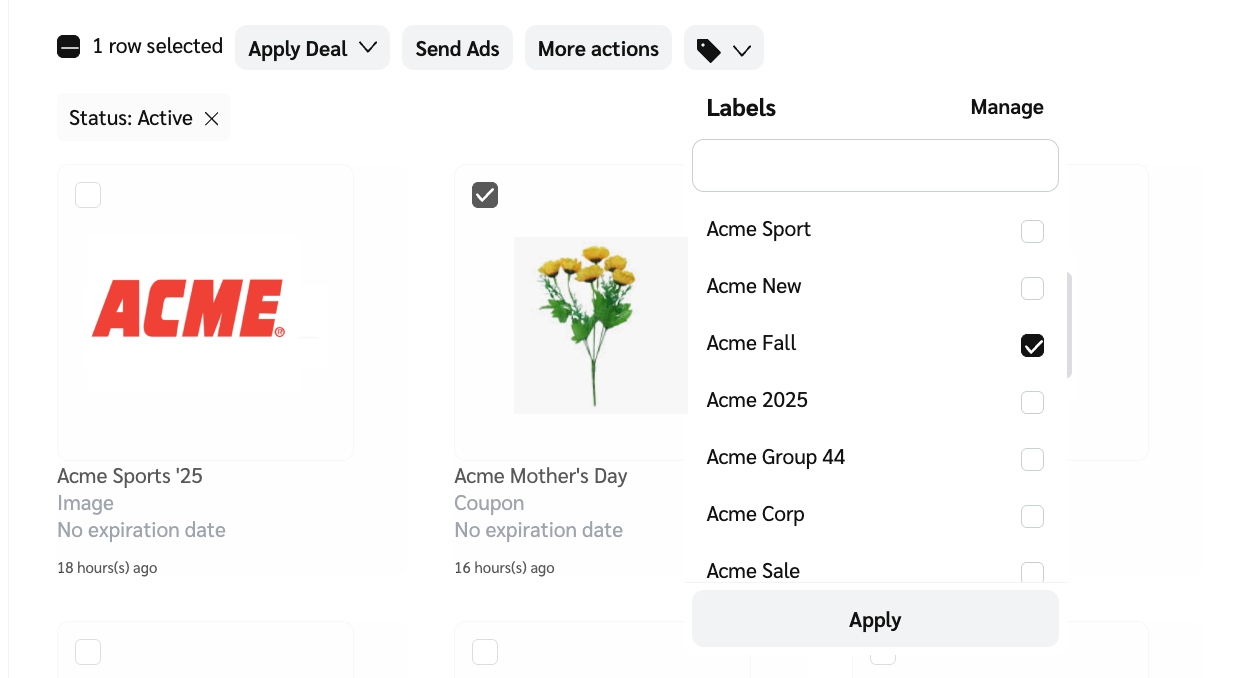
2. Passe o cursor sobre o ativo ao qual você deseja adicionar um rótulo e selecione o  **\[caixa desmarcada]**.
3. Opcionalmente, para selecionar todos os ativos na página atual, selecione o **Selecionar tudo**  **\[caixa desmarcada]**. Para estender sua seleção por todas as páginas, selecione **Selecionar todas as linhas possíveis**.
4. Selecione o  **\[Rótulo]** que você deseja aplicar em  **\[menu suspenso]** e então selecione **Aplicar**.
* Use a barra de pesquisa para encontrar rótulos rapidamente.
#### Gerenciar rótulos de anúncios
Você pode selecionar mais de um ativo ao fazer alterações nos rótulos dos ativos.
1. No menu de navegação à esquerda, selecione  **\[Engage]** → **Conteúdo → Anúncios**.
2. Passe o cursor sobre o ativo cujos rótulos você deseja gerenciar e selecione o  **\[caixa desmarcada]**.
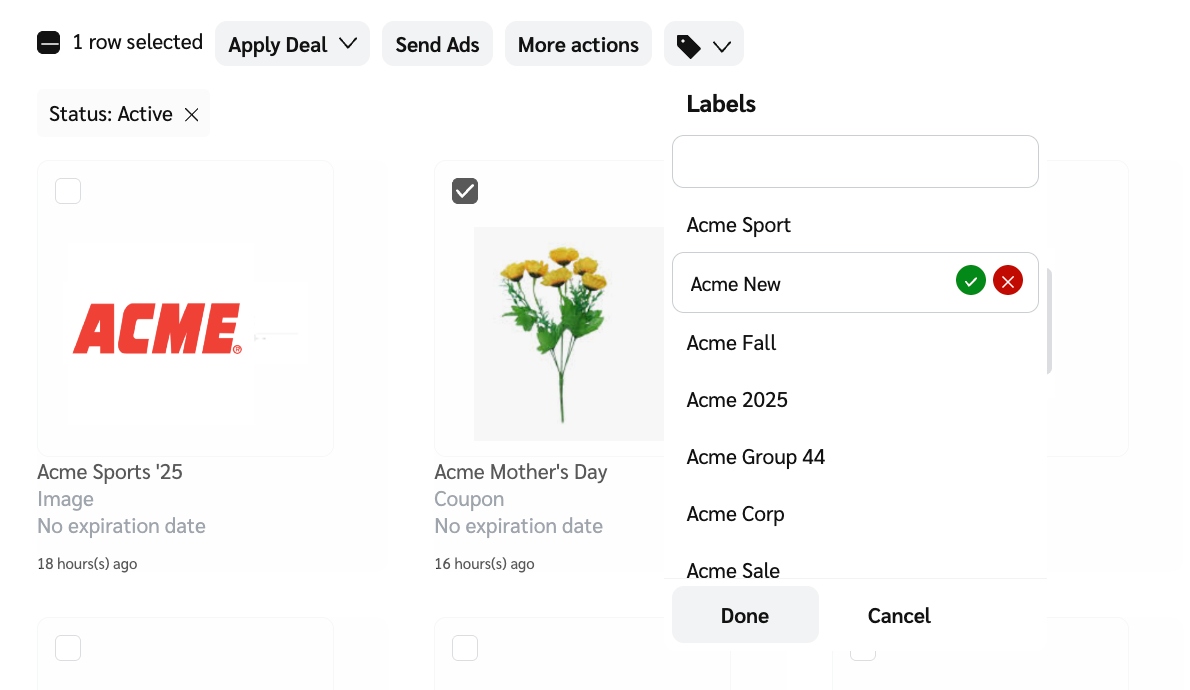
3. Selecione  **\[Rótulo]** →**Gerenciar**.
4. Passe o cursor sobre o ativo cujos rótulos você deseja editar e selecione  **\[Editar]**.
5. Altere ou atualize o nome do rótulo e selecione  **\[Verificar]** para confirmar a atualização.
6. Depois de atualizar todos os rótulos necessários, selecione **Concluído**.
---
# Agent Instructions
This documentation is published with GitBook. GitBook is the documentation platform designed so that both humans and AI agents can read, navigate, and reason over technical content effectively. Learn more at gitbook.com.
## Querying This Documentation
If you need additional information that is not directly available in this page, you can query the documentation by asking a question.
Perform an HTTP GET request on the following URL with the `ask` and `goal` query parameters:
```
GET https://help.impact.com/brand/pt-br/what-would-you-like-to-learn-about/platform-features/ads/manage-ads/add-labels-to-assets.md?ask=&goal=
```
`ask` is the immediate question: it should be specific, self-contained, and written in natural language.
`goal` is what the user is ultimately trying to achieve, the reason they need the answer. Sharing it helps GitBook give you a better, more relevant answer. A goal is most helpful when it describes the outcome the user wants rather than restating the question. For example, with `ask=how do I create an API token`, a goal like `automate deployments from our CI pipeline` lets GitBook tailor the answer to that use case.
The response will contain a direct answer to the question and relevant excerpts and sources from the documentation.
Use this mechanism when the answer is not explicitly present in the current page, you need clarification or additional context, or you want to retrieve related documentation sections.