> For the complete documentation index, see [llms.txt](https://help.impact.com/llms.txt). Markdown versions of documentation pages are available by appending `.md` to page URLs; this page is available as [Markdown](https://help.impact.com/brand/ja/what-would-you-like-to-learn-about/seller-program/amazon-seller-program/amazon-seller-tracking/amazon-seller-tracking-explained.md).
# Amazonセラートラッキングの解説
impact.com が Amazon Seller プログラムのアトリビューションを追跡する方法は、他のプログラムで一般的に使用される追跡方法とは異なります。Amazon Seller では、アトリビューション追跡の処理に Amazon Attribution API を使用しており、これにはいくつかの留意点があります。これらの追跡の違いを理解することで、パートナーに対して適切な期待値を設定し、レポートをより正しく解釈できるようになります。
## 国をまたいだトラッキング
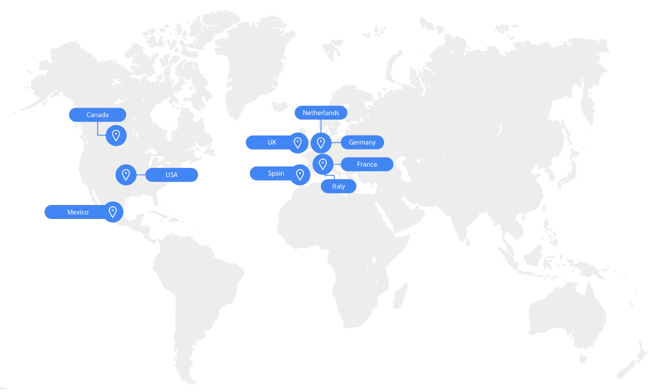
Amazon のアトリビューション追跡では国をまたいだトラッキングはサポートされていません。つまり、あなたのサイトとパートナーのオーディエンスが同じ国/地域にある場合にのみ、Amazon は Amazon サイトへのトラフィックを追跡し、該当するパートナーに帰属させます。
## トラッキングリンクのパラメータ
Amazon Seller では、パートナーは次の項目を追加することで、コンバージョンとともに追加データを渡すことができます: `sharedId` [パラメータ](/brand/ja/what-would-you-like-to-learn-about/platform-features/tracking/tracking-explained/tracking-link-parameters-explained.md) をトラッキングリンクに追加します。Amazon Attribution は `subId` パラメータを無視するため、サブアフィリエイトのトラフィックを把握したいパートナーは代わりに `sharedId` を使用してください。
さらに、パートナーが次に参加している場合: [Amazonアソシエイト](https://affiliate-program.amazon.com/)、同一コンバージョンで複数の報酬を得るために、impact.com と Amazonアソシエイトのトラッキングリンクを相互に追加することはできません。
{% hint style="success" %}
**注:** SharedID は英数字のみで、255 文字未満である必要があることをパートナーに案内してください。スペースや特殊文字(`/`, `&`, `=`, `#`, `?`, `+`, `'`, `"`, `%`, `$`, `[`, `]`)はトラッキングを壊し、パートナーがコンバージョンクレジットを受け取れなくなるため、使用しないでください。
{% endhint %}
## 商品の自動返品
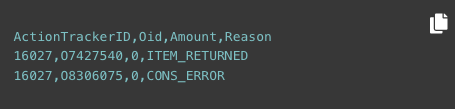
商品の返品については、アクションを処理するために impact.com にデータファイルを送信する必要はありません [取り消しまたは修正](/brand/ja/what-would-you-like-to-learn-about/platform-features/submit-and-modify-conversion-data/batch-modify-conversion-data/submit-batch-modifications-and-reversals.md)。Amazon では通常どおり返品を処理し、コンバージョンデータは 28 日のローリングウィンドウ内に impact.com 上で更新されます。
## 注文 ID の違い
impact.com は、Amazon から受信する日次データフィードに基づいて、Amazon Seller プログラム用の内部注文 ID を生成します。これらの ID は内部識別子としてのみ使用され、構成は `EventDate-PartnerID-ProgramID-SKU`.
これらの注文 ID は、照合しようとしても Amazon の注文番号とは一致しません。これは、Amazon が消費者のプライバシーを保護し GDPR に準拠するために、集計データを提供しているためです。
## クリックパスの可視性に関する制限
impact.com では、購入に至るまでのユーザーのクリックパスや行動経路を把握することはできません。Amazon Seller プログラムでは、たとえば Performance プログラムの次の項目で見る場合のように、これらの詳細を同じ形では確認できません: [Top Paths](/brand/ja/what-would-you-like-to-learn-about/platform-features/cross-channel-performance-insights/optimize-reports/top-paths-explained.md) レポート。
## 追加リソース
* Amazon Seller プログラム、その仕組み、そして提供できる価値について詳しくは、次をご覧ください: [Amazon Seller プログラムの解説](/brand/ja/what-would-you-like-to-learn-about/seller-program/amazon-seller-program/amazon-seller-program-explained.md).
* Amazon Seller のレポートについて詳しくは、次をご覧ください: [ブランド向け Amazon Seller レポーティングの解説](/brand/ja/what-would-you-like-to-learn-about/seller-program/amazon-seller-program/amazon-seller-reporting-for-brands/amazon-seller-reporting-explained-for-brands.md).
---
# Agent Instructions
This documentation is published with GitBook. GitBook is the documentation platform designed so that both humans and AI agents can read, navigate, and reason over technical content effectively. Learn more at gitbook.com.
## Querying This Documentation
If you need additional information that is not directly available in this page, you can query the documentation by asking a question.
Perform an HTTP GET request on the following URL with the `ask` and `goal` query parameters:
```
GET https://help.impact.com/brand/ja/what-would-you-like-to-learn-about/seller-program/amazon-seller-program/amazon-seller-tracking/amazon-seller-tracking-explained.md?ask=&goal=
```
`ask` is the immediate question: it should be specific, self-contained, and written in natural language.
`goal` is what the user is ultimately trying to achieve, the reason they need the answer. Sharing it helps GitBook give you a better, more relevant answer. A goal is most helpful when it describes the outcome the user wants rather than restating the question. For example, with `ask=how do I create an API token`, a goal like `automate deployments from our CI pipeline` lets GitBook tailor the answer to that use case.
The response will contain a direct answer to the question and relevant excerpts and sources from the documentation.
Use this mechanism when the answer is not explicitly present in the current page, you need clarification or additional context, or you want to retrieve related documentation sections.