> For the complete documentation index, see [llms.txt](https://help.impact.com/llms.txt). Markdown versions of documentation pages are available by appending `.md` to page URLs; this page is available as [Markdown](https://help.impact.com/brand/ja/what-would-you-like-to-learn-about/platform-features/tracking/tracking-explained/tracking-links-explained-for-brands.md).
# ブランド向けトラッキングリンクの説明
impact.comを使うと、パートナーはあなたが提供するプロモーション用アセットや製品から独自のリンクを作成できます。パートナーがそれらのアセットや製品を自分のオーディエンスに向けてプロモーションすると、顧客によるリンククリックや製品購入は追跡され、該当するパートナーに帰属させることができます。これにより、パートナー経由のコンバージョン(つまり、売上、アプリインストール、または望ましい顧客アクション)に対して公正な支払いが保証され、最大の成果を得るために支払い戦略を最適化できます。
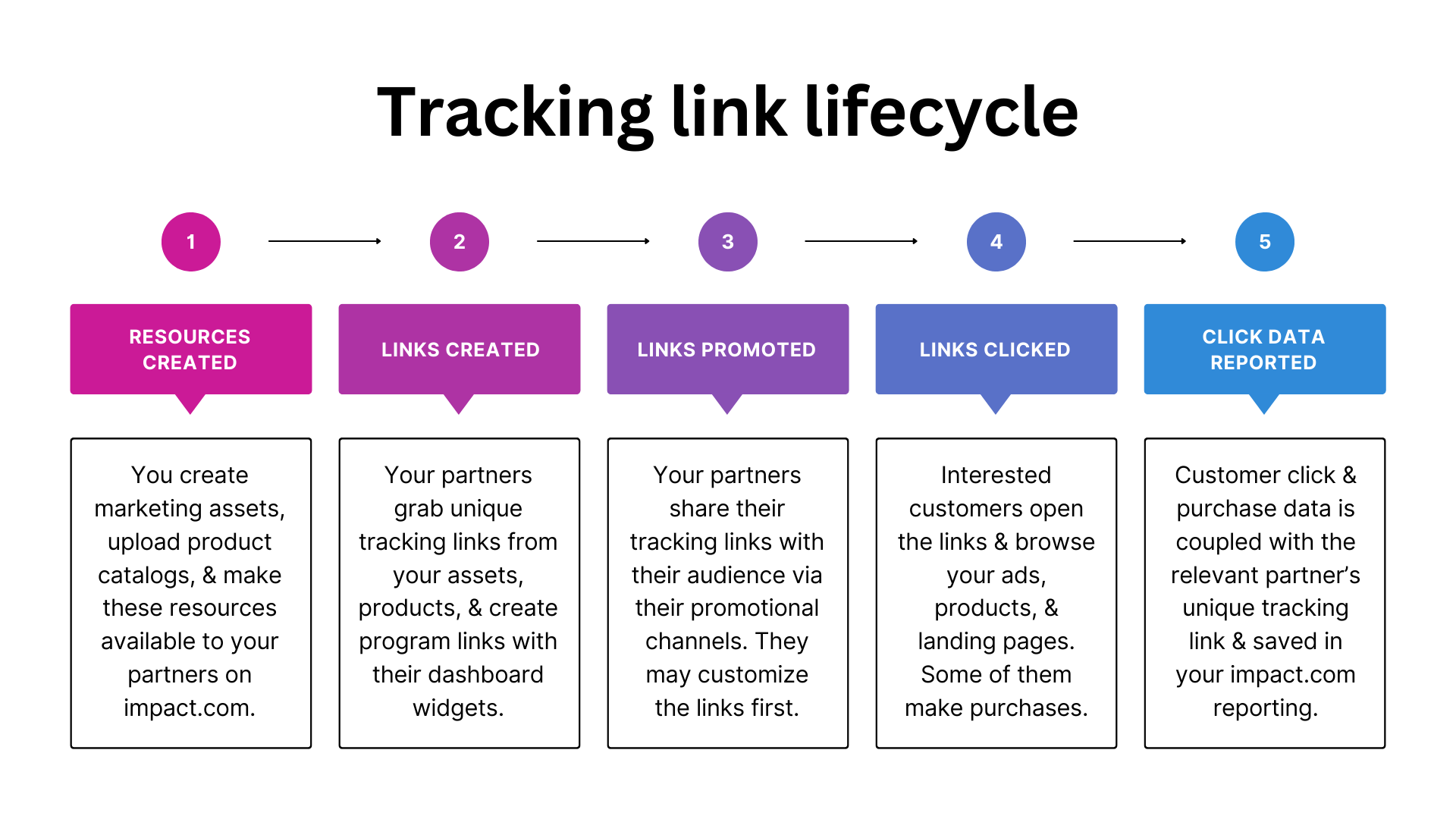
#### ステップ1:プロモーション用リソースを提供する
impact.comでプログラムを設定したら、次のことを行って生産的に進めます:
{% tabs %}
{% tab title="アセットを作成する" %}
ブランドとして、画像広告、メール、動画などのマーケティングアセットを持っている場合があります。あなたは [これらのアセットをアップロードして](/brand/ja/what-would-you-like-to-learn-about/platform-features/ads/create-ads/introduction-to-asset-types.md) impact.comにアップロードし、パートナーが自分のオーディエンスに向けてプロモーションできるように公開できます。パートナーはまた [依頼する](/brand/ja/what-would-you-like-to-learn-about/platform-features/ads/manage-ads/process-partner-requests.md) こともできます。自分のソーシャルチャネル上でプロモーションの可能性があると判断した特定のアセットについて。
{% endtab %}
{% tab title="商品カタログをアップロードする" %}
次の方法をご利用いただけます: [自動更新されるデータファイルを追加する](/brand/ja/what-would-you-like-to-learn-about/platform-features/product-catalogs/add-product-catalogs-as-a-brand.md) impact.comに追加して、販売している製品の詳細情報を提供します。多くのブランドは、eコマースソリューションを通じて商品カタログを作成します。たとえば [Shopify](https://integrations.impact.com/integration-guides/for-brands/plugin-integrations/e-commerce/integrate-with-shopify) または [Magento](https://integrations.impact.com/integration-guides/for-brands/plugin-integrations/e-commerce/integrate-with-adobe-commerce-magento)など。これらをimpact.comと共有する前に。
{% endtab %}
{% tab title="キャンペーンを作成する" %}
クリエイタープログラムを運用している場合は、 [キャンペーンを作成し](/brand/ja/what-would-you-like-to-learn-about/creator-program/creator-campaigns-for-brands/configure-a-creator-campaign.md) 、あなたのために広告素材を作成できるクリエイターを起用します。各キャンペーンには、参加したクリエイターが完了することに同意したタスクと成果物が含まれます。
{% endtab %}
{% endtabs %}
#### ステップ2:パートナーがトラッキングリンクを取得する
パートナーは、さまざまな方法であなたのリソースからトラッキングリンクを取得できます:
{% tabs %}
{% tab title="アセット画面" %}
マーケティングアセットをプロモーションする場合、パートナーは自分の [アセット画面](/partner/ja/nitsuitebitaidesuka/platform-features/marketing-content/brand-assets/manage-assets-as-a-partner.md)ブランドプログラムで絞り込み、そのアセットに関連付けられた固有のトラッキングリンクをコピーします。
{% endtab %}
{% tab title="プロダクトマーケットプレイス" %}
商品をプロモーションする場合、パートナーは [プロダクトマーケットプレイス](/partner/ja/nitsuitebitaidesuka/platform-features/marketing-content/product-promotions/promote-a-product-from-the-product-marketplace.md)、関心のある商品のカテゴリを閲覧し、その商品に関連付けられた固有のトラッキングリンクをコピーします。
{% endtab %}
{% tab title="ダッシュボードウィジェット" %}
また、パートナーは [リンクウィジェットを作成する](/partner/ja/nitsuitebitaidesuka/platform-features/tracking/tracking-links/create-and-manage-links/create-tracking-links.md) ことで、サイトのランディングページにつながる固有のトラッキングリンクを生成し、自社のブランドプログラム全体をプロモーションすることもできます。これはパートナーダッシュボード上の
さらに、クリエイターはこのウィジェットを使ってトラッキングリンクを生成できます [特定のキャンペーンタスク用の](/partner/ja/nitsuitebitaidesuka/campaigns/creator-campaigns/campaign-management/generate-tracking-links-for-campaign-tasks-as-a-creator.md)。これにより、impact.comはクリエイターキャンペーンおよびタスクに関連するクリックとコンバージョンを追跡できます。
{% endtab %}
{% tab title="My Brands画面" %}
パートナーはまた、 [My Brands](https://app.impact.com/secure/mediapartner/marketplace/new-campaign-marketplace-flow.ihtml) 画面上のあなたのプロフィールにアクセスして、自社のブランドプログラム全体をプロモーションするための固有のトラッキングリンクを取得したり、アセットの一覧にアクセスしたりできます。
{% endtab %}
{% tab title="アクティブ契約画面" %}
パートナーはまた、 [Active Contracts](https://app.impact.com/secure/mediapartner/campaigns/mp-manage-active-ios-flow.ihtml) 画面。
{% endtab %}
{% endtabs %}
{% hint style="info" %}
**注:** 画面で、プログラム全体向けの汎用トラッキングリンクを取得することもできます。パートナーは、コンバージョンに関する追加データをレポートに表示するために、トラッキングリンクをカスタマイズすることがあります。リンクのカスタマイズについて、またパートナーが追加するパラメータを表示/制御できるかどうかについて詳しくは、 [トラッキングリンクのパラメータの説明](/brand/ja/what-would-you-like-to-learn-about/platform-features/tracking/tracking-explained/tracking-link-parameters-explained.md).
{% endhint %}
#### ステップ3:パートナーがリンクをオーディエンスと共有する
次に、パートナーはトラッキングリンクをプロモーションチャネルを通じて共有します。これらのチャネルには、ソーシャルメディアプラットフォーム、ブログ、ウェブサイト、ニュースレター、さらにはオーディエンスにリーチするオフラインの手段も含まれます。パートナーは通常、自分のプロモーションチャネルをimpact.comに [メディアプロパティ](/partner/ja/nitsuitebitaidesuka/account-management/account-settings/connect-media-properties/connect-and-manage-media-properties.md).
トラッキングリンクが共有されると、そのリンクはパートナーのオーディエンスにあなたのブランドを露出させ、製品への信頼を高め、顧客があなたのサイトを訪れるよう促します。トラッキングリンクには、関連する特定のアセットのID(該当する場合)、プログラムID、およびパートナーのアカウントIDが含まれます。
#### ステップ4:顧客がリンクを開く
顧客がパートナーによって共有されたリンクを開くと、あなたのサイト上のページに誘導されます。リンクの既定の遷移先は設定できます — [ステップ2](#step-2-partner-grabs-tracking-links) — または [パートナーにディープリンクを許可する](/brand/ja/what-would-you-like-to-learn-about/account-administration/program-settings/tracking-settings/set-up-permitted-domains-for-deep-linking.md) ことで、あなたのサイト上の任意のページに誘導できます。その後、顧客は購入、アプリインストール、またはプログラムが促進したい任意のタイプのコンバージョンを完了する場合があります。impact.comは、トラッキングリンクからのクリックトラフィックとコンバージョンデータを記録し、そのリンクを共有したパートナーに成果を帰属させます。
#### ステップ5:レポートデータを確認する
コンバージョンに関連するデータがimpact.comに保存されると、レポートで確認できます。レポートのインサイトを使って、どのパートナーとマーケティングチャネルがプログラムに最も価値をもたらしているかを把握し、収益を最大化するための戦略的な判断を下すことができます。
**レポートにアクセスする**
1. 左側のナビゲーションバーから  **[Engage]→[レポート]→[その他のレポート]**.
2. 検索バーに、表示したいレポート名を入力します。
* すばやくアクセスできるようにレポートを左側のナビゲーションバーにピン留めするには、レポート行にカーソルを合わせて **固定**.
**関連レポート**
* [パートナー別パフォーマンスレポート](/brand/ja/what-would-you-like-to-learn-about/platform-features/multi-program-reports/performance-reports-for-brands/performance-by-partner-report.md) — パートナー別にグループ化された一般的なクリックデータに加え、アクション、売上、アクション単価などの他の指標も確認できます。
* [上位経路レポート](/brand/ja/what-would-you-like-to-learn-about/platform-features/cross-channel-performance-insights/optimize-reports/top-paths-report.md) — 最も一般的な顧客コンバージョン経路、つまり顧客が購入する前にやり取りする最も一般的なタッチポイントの系列を確認できます。
* [支払い対象クリックデータレポート](/brand/ja/what-would-you-like-to-learn-about/platform-features/multi-program-reports/listing-reports/payable-click-data-report.md) — 支払い対象と見なされた顧客クリックの詳細を確認できます。たとえば、そのクリックを発生させたパートナー、関連する広告、クリック単価などです。このレポートは、 [CPCイベントタイプ](/brand/ja/what-would-you-like-to-learn-about/platform-features/event-types/event-types-explained.md) を使ってクリックごとにパートナーへ支払いを行う場合に役立ちます。
* [期限切れ広告からのクリックレポート](/brand/ja/what-would-you-like-to-learn-about/platform-features/multi-program-reports/operations-reports/clicks-from-expired-ads-report.md) — どの期限切れアセットがまだクリックを生み出しているかを確認し、該当するパートナーにアセット/投稿を更新してもらうよう通知できます。
* [パートナー別リスクレポート](/brand/ja/what-would-you-like-to-learn-about/platform-features/protect-and-monitor-your-performance-program/event-risk/risk-by-partner-report.md) — 高リスクまたは不正の可能性があるクリックに関連するパートナーを特定できます。
{% hint style="info" %}
**注:** パートナーがダッシュボードウィジェットを使って生成したトラッキングリンクを顧客がクリックすると、そのクリックデータはレポート上で、 *オンライン・トラッキングリンク* アセットタイプ。
{% endhint %}
---
# Agent Instructions
This documentation is published with GitBook. GitBook is the documentation platform designed so that both humans and AI agents can read, navigate, and reason over technical content effectively. Learn more at gitbook.com.
## Querying This Documentation
If you need additional information that is not directly available in this page, you can query the documentation by asking a question.
Perform an HTTP GET request on the following URL with the `ask` and `goal` query parameters:
```
GET https://help.impact.com/brand/ja/what-would-you-like-to-learn-about/platform-features/tracking/tracking-explained/tracking-links-explained-for-brands.md?ask=&goal=
```
`ask` is the immediate question: it should be specific, self-contained, and written in natural language.
`goal` is what the user is ultimately trying to achieve, the reason they need the answer. Sharing it helps GitBook give you a better, more relevant answer. A goal is most helpful when it describes the outcome the user wants rather than restating the question. For example, with `ask=how do I create an API token`, a goal like `automate deployments from our CI pipeline` lets GitBook tailor the answer to that use case.
The response will contain a direct answer to the question and relevant excerpts and sources from the documentation.
Use this mechanism when the answer is not explicitly present in the current page, you need clarification or additional context, or you want to retrieve related documentation sections.


.png?alt=media&token=ad740050-8f01-4e28-8fdf-ad0c7005f9a5)
